We remain fully operational. Our teams are working around the clock to ensure your deliveries continue safely.

Descargar la aplicación


Servicios al cliente
Sobre nosotros
Copyright © 2025 Desertcart Holdings Limited
Descargar la aplicación
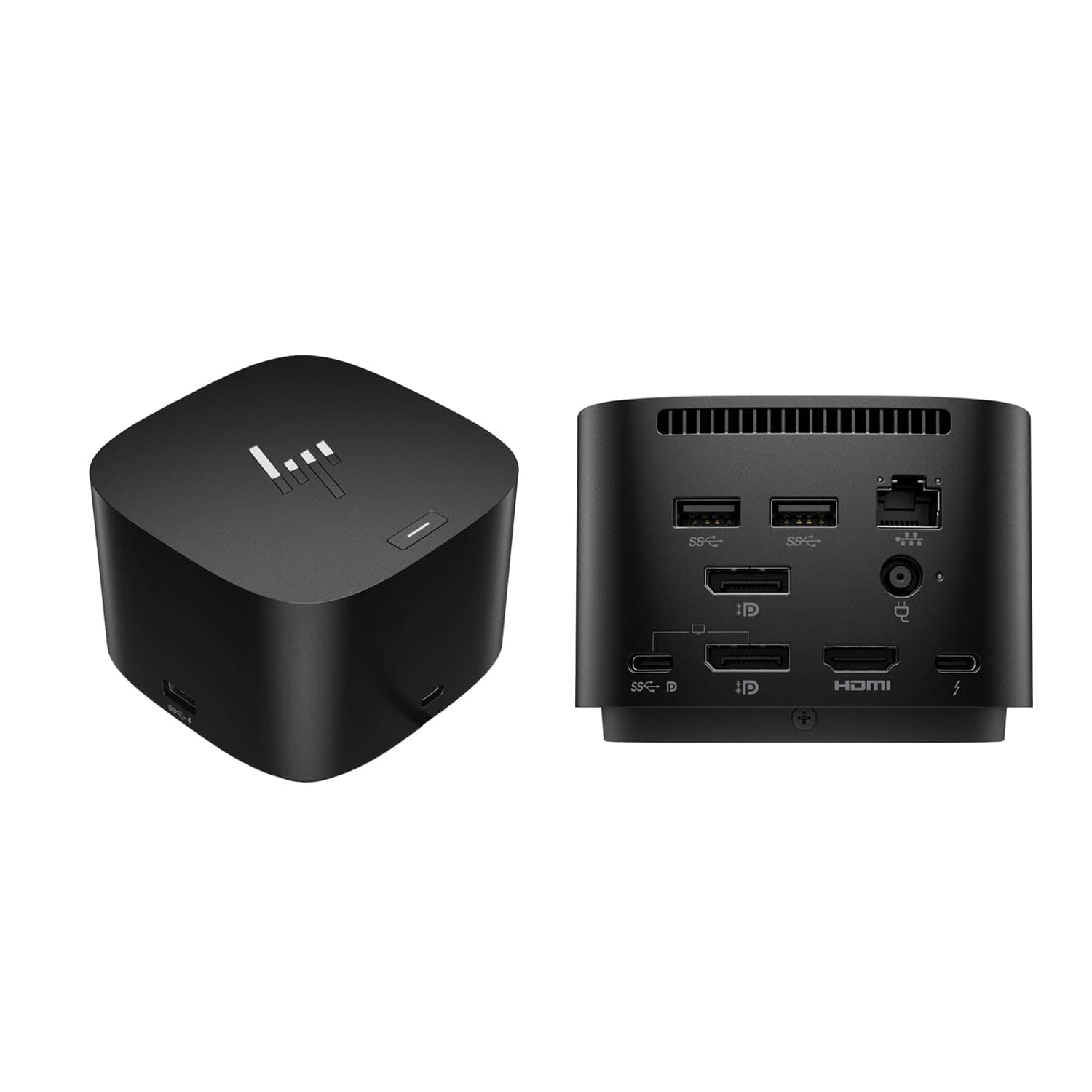
⚡ Power, Ports & Performance — Dock Like a Pro!
The HP Thunderbolt 4 Dock 120W G4 is a premium 13-in-1 USB-C docking station designed for professionals who demand high-speed charging, multi-display support up to four 4K monitors, and ultra-fast 2.5Gb Ethernet connectivity. Compatible with a wide range of laptops across Windows, MacOS, and ChromeOS, it consolidates all essential ports into a sleek, compact hub, boosting productivity and workspace efficiency.


| ASIN | B0D31JG624 |
| Best Sellers Rank | #19,222 in Electronics ( See Top 100 in Electronics ) #273 in Laptop Docking Stations |
| Brand | ist computers |
| Color | Black |
| Compatible Devices | HP pavilion Envy spectre EliteBook x360 830 840 845 850 855 860; ProBook 845 840 445 440 450 455 640 650 850 855 860 865; Lenovo Yoga Flex 9i 7i 5i ThinkPad C13 X13 C14 L14 L15 E14 E15 E16 T14 T15 T15g T16 P14 P14s P15 P15v P15s P16 P16s P16v P17 X1 Carbon Extreme, thinkbook 14 15 16; Dell Latitude Inspiron 9000 7000 5000 3000 9330 9440 9450 7435 7445 7430 7635 7620 7630 5400 7450 3340 7350 5350 7… |
| Customer Reviews | 4.2 4.2 out of 5 stars (42) |
| Hardware Interface | Ethernet, HDMI, Thunderbolt, USB, USB 3.1 Type A, USB 3.1 Type C, USB Docking Station |
| Input Voltage | 12 Volts |
| Item Dimensions L x W x H | 3.9"L x 3.9"W x 2.7"H |
| Item Weight | 1.68 Pounds |
| Manufacturer | ist computers |
| Number of Ports | 13 |
| Total Number of HDMI Ports | 1 |
| Total Usb Ports | 6 |
| UPC | 704920821805 |
| Wattage | 120 watts |
A**H
Great Docking Station
This was my third attempt at finding a suitable dock for swapping from my work issued Surface Laptop to my Macbook. Others were functional but inconsistent. This HP dock has been cranking away now without issue.
R**.
Provides plenty of Power, but causes other issues
Powers both my HP Z Book and MacBook Pro well, but doesn’t allow power up of either system while lids are closed. Previous HP Dock allowed power up with lids closed.
T**.
Sort of works
Since the latest firmware when the laptop goes to sleep (Zbook Ultra G1a) the dock goes bladoop USB sound and decides to move all active windows to the laptop screen when I wake up my device. Also is finnicky about monitor output. Straight up decided one of the USB-C ports was not going to output anything so I had to move a screen to DP. This should not be something that happens on a $400 dock.
D**I
Needs to be more robust
Love this dock, but if they get bumped off the desk, they fold like a gen-z activist.
N**.
Worth the price
Love how this doesn't take up a lot of space on my desk. Simple to set up and works like a dream! Definitely worth the money!
S**E
Best Hub Ever for working from home in Tech Industry
I work from home, in Tech and I purchased this hub as the one my work provided did not have enough connections and had issues with drivers needing installed continually and from day one. (J5 create). I also wanted more HDMI connections for multiple monitors (I have 3). This hub is excellent! It is easy to set up, no drivers to install, its plug in and you are ready to go. I kept the other hub too, but use the HP hub for the connections that never worked with the J5, and also it has way more connections, usb, hdmi, etc so I can hook up 3 monitors to it and more, easily. No issues with this hub! Highly recommend!
S**Y
Won’t work with multiple displays.
Won’t work with multiple monitors. I’ve updated all firmware on docking station and laptop but still doesn’t recognize more than a single monitor. I work in IT so I’ve done all the usual steps with firmware updates and driver updates. But no luck.
M**E
Worth the price!!
Works great just what I needed to work from home with my Zbook.
Trustpilot
Hace 1 mes
Hace 1 día