We remain fully operational. Our teams are working around the clock to ensure your deliveries continue safely.

Descargar la aplicación


Servicios al cliente
Sobre nosotros
Copyright © 2025 Desertcart Holdings Limited
Descargar la aplicación





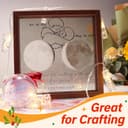
✨ Elevate your presentations and projects with crystal-clear precision! 📊
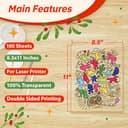
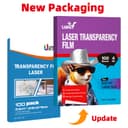
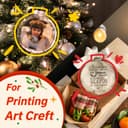
Uinkit Laser Transparency Film offers 100 sheets of 8.5x11 inch glossy, double-sided PET film designed for laser printers and copiers. With a durable 4 mil thickness, it delivers sharp, professional-quality prints ideal for presentations, screen printing, and diverse creative projects. Bulk packaging ensures great value and uninterrupted workflow.


| ASIN | B078R4DGSB |
| Best Sellers Rank | #4,681 in Office Products ( See Top 100 in Office Products ) #38 in Inkjet Printer Paper |
| Brand Name | Uinkit |
| Color | Clear |
| Customer Reviews | 4.4 4.4 out of 5 stars (1,473) |
| Item Dimensions L x W | 11"L x 8.5"W |
| Item Weight | 0.97 Kilograms |
| Manufacturer | Uinkit |
| Material Features | clear |
| Paper Finish | Glossy |
| Paper Size | 8.5x11 Inches |
| Paper Weight | 4 |
| Sheet Count | 100 |
| UPC | 748476755191 |
| Unit Count | 100.0 Count |
C**I
Great for screen printing
Worked really great for a screen printing project. Make sure to remove the paper separators before putting it in the printer, otherwise you will end up with a paper jam.
T**R
This sheet works well
I use these in my business making frames and embedding pictures on these transparent sheets. Its works really well, but it wouldn't feed through my Brother Laser at first. I found that if use the manual tray as suggested, with glossy paper selection, and a few sheets of white paper under the transparent sheet it feeds with little or no problem. Should wait awhile after printing, but I'm impatient and never had any issue. Be careful though not to scrape the pic too hard or it will scratch. I will be ordering more when I'm low.
W**G
Excellent Value
I needed larger clear acetate sheets to trace my artwork and then transfer the dimensions to my canvas for painting. Even though the sheets are quite large I needed to get a larger size so I used clear tape to piece the sheets together. It's great quality and you get 50 sheets for a great price. Well Done!!
N**S
Works. Canon Color Laser Tweaking Needed
BACKGROUND: I have a Canon ImageCLASS MF656Cdw color laser printer. The printer has no transparency paper option, so finding the right paper and driver settings took a lot of test prints. PROS (with my printer anyway): Good value overall. These work fine with the correct printer settings. I had no paper jams or ill-effects to the printer when inserting one sheet at a time into the printer's single-sheet multi-purpose paper slot. CONS (with my printer anyway): If you have a color laser printer with no transparency option like I do, you're going to have to experiment to find the best combination of printer settings. With my Canon ImageCLASS MF656Cdw color laser printer, I found that using the "Plain 3" paper setting and turning OFF the "Advanced Smoothing" feature in the printer driver settings (a feature buried deep in the settings) significantly improved black and especially color prints with no toner smearing. Turning off “Advanced Smoothing” was the key. Before doing that, prints came out smeared. Using the Plain 3 paper type was also important so the printer’s fuser spends just a bit more time fusing the toner to the transparency. CONCLUSION: Good value. Recommended overall. Just be aware that results will vary if your laser printer has no transparency paper setting (like mine). Expect to spend a lot of time (and toner and transparencies) making test prints to find the best paper settings for your printer.
H**0
Perfect for screenprinting.
I use these to create transparencies for screenprinting. They work perfectly.
M**B
Works
A little thinner than I expected, but it works with my laser printer even though my printer made a slight noise as the paper went through my printer.
D**Y
Not very good.
Ink doesn’t stick at all. It is not very durable and not a good value at all.
D**S
Great material
Works well for positives for screen printing, from a copier or printer
A**.
Daughter uses them for certain art projects. No problem with final result on Brother laser printer, but sometimes requires assistance to feed from manual tray. Very good adhesion and color result.
T**N
I bought these sheets to print floral patterns on so that I could project the image onto a canvas to trace for a painting. I only put one sheet into the printer at a time but a word of warning - don’t forget to remove the tissue sheet from the transparency! I was able to easily retrieve the crumpled tissue from my home printer and continue on, but that mess would have been prevented by removing the tissue first. The print quality is excellent! The print doesn’t smudge at all and I’m very happy with the resulting print.
L**S
I purchased these to give my young children something creative to do when stuck inside during bad weather, rather than watch TV: I gave them a bunch of these transparencies and a pack of watercolor markers and told them to make a play for their mom. The kids loved the concept (although none of them will ever win a Emmy) and they finished the play just in time before the bulb blew in my old Eiki OHP-4100. Should it be necessary--the sheets are acetate and the marker just wipes off--I would absolutely buy these again.
E**.
For the money, this is a stack of good quality overhead sheets. Purchased in stores, you'll often only find overhead sheets that you can run through a printer (far fewer number of sheets for a much higher price). While these are "marker only", they are a fraction of the cost, yielding a better value for the dollar. If you are an educator or a crafter, I think that you'll agree that these are a great purchase.
M**.
I was a little nervous, because the package came in a shrink-wrapped white box without the word "Unkit" - it just had Hartwii Imaging Materials Co Ltd. When I opened the box, the paper was inside with the blue flyer as shown in Amazon's product description. I was nervous about using this, but the test print I did was perfect. The only drawback (as others have mentioned) is that there are tissue paper sheets between each page. In any case, I am not planning a large volume of printing, so I will probably just use the manual feed, with one sheet at a time. I am happy with this product.
Trustpilot
Hace 1 mes
Hace 5 días