We remain fully operational. Our teams are working around the clock to ensure your deliveries continue safely.

Descargar la aplicación


Servicios al cliente
Sobre nosotros
Copyright © 2025 Desertcart Holdings Limited
Descargar la aplicación
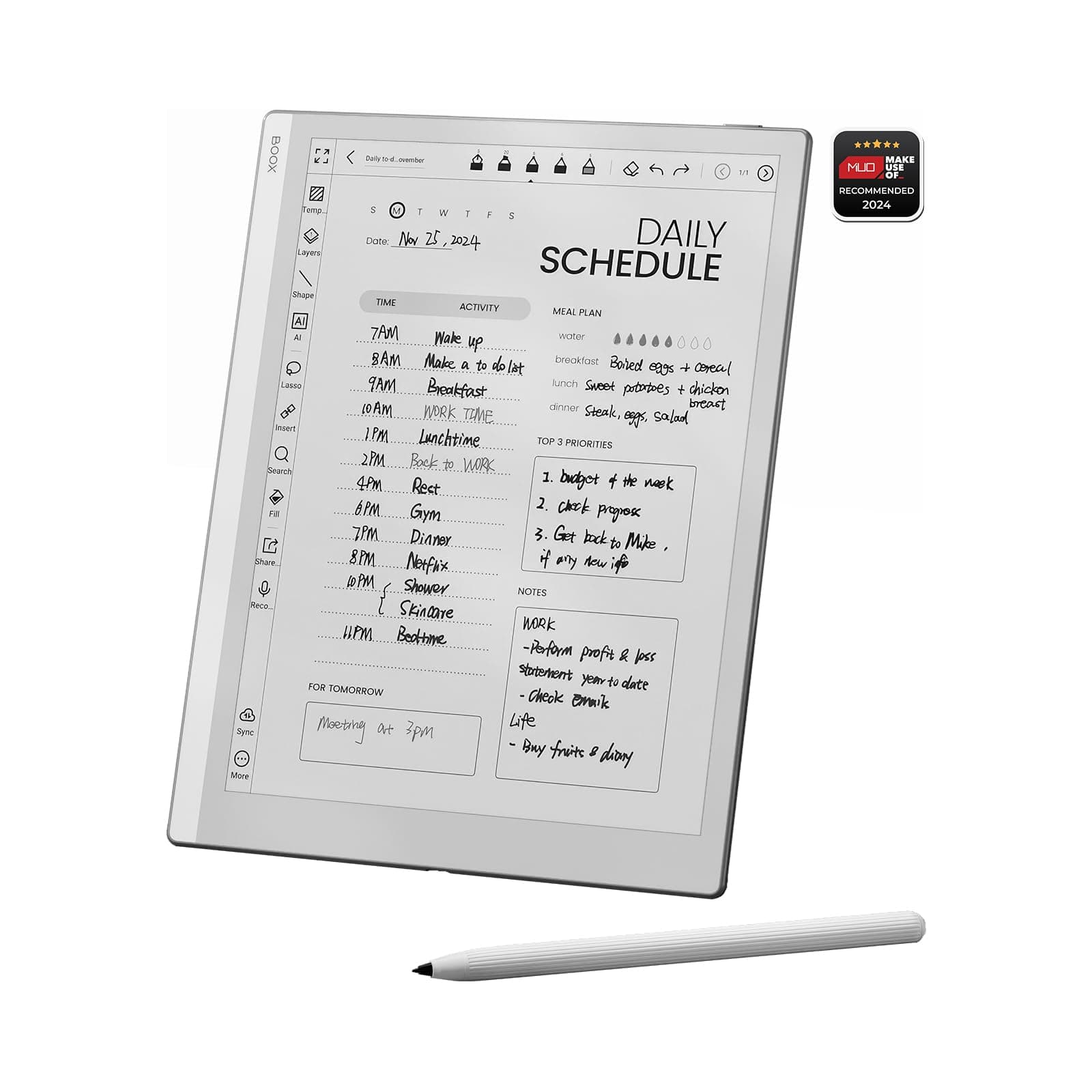




🖤 Elevate your digital note-taking with the sleek, powerful BOOX Go 10.3 — where clarity meets creativity.
The BOOX Tablet Go 10.3 is a premium 10.3-inch eInk device featuring a 300 PPI HD Carta 1200 glass screen, a fast 2.4 GHz Octa-core MediaTek processor, and 4GB RAM. It supports a highly sensitive stylus with 4,096 pressure levels and runs on Android OS, allowing users to install apps from Google Play. Designed without a front light for optimal eye comfort, it weighs just 365 grams and offers robust connectivity with Wi-Fi and Bluetooth 5.0, making it an ideal tool for professionals seeking distraction-free reading and note-taking.


| ASIN | B0D4DFT3W3 |
| Age Range Description | Teen |
| Aspect Ratio | 1:1 |
| Battery Average Life | 1 days |
| Battery Capacity | 3700 Amp Hours |
| Battery Cell Type | Lithium Ion |
| Battery Power | 3700 Amp Hours |
| Best Sellers Rank | 41,591 in Computers & Accessories ( See Top 100 in Computers & Accessories ) 620 in Tablets |
| Box Contents | DEVICE |
| Brand Name | BOOX |
| CPU Model Number | QUALCOMM_UK_Go_10.3 |
| Camera Description | No Camera |
| Cellular Technology | 4G |
| Compatible Devices | stylus |
| Customer Reviews | 4.1 4.1 out of 5 stars (430) |
| Display Type | E INK |
| Generation | [APPROX] 4 |
| Graphics Description | Integrated |
| Hardware Interface | USB Type C |
| Human Interface Types | Touchscreen with Stylus Support |
| Item Dimensions L x W x Thickness | 23L x 18W x 0.4Th centimetres |
| Item Weight | 365 Grams |
| Lithium Battery Energy Content | 15.17 Watt Hours |
| Manufacturer | BOOX |
| Maximum Display Resolution | 2480*1860 300PPI Pixels Per Inch |
| Memory Storage Capacity | 64 GB |
| Model Name | UK Go 10.3 |
| Model Number | UK Go 10.3 |
| Model Year | 2024 |
| Native Resolution | 300 pixels per inch (ppi) |
| Network Connectivity Technology | USB |
| Operating Systems | Android |
| Other Special Features of the Product | Supports USB OTG |
| Processor Brand | MediaTek |
| Processor Description | Octa-core 2.4 GHz |
| Processor Speed | 2.4 GHz |
| Product Warranty | 1 year |
| RAM Memory Installed | 4 GB |
| Screen Size | 10.3 Inches |
| Specific Uses For Product | [IST] Reading, note-taking, and creative activities |
| Supported Audio Format | MP3, AAC, FLAC, WAV, OGG |
| Total USB Ports | 1 |
| Video Processor | Qualcomm |
| Warranty Type | Limited |
| Wireless Compability | 802.11ac |
| Wireless Technology Type | Bluetooth, Wi-Fi |
M**Y
Beautiful and useful eReader
I’m heavily invested in the Apple ecosystem and come from a Remarkable 2, so I appreciate quality kit, and the Boox Go 10.3 is absolutely gorgeous. It’s a beautiful device to hold and use - the build quality is outstanding. The feeling of writing is super important to me for a device like this. The Remarkable 2 was the best I’d tried so far, but this device equals it. I did find the supplied pen to be a little “scratchy”, but it’s grown on me. I can also use the Staedtler pen I’d bought to use with the Remarkable for a smoother writing experience. I decided to sell the Remarkable and switch to the Boox as my primary note-taker. The Notes app in the Boox has a lot more functionality than the Remarkable. In addition and of most importance to me was the ability to download other apps on the Google store. So I can now use this fabulous eInk device for more of my reading, including my RSS feeds, Pocket articles, magazines with Libby, and of course eBooks which I’m using with KOReader. This is probably my favourite device this year and allows me to do a lot more reading on eInk and distraction-free. I don’t miss the front-light. My use is either outdoors or indoors under lighting and I’ve not had a situation yet where I couldn’t use the device due to lack of lighting. You don’t get the “free” case when ordering from Amazon, but most reviews of that I’ve seen aren’t particularly positive, so no great loss. I purchased a sleeve case for now until such time as third-party flip covers come out.
F**E
The best budget E-ink writing tablet?
This is an amazing eink tablet the writing feels is brilliant and the clarity is great it's easy to navigate and simple to add apps. I love writhing on the tablet and the support is good too as th operating system is constantly being updated and patched. The price although not the cheapest is good considering other tablets of its size and statistics
M**E
... an outstanding desktop clock
This tablet spent most of its time on my shelf, next to its box as a desktop clock (a role in which it excelled - has a beautiful large clock/calendar screensaver). I only actually used the Go 10.3 as it was intended, for a few days and within that time, i was not thrilled and did not get the 'wow' factor that i was expecting. The screen on the Go 10.3 was much darker than my Remarkable 2 and also my Boox Palma (original) - which has a very white screen. This made the screen on the Go 10.3 slightly difficult to read without eye strain in typical UK daylight (indoors). Reading PDFs was not a breeze as the text still looked quite small on the screen, although navigating PDFs, accessing them and transitioning through them, was much easier on the Boox Go10.3 than on my Remarkable 2. In terms of functionality, the Go 10.3 tablet does much more than a Remarkable 2 and outshines it completely. However, these functions can only really be used to the maximum if screen is easy to read. Boox really needs to improve this with the next generation device. Text needs to be very black against white-ish background. I was confused as to how this was achieved for the Palma (original) but could not be replicated on the Go 10.3. Screen touch stability was also an issue for me. Sometimes i would touch the screen on the right and the Go 10.3 tablet would return to the home screen. This was very frustrating - particularly as i am not a tech novice and am familiar with Boox and setting up their technology; I was very disappointed about this glitchiness. Boox MUST do something to redesign their pen/stylus. Although it has a satisfactory and realistic pen like feel on the screen, It looks and feels like a flimsy, cheap felt tip pen. When i picked it up, i felt... 'ripped off'. I found that other 3rd party stylus' felt better on the screen and in the hand. For the days in which i was using this tablet, i preferred a third party stylus - the HB looking yellow and black ones. For such an expensive device, quality and presentation matters and i think that Boox needs to work on this a little - particularly with their stylus. Finally, it must be emphasised that this, (just like the Remarkable 2), is a desktop item. It is cumbersome to carry and read, for example when sitting up in bed. When in lap, i found it was too far away from my eyes and once again caused eye strain. Despite its much smaller size, the Boox Palma is easier to hold and read on in my bed. The high contrast between ink and screen helps for reading clarity. Palma is also more stable and easier to adjust.
R**S
Don't know what to say.....
So, it looks nice, from there it is downhill. The user interface is clunky and just a mess as though different parts were designed by different people that didn't communicate with each other. The screen has very poor contrast, black on a grey background. I have a 5 year old Remarkable 1 and the screen is much brighter on this, plus the remarkable is way faster at everything, from booting to page refresh, etc. You have to be very selective on which android apps you can run on it as they are not all compatible, even though they should be. Not happy at all as this was meant to be my 'upgrade' to my RM1. At the moment it will probably be returned.
O**N
Brilliant for writing to text!
Super thin and light. Software is brilliant and responsive for e-ink. Amazing tablet for handwriting to text.
D**B
Boox Go 10.3
I've had this device for a couple of months now and am really happy with it. I mainly got it because my Kobo Libra is a bit to small for reading Manga and I couldn't take hand written notes on it when reading Dharma. Also I wanted an e Ink device I could have all my eBooks on (Kindle, Kobo and Google books), which I now can as this is an android device. It is a bit of a learning curve as all new devices are, but there are a number of short cuts you can customise to make it personal and to your liking. The lack of front light could be an issue if you've not got good lighting, the only time I've notice is in the evening before it's time to turn the lights on. As I said at the start I'm really happy with my Go 10.3
L**A
Lovely
It's lovely. I bought it for distraction-free reading. Its reading software is very good, with fast navigation and thoughtful options. Note-taking is a new experience, I wasn't looking for it but it's very good and I'm now writing in the margins quite a bit as I read. I added a beautiful third-party magnetic cover and a little booklight for reading at night.
S**N
I was looking at the Remarkable 2 but the Go 10.3 is cheaper and has a faster processor. So I got the Boox device. This is a wonderful device for note taking! I really enjoy the built-in note taking app. It has a bunch of features. It's easy to keep notes organized. And I like the writing feel. You can sync/back up the notes with Google Drive or Dropbox. You can export notes as PDFs and then manually move the files over to a computer to back up your notes as well. I really like that you can make things simple (just taking notes) or more complicated (access to the Play Store). I initially used it for taking notes, reading books with the built in reading app, NeoReader, as well as logging into the Play Store to get Libby and Pocket. After reading about some potential privacy issues (older version of Android and a Chinese company designs and makes these) I ended up removing Libby, Pocket and removing my Play Store account info. I am now treating this device like a Remarkable 2. I am just taking notes and reading epub files on NeoReader. I rarely connect the Go 10.3 to the internet and I save my notes to my MacBook using a USB cable. So you have the option to make this a "dumb"/"simple" device. Here is my short list of pros and cons: PROS: - You can keep it simple with the device and just take notes and read epub books. - This has Android 12 so you have access to the Play Store - Access to the Play Store means you can download any app (like Kindle, Pocket, Libby, etc). - This can sync up with Google Drive or Dropbox to back up notes or add epub books. - Built-in note taking and reader apps are fantastic. - The writing experience is great. CONS: - Magnet on the side of the device is not very strong. So the stylus doesn't stay on very well. I ended up getting a sleeve case so the device is really protected and I keep the stylus in the front pocket of the sleeve case. - Speaking of the stylus, it is just ok. My biggest issue is that it doesn't have an eraser function. I ended up getting the Noris Jumbo stylus. It looks like a pencil and has an eraser function on the bottom of it that works very well. - Privacy Issues: This uses Android 12, so it isn't the current version of Android. Also, Boox doesn't usually update the Android software. So it will probably always have 12 on it. And again, Boox is a Chinese company. So there can be some privacy issues when it comes to your personal information. Overall I am giving the Go 10.3 five stars because you have the option to do whatever you want with it. Whereas the Remarkable 2 is just a note taking device with no other options. And the main pro for me is that the writing experience is fantastic on this. It's been wonderful using it for work and as a journal! -
O**K
If you are a paper person like me, that is what you are looking for. Color is not something is miss as well as the backlight. Everything is just same as my paper notebook but smarter. To be able to work on pdf docs without printing is a game changer.
U**N
Ho aspettato un po' a scrivere la recensione perché in effetti, come si legge da più parti, la curva di apprendimento di questo dispositivo è piuttosto ripida. Una volta imparate le sue funzioni però devo dire che è davvero fantastico. Scrivo qui che le informazioni che cercavo prima di acquistarlo e che si trovavano a fatica sperando siano utili a qualcuno: anzitutto supporta la lingua italiana, sia come tastiera integrata sia nel riconoscimento della scrittura. Quest'ultima funzione è davvero notevole perchè puoi scrivere quasi degli scarabocchi e lui riconosce tutte le parole! Il riconoscimento vocale appena acquistato funzionava solo con il cinese il francese e l' inglese, ma dopo l'ultimo aggiornamento ora riconosce anche l'italiano. La penna supporta i livelli di pressione, il dipositivo è compatibile anche con la stylus staedler ma la penna in dotazione non è affatto male. In ogni caso non è un dispositivo per disegnare, si possono gestire schizzi su più livelli ma ad esempio non si può gestire l'opacità dei livelli in background e anche la funzione matita è abbastanza basica. Non ha retroilluminazione e più che un difetto a me sembra un pregio perchè restituisce una realistica esperienza di lettura e scrittura su carta. La latenza durante la scrittura è inesistente, sembra davvero di scrivere su carta. La ricarica dura parecchi giorni, non ci ho lavorato a pieno regime ma dopo qualche settimana è ancora al 60%. Si possono inserire annotazioni su qualsiasi formato, perfino sui kindle anche se non direttamente come sui pdf. Ottimo acquisto se si sa a cosa serve. Consigliatissimo.
C**A
I bought it instead of Remarkable bc all my internet research said it was more compatible with files and it's true. Have been promoting it among my friends. Not kidding––this little thing has changed my life. I wish I had bought it years ago. I'm sure my GPA will skyrocket now that I don't have papers flying around my room lol. Also I don't have to spend money in books no more.
L**O
J’utilise la BOOX Go 10.3 pour écrire et lire. La tablette est légère, fine et très agréable à tenir en main. L’écriture est fluide, avec une faible latence, et on peut désactiver le toucher des doigts pour poser la main sur l’écran sans problème. Le logiciel est bien optimisé et l’autonomie est un vrai point fort : jusqu’à deux semaines d’utilisation en usage réel. C’est un vrai Android, les applications fonctionnent correctement, et l’écran est net et confortable pour les PDF et le texte. À noter : malgré ses 10,3 pouces, l’écran n’est pas exactement au format A5.
Trustpilot
Hace 3 semanas
Hace 2 semanas