🚀 Elevate Your Storage Game!
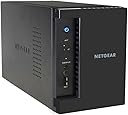
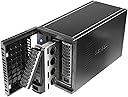
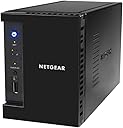
The NETGEAR RN10200-100EUS ReadyNAS 102 is a powerful 2-bay personal cloud network attached storage solution designed for seamless data storage, sharing, and streaming. With compatibility across all major operating systems and devices, it supports both SSD and SATA drives with an easy tool-less installation process, making it the ideal choice for tech-savvy professionals looking to enhance their digital lifestyle.


| ASIN | B00BJ1BGOS |
| Brand Name | NETGEAR |
| Colour | Black |
| Compatible Devices | Desktop |
| Customer Reviews | 3.7 3.7 out of 5 stars (283) |
| Enclosure Material | Metal |
| Global Trade Identification Number | 06064490928132 |
| Is Assembly Required | Yes |
| Item Part Number | RN10200-100EUS, RN10200100EUS |
| Item Weight | 2120 Grams |
| Manufacturer | NETGEAR |
| Manufacturer Part Number | RN10200-100EUS |
| Model Number | RN10200-100EUS |
| Mounting Type | Rack Mount |
| Size | Enclosure |
| UPC | 606449092813 616268695706 |
T**N
My overall experience with 102 has been brilliant. Its fairly straight forward despite the device not ...
My overall experience with 102 has been brilliant. Its fairly straight forward despite the device not really coming with instructions of how to insert the discs into the trays, so watch out for this as the runners are only plastic and could be snapped really easily BUT that said once that was all done it smooth sailing really. The transfer rate has been great and I've now rigged up everything so I'm working purely on the NAS and v few files stored locally - this took a bit of working out but got there in the end. Works as a nice central hub so when I'm working on a document others see those reflected with 10 seconds of me saving the document. The indexing is worth the wait too! Once a file has been uploaded it likes to index it. This was taking forever because of the shear volume but once its dome, it beautifully regulates itself from then on. One thing i have found is it only lets you back up and sync 10 files. Sync with Netgear I've learned is applied to specific folders you want constantly updating and saving files in to. These can then be accessed across the network for others to see the changes reflected. A really handy feature but i was surprised when i probably had a moment of madness and wanted to sync all the folders and i got this error message. Saying that though, for myself its not a massive problem you just have to be selective. Everything's works great with it too once accessed through web browser (ReadyNAS) app isn't supported on Windows Store :( but you can work around that. All in all, I'm really pleased with it. Perfect for new ones like myself wanting to delve a little deeper in to things but i can imagine its limiting for the more advanced user.
A**N
Good, but could be better
The NAS is brilliant. It was an upgrade from my D-Link DNS 320 which I had about a month ago but it didn't have many great features, so I went looking for a new one. When I saw this I knew that it was a no-brainer. It was cheap and was packed full of features I'd expect from a NAS twice the price. When the friendly delivery man came to the door it was packed in a nice Amazon box, I signed it and he went. When I opened the box I noticed that the actual box for the NAS was a bit smaller than the outer box, but that doesn't matter. The actual box was very tidy with all of the information about the NAS on the side. I opened the box which was a bit of a struggle because of how thick the cardboard was and I pulled the NAS out which was quite a bit heavier than I thought but it was definitely well built. I had a look around and I liked the screwless installation idea where you just slot the drive into the caddy and push it in to the NAS. I then plugged everything in and inserted the resource CD into my computer, installed the RAIDar application and opened the application. It found my NAS in no time, but said there was a corrupt root. As they were used drives I thought that it must have been a dodgy file type on the drive, so I reformatted them to NTFS and still has the corrupt root problem. This is where the real problem came. I scoured the internet for about an hour trying to find an answer. Then there was a breakthrough. I apparently had to put my NAS into boot mode and factory reset it. I thought that because it was brand new I wouldn't have to do this, but I gave it a shot. So I turned it off and used a straightened paperclip to press and hold the reset button and turn it on at the same time, then all of the lights at the front of the NAS came on. To scroll through the boot modes I had to press the 'Backup' button and select which one by releasing the reset button. I set it to factory reset and left it for half an hour reset itself. I came back and turned the NAS on and looked for it on the RAIDar application and it said it was running version 6.0.0. I clicked on setup and it took me to the NAS's web address (192.168.2.5). I looked through the settings and it was all clearly laid out and clean. I changed some settings and started using it as I should and it is still working fine now. I would definitely recommend this to someone who knew what they were doing. Pros: Lots of features for the price Runs nice and cool User accounts Useful apps Built in anti-virus that updates 2-3 times a day Quiet Cons: You need to have some good experience setting these up or else you will struggle. No Paper instructions. Only on a CD Could have some more apps
D**E
What a relief!
I bought this to replace a QNAP TS-212P which I had returned to Amazon. Whereas the QNAP was a nightmare to set up and had appalling documentation, this unit was very easy to configure and has excellent documentation. It was also very simple, via the unit's boot menu, to reformat and use a pair of hard drives salvaged from my old WD MyBook NAS. It is too early to say how durable it will be but it certianly seems very robust and well constructed. I would recommend it! UPDATE: One other reviewer has commented on the fact that the discs never spin down. All the time that the unit is powered on, even if no data is being written or accessed, you can hear the little "tick - tunk" noises made (I guess) by the read/write heads moving backwards and forwards. I don't know whether this means that the disc drives are more likely to wear out prematurely or not, but I have decided to use the built-in timer to only switch on the unit during the hours I expect to be accessing it. The Wake-on-LAN function also works well to boot the unit if I unexpectedly want to use it at other times. I am still perfectly happy, however this solution would not really be acceptable in a busier environment. It would be useful to hear from a disc-drive expert whether or not it is harmful to the drives to have them busily "tick-tunking" 24/7.
T**S
NON-EXISTENT NETGEAR SUPPORT
Don't buy this if you might need technical/set-up support in any way. I got stuck on accessing the set-up website - sat on their premium helpline with no answer for 5 minutes; then e-mailed their help system with no response now for 2 days. Luckily I figured out a way round and have the device now working. Advice: 1. Don't use IE for set-up - try Chrome or Firefox. 2. Don't drag & drop items you want to copy from an attached hard drive... It will 'move' and so delete the original... Use COPY and PASTE instead. 3. Allow a lot of time for transfers and monitor closely - it is a SLOW process to transfer 3TB+ of files, and some folders (possibly those with folders within folders?) don't seem to transfer as a whole... you have to go in and copy them section by section. That said, the device is functioning well now (after 2 days). I will update as things progress.
O**S
Heute habe ich den Netgear RN10221D bekommen. Die Inbetriebnahme klappt erstmal problemlos. Was aber schon mal nicht ging, war der Zugriff über ein Netzlaufwerk. Eine Verbindung war nicht möglich, obwohl alle Dienste beim Netgear laufen. smb, afp waren gestartet, ein Zugriff jedoch nicht möglich. Nach einem Factory Reset kann ich mittlerweile auf die Shares zugreifen. Zugreifen heisst hier, dass ich mich jedes mal neu verbinden muss, da die Verbindung offensichtlich ständig gekappt wird. Wundert mich etwas, da ja die Admin-Oberfläche über http ständig verfügbar ist. Kurzfristig hatte ich auch die Möglichkeit die TimeMachine Sicherung unter Mac OS zu konfigurieren, im nächsten Moment war sich wieder schon weg. Ein Telnet auf die verschiedenen Dienste war auch nur teilweise möglich. Update (7Stunden später ;): Nach mehrmaligem Reboot und nochmaliger Installation der aktuellen Firmware läuft der Server erstmal stabil. Der Zugriff über DLNA läuft problemlos, der Zugriff über afp lässt immer noch zu wünschen übrig. TimeMachinekonfiguration nach Videoanleitung funktioniert nicht, erst nach expliziter Netzverbindung mit afp://ReadyNAS@rechner-ip wurde in der TimeMachine der NAS angeboten. Außerdem wird mein NAS im Netzwerk nicht angezeigt, deshalb wahrscheinlich der TimeMachine Fehler. Woran das liegt, entzieht sich meiner Kenntnis. Somit vergebe ich jetzt mal statt einem Stern 4 Sterne, da die Funktionalität gegeben ist und derzeit keine Aussetzer vorhanden sind, Vielleicht kann mir ja der Netgear Amazon Support weiterhelfen. Update: NAS läuft ohne Probleme, ursprüngliche Fehler hat mein Router produziert. 5 Sterne lg
A**E
Ich bin kein IT-Spezialist und ich habe ebenfalls keine Muse mich im Internet lange Zeit nach möglichen Lösungen umzusehen bei einem Produkt, dass "einfach" funktionieren soll. Ich hab die Version 102 mit 2*2 TB Konfiguration auf Grund des guten P/L-Verhältnisses gewählt, auch weil die Menge an Datenplatz für meinen Heimbetrieb ausreichend ist. Der Aufbau ging glatt voran, SW-Update hat das System auch gleich aus dem Netz gezogen. Dann ging es ans einrichten und in dem Zusammenhang stieg der Frustrationsgrad ziemlich an. Ich verstand die Logik hinter den Dingen bei Netgear nicht, Handbuch nur in Englisch, doch auch das half mir nicht weiter. Die Rechner im Netz sahen Dinge, die ich nicht auf der Adminkonsole sah, man konnte einen Benutzer sperren/löschen, der hatte danach aber immer noch Zugriff auf die Daten. Rechtemanagement soll wohl vorhanden sein, doch ich fand keine Einstellung, die meine geringen Ansprüche erfüllte. Vermutlich ist alles möglich, doch die Anleitung richtet sich leider nicht an die Zielgruppe der Privatanwender, so dass ich hier am Ende einen Reset durchführte und alles wieder einpackte. Ergänzend zum Gerät, es ist recht laut, die Festplatten, Toshiba, machten sehr heftige Geräusche, der Lüfter ist permanent zu hören, lauter als der Gaming-PC im gleichen Raum, auch gab es Geräusche, die ich nicht zuordnen konnte, in der Art wie Resonanzgeräusche, man konnte sie vermeiden durch Belastung des Gehäuses. Die FPs werden sehr heiß trotz kühlem, freien (10 bis 30 cm in jeder Richtung) Platz zeigte der Sensor über 60 Grad an. Das ist nicht normal. Somit kann ich dem Gerät nur 2 Sterne geben. ***Update*** Durch den guten Support von Netgear passe ich die Bewertung auf 3 Sterne an.
G**1
Matériel livré en 24 heures par Amazon et garanti 3 ans par Netgear après inscription sur MyNetgear avec trois mois de support technique pour l'aide à l'installation. Déjà heureux possesseur depuis plus de trois ans d'un ReadyNAS DUO V1 (processeur SPARC) équipé de 2 disques Western Digital Caviar Green 10EARS ( 1 To ) paramétré en X-RAID et principalement utilisé comme serveur iTunes avec Firefly ainsi que pour des fichiers peu accédés, j'ai fait l'achat de ce ReadyNAS 102 V3 sous OS 6 ( processeur ARM Marvell Armada 370 cadencé à 1,2 GHz ) que j'ai équipé de 2 disques Western Digital Green 10EZRX ( 1 To ) paramétré en X-RAID2. Bien que ces disques ne soient pas conseillés par Netgear pour une utilisation en NAS, j'ai fait ce choix car mes NAS sont à un mètre de mes oreilles et je souhaite privilégier le silence de fonctionnement, la basse température et la faible consommation. Il sera toujours possible de passer à des Western Digital Red par la suite si mes disques lâchent. En utilisation, le RN 102 est quasiment inaudible, ce qui n'est pas le cas du RN DUO V1 à cause de son ventilateur bruyant. L'interface de gestion OS 6 est fluide contrairement à l'interface de gestion Frontview du RN DUO V1 qui est TRES lente. La philosophie des deux interfaces est très différente. Plus sympa, orientée Cloud et utilisateur lambda sur le RN 102. Il manque la gestion des quotas mais cela est dû à un nouveau système de fichiers, BTRFS, qui offre par contre le cryptage des données et les snapshots d'origine (que l'on peut activer ou désactiver) par exemple. J'apprécie l'antivirus intégré et gratuit, le Wake on LAN et la boutique d'applications intégrée, absents du RN DUO V1. Au niveau matériel, les LEDs sont plus visibles et l'installation des disques de format 3.5 pouces sans aucun outil est une idée de génie. On peut bien entendu installer des disques de format 2.5 pouces (classiques ou SSD) mais il faut en ce cas utiliser des vis fournies pour les fixer dans les berceaux. Mes deux NAS sont protégés par un onduleur APC, le RN 102 V3 étant piloté par le RN DUO V1 après paramétrage des deux NAS. Ce RN 102 V3 tourne précisément sous OS 6.1.8. En conclusion, ce produit est parfait pour la protection des données, le Cloud distant ou local, de construction robuste et tout ceci pour un prix très serré. Un seul bémol pour les clients ne maîtrisant pas l'anglais, ce qui n'est pas mon cas. Il m'a été impossible de trouver les deux grosses documentations détaillées en français mais uniquement en anglais au format PDF. Totalement satisfait par cet achat payé 99 euros lors d'une promotion ponctuelle. Mise à jour du 1er juillet 2015 : Au bout d'un an d'utilisation, matériel toujours silencieux et fonctionnant parfaitement sans aucune perte de données bien qu'utilisant 2 disques Western Digital Green 10EZRX ( 1 To et non recommandés par Netgear ) paramétrés en X-RAID2. Avec les nouvelles mise à jour, ce NAS tourne actuellement sous OS 6.2.4 Mise à jour du 8 octobre 2015 : NAS mis à jour sous OS 6.4.0 Interface très stable et très réactive.
R**R
Es gibt sicherlich bessere NAS Systeme mit mehr Community Unterstützung und mehr Zusatzapps. Bsp.: Synology Wenn man jedoch das Preis/Leistungsverhältnis betrachtet kann man sagen es passt.
H**.
Ich habe von diesen Geräten 2 Stück im Einsatz. Eins läuft zeitgesteuert 16 bis 20 Stunden pro Tag, das Andere dient als Backupgerät und fährt nur zu diesem Zweck für ein paar Stunden täglich hoch. Hierauf fährt die Hauptmaschine zeitlich gesteuert ihre Backups. Die erste Maschine hat zwei 3 TB Platten von Seagate als RAID1 und die Backupmaschine hat eine WD red 3 TB. Beide Maschinen sind über eine 1GBit Verbindung in das Hausnetz eingebunden. Die "Hauptmaschine" bietet die Home Shares für alle Benutzer meines Netzwerkes und diese sind in deren Windows Workstations als Netzlaufwerke eingebunden. Somit gibt es keine Speicherung wichtiger Daten auf lokalen Festplatten. Desweiteren trägt das NAS natürlich auch die Fotosammlung, Musik und Videos in entprechenden Shares. Die Zugriffe auf diese Resourcen sind in den Berechtigungen der einzelnen User/Gruppen festgelegt. Als Protokolle sind SMB, AFS, DLNA, HTTP und HTTPS aktiviert. Ebenfalls habe ich den Zugriff über SSH aktiviert. Prime Fotos werden in die Cloud repliziert. Die Performance dieser Maschine ist für alle Funktionen bisher sehr gut gewesen, keine Aussetzer oder Verzögerungen. Die Wärme- und Geräuschbelastung ist in allen Situationen sehr gering. Die Maschine ist über die Readycloud aus dem Internet erreichbar, der Zugriff über die Benutzerrechte geregelt. Das Betriebssystem wird von Netgear weiterentwickelt und es kommen immer mal wieder Updates. Das NAS kann auch an eine USV angeschlossen werden, die dieses dann bei Bedarf auch herunterfahren kann. Alles in allem bietet dieses NAS eine solide Ausstattung und zuverlässige Funktion für relativ wenig Geld. Empfehlenswert für Privatanwender, eventuell auch für kleine Firmen.
Trustpilot
Hace 2 días
Hace 3 semanas