We remain fully operational. Our teams are working around the clock to ensure your deliveries continue safely.

Descargar la aplicación


Servicios al cliente
Sobre nosotros
Copyright © 2025 Desertcart Holdings Limited
Descargar la aplicación




🖥️ Elevate Your GPU Game — Support That Means Business
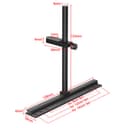
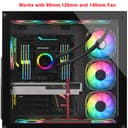
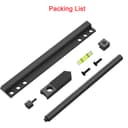
The JOYJOM GPU Support Bracket is a precision-engineered, adjustable aluminum stand designed to prevent graphics card sag. Compatible with 9cm, 12cm, and 14cm fans, it mounts securely without obstructing airflow. Its CNC electroplated finish ensures durability and style, while the included mini bubble level guarantees perfect installation. Ideal for ITX, MATX, and ATX cases, this bracket offers a sleek, tool-free solution to protect your investment and maintain optimal GPU performance.


| Item depth | [10, 129] mm |
| Mounting type | Case Mount |
| Manufacturer | JOYJOM |
| Package Dimensions | 16.9 x 7 x 1.8 cm; 70 g |
| Item model number | JOYJOM |
| Size | 136mm |
| Finish | Black |
| Item Package Quantity | 1 |
| Batteries included? | No |
| Batteries Required? | No |
| Item Weight | 70 g |
A**T
Secure
Exactly as described. Easy to adjust and a secure fit
I**P
Case: Lancool 216 GPU: 7800XT reference (Sapphire Pulse) 140mm bottom case fans All the screw holes lined up, it secures in place pretty well, provides sturdy support, and is a nice addition to a black case. I love that it came with two longer screws for mounting through the fan and into the case as opposed to some crappy inserts that would leave the fan floppy on that side. I have the motherboard mounted in the lower 'water cooling' configuration. The pole sticks up about an inch over the top of the GPU. This means it would work well for the air cooled config too. If all you want is a fan mounted solution with a minimal offset to take the weight off your GPU, this will work. Put this thing in your cart and stop reading here. My end goal is to have a rigid anti-sag solution utilizing the four 4mm screw holes on the end of the GPU. The end of the GPU lines up a couple mm short of the center of the lower case fan screws. This design was the only one providing a minimal offset plus the freedom to attach the pole anywhere along the length of the fan-mounted bracket. The greater offset afforded by brackets with two sets of fan mount holes may be handy for anyone trying this with 120mm fans, but you will be limited by which holes will be useful on the end of the GPU. I appreciate that this listing included the 8mm pole diameter measurement. After some searching, it seems an 8mm "MSCF Sliding Bracket Guide" (google image search that) is the only other thing necessary to complete a rigid mount. Language barriers exist, so it may actually be a JSCF sliding bracket. I dunno. Amazon does not have any, and I'm ordering by picture. The GPU screw holes are ~21mm apart, so going with the 70mm length bracket guide.
K**N
I recently built a 5070ti setup and I noticed sag within a week, the fans on the card and on the bottom of my case made it quite hard to find one that will work, the normal cylinder ones would end up in my fan and break things. This actually bolts into your fan and then you can slide the entire thing back and fourth to position anywhere along the channel, Its built really well and dosent feel flimsy, it also doesn't attract attention to itself keeping your setup clean
K**1
Easy to install and easy to adjust.
B**K
Perfect fit for 120mm Lian Li fans, and fixed my GPU sag
P**0
I have an ASUS Prime 5080 OC and it’s kind of heavy, but not ridiculously heavy. So this is just for piece of mind and because I know some newer reinforced PCIE slots can break down when a heavy GPU sags for a long time. So this bracket will take those worries away. I set mine on the bottom intake fans and it fit perfectly fine. However you do have to remove the right middle screw to make sure it sits flush as the holes don’t line up with all 120mm fans. So if you set it on the right side like mine you’ll have to do screw, screw, screw, empty, screw, screw. Look at my last picture & video for example.
Trustpilot
Hace 1 mes
Hace 5 días