We remain fully operational. Our teams are working around the clock to ensure your deliveries continue safely.

Descargar la aplicación


Servicios al cliente
Sobre nosotros
Copyright © 2025 Desertcart Holdings Limited
Descargar la aplicación
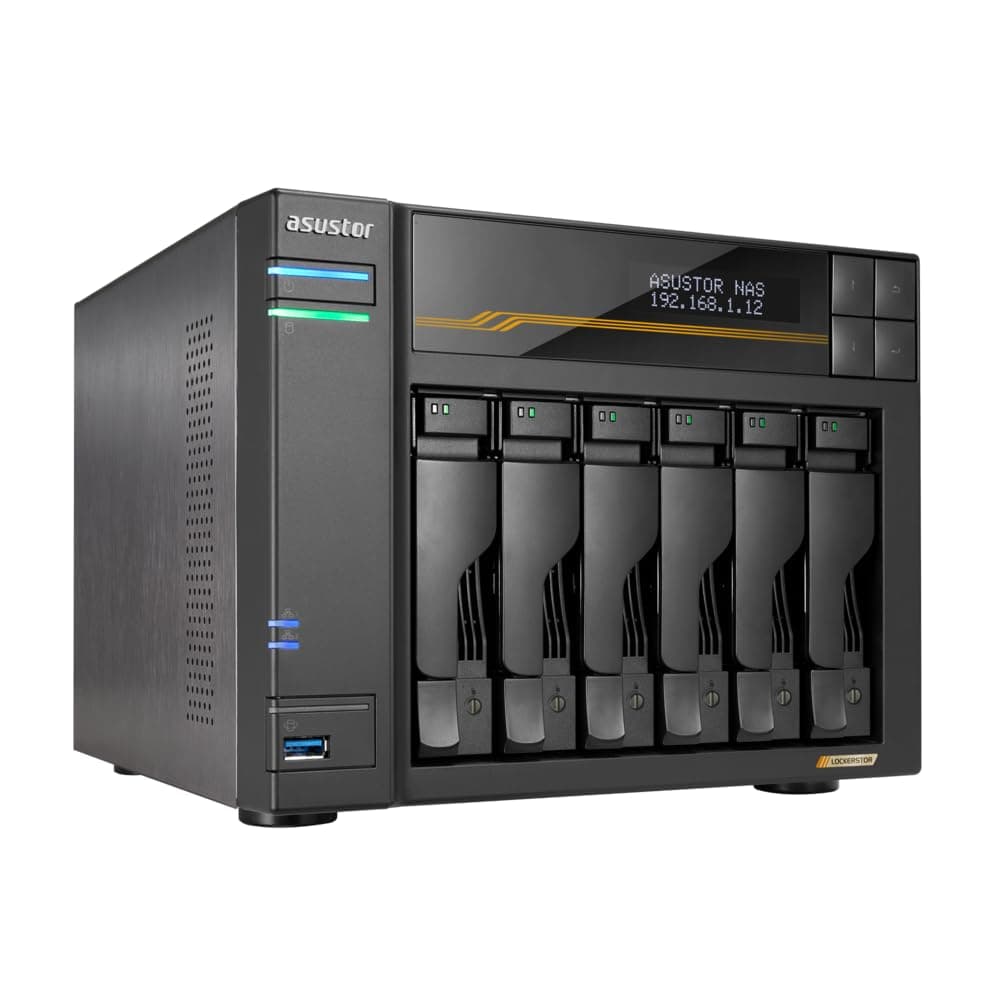
🚀 Unlock Pro-Level NAS Speed & Reliability — Don’t Get Left Behind!
The Asustor Lockerstor 6 Gen3 AS6806T is a high-performance 6-bay NAS designed for video editors and content creators. Powered by a quad-core AMD Ryzen CPU with turbo boost up to 3.8 GHz and equipped with 16GB ECC DDR5 RAM, it supports four M.2 NVMe PCIe 4.0 SSD slots for blazing storage speeds. Dual 10GbE and 5GbE ports plus USB4 connectivity ensure ultra-fast data transfer and network flexibility. Its intuitive management software and advanced features like Wake on LAN/WAN make it an essential tool for professionals demanding speed, reliability, and future-proof scalability.


| ASIN | B0DBZ668G8 |
| Best Sellers Rank | #34 in Network Attached Storage (NAS) Enclosures |
| Brand | Asustor |
| Compatible Devices | Server |
| Customer Reviews | 4.2 4.2 out of 5 stars (66) |
| Global Trade Identification Number | 04710474831562 |
| Is Assembly Required | No |
| Item Weight | 4600 Grams |
| Manufacturer | Asustor |
| Mfr Part Number | AS6806T |
| Model Number | AS6806T |
| Mounting Type | Rack Mount |
| Size | 6 Bay |
H**X
Flexible NAS options. Excellent fit and finish.
Although I am still in the middle of installing my Asustor Lockerstor 4 Gen3 AS6804T, the process has been straightforward so far. After installing the 2.0 TB SATA drives from my old HP (defunct) NAS, the Asustor informed me that two of the drives were faulty. After replacing them with new 2.0 TB drives, I now have a functional RAID 6 array. My final step is to set up user accounts and define how I want ongoing backups to be done. The built-in user interface is a novel (and quite useful) adjunct to the ASUSTOR Control Center PC application, which is easy to use and has very flexible options. Fit and finish are excellent. Over time, I'll also populate the four NVMe M.2 slots.
L**N
Fast & Easy
Working great - nice and fast RAID5 operations. ;-) Was easy to setup.
V**R
WOL doesn't work
I received the delivery without issues, and since the hard drives haven’t arrived yet, I’m currently testing with two M.2 SSDs installed. However, the WOL (Wake on LAN) feature doesn’t seem to work. I registered the MAC address for Wake on LAN in ACC and enabled WOL in the power settings within ADM, but it still doesn’t function. For comparison, the WOL feature works perfectly fine on my QNAP NAS on the same network. If the WOL issue gets resolved, I’ll update this review. Currently, I’m using ADM version 5.0.0.RA82. If it turns out to be a hardware defect... I’d be really stressed. I hope to receive some support to resolve this issue.
J**N
Highly Recommend
This Asustor NAS exceeds my requirements. It was purchased to replace an older Netgear NAS and I am not disappointed. I found the learning curve was easy. High quality with excellent connectivity. In addition to using it to store backups for 6 computers, I use to store duplicate files.
M**S
Solid NAS for the money!
Solid NAS for the money!
E**B
Extended power outage destroyed 64TB of data despite UPS and RAID5
I purchased the Asustor Lockerstor Gen3 AS6710T (10-bay) and populated it with five 26TB Seagate Exos drives in a RAID5 configuration - nearly 100TB of protected storage, or so I thought. The NAS was connected to a UPS. When an extended power outage occurred while I was away, the UPS eventually depleted its battery and the NAS lost power. This single event completely destroyed the Btrfs filesystem. Not the drives - all five drives are perfectly healthy with zero bad sectors according to SMART diagnostics. The RAID array itself is fine and assembled correctly. What failed was the filesystem metadata, specifically the chunk tree and root tree that Btrfs uses to locate data on the drives. I spent over a week attempting recovery: btrfs rescue chunk-recover (20+ hour scans, multiple times) Manual superblock patching with corrected checksums Every mount option and rescue flag available Consultation with AI assistants walking through increasingly aggressive recovery attempts The chunk-recover tool found 65,000+ recoverable chunks but couldn't rebuild the filesystem because multiple critical metadata structures were corrupted simultaneously. The tools kept failing with circular dependency errors - can't fix the chunk tree without the root tree, can't read the root tree without the chunk tree. The data is still physically on the drives. The RAID parity is intact. But without the filesystem metadata, 64TB is completely inaccessible without professional recovery services costing thousands of dollars. Why doesn't this NAS support automatic graceful shutdown when UPS battery runs low? Many UPS units support USB signaling for exactly this purpose. The NAS should have detected the low battery condition and shut down cleanly before power was lost. Instead, it just kept running until it crashed. What's the point of RAID5 redundancy and a UPS investment if the filesystem can be destroyed beyond recovery anyway? Bottom line: Even with proper power protection, this device cannot be trusted with important data unless you're physically present during every power event or have comprehensive offsite backups. The Btrfs filesystem implementation is fragile, and Asustor provides no safety net for extended outages. 64TB of data, gone.
V**S
Easy setup and does the job.
Big fan of ASUS and this did not disappoint. Easy setup and does the job.
B**R
High quality product, documentation needs a little work
This is a high-quality product with a lot of features, but with a caveat: the documentation is not very easy to follow for non-NAS experts, and it can be challenging to find the most updated instructions for this particular model. I've now got it up and running with 4x16tb drives in a 5 RAID setup, and I'm happy with the performance and the capabilities.
M**R
This is a really nice NAS drive. The only reason I give it 4/5 stars is because I wish the price was a little lower. I think it's too expensive for a NAS drive. You could buy a used storage server for this price. The installation was pretty simple and so far it's been reliable after more than a year.
T**D
Works well, makes my 3D production from rendering on multiple machines to final edits very efficent, it does hang every now and then requiring a reset, but overall happy just wish I had bought the 10 bay version
L**W
Amazing piece of kit. Not cheap by any means, but amazingly powerful. Simple, basic, Linux-based OS, "official" support for wiping the supplied OS and using TrueNAS/FreeNAS/etc, all the arrays are basic mdadm arrays. Tons of apps (but I don't use them because I just want a NAS but they work), enterprise-grade management and features, and with the 10 bay version and the 4 NVMe bays in it, more than enough space, and can be expanded with up to 3 x USB4 expansion units to 22 drives and 4 NVMe in total. Hotplug drives, simple setup. I don't like two things about it - it tries to automatically claim disks that are inserted into positions that were previously occupied by an array disk (do NOT put in a drive with data you want to keep... instead pop it into a USB enclosure and connect it as an external drive), and similarly it cannot read existing arrays (unless you're prepared to tamper a LOT on the Linux command line and bring them in by hand). Fast, able to take a lot of traffic from a lot of different sources simultaneously (e.g. I was mirroring from two other NAS over the network, and some backed up data from my local computer, and using it for media viewing all at the same time, and it laughed at it), plenty of expansion and features and ports. A really nice simple GUI over the top and at first I believed it was telling lies and breaking my drives, but actually no - it was spotting data corruption that was NOT showing on SMART on some ancient drives. It didn't care, it worked around it (the RAID6 literally got syslog entries saying that a drive was returning incorrect data - on a fresh array - so it was taking the majority view of the RAID6 for those sectors... even though SMART registered no fault with the drive. Didn't even mark the array as degraded as it could reconstruct the sector and rewrite it to the faulty drive and just carry on). Those drives were, in fact, faulty and it spotted them when my old NAS hadn't. Very heavy when fully loaded, but very meaty in what it can deliver. I haven't been this impressed by a NAS in a long time. The apps also seem to "just work" and it appears to be a great device for home, power-user or high-end enterprise use. I would gladly have this in my IT department as a NAS for users or backups.
A**N
I've used Windows for years, so working with the Linux file system in the Lockerstor is a BIG step. I have a pair of blank 18 TB drives set up as a RAID array, plus 3 used drives. Still have no idea how to browse the other drives with content that I don't want to format without knowing what's on them.
J**.
Livraison rapide, produit conforme, rien à dire.
Trustpilot
Hace 2 días
Hace 1 semana