We remain fully operational. Our teams are working around the clock to ensure your deliveries continue safely.

Descargar la aplicación


Servicios al cliente
Sobre nosotros
Copyright © 2025 Desertcart Holdings Limited
Descargar la aplicación

Buy anything from 5,000+ international stores. One checkout price. No surprise fees. Join 2M+ shoppers on Desertcart.
Desertcart purchases this item on your behalf and handles shipping, customs, and support to Uruguay.
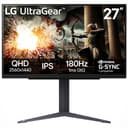
🎮 Level up your game with LG UltraGear — where speed meets stunning visuals!
The LG 27GS75Q-B is a 27-inch QHD (2560x1440) IPS gaming monitor featuring an ultra-fast 180Hz refresh rate (overclockable to 200Hz) and 1ms response time for fluid gameplay. It supports NVIDIA G-SYNC and AMD FreeSync for tear-free visuals, HDR10 for enhanced color and contrast, and covers 99% of the sRGB color gamut. Designed with gamers in mind, it offers a virtually borderless display and an adjustable stand (tilt, height, pivot) to optimize comfort and immersion.


| ASIN | B0DFZZHK6X |
| Adaptive Sync | G-Sync Compatible |
| Additional Features | Height Adjustment, High Dynamic Range, Pivot Adjustment, Tilt Adjustment |
| Aspect Ratio | 16:9 |
| Best Sellers Rank | #9,493 in Computers ( See Top 100 in Computers ) #324 in Computer Monitors |
| Brand | LG |
| Brightness | 300 cd/m² |
| Built-In Media | Monitor, Power Adapter |
| Color | Black |
| Compatible Devices | Laptops, Desktops, Gaming Consoles |
| Connectivity Technology | DisplayPort, HDMI |
| Contrast Ratio | 1000:1 |
| Customer Reviews | 4.5 4.5 out of 5 stars (153) |
| Display Resolution Maximum | 2560 x 1440 Pixels |
| Display Technology | IPS |
| Display Type | IPS |
| Hardware Connectivity | DisplayPort, HDMI |
| Has Color Screen | Yes |
| Item Dimensions D x W x H | 25.4D x 61.5W x 57.7H centimeters |
| Item Weight | 5.99 kg |
| Manufacturer | LG |
| Model Name | 27GS75Q-B.AUS |
| Model Number | 27GS75Q-B.AUS |
| Mounting Type | Wall Mount |
| Native Resolution | 2560x1440 |
| Number of Component Outputs | 2 |
| Picture Quality Enhancement Technology | HDR10, sRGB color gamut |
| Refresh Rate | 200 hertz |
| Resolution | QHD Wide 1440p |
| Response Time | 1 Milliseconds |
| Screen Finish | Matte |
| Screen Size | 27 Inches |
| Series Number | 75 |
| Shape | rectangular |
| Specific Uses For Product | Gaming |
| Total Number of HDMI Ports | 2 |
| UPC | 195174084908 |
| Viewing Angle | 170 Degrees |
H**M
Great choice for FPS games.
I like it and the UI is easy. one thing I wasn't aware of that you can't lower it a lot. it is designed for the monitor to stay 25 CM above the desk. It is effecient and good for its price and its 180 refresh rate.
G**O
Have two, want more! Recommend!
Good monitor. I have two: one at home, one at office. I bought second to replace my existing UltraGear 27inch qhd at home. 27 inch was too small for me. Also, I can say that 32inch might be big for tables less than 60cm deep. But if you have 80cm table - 32 inch with qhd is best choice, even you have a good vision (I have about -0.65) I use it for programming and gaming, watching shows and movies - very satisfied. No designer’s specific tasks, but colors, in my opinion, are great. I verified all declared refresh rate up to 144hz, and HDR support. I was able to verify a VRR (FreeSync). It works, but I have several PC’s connected thru a KVM which supports everything (g-sync, freesync). In my case I was able to use FreeSync (HDMI connection) only via laptop with AMD’s CPU (integrated GPU). All other devices (even claimed support) are not able to use VRR (thru KVM?) by an unknown reasons. But monitors are supported VRR, verified. I think better to mount it on a clamp, but stand is perfect, actually. It doesn’t use much space, and I keep xbox controller between stand’s legs, looks good :)
B**L
good except low light scenarios but that’s minimal
greater than greated cheese 👍
S**L
I have 2 of the older versions of this monitor, and needed another. Specifically I wanted this one for portrait mode, to be the side monitor. It can fit the bill to be the main, or secondary screen very easily. I have not tested it over 300 FPS, because I typically game capped at 120FPS. I cant notice the difference, and power consumption at the crazy end of the spectrum is not worth it. At least for those of us that are actually paying the utility bills. This monitor displays 4K just fine at reduced frame rates. It would probably not take 350fps at 4K. But again that's not my cup of tea. When I game, I actually prefer playing at 1080P 120fps. For windows or Netflix, I bump it up to 4K 120hz. It looks stunning. Historically, I have been all Sony (pre-2000), followed by all Samsung(pre-2020). With this family of ultragear, specifically those with G-sync, I am now all LG. I still love the other 2 brands, but their value is slipping. LG is still what I would consider to be a good price point for workstations and armature gamers on a budget. You will want to note, that if you are an Nvidia GPU user, you need to make sure the one you pick has G-Sync. If you are an ATI GPU used, you will need to make sure the one you pick has V-Sync. I think that they are planning on making the next generation of screens with both. But in the end G-sync is better because Nvidia is better then ATI. (which is junk IMO) I have been a network administrator for 30+ years. And have purchased somewhere north of 1000 CRT's, LED's and LCD's over the years. These are not Premium OLED screens. But for the price point, they are superb. If money was not an option, OLEDs are the way to go. Faster, brighter, less prone to glare. a 10% boost for a 300% price increase. I highly recommend these screens. Also 32" is the new minimum size. I stopped buying 27" about 5 years ago. All of my employees thank me for it.
J**G
I bought the LG 27GS75Q-B and I’m very satisfied with the purchase. The interface is easy to use, the image quality is excellent, with sharp details and vibrant colors, and the performance for gaming is outstanding. The high refresh rate and fast response time make games feel smooth and responsive. Overall, it’s a great monitor with excellent value for the price. Highly recommended.
E**D
Good quality at an affordable price. Resolution is good and has the various inputs and options for gaming.
A**A
So far loving the monitor! Definitely recommend checking out. Much better quality and fun to play games on
A**R
After using the LG UltraGear 32GS75Q-B (31.5" QHD IPS gaming monitor) for about a month, I am thoroughly impressed with its performance. I upgraded from a previous LG VA panel that exhibited noticeable ghosting and trailing behind fast-moving objects, such as the mouse cursor. This issue stemmed from the slower gray-to-gray (GtG) response times typical of VA panels compared to IPS. With this UltraGear model, featuring a 1ms GtG response time, those artifacts are completely eliminated, delivering crisp and fluid motion.While the static contrast ratio is 1200:1 (lower than the 3000:1 on many VA panels), the IPS technology provides superior overall image quality, with excellent viewing angles and color accuracy (sRGB 99% typical). The VESA DisplayHDR 400 certification ensures solid HDR performance, producing vibrant highlights and satisfactory dynamic range for gaming and media consumption—far better than I expected for an entry-level HDR implementation.A standout feature is its compatibility with both AMD FreeSync and NVIDIA G-SYNC Compatible technologies, making it future-proof for my planned upgrade to an NVIDIA GPU while delivering tear-free gameplay on my current setup.The primary minor drawback is the pixel density of approximately 93 PPI at 2560x1440 resolution on a 31.5-inch panel. At very close viewing distances, individual pixels become faintly visible, which could bother users sensitive to such details. However, at typical desktop distances (around 2–3 feet), this is imperceptible, and it poses no issue during gaming or video playback.Other aspects are excellent: the On-Screen Display (OSD) menu is intuitive and responsive, and the stand assembles quickly while offering height, tilt, and pivot adjustments for ergonomic comfort. Connectivity includes two HDMI 2.1 ports and one DisplayPort 1.4, providing ample bandwidth for the QHD 180Hz specification (though the higher versions are not fully utilized at this resolution).P.S.: For Linux users interested in HDR, note that robust support is currently limited to recent versions of KDE Plasma (Wayland session) and GNOME (starting with version 48 or via experimental flags in earlier releases). Additional libraries or extensions may be required for full functionality, and some setup tweaks could be needed. In contrast, Windows 11 enables HDR seamlessly out of the box via the display settings.Overall, the LG 32GS75Q-B offers outstanding value for QHD gaming, with responsive performance, reliable adaptive sync, and impressive visuals that make it an easy recommendation.
Trustpilot
Hace 2 semanas
Hace 2 semanas