We remain fully operational. Our teams are working around the clock to ensure your deliveries continue safely.

Descargar la aplicación


Servicios al cliente
Sobre nosotros
Copyright © 2025 Desertcart Holdings Limited
Descargar la aplicación







Buy anything from 5,000+ international stores. One checkout price. No surprise fees. Join 2M+ shoppers on Desertcart.
Desertcart purchases this item on your behalf and handles shipping, customs, and support to Uruguay.
⚡ Future-Proof Your Network with ASUS RT-BE92U – Speed, Security, and Smarts Combined!
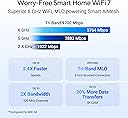
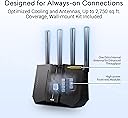
The ASUS RT-BE92U is a cutting-edge Tri-Band WiFi 7 router delivering up to 9700 Mbps speeds via 320 MHz channels and 4096-QAM modulation. It features AI-powered multi-link operation for stable connections, flexible WAN options including 4G/5G tethering, and subscription-free commercial-grade network security with Trend Micro. Designed for smart homes and professionals, it supports AiMesh for seamless whole-home coverage and advanced VPN capabilities, making it a future-ready networking hub.


| ASIN | B0DHWCQ3FP |
| Antenna Location | Game, Gaming, Home, Professional, Video Games |
| Box Contents | RT-BE92U |
| Brand | ASUS |
| Brand Name | ASUS |
| Colour | black |
| Compatible Devices | Personal Computer |
| Compatible devices | Personal Computer |
| Connectivity Protocol | Wi-Fi, Bluetooth |
| Connectivity Technology | Bluetooth, Wi-Fi |
| Control Method | Push Button |
| Coverage | Extensive coverage |
| Customer Reviews | 3.5 out of 5 stars 441 Reviews |
| Data Transfer Rate | 5764 Megabits Per Second |
| Frequency | 320 MHz |
| Frequency Band Class | Tri-Band |
| Frequency band class | Tri-Band |
| Is Electric | Yes |
| Is Modem Compatible | Yes |
| Item Dimensions L x W x H | 28.7L x 10.2W x 24.7H centimetres |
| Item Weight | 1.74 Pounds |
| LAN Port Bandwidth | 9700 Mbps |
| Manufacturer | ASUS |
| Manufacturer Part Number | RT-BE92U |
| Maximum Upstream Data Transfer Rate | 5764 Megabits Per Second |
| Model Name | RT-BE92U |
| Model Number | RT-BE92U |
| Model name | RT-BE92U |
| Number of Antennas | 4 |
| Number of Ports | 5 |
| Operating System | ASUSWRT |
| Other Special Features of the Product | Alexa Compatible, Internet Security |
| Security Protocol | WPA3 |
| Special feature | Alexa Compatible, Internet Security |
| UPC | 197105580633 |
| Wi-Fi Generation | Wi-Fi 7 |
| Wireless Compability | 802.11.be, 802.11ac, 802.11ax, 802.11n |
| Wireless communication standard | 802.11.be, 802.11ac, 802.11ax, 802.11n |
W**A
Excelente producto Cumple su función
M**D
very nice the vpn from sharksurf is compatable and good
S**Y
Here’s my review. I purchased one open box to replace my Bell modem as I switched to EBOX Internet. The Nokia Becon 3.1 is terrible. You have to be right beside it to get full speed. The moment you move to a different room or floor you lose 50-70 percent speed. It does not penetrate through floors or walls well. Even though it shows full signal. After doing research I came across this router open box deal. I purchased 1 to start. Placed it in the same spot as the Nokia router. Did my speed test again and the speeds only dropped 20 percent going to the 2nd floor. Speed penetrates through walls and floors much stronger than the Nokia router. However. I want to utilize the full speed on 6ghz on all floors which is where the other 2 routers come in open box and added 1 to each floor. I now how full 6ghz speed throughout the entire house. Once you have the entire mesh system setup and begin adding devices. If you have a smart home with 40+ switches, camera, HomePods, it’s important to name them as you connect to the internet in the ASUS app. Because to fully utilize the system it’s important to bind each device to the router you want to lock it to prevent roaming to a weaker signal. Another thing I noticed. Each open box had someone else’s wifi setup to a single network. It combines all 3 bands into 1 network. I don’t recommend this because you won’t utilize full speed at times it will connect to 2.4 ghz instead of 5 or 6 which makes it very slow. For the price. You can’t go wrong with this mesh setup. Another thing to add. If you are with EBOX. Completely disconnect unplug and put back in the box the crappy Nokia beacon. You can’t even disable the wifi it’s annoying. Connect main fibre modem directly into the ASUS router and setup PPPOE information in the ASUS web gui. I currently have 58 devices connected and my ram utilization is 69-71% these are future proof ai nodes. In the future when it’s time to upgrade the main unit to a 4x4 mimo. It will still utilize full wifi 7 speeds as ai nodes. This router is 2x2 mimo on 5ghz and 6ghz 3x3 for 2.4ghz ideal for smart home devices. Best bang for your buck right now With my internet speed capped at 1gbps it doesn’t make sense to purchase a high end router yet.
A**R
This router works. I've read all the negative reviews and just can't believe it. I bought the router and never had a problem. It had the lastest firmware installed. This unit is fast. The speeds i was getting was wow. Now I have a 1Gb plan and was getting more than that. I've done speed test thur various sites and all came really close to one another. The stability of this router was very good quality thur out my home. Up stairs down stairs didn't matter. My wifi connection was great. Couldn't be happier. The app that you have to DL is very good. It gives you alot of info and options. I was able to update the firmware to the lastest that just came out. Everything went like clockwork. Now I did have to reboot it once done . Otherwise it has worked perfectly. I've had no problems. But I will update if something comes up. If your on the fence about this one ,I say go for it . This router is a good one for anyone who's looking to upgrade there old unit.
Y**W
I have to return the router as its connectivity is extremely unstable in my case. My situation: I live in a stacked townhouse (two floors) with Bell 3 Gbps service; I have 5-6 devices, non of which can support Wifi 7 (best can do Wifi 6E). I use the router as AP to enhance wifi coverage and get my place ready for any future wifi 7 device. The router's signal is strong enough to cover my entire home (when it works) but my phone and computer would frequently lose connection without any reason, particularly when I resume my phone/pc, change location from the first floor (where the router is) to the second, or start a heavy load downloading/uploading. I have to reconnect wifi multiple times a day; the speed is better when newly connected but gets worse as I use. I tried troubleshooting and did some research. With this router, many have complained about similar problems and warned that tri-band/wifi 7 is very new and still requires constant improvement. I've also tried different setup, e.g., turn off wifi 7 mode, turn off roaming assistant... to improve stability, but the problem persisted. So be ware of the challenges embracing new technologies.
Trustpilot
Hace 1 mes
Hace 3 semanas