We remain fully operational. Our teams are working around the clock to ensure your deliveries continue safely.

Descargar la aplicación


Servicios al cliente
Sobre nosotros
Copyright © 2025 Desertcart Holdings Limited
Descargar la aplicación
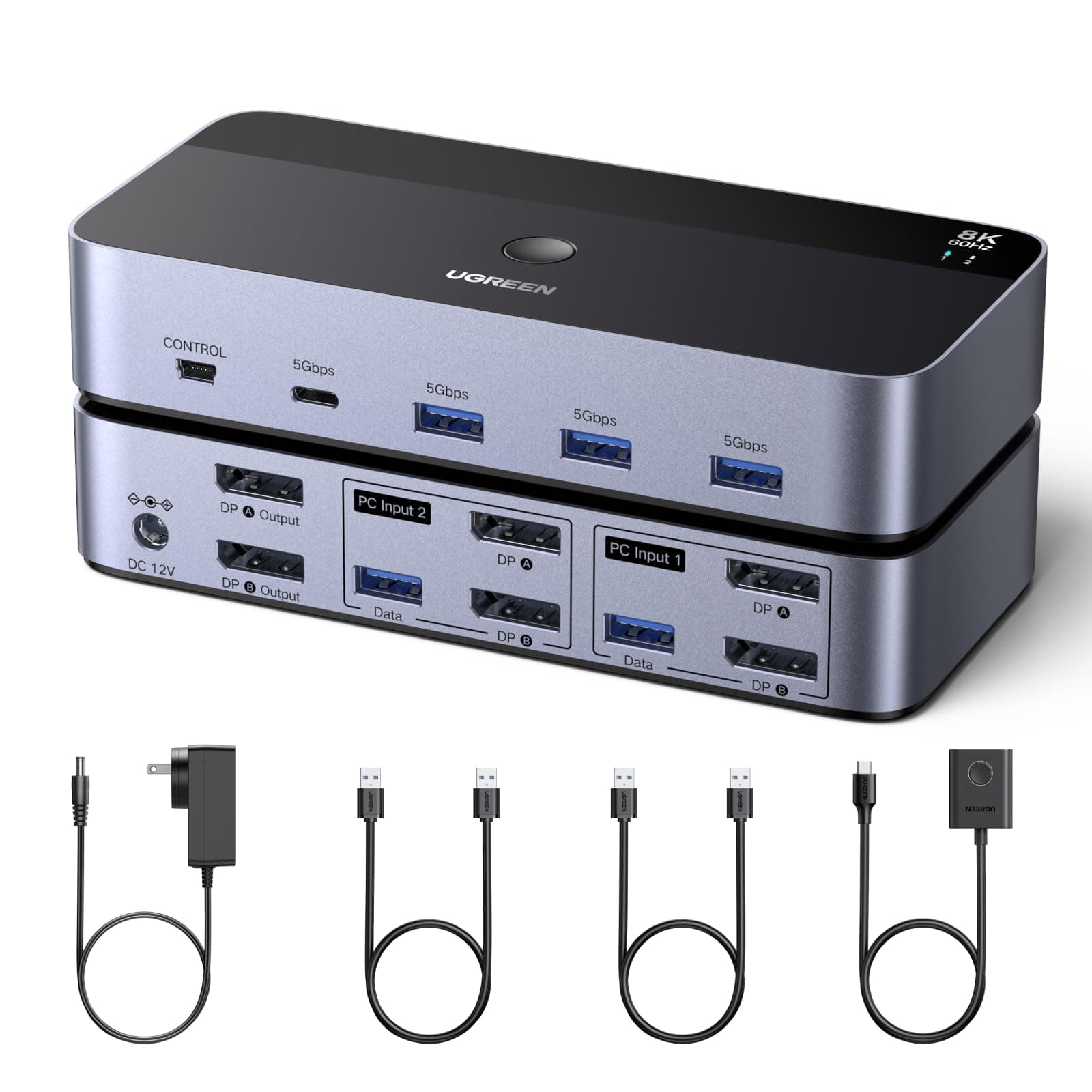
🚀 Elevate Your Dual-Computer Setup to 8K Brilliance — Because Your Workflow Deserves the Best
The UGREEN 8K@60Hz DisplayPort KVM Switch enables seamless control of two computers across dual monitors with ultra-high-definition 8K resolution support. Crafted from durable aluminum, it features four USB 3.0 ports for fast peripheral sharing and offers easy switching via a desktop controller or button. Compatible with Windows, MacOS, and Linux, this plug-and-play device is designed for professionals seeking a clutter-free, high-performance multi-computer workspace.


| ASIN | B0DXF5Z23S |
| Best Sellers Rank | #10 in KVM Switches |
| Brand Name | UGREEN |
| Color Name | Multi |
| Customer Reviews | 3.8 3.8 out of 5 stars (532) |
| Date First Available | June 10, 2025 |
| Item Weight | 1.87 pounds |
| Item model number | 55851 |
| Product Dimensions | 6.18 x 2.83 x 1.18 inches |
G**X
Excellent quality
Perfect for me. This has been an absolute lifesaver for me. I finally found a kvm that supports dual 4k 240hz displays with no issues. All features work (Dolby vision, VRR, Gsync, etc). The USB ports are limited and I wish it had more, however the features work fine, as the ports seamlessly swap between my two computers (keyboard, mouse, hd, controller). Would recommend this for someone who needs a kvm for driving multiple displays for gaming or work at very high resolution and refresh rate.
V**4
KVM Space saver.
I was debating on getting a second monitor for my second computer but due to the limited space I occupy this KVM switch saved me the trouble of having of a such a spacious set up. I bought this unit of having the flexibility of having two computers with one monitor (or two, should the need arise). The functionality is pretty straight forward, but this unit is DESIGNED FOR ONE COMPUTER USE AT A TIME by either using the button switch on the unit itself or by a tethered Remote Control. There's barley any heat level on the unit and the quality is pretty solid. Absent of an 8K or 4K monitor, the KVM switch works perfect for my 2K monitor with full refresh rates at any resolution I set. Recommend using a DisplayPort cable at 6ft or less (depending on your set-up) for a solid full performance. This unit is perfect for people with high productivity work and lite post production.
J**X
Don't buy. Died after six months
Update. USB ports died after only six months. I have to older monitors (about ten year old. Works fine with both. Takes a few seconds to swap. Would give it 5 except it sometimes fails to swap or computers don't recognize one of the monitors. Especially with Linux Mint.
D**N
Good & works as advertised
I got it to use on 2 4k monitors. My monitors are capped at 144hz refresh rate & this works well for the refresh rate. Set up was easy. Switching between machines is an ease with click of a button. Compatible for windows & mac. One of the review pointed out the screen resolution resets every time when switching between machines. I did notice the same too. However, if I think this has to do with the machine & not the switch. My newer windows machine has no such issues & I can see the same resolution I set it up with. However, when I connect a laptop the display resolution for laptop screen gets reset to default. The switch is a little bulky & needs a power source which makes be give it a 4 star. Overall I am happy with the purchase
I**R
Amazing KVM, supports high resolution and refresh rate
This is honestly a hidden gem for KVM's. I have gone through several KVM's, even spent a good amount of money on Level1Tech's KVM switch (which is known to be one of the best KVM's) However this one does everything better at fraction of the cost. Though it does not state to have EDID support, when switching between computers, I noticed that the windows that I had up remain in the same spot as they did, this might be due to the monitor's I have, I have not tested on any other hardware. This thing can handle a variety of resolutions and refresh rates. I have this connected to a 5120x1440p monitor and a 3440x1440p both at 144hz runs them no problem The HDCP 2.3 seems to work well, if you don't know what this is, when you have a monitor connected to a kvm switch, the hdcp protocol thinks its a recording device which will cause you screen to go black intermittently when watching something like netflix, amazon prime video, hbo max etc. Even the $400 Level1Tech KVM switch, goes black now and then because of the hdcp protocol. If you are a remote worker looking to switch between your work pc and gaming pc with no issue, this is the one. I hope Ugreen comes out with a triple monitor version.
J**B
Audio Switch Work Great
The KVM switch works great for two computers. Setup was easy, connect a USB cable and Video cable to each computer and to the back of the KVM, then connect a Video cable from the KVM to your monitor, last thing to do is connect your keyboard (USB) and mouse (USB) to the front of the KVM. Also no SW or drivers are needed. Note: For sound / speakers you will need a separate Audio switch and 2 - 3.5mm to 3.5mm cables. Link to 3.5mm 2 into 1 Audio Switch below. https://www.amazon.com/LiNKFOR-Switcher-Splitter-External-Required/dp/B08L3BQCF7?th=1
V**A
An excellent KVM Switch
I needed to share my displays, as well as data and input and output devices between two systems; this KVM switch was perfect for the task. It is rock-solid and works perfectly. I wanted to share microphone, speakers and other amenities as well as data; connecting a USB hub to one of the shared data ports allowed connection of all the devices I needed to share and the remote switch button allowed me to park the switch out of the way and out of sight, leaving me with one button on my desk. Like other UGREEN devices I have purchased, it is solid and well constructed and works perfectly, right out of the box. I have two, actually; one on my workbench, which allows me to share between my bench PC and any system I am working or troubleshooting, and another for my office desk, which allows me to share between my desk PC and my Mac Pro. I highly recommend this product.
J**N
Not recommended, poor reliability
Not recommended; does not support all resolutions; boot/bios from windows pcs will not display-- requires you to bypass the KVM to see "why are things not booting". Disconnects attached keyboards/mice frequently (several times per minute), and does NOT work with Caldigit Thunderbolt Docks.
Trustpilot
Hace 2 días
Hace 2 semanas