We remain fully operational. Our teams are working around the clock to ensure your deliveries continue safely.

Descargar la aplicación


Servicios al cliente
Sobre nosotros
Copyright © 2025 Desertcart Holdings Limited
Descargar la aplicación


Buy anything from 5,000+ international stores. One checkout price. No surprise fees. Join 2M+ shoppers on Desertcart.
Desertcart purchases this item on your behalf and handles shipping, customs, and support to Uruguay.
💧 Stay cool, stay ahead — liquid cooling that’s as smart as your setup.
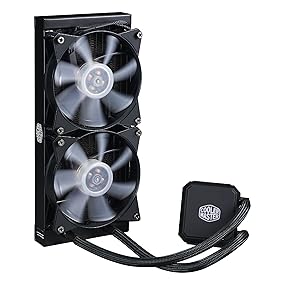
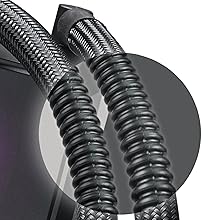
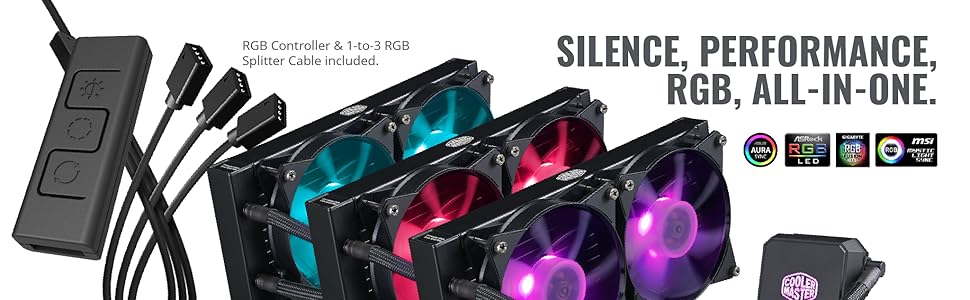
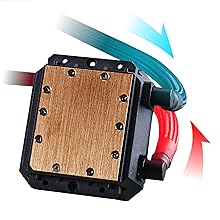
The Cooler Master MasterLiquid LC240E RGB is a high-performance all-in-one liquid CPU cooler featuring a 240mm radiator, dual chamber pump, and dual 120mm RGB fans. It offers powerful 66.7 CFM airflow at a whisper-quiet 31.5 dB noise level, compatible with a wide range of Intel and AMD sockets. With customizable RGB lighting and durable sleeved tubing, it combines style, efficiency, and reliability for professional-grade PC cooling.





| ASIN | B07CRGC899 |
| Air Flow Capacity | 66.7 Cubic Feet Per Minute |
| Best Sellers Rank | #611 in Water Cooling Systems |
| Brand Name | Cooler Master |
| Compatible Devices | Desktop |
| Cooling Method | Water |
| Customer Reviews | 4.4 4.4 out of 5 stars (2,796) |
| Global Trade Identification Number | 00884102045561 |
| Included Components | 1 x AIO CPU Cooler |
| Item Dimensions L x W x H | 10.9"L x 4.7"W x 1.1"H |
| Item Type Name | Cooler Master MasterLiquid LC240E RGB All-in-one CPU Liquid Cooler with Dual Chamber Pump Latest INTEL/AMD Support |
| Item Weight | 2.51 Pounds |
| Manufacturer | Cooler Master USA, Inc. |
| Material Type | Polycarbonate |
| Noise Level | 31.5 Decibels |
| Power Connector Type | 3-Pin |
| UPC | 884102045561 |
| Unit Count | 1 Count |
| Voltage | 12 Volts |
| Warranty Description | 2 Years |
| Wattage | 50 |
T**Y
Works so well, I had to slow the fans down.
I just upgraded from a 120 mm water cooler to this 240 mm model. For reference, my processor is rated at 125 W. I purposely picked the same brand cooler with the hopes that the mounting would be identical. For my socket, this unit requires the factory mounting bracket that many other coolers, including my original cooler, do not use. It is a simple process to install, if the bracket is already on the motherboard. Otherwise, you have to find one. Luckily, they are under $10 to replace, if missing. Performance wise, I had my old cooler from the factory constantly running at 100% fan speeds to maintain decent temps. This new cooler is so efficient that I had to reduce the fan speeds to keep the temps above ambient levels. (Can’t drop below ambient in Florida unless I want a wet processor.) At constant 100% fans, this new cooler dropped my temps to below 20° C. With the motherboard now in control and adjusting the fan speed, I am about 30° C at idle and peak in the 40’s with moderate activity. This is about a 10° C drop from my old cooler for idle temps. I am not a gamer so I rarely push the processor too hard. Video production is the main thing stressing the system and that only happens in bursts. Based on some other reviews, I used a name brand thermal paste instead of what came with the cooler. I don’t know how much that changes things. The setup works great so I like it. Also, important to note that the factory paste originally installed was still extremely wet so it had not dried out. For whatever reason, the old setup was just not keeping up with the heat being generated. If I am hearing the pieces correctly, the fans are extremely quiet and I hear a little bit of pump noise. Since I am always wearing headphones, I don’t hear anything with them on. The RGB system works, but seems to have extremely limited options. I wanted a decent, budget cooler, more than lights, so I am happy with the product.
B**E
The Cooler is a Significant Improvement over the OEM CPU fan and easy to install
Personal Experience: After my wife made a comment on how loud the OEM CPU fan was for my desktop I decided it was time to get a liquid cooled replacement. I wanted something that would not only be quieter but keep my CPU cooler. Read some reviews and I was between the 120mm and 240mm radiator, I settled on the 240mm radiator because my case had the space and for the price it was a good deal. Install of the cooler is relatively easy if you have experience building computers or swapping out components and your case has room to accommodate the radiator and cooling tubes. My setup uses an AMD chipset but the cooler accommodates both AMD and Intel chipsets; the directions are easy to follow on how to install for either style. Make sure you clear cables out of your way with Zip ties and ensure that everything fits before you bolt/strap it down. If you are upgrading your existing CPU Fan/Cooler I would suggest purchasing good thermal paste remover so you can start with a clean surface. Overall it took me about 45 minutes to remove the old fan, clean off the thermal paste, layout the new Cooler setup then bolt everything down/apply new thermal paste. The lights on the cooler are a nice touch. All in all I was pleased with CPU cooler upgrade from install to performance. Recommend: Yes Pros: Far quieter than the OEM fan that came with the CPU Easy to install in a large case Came with all the mounting equipment you would need Lights are a nice touch to customize your setup Works with both AMD and Intel chip sets (AMD on my setup) Cons: Will not fit in a smaller case (did not affect me but be aware) Installation Suggestions: If you are upgrading get thermal paste remover and be generous when cleaning the CPU Layout everything before you tighten everything down; I had to move the radiator slightly to get everything to fit nicely Read the directions on which way to install the fans the first time (I have installed fans backwards before and it sucks)
K**.
This thing is good!
I used this with a Ryzen 2600x CPU and added 2 fans to it to make it a push pull, Works amazing compared to the stock AIO cooler in my other ryzen 2700x from Cyberpower, that is only a single radiator push pull.... That one sucks compared to this guy!!!!! Keeps my CPU very cool. I have not had one power failure due to CPU overheating on this system.. But my other 2700x with the single overheats all the time. I actually had to downclock it, I am thinking about getting another one of these for that one as well, but I would have to dismantle a lot of stuff to make it fit as it would only fit my case in the front.... and the lights on it are cool... I did not like the clamps for the motherboard though.... they were rather tricky and flimsy..... just be careful, be calm, and do it when rested on a clear head.... do not attempt to install if frustrated.
S**N
Lo compré sin darme cuenta que no embonaba en mi gabinete y tuve que usar el disipador que viene en el procesador (Ryzen 2600x) pero este hacía demasiado ruido y se calentaba bastante, entonces adapté el gabinete para que entrara y ha sido una maravilla, poco ruido a comparación de antes y se mantiene a muy buena temperatura. Es la primera computadora que armo y no tuve ningún problema para armarlo, las instrucciones son claras.
H**I
مبرد قوي لكن الصوت المراوح على اعلى دوران مزعج
M**B
ممتاز
A**R
well my aging H105,was giving me 83.c core temps playing Battlefiield V,it was almost 5 years old,this new cooler dropped my core temps back down to 75.c,,,the fans after 70% are loud,it was farely easy to install,the pump itself is silent,.the price was right,,shipping was free,,i ordered Jan 1st,recieved Jan 3rd,,impresseive amazon
C**Y
Really nice cooler keeps temps nice and cool fans are a little loud and the radiator came with a couple dents also only way I found of changing colours is with little remote as I could not find no software to use even the ones it says is compatible with don’t seem to work but all that a side really good cooler would give 5 star.
Trustpilot
Hace 1 mes
Hace 3 días