We remain fully operational. Our teams are working around the clock to ensure your deliveries continue safely.

Descargar la aplicación


Servicios al cliente
Sobre nosotros
Copyright © 2025 Desertcart Holdings Limited
Descargar la aplicación
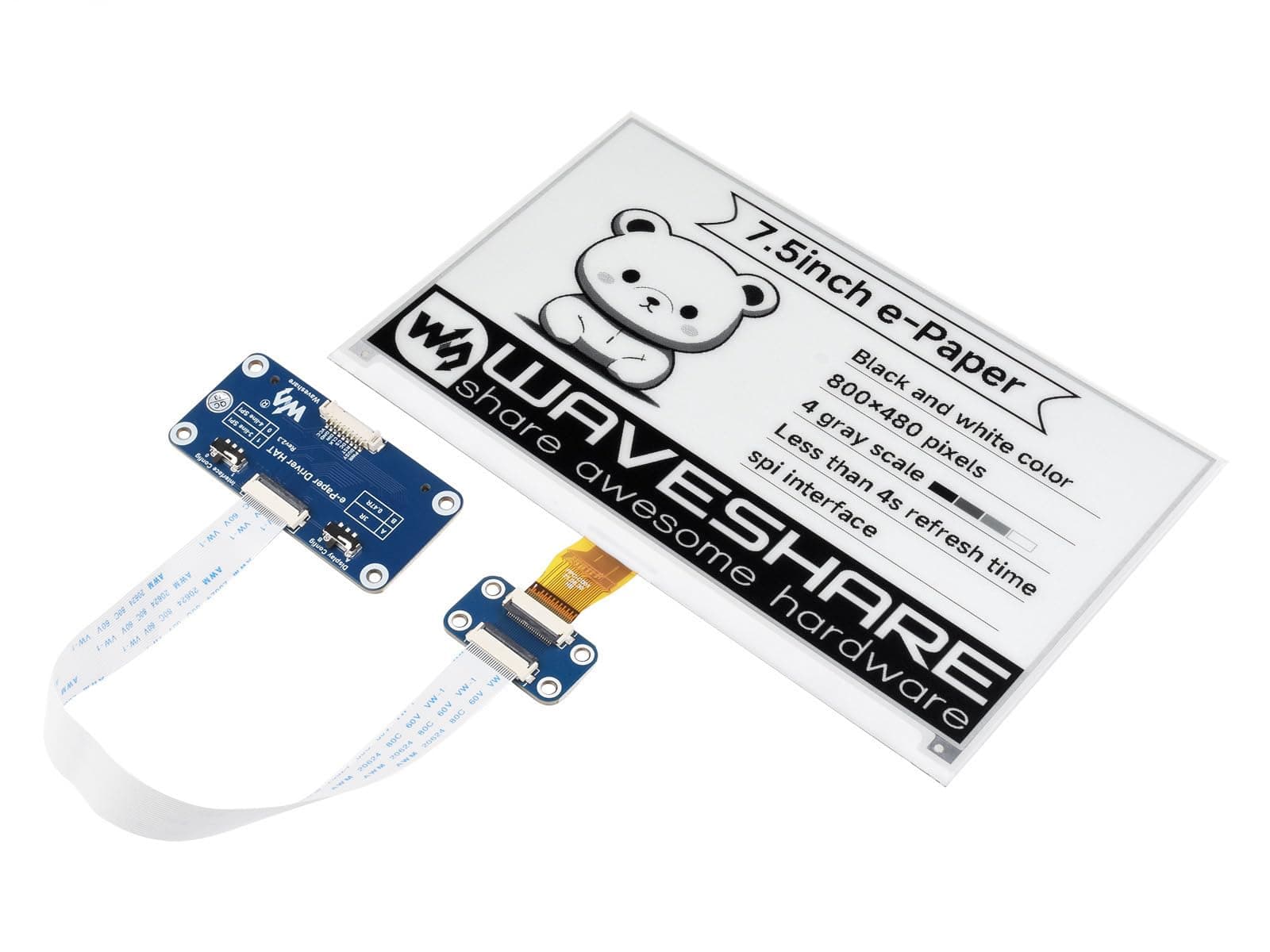
📺 Elevate your maker game with the ultimate low-power, high-impact e-ink display!
The Waveshare 7.5inch E-Ink Display HAT offers a sharp 800×480 resolution on a large, ultra-thin 7.5-inch screen. Designed for Raspberry Pi and compatible MCUs, it features an SPI interface and onboard voltage translation for 3.3V/5V compatibility. Its ultra low power consumption and persistent display make it ideal for industrial, shelf labeling, and embedded projects where power efficiency and readability matter. Supported by comprehensive manuals and example code, it’s a plug-and-play solution for professionals and makers seeking a sleek, always-on display.


| ASIN | B075R4QY3L |
| Best Sellers Rank | #302 in Single Board Computers (Computers & Accessories) |
| Brand | waveshare |
| Built-In Media | User manual, development resources |
| CPU Model | MediaTek MT8125 |
| Compatible Devices | Raspberry Pi series boards, Jetson Nano |
| Connectivity Technology | SPI |
| Customer Reviews | 4.3 4.3 out of 5 stars (216) |
| External Testing Certification | Não aplicável |
| Global Trade Identification Number | 00614961951068 |
| Item Dimensions L x W x H | 7.09"L x 3.94"W x 3.54"H |
| Item Weight | 0.1 Kilograms |
| Manufacturer | Waveshare |
| Mfr Part Number | 7.5inch e-Paper HAT |
| Model Name | 13504 |
| Model Number | 7.5inch e-Paper HAT |
| Operating System | Raspberry Pi OS |
| Processor Brand | VIA |
| Processor Count | 1 |
| RAM Memory Installed | 8 GB |
| RAM Memory Technology | LPDDR3 |
| Total Usb Ports | 3 |
| UPC | 614961951068 |
| Wireless Compability | Infrared |
J**L
Works well larger than expected
I was able to use python script to write to eink screen. I had a lot of tweaking for the fonts and sizes. This screen is a lot bigger then I thought it would be for my project. 5 inch would of been better for me. I tweaked this script RaspberryPi_JetsonNano/python/examples/epd_7in5_V2_test.py from waveshare. Def use AI to help you build out the layout etc.. This screen purchased on feb 10 2026.
J**S
Amazing screens and very easy to set up
Due to amazon's stance on linking to external sites, this review _can't_ post actual useful information (like the technical spec), but I will try my best. These screens are great. At 1-bit color depth (black and white) with a 800x480 display resolution, you can print a fair amount of content on them. The included ribbon and SPI interface board is amazing and makes things basically plug-and-play. Now, this is also in the maker space, so it isn't a generic thing you can plug in to any old computer. You have to have some idea of what they are and how to use them (but, as a hardware newbie myself, I was able to find the necessary information to get it up and running on a Raspberry Pi Pico (RP2040) within a week. From my perspective, the hardest part of using this product is literally wiring it to the micro-controller correctly; after that, it is just sending it commands, and data. The screen is about .8mm thick, and it is made of glass, so you will want to be careful with it. It appears to come with a protective film over the front, and they suggest that if you are using it for development purposes, you reinforce the back as well. I did this by taping it to a wooden clipboard, giving it a rigid surface to be flat against. The fact that this screen runs at 3.3v is great, you won't need a boost converter or any additional hardware to be able to run with most micro-controllers or Raspberry Pi units. I wish that some of their more expensive displays could also operate on 3.3v (instead of 5v, which a lot of them require). This screen supports true partial drawing/ refreshing, which is very nice; though does take a bit of time to get used to as you specify the banks that are going to be drawn and refreshed with the command, instead of the raw pixels you want to modify (in this case, a bank is 8 pixels wide by 1 pixel tall). Full screen refresh appears to take around 5 seconds, so it isn't the fastest out there. It is also worth noting that they strongly suggest that you don't leave the display powered up at all times. The main loop flow diagram they have shows powering on, initializing the settings, drawing the content to the screen, and then power off followed by deep sleeping the display. So long as you don't disconnect the screen from power, you can go through a truncated restart process where you just re-send the settings and can draw right afterwards. This saves a little time, but the entire boot sequence really doesn't take very long (at least in comparison to a redraw). Waveshare has a website with a wiki which contains all the technical specifications for their various displays, and they also have a github with examples on a number of embedded devices for each of their screens. I can't post direct links, but a quick web search should be able to turn those up.
J**Y
Not bad!
It works well. I suggest using ChatGPT or something to get it going. I did and it got me the correct libs and code to render an image (make sure it's 1bit monochrome black and white 800x480). Make sure to enable SPI if on a rasp pi. Resolution is not great but def fine for some projects. You can use more bold/blocky fonts and images to clean it up.
C**Y
Works perfectly for a Weather e-Ink Display station!
Very easy to use, great documentation for installation etc
D**X
7.5 Inch, good buy, great programming fun!
Waveshare 7.5inch E-Ink Display HAT for Raspberry Pi 640x384 Black White Two-color Display Screen SPI No Backlight Ultra Low Consumption Current user of the 7.5 inch screen. Screen refresh is adequate, it will flash entire screen while displaying though (usually alternating 2 between black and white). It may be possible to implement partial refresh of the screen, however I have not had any luck doing so ( or finding sources ). Here is a list of source code in order of most responsive to least on a PI W0: BCM2835: By far the fastest source code to use, likely due to direct access to GPIO device memory /dev/mem. Typically as soon as I invoke my executable, the screen is responding within the first couple of seconds. WiringPi: Typically as soon as a run the executable there is a notable delay of a few seconds before the screen is responding. Still quick, but not nearly as quick as the BCM2835 based source code. Python: The Python source code is by far the slowest with an extremely noticeable delay before the screen is responding. The only time I've seen Python work quickly on the E-Ink display is with smaller, less intensive displays. Screen is great if you don't mind the flashing refresh, I'll update later if I find a way to implement partial refresh, or if the manufacture let's me know of any new source code implementing that ability.
J**F
Could never get it to display anything.
Could never get it to display anything. I watched every youtube vid and read every blog and github project. I programmed this thing for days on end. Even had chatgpt try to help program it for me. Used the sample code provided by waveshare as well. Nothing worked. Never able to display any pixels. Returned.
G**G
Great display
I did like most everyone else did and made a Portal theme calendar. First item came in damaged, but seller replaced that quickly. Display has been running for about a year with no failures.
C**I
Works great with ESPhome and Home Assistant
If you know what you're doing in Home Assistant and ESPhome then you can put in a little work to make a custom display like this that will communicate many things without getting in your face. That's why I like these screens. A subtle way to share info in the home.
J**N
Having used two of these screens over the past 4 months I can confidently say that these are poor quality screens. They simply do not render images consistently over time. I have experienced two things: 1) Blacks turning into light greys over time (~ 2 days). Blacks in certain parts of the screen simply will not show up as black anymore. 2) Inconsistent pixel activation. Essentially random pixels being activated in large streaks when they are not supposed to be
L**A
Ottimo bundle, la qualità dei componenti è ottima, ho ricevuto quello che era descritto.
C**S
Very happy with this screen. I have the first gen screen and I've been using it for about 5 years now as a weather and calendar dashboard. I have the Waveshare 7.5 Inch V1 from many years ago. Just search for simple waveshare epaper dashboard by mendhak. I've attached it to a RPI Zero, and put it in a picture frame. The screen doesn't take too long to refresh, it used to be 30 seconds but the latest code brings it down to less than 10 seconds.
J**N
La nouvelle version de l'écran est carrément mieux que la précédente : meilleure résolution et niveaux de gris. Juste faites attention à la connectique au niveau de l'écran, la mienne s'est décollée après deux semaines de manipulation.
M**E
Happy with this screen, I was able to build a very pretty dashboard
Trustpilot
Hace 2 semanas
Hace 1 mes