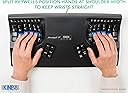
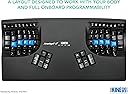
⌨️ Elevate your typing game—comfort, silence, and control in one sleek package!
The KINESIS Advantage2 Quiet LF Keyboard redefines ergonomic typing with its patented contoured split design and 20° tenting, reducing wrist strain for professionals. Equipped with ultra-quiet Cherry MX Silent Red mechanical switches rated for 50 million presses, it ensures a premium, noise-minimized typing experience. Fully programmable via the driverless Smart Set engine, it supports custom layouts and macros saved on 4MB onboard memory. Compatible across all major OS platforms and backed by a 3-year US-engineered warranty, this keyboard is the ultimate tool for millennial managers seeking productivity, comfort, and durability.


| ASIN | B07K1SMRGS |
| Additional Features | Ergonomic, Split Keyset Design, Wrist Rest |
| Antenna Location | Office |
| Best Sellers Rank | #586 in Computer Keyboards |
| Brand | KINESIS |
| Built-In Media | Keycap Puller, Mac Keycaps, USB Cable |
| Button Quantity | 104 |
| Color | Black |
| Compatible Devices | Windows, Mac, Linux, Android, Chrome |
| Connectivity Technology | USB |
| Customer Reviews | 4.3 out of 5 stars 261 Reviews |
| EU Spare Part Availability Duration | 3 Years |
| Enclosure Material | Aluminum or Steel |
| Generation | 3rd Generation |
| Global Trade Identification Number | 00607998600115 |
| Hand Orientation | Ambidextrous |
| Item Dimensions L x W x H | 16.5"L x 8"W x 3"H |
| Item Weight | 2.2 Pounds |
| Keyboard Backlighting Color Support | RGB |
| Keyboard Description | Ergonomic |
| Keyboard Layout | QWERTY |
| Manufacturer | KINESIS |
| Mechanical Keyboard Switch Model | Cherry MX Silent Red |
| Model Name | KB600LFQ |
| Model Number | KB600LFQ |
| Number of Keys | 68 |
| Number of Sections | 2 |
| Power Source | Corded Electric |
| Processor Count | 1 |
| Recommended Uses For Product | Office |
| Special Feature | Ergonomic, Split Keyset Design, Wrist Rest |
| Style Name | Ergonomic and Quiet |
| Switch Type | Linear Quiet |
| Theme | Ergonomic |
| UPC | 607998600115 |
| Warranty Description | 3 Year Manufacturer |
| Water Resistance Level | Not Water Resistant |
M**T
Very innovative, ergonomic and cool! Learning curve requires patience.
I was so excited when this product arrived at my house! I'm obsessed with good design and ergonomics, and this product did not disappoint. I was looking for something that would have absolute minimum impact on my fingers because I had tendonitis and pre-osteoarthritis from overwork. With this product, it feels very good to type, and I love the quiet cherry red keys. I read some reviews that said cherry red felt "mushy: but to me they feel awesome!! I love low-impact on my body. It warps my mind and makes me realize everything I've been doing wrong with typing. It also makes a fun parlor toy to show off to friends when they come over. None of us have ever seen anything like it before--even the nerdy tech guys in my family! I find the thumb keys the most difficult to relearn, though I know there are options to reprogram the way you want it--I haven't done that yet. I normally type 100-120 WPM on a traditional keyboard, but I'm super slow with this one as I get used to the curved keys and new thumb position keys. It's a great product for anyone who is serious about ergonomics--knowing as well that ergo is highly personal and it's important to find the right products that feel great and work for YOUR body and workspace setup.
U**R
FABULOUS keyboard. Absolute MUST-HAVE for a writer.
The BEST keyboard on the market!! I own 2 of them ... one for each computer. I LOVE my Kenesis Advantage Keyboard!!! I have retired 2 others over the past 20 years... one got urped on by kitty cats and the other finally just gave up the ghost after 16 years. LOL. I have used a Kinesis keyboard since the mid-90s. Could not live without it. Just lay it across my lap and go. No more carpel tunnel syndrome. Literally. I was in deep pain transcribing notes from a director (197 single-space pages) and the pain was terrifying through my arms and back. I was either going to go to the hospital or find an ergonomic keyboard. I went online and found this keyboard. Bought it... spent a few days getting used to it.... and never looked back. ALL the pain left while I kept typing. (I have clocked in on an old Selectric typewriter at 111 wpm @ Kelly Girl Services.) Everything else is primitive to this. It's definitely worth the few days of getting used to. I LOVE being able to sit the keyboard in my lap, rest the pads of my hands on the keyboard and just clatter away. Keyboard quality: Fabulous. A+++ Typing speed: Fast. And faster than fast. Easy peasy. Literally NO PAIN because of positioning of keys and use of thumbs for heavily used keys like Backspace, Shift, Delete, etc. Build quality: Fabulous. Top quality.
J**I
Just plain WOW!
BACKGROUND: I have used Macs since 1986 and, therefore, many of their keyboards. I have also tried several other brands over the years - but none can compare to the ease of typing on my Kinesis, which I have used for 15 years. I don't remember when I got the first one, but the original keyboard was the white model, and, over the years, it has gradually turned a dull yellow. The first one took a little time to get used to it, but it was/is fantastic once I did. I'm 6' 1" and broad-shouldered, so I had to squinch my arms together and bend my wrists. And I used to wear wrist braces for carpal tunnel issues. After using the Kinesis for a while, I stopped wearing the braces and have not had wrist issues for a loooonnnnggg time. :-) Also, I can touch type on the Kinesis keyboards. I say boards because this purchase was my 4th one: upgrading the office keyboard, home, and 2nd home. In December, after waiting for six weeks, I was excited to try one of the new 360 models - and frankly LOVED both the flexibility of adjusting each hand's key's angle and elevations together with the feel of the keys! But unfortunately, despite all of Tyler Sullivan's (in their tech support department) efforts, I could not conquer the programming skills needed to make it operate as a Mac keyboard. His efforts were much appreciated, but although I have used Macs for all these years, I have never done any coding. It was literally Greek to me! Since I liked the keys on the 360, I decided to try the Advantage 2 model to see how it feels. It arrived yesterday. The new model keys are so silent and touch-friendly. A tiny detail - the home keys are slightly more cupped, so one's fingertips tell you instantly that they are “home.” :-) Overall: WOW! Nice! Smooth! And Quiet. Worth updating! (Even without my carpal tunnel issue, I’d update just for the superior feel and quieter typing!) And consider that the A2 is one-half the cost of the 360 (which I had just returned), so there is that. And finally, FYI - I will likely upgrade the other two keyboards. Considering the extra cost of replacing two more keyboards tells you how much I like the A-2 model. Nonetheless, I will wait awhile with my fingers crossed - yep - it is challenging to type that way ;-) I am hoping that, once the original demand for the 360 has been caught up, Kinesis will consider making the 360 available ready to use as a Mac Keyboard! KINESIS, ARE YOU LISTENING? So, I strongly recommend you give their technology a try. I hope you find it as appealing as I do.
C**.
The Rolls-Royce of Keyboards
The closest one has gotten thus far to ergonomic perfection. Reduces repetitive strain injury by separating the keywells to about shoulder's width apart, opening up the chest and slightly unrounding the shoulders by eliminating the need to bring the two wrists together--which inclines towards the fetal position. Takes some time to getting used to as the space, enter, ctrl, alt, del, and backspace keys have been relegated to the thumbs. Wouldn't know exactly how long as I integrated it into my setup around the same time I switched over to Dvorak (3-4 weeks ramp up time) but I'd say the keyboard itself take maybe 3 days to get used to . The keyboard already comes with built-in mode switch buttons enabling hotswapping from DVORAK to QWERTY with two key presses. The keys themselves are height-offset in the wells so that they are never out of your fingers reach. These ergonomic wells, and distance they are spit across, are the main innovations that make the Advantage the best, as well as the only example I've ever seen for 20+ years in the keyboard market. Overall, the keyboard seem to be made of rugged material and durable contruction; albeit only time will tell. The only improvement I can think of is that the keyboard apparatus still limits the user by a pronation. Though the keywells open up the finger move to 3-dimensional space, the kinesthetics of linking, or the kinetic chain, stop at the wrist. The design of the keyboard encourages wrist resting at he base of the board which may lead to wrist extension at an angle which, if extended, is the exact movement which pinches the median nerve resulting in carpal tunnel syndrome. This example, of course is based on the height of the keyboard relative to the users torso but as most people place the keyboard at below shoulder level, the hand is forced into the horizontal position, parallel to the ground, to maintain contact with the keys; which, again, due to the kinesthetics, have an impact on the rest of the chain by abducting the elbows, and further up, extending the shoulder cuff, cumulatively pronating the torso, and overall leading to what one holistically observes as bad posture. Of course this is still leagues better than the normal keyboard. I can't think of anyway around the horizontal hand problem without liberating the keyboard from the 2-D plane to 3-D space, which is what the keywells started to de but didn't finish. However, the logical conclusion and execution, of this line of thought would result either in a torso support apparatus or an elliptical "key-cave" that would completely redefine human-computer i/o as we know it. Thee keywells are a bit too close together for the broad shouldered--better than the smushing of the conventional keyboard, of course, but it would have been nice if the keywells were width adjustable.
A**D
Great keyboard- just not for small hands
If you hands tend towards average to large, then this keyboard will be a good fit for those looking for an ergonomic solution. My hands are tiny and so it didn't work to well. I wound up just straining my fingers in new and unusual ways. It is a solid keyboard, doesn't make loud clicky sounds, uses just the right amount of pressure and even has little rubber feet to keep it from moving around or scratching things up. Even the 10 key function was nicely worked in and that was the least difficult learning curve too lol. The learning curve is there but for any good typist it is not to difficult overcome. Even with the trouble I had reaching some keys it took mostly about an hour to get the main changes down. For those who are curious the most difficult really was only having the space bar on one side. Was just too used to be able to switch between thumbs for that. I didn't try remapping as it just wasn't going to work for me long term so got nothing there. I have pc and it was just plug and play with no problems. Word of caution if you intend to put it on a pull out keyboard tray - it's quite tall and likely won't fit. Measure carefully. Hope this is useful for someone out there!
D**.
Ok, Straight up...
Ok, straight up...I've used about 10 different ergonomic keyboards, and this one is by far my favorite. I have carpal and cubital tunnel, and prior to this, the only keyboard I found that helped as much as this one, in terms of comfort, was the Microsoft 4000, which has been discontinued. Cons: -Price tag, wish it was cheaper, but if it lasts, it'll be worth it. -10 Key, the on/off button for the number pad sucks and you're fooling yourself if you don't think you need one. Being a Mortgage Loan Officer, I use it frequently. Switching back and forth was not the business -Learning curve, I'm going on 2 weeks, and no look typing with about 80% accuracy. -Other Keyboards, I didn't think this was going to be an issue at first, but since I work from home about 20% of the time, I use this keyboard and also a Kensington Split keyboard (Pro Fit). Switching from one to the other sucks...you have to unlearn and relearn both keyboards because the layouts are so different. Pros- Comfort- Really comfortable, like really. no wrist pressure Key Mapping - didn't think this would come in handy, but it does. Thumb keys- probably my favorite part, this helps out a lot, didn't realize how much I use it. Layout - I wasn't the best typist, but I have realized that this layout has forced me to learn how to use the rest of my fingers, not just my thumb, pointer, middle fingers for typing. This is good, less stress for those, as the work is distributed evenly across my hand. buy it, if you have the cash, just know it's going to take time to learn.
I**C
BROKE BEFORE I EVEN GOT USE IT. (READ BEFORE YOU BUY)
Please read Before you buy! Background: I’m not a programmer or anything but, I’ve always had discomfort reaching keys under home row and discomfort in wrists. This limited me to an hour of typing at 10WPM. I started looking into ergonomic keyboards hoping I would a find something that would allow me to reach all the keys comfortably and improve my typing speed. I was so excited after going through the years worth of reviews. I saved my money for 2 months and finally bought it!! Once I figured out how to set up the software on my Mac. I started to removing the keys to swap out with the Mac keys. Well, I started removing keys to using the “INCLUDED” keycap remover. When I went down to remove the keycap and it came off but not without the switch alongside it. This made it now unusable. I was being a gentle and delicate as possible and still it broke :(. I tried calling Kinesis Support only for the automated system to tell me they were “no longer taking tech support inquiries” DUE TO THE PANDEMIC AND LIMITED STAFF. I’m so disappointed and I’m sending it back! I hope Amazon will give me a refund or exchange. I may just try another brand. I specifically picked chose this model because it was the most affordable “Mechanical” Ergonomic keyboards out there and now I see why. To anyone buying this Please be VERY GENTLE when removing keycaps and DO NOT use the included Keycap Removal Tool. I cannot stress this enough!!! That thing is junk. I’ve seen wire keycap remover and that may work better. (Never tried one) I hope no else has to experience this :(( UPDATE: Amazon was able to refund my purchase after explaining my situation!! : )
J**T
Doesn't have all keys of Kinesis Advantage360, horrible function keys
I got this to have a keyboard I could put in my lap. I use other "normal" keyboards and it doesn't seem to interfere with my ability to use those. The first week was infuriating and I wanted to throw it across the room. Every session seemed a little bit better and by the middle of week 2 I could type about half my normal speed (120+ WPM). I would not recommend this product for developers who need consistent access to function keys (F4, F5, F9, F10, F12) as it will seriously disturb your workflow. This issue is so bad for me that I've considered returning it. Pros: - Being able to remap keys directly on the keyboard without needing extra software is easy and great. - Typing requires much less movement and feels almost effortless when you get the hang of it. - Cherry red switches feel sort of mushy, but the built-in extra click helps save my fingers from bottoming out on the keys. - It seems to promote better typing habits since keys can't be hit by the "wrong" hand and using the wrong finger for a key is difficult. - It's much lighter weight and sturdier than I expected. - Having navigation keys (home/end/pageup/pagedown/arrow keys) and backspace/delete in easy reach is amazing. Cons: - **DOES NOT** have the same full layout as an Advantage360 - missing layer swap keys, fifth key on lowest row of both hands). - The key to switch to the alternative layer (keypad layer) where keys can be bound itself can't be bound to a key, though you can get a foot pedal to do this for you. - The function keys are set up into two groups of nine with identical spacing. This makes hitting them reliably without looking is nearly possible as the usual groups of 4 aren't there. They did come as hard plastic keys, but the spacing issue makes them as unergonomic as the rest of the keyboard is ergonomic. - Nitpick: tilde is swapped with += on the left for some reason, you can remap it, but the keycaps aren't swappable since they're different sizes
Trustpilot
2 weeks ago
1 month ago