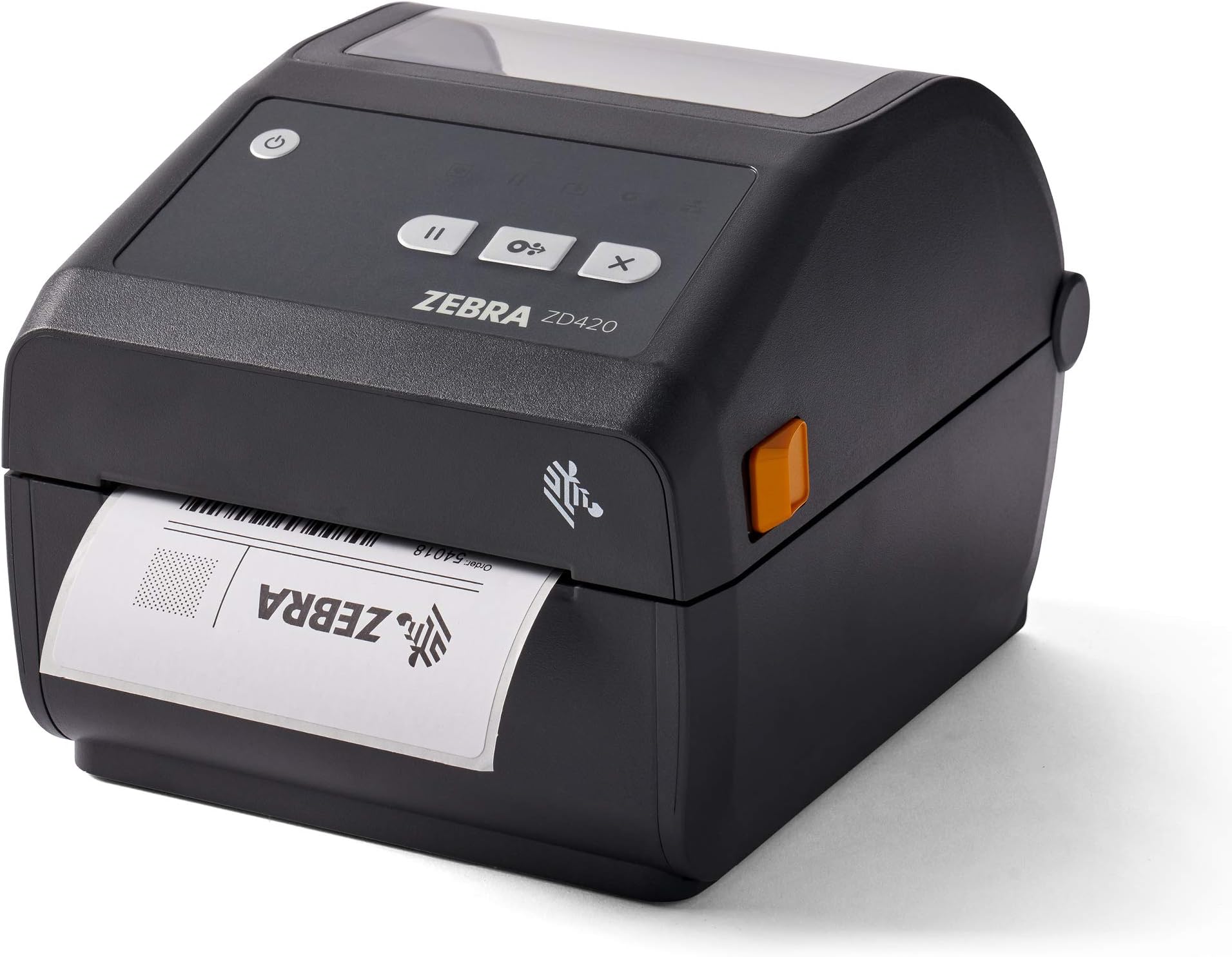
ZEBRA ZD420d Direct Thermal Desktop Printer 203 dpi Print Width 4 in USB ZD42042-D01000EZ
Product ID: 103075182
⚡6 in/sec print speed
📏4.25 in max width
🔌USB connectivity
Desertcart purchases this item on your behalf and handles shipping, customs, and support to Uruguay.
Print Smart, Live Bold! 🖨️
The ZEBRA ZD420d Direct Thermal Desktop Printer is designed for efficiency and ease of use, featuring a 203 dpi resolution and a maximum print width of 4.25 inches. It connects via USB and supports a variety of media rolls, making it ideal for printing labels, tags, and receipts. With a print speed of 6 inches per second and Energy Star certification, this printer is both fast and environmentally friendly. The Link-OS platform simplifies remote management, ensuring your printing operations run smoothly across multiple locations.


| ASIN | B07KML7BZT |
| Additional Printer Functions | Print Only |
| Best Sellers Rank | #221,322 in Office Products ( See Top 100 in Office Products ) #463 in Desktop Label Printers |
| Brand | Zebra Technologies |
| Color | Gray |
| Color Depth | 1 bpp |
| Compatible Devices | PC |
| Connectivity Technology | USB |
| Control Method | Remote |
| Customer Reviews | 3.8 out of 5 stars 31 Reviews |
| Duplex | Simplex |
| Hardware Interface | USB |
| Ink Color | Black |
| Item Weight | 7.5 pounds |
| Manufacturer | ZEBRA |
| Maximum Copy Resolution Black and White | 203 dpi |
| Maximum Media Size | 4.25 inches |
| Maximum Print Resolution Black and White | 203 dpi |
| Maximum Sheet Capacity | 100 |
| Maximum print Resolution Color | 203 dpi |
| Model Name | ZD420 |
| Model Number | ZD42042-D01000EZ |
| Model Series | ZD420 |
| Number of Ethernet Ports | 1 |
| Other Special Features of the Product | Energy Star |
| Paper Size | 8.5 inches |
| Print media | Labels |
| Printer Connectivity Type | USB |
| Printer Output Type | Monochrome |
| Printer Type | Thermal |
| Printing Technology | Thermal |
| Resolution | 203 x 203 DPI |
| Series Number | 420 |
| Special Feature | Energy Star |
| Total USB 2.0 Ports | 2 |
| Total Usb Ports | 2 |
| Warranty Type | limited warranty |
M**R
The GO To label printer
This model is used at all of our facilities. It is a go to printer.
S**D
Inaccurate description
They are not 203 dpi and print very slow. Inaccurate description. Had to install different softwares to be able to use this printer.
C**0
Very good
Great printer
A**.
Ridiculously Complicated (near impossible) to Install on Wifi
I am pretty tech-savvy and know how to follow instructions. If you are looking for a wifi thermal printer that is easy to set up and does not require what seems to be a professional IT support person, this is NOT the printer for you. After multiple hours of following instructions, loading drivers, deleting drivers, testing, and retesting, I could not get it to connect via wifi. If this is important to you, do NOT purchase the Zebra product. Unfortunately, their customer service is non-existent. Their chat widget will kindly inform you that their agents are busy, but you can raise a case and have the team reach out to you...via email. Not useful. Not helpful. Don't waste your time.
G**H
Absolute piece of garbage - DO NOT BUY EVER!
Bought this printer 2 years ago to replace a DYMO that was getting old. Was told that Zebra printers were bullet proof. WRONG. This thing was a fail from the get. Did not work most of the time, froze up, learned from tech support that I have to constantly go into Services (Windows 10) and restart the print spooler. Half the time, the printer would spit out an endless amount of labels until I shut it off. And yes I'm aware of the sensor you have to adjust. 2 years of crap with this thing and we finally smashed it outside in our parking lot and cheered! I should of known when the sales guy who duped us into buying this piece of crap, told us that the more expensive versions of the printer were "prone to failure". DO NOT BUY THIS THING!
W**E
Horrible Win 10 drivers - do not buy
Terrible drivers! I've had this printer for 18 months and it has been a constant trouble keeping it working. Today's problem is I moved it to another PC in the office where it is recognized via USB but the Windows driver that it automatically installs doesn't recognize the printer. Zebra's own utilities see the printer and can configure it and send test labels, but the Windows 10 driver itself doesn't recognize it. This was an expensive printer. It is a very good and fast label printer when it works. Don't buy it. Try any of the cheaper 4x6 shipping label printers on Amazon first.
Trustpilot
1 month ago
3 weeks ago