๐ Elevate Your Office Game with the HP LaserJet Pro!
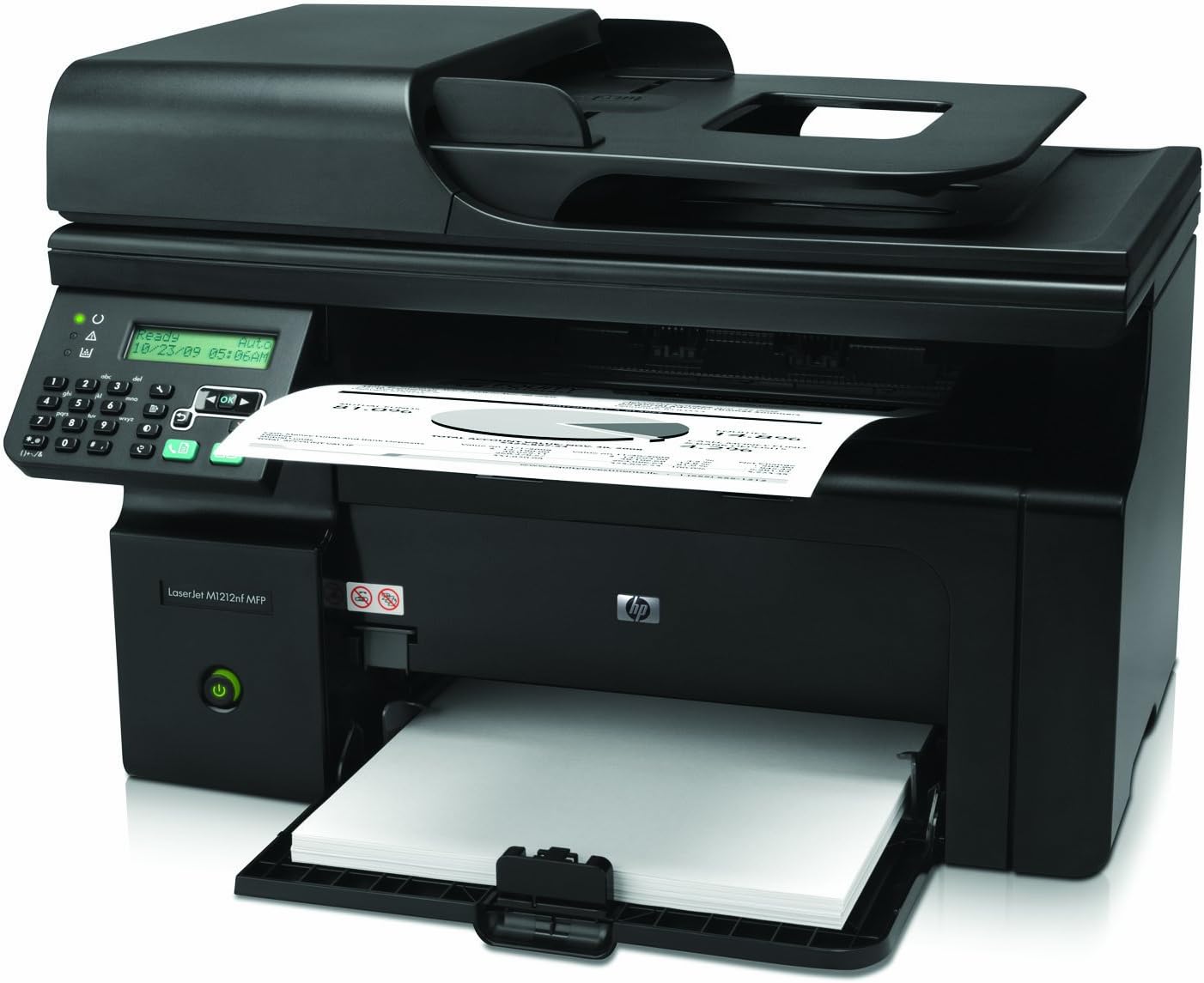
The HP LaserJet Pro M1212nf MFP Printer is a versatile monochrome printer designed for busy professionals. With a print speed of 19 pages per minute, it offers efficient printing, scanning, and faxing capabilities. Its compact design and multiple connectivity options make it a perfect fit for any workspace, ensuring you stay productive without compromising on quality.
| Additional Printer Functions | All In One |
| Asin | B0036TGGJQ |
| B W Pages Per Minute | 19 pages_per_minute |
| Brand | HP |
| Built In Media | Paper |
| Color | BLK |
| Color Depth | 1 bpp |
| Compatible Cartridge | Arthur Imaging compatible cartridges |
| Compatible Devices | PC |
| Control Method | App |
| Customer Reviews | 4.0 4.0 out of 5 stars (197) 4.0 out of 5 stars |
| Duplex | No |
| Global Trade Identification Number | 00884962455142 |
| Hardware Interface | USB |
| Ink Color | Black |
| Item Weight | 18.3 pounds |
| Manufacturer | HP |
| Maximum Copies Per Run | A few hundred copies |
| Maximum Copy Resolution Black And White | 1200 dpi |
| Maximum Copy Speed Black And White | 19 pages_per_minute |
| Maximum Media Size | 8.5 x 14 inch |
| Maximum Print Resolution Black And White | 1200 dpi |
| Maximum Sheet Capacity | 150 |
| Model Name | M1212nf |
| Model Number | CE841A#BGJ |
| Model Series | M1200 |
| Number Of Ethernet Ports | 1 |
| Number Of Trays | 1 |
| Other Special Features Of The Product | Copying, Fax, scanning |
| Output Sheet Capacity | 100 |
| Paper Size | 8.5 x 14 inches inches |
| Power Consumption | 375 watts |
| Print Media | Paper (plain) |
| Printer Connectivity Type | Ethernet | USB Cable | USB Drive |
| Printer Output Type | Monochrome |
| Printer Type | Laser |
| Resolution | 1200 x 1200 |
| Scanner Type | Sheetfed |
| Series Number | 1212 |
| Specific Uses For Product | Office |
| Total Usb 2 0 Ports | 1 |
| Total Usb Ports | 1 |
| Unit Count | 1 Count |
| Upc | 999992715828 763615888349 031112193298 151903048887 115970735309 884962455142 764475700055 |
| Warranty Description | One-year limited warranty |
| Warranty Type | No warranty on printer, Cartridge warranty available |
| Wattage | 375 watts |
User
pleaseantly surprised
For my purposes this printer works perfectly. As others have said set-up was a breeze and in no time I was able to print. Based on other reviews I did not attempt to set up wireless (I have enough headaches) and opted to use a USB connection. I did not go out and purchase a dedicated USB connector cord, but simply used one from an external CD burner that I don't need to use all the time. I figured it is the rare case that I would be using both at the same time and could save a dollar by simply plugging and unplugging when I needed it.The copies are quite crisp and I love the document feeder which allows me to feed items to be copied through at a very decent speed. It is not hinged but you can't have everything. It is also not blazing fast but it beats using my expensive color copier, driving someplace to make copies or using the copy feature on my fax machine which is a horror story in itself but gives me a slightly reasonable facsimile.I know others have talked about the number of copies but my color copier drinks ink like a sailor so all in all this one seems reasonable. I say that because the printer companies seem to have made it a rule of thumb to sell the printer cheaply and then make their money back on the ink. We all seem to have learned that lesson. That said, I will not be copying large volumes so the cost on this printer is reasonable.All in all I am pleased with my experience with this printer, and for a small office it offers flexibility at a decent price.3MONTH UPDATE:Have had the printer for awhile now and wanted to update my review. Initially I thought the printer made copies at a decent speed. However, after comparing the speed with copies made by a large machine at work I now realize my little printer is pretty fast.I don't make a huge number of copies but after setting copy quality to a decent range, I am more than pleased with the number of copies I have received from the original ink cartridge. So pleased in fact, that my color copier (an ink abuser) has sat idle since getting this baby. I love the document feeder as it allows me to copy almost anything with few restrictions.My one complaint, if you could call it that, is there is no way to make legal copies (at least that I have found). However, you can reduce the document down to letter size with the resulting much smaller font. But a small price to pay for the convenience of getting quality copies with a minimum of fuss.It was worth every penny I paid and more. If you have a small office this is the copier for you!7 MONTH UPDATE:Copier is still going strong and making great copies. I have been making a lot more copies than in the beginning and finally had to order more toner. However, I am working on draining every last drop from the original cassette that came with the copier. Each time toner quality declines, I take cassette out, shake it and return to the housing and it keeps making great copies. I have not had the driver problems others mention and WOULD DEFINITELY BUY THIS COPIER AGAIN. That said, I am not really a fan of HP but they have exceeded my expectations on this one.
User
Easy setup, works great
I was extremely leery about setting this up. I was sure it was going to eat up my whole weekend and I would end up frustrated and cursing with a non-functional printer. That was not at all the case. Setup was very quick and it works great.We have high-speed DSL. The DSL box is our wireless network router. We have a PC laptop, a Mac laptop, and a Mac desktop, and we wanted all to be able to access the printer. I connected the printer to the DSL box with an ethernet cable, and the printer was automatically assigned an IP address by the DSL box. As directed by the printer instructions, I printed out an information page, which showed the IP address of the printer. Still following the instructions, I entered that IP address into a web browser on the PC, and it was able to install the printer driver on its own. From the Macs, I had to use the disk that came with the printer to install the driver, but it was no problem. We now can scan and print from any of our computers. Haven't tried the fax yet, but the only people I know who fax things anymore are realtors.Printer is fast and print quality is great. The printer is smaller than I expected from the photo. It's a little noisy when you first turn it on and when it's printing, which might be an issue in some situations.Overall, I was extremely happy that I was able to get it working so quickly, which was a big plus for me.
User
Great AirPrint Printer For iPhone and iPad
I purchased this printer so I could add Airprint to my home network. Since I already had a WiFi network and this printer was going to sit close to the router, I did not need to get a WiFi enabled printer. All I had to do was install the printer and plug it into my wired network. I did run into one problem that I had to download the latest printer firmware before Airprint would work.To download the latest firmware from HP, login to the printer via the browser and the IP address of the printer. (you can get the IP address by looking on the printer display) Go to the Status tab and click on the network summary. Make sure the Firmware datecode = 20120206. If it does not equal this and Airprint is not working, click on the Support button and click on product support. Navigate to the firmware called - 2012-02-17 , Version:20120206, 5.44M and download. Follow the instructions to update the printer.After the firmware update Airprint worked perfect and the printer is very fast. This is a great printer for the price!
User
TOXIC fumes - unbearable
The printer functions okay, although there were some driver issues. The main problem is that it's TOXIC emissions, which I assume is ozone. Keep in mind that I am not oversensitive to this kind of thing, and others has experienced it. When turning this on, I can immediately feel it in my breathing, as well as a quickly developing headache. This all goes away quickly after I turn it off. I can only use this with a garbage bag covering the entire printer. Note, the problem occurs immediately upon power-up. Interestingly, it's no worse when it's actually printing copies.A further note... I have had multiple laser printer, my HP 1020 is literally at my feet in my very small office - and I sense no ozone.Apparently my unit is worse than the norm, as it would be mentioned my others here on Amazon. It is truly unbearable.
User
Great Printer
I've had this printer for about 3 months and I love it. I bought this particular model based partially on consumer reports reviews and also on the reviews here on amazon and I'm happy with my choice. I use this printer only occasionally. I'm a college student and occasionally need to print off a paper or other assignment for class, that sort of thing. It prints very quickly, even coming out of standby mode. I've used inkjet printers for years because I'm a low volume user but I wish I'd switched to laserjet years ago based on this experience. Buy this printer and you won't regret it. Oh yeah, like I said, I'm only a low volume user but 3 months in and I'm still on the starter printer cartridge with no indication of needing to replace it yet.
User
I'm having a few problems
I really liked this printer at first. It's small and compact and prints very quickly. It does skip pages and such. However, my biggest problem with this printer is that it doesn't have an output tray. The printed/copied paper falls right back into the paper tray and is used again, otherwise, it falls to the floor, which is havoc if your documents are not properly numbered. You have to really babysit the printer to prevent it from happening. As for the copier, it's very slow, and today a gray tab broke off. I tried to put it back, but it won't stay, and comes off every time I used the automatic feed. I've only had this printer for two months, and though I still like it as a printer, it's got some major design flaws.
User
great machine for the price
I did a little research on the reviews before deciding on this one. we upgraded from our InkJet printer which was about 3 years old, the old one was color but the copies took so long to print and they werent clear. this printer was very easy to set up and start printing. the pages print quick and silent. i dont miss that its only black and white, the color cartridges of the old printer were getting expensive and they really didnt print that many copies and the print wasnt that good. i love this machine. the scanner is so quiet compared to the old inkjet printer. the paper tray on this one holds alot of paper. we use it for just home printing but feel this would work for any small business whether it be at home or in a small shop. i wish i had of bought a laser years ago. we dont use the fax part of it but if we need to down the road its there. all in all, this is a great machine for the price. i dont think i have ever had a printer that sets up so quick and easy. kudos to HP on that part.
User
Love it!
We had an old Brother laser jet printer. It had a very good life but after a few moves and then not being used it stopped working. We looked around a bit and decided to go with this HP Laser Jet. All I can say is it is wonderful. Installation was a snap. Do take into consideration that this day in age most companies do supply the USB printer cable. We already had one so that was no problem and if we didn't it would not have been a shock not to have the cable included. I had never set up a laser jet before. That had always been my other half's job. This was so easy! The hardest part was removing the previous MONSTER that weighed a ton! Do make sure to gently shake the ink cartridge other wise it may have a line or real light print. This printer is light and easy to handle. It prints pretty fast and has a very short "warm up time". It is also half the size of the old Brother. I would recomend this printer to anyone wanting a basic laser jet printer. This one has all the basic bells and whistles!
User
Happy to have made the switch
Although this review is more based on my inexperience of owning a laser printer, I can definitely see the advantages to using one when it comes to school documentation. As of yet I have printed several hundred pages of paper with no problems whatsoever. The scan quality is good and the connectivity via Ethernet cable removes the hassle for me to always plug in my laptop. The double sided print feature is incredibly easy to use, with the only down side being that you have to move the one sided printed sheets back into the feeder tray. Overall , very happy.
User
Functioning well
Very practical and multifunctional little machine! Setting it up was a big of headache for my husband, but once we sorted everything out, it a little magical machine which meets all of our needs!Worth the money.
User
My HP Laser Jet Purchase
This particular printer was recommended to me by a friend. It is his choice of printers.I have always used Brother, but I said that I would give HP a chance.I am very pleased with the printing and the scanning, however I am really not finding it easy to do faxing.I suppose I will have to practice, or read more on 'how to do it'. But overall I am satisfied with the product.Would I buy another HP? I'm not sure at this point. I have only had it a month or so.
User
Good
Good for price
User
Very fast shipping, product has been used for few month without downtime
Trustpilot
2 months ago
5 days ago