

๐ท๏ธ Elevate your workspace with labels that mean business!
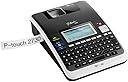
The Brother PT-2730VP is a versatile desktop label maker designed for professionals who demand precision and style. It offers USB connectivity to PC and Mac, a large backlit graphical display, and prints durable laminated labels up to 24mm wide. With over 50 pre-designed label templates and a protective carry case included, itโs the ultimate tool for organized, high-impact labeling at the office or on the move.
| ASIN | B004648W7E |
| Additional Printer Functions | Print Only |
| Best Sellers Rank | #1,451,687 in Office Products ( See Top 100 in Office Products ) #3,573 in Label Makers |
| Brand | Brother |
| Built-In Media | protective carry case, label tapes |
| Color | Dark Grey |
| Color Depth | 24 bits_per_pixel |
| Compatible Devices | PC |
| Connectivity Technology | USB |
| Control Method | Touch |
| Controller Type | Push Button |
| Customer Reviews | 4.3 out of 5 stars 147 Reviews |
| Display Type | LCD |
| Duplex | Simplex |
| Global Trade Identification Number | 00012502626596 |
| Hardware Interface | USB |
| Ink Color | CMYK |
| Item Weight | 1.9 pounds |
| Manufacturer | Brother Printer |
| Maximum Copy Resolution Black and White | 300 dpi |
| Maximum Copy Resolution Color | 300 dpi |
| Maximum Media Size | 0.94 inches |
| Maximum Print Resolution Black and White | 300 dpi |
| Maximum Sheet Capacity | 1 |
| Maximum print Resolution Color | <300 dpi |
| Model Name | PT 2730VP |
| Model Number | PT2730VP |
| Model Series | PT |
| Other Special Features of the Product | Display Screen |
| Paper Size | 24 millimeters |
| Print media | Labels |
| Printer Connectivity Type | USB |
| Printer Output Type | Color |
| Printer Type | Thermal |
| Printing Technology | Thermal |
| Resolution | 300 x 300 |
| Special Feature | Display Screen |
| Specific Uses For Product | personal |
| Total USB 2.0 Ports | 1 |
| Total Usb Ports | 1 |
| UPC | 777786384876 778889245729 080000232502 012502626596 778889545362 012502628163 |
| Unit Count | 1 Count |
| Warranty Description | 2 Year Limited Warranty |
| Warranty Type | Limited Warranty |
T**C
Versatile Label Printer, Excellent In Its Price Range
I purchased this printer for use both at work and at home. I work in the IT industry and use this for labeling computers, patch panels, switches, routers, etc. This PT-2730VP replaces an older Brother model PT-1800 that I've had for 8 years. The durability of my old PT-1800 made me want to consider a Brother again this time. Even after 8 years, the PT-1800 is still going strong, I just wanted more features. My short list of requirements for a new label printer were: - must run on batteries for "in the field" use - must also include an AC adapter so it can be left on for extended periods when needed - must have a QWERTY keyboard - must have a back-lit display for use in areas with minimal lighting - must be able to use as BOTH a stand-alone printer and as a computer-driven printer - prefer a unit that comes with a case - as my label printer gets fairly heavy use (make that ab-use) - should have 'reasonable' label making software included - should not waste large amounts of label tape (my only real complaint with the older PT-1800) - labels should look good - i.e. not smeared or ragged - should be reasonable in price In all these areas, I'd say that the Brother PT-2730VP either meets or exceeds my requirements. On whole, I gave it 5 stars. It's not perfect but I feel it is an excellent value - a great balance of features and price. I'm not aware of any other label printer in this price range that offers better quality than the PT-2730VP. I'd like to comment on the hard-shell plastic case that comes with this printer, especially since one reviewer was unhappy with it. I certainly understand where that person is coming from - I too have more tape cartridges than will fit in the case. I too would prefer more room for labels. And let's not stop there; while we're at it, I'd also like room for a spare set of batteries. Oh, and scissors. Can't forget the scissors. But all that said, I feel that the case is quite rugged, it protects the printer well, it looks good, and it provides enough space for the basics - i.e. the printer, all cables/adapter and 3-4 large tape cartridges. So it's not a bad case. Again, considering the price, it's a good deal. The labels are the standard TZ-Tape series used by many Brother models. You can find them lots of places - at least in the basic black on white style. If you want the more exotic types and colors, you'll probably need to order them on-line. Compare these labels to other brands in the same price range and I think you'll be happy with the quality. Cartridges run between $14-$23 depending on style and width. One advantage this PT-2730VP label printer has over my older PT-1800 is that it is compatible with the "1 inch" wide labels (actually 0.94"). My older printer stopped at the 3/4 inch tape. However, this printer does not print on the 1.5 inch TZ-tape available from Brother. Another improvement over my older unit is that PT-2730VP wastes far less label tape. All label printers are going to have some wasted tape - but the PT-2730VP does very good job of keeping this to a minimum. On average there is less than an inch of total excess per label. My PT-1800 regular required 3-4 times that amount. Less waste means more labels per cartridge. The software that comes with this unit is very nice for the price (P-Touch Editor 5.0). It has lots of useful features and is well designed. It installed and ran without a problem on all 3 computers I needed it on: my Windows 7 box at home, my Windows 7 laptop at work, and my XP desktop at work. No errors or crashes have occurred on any of the systems I'm using it on. With this software, you can create and store as many labels as you want. I use my laptop in the field. I've got all my label designs on all 3 machines. Others have provided good photos of the unit itself so I uploaded a capture of the P-Touch Editor screen and a photo of what the label looked like when I printed it use black on yellow. As you can see, graphics/logos are easy to include. The software is fairly intuitive if you've used drawing software before. There's a "Professional" mode for experienced users - and an "Express" mode that is simpler and has fewer choices. You can also "insert Symbol" - this lets you insert characters from fonts like Wingdings, Dingbats, etc. These can be scaled to any convenient size. It prints any of about 18-20 different types of bar codes, including the increasingly popular QR Code. Just about anything can be rotated, scaled, styled, etc. Tip: Since this is a monotone label printer, importing a graphic such as a logo works best if you start with a black and white version. Avoid images with lots of color and/or gradients/shading and or fine details - you'll be much happier with the results.
P**2
Brother hits another home run!
Wow, I like this labeler. I tend to be a big fan of Brother products, and this is no exception. I've been avoiding buying a labeler because (1) the handheld models didn't seem versatile enough, and (2) I thought, what can I do with this that I can't do with, say, a black marker and paper labels? Then, after the 50th time I couldn't figure out what something was because the marker had rubbed off, or the paper label had disintegrated, I thought, it's time to check out the labelers. Handhelds were out because they didn't seem to do enough. I wanted one that would connect to my Mac, and if possible, have Mac software. (I confess to running Windows on my Mac out of desperation - not all software that I need runs on the Mac; that's another story.) But I also wanted one where I didn't have to attach it to the computer; I might want to, say, label stuff in the garage, or someplace else where maybe I didn't want to haul a laptop. I wanted labels that would hold up to a bit of abuse; they had to take some abrasion and not tear too easily. If the labeler could run on batteries or AC, that was a plus, although AC only would be okay. I was amazed to find a labeler that met all of my requirements, and was still in my price range. I have lots of other Brother products (fax, sewing/embroidery machine, knitting machines, probably some other stuff I forgot about), and they're great, so I was willing to give this a whirl. It's terrific. The Mac software isn't available yet (I'm on OS X 10.9; if I were still on 10.8, the software is available), but it's coming. I've loaded the PC software, running under Windows on the Mac, and it's running just fine. There's a learning curve, but it's not huge (took me about 10 minutes to figure out how to use it). I like that I get a print preview, so I'm not surprised at the label that comes out. I like, too, that there's no wasted tape when printing labels from the software. Standalone, without the computer, the labels are still great, but there's a fair amount of tape waste. That's okay, in a way, because the labels I wanted were pretty small, and sometimes it's helpful to have enough label to be able to see where the label is. (I'm not sure I explained that well, but if you've ever looked all over something for a teeny weeny label, you might appreciate this.) The print is clear and sharp. The labels print quickly, and cut automatically. I might be the only one around who still remembers the old labelers that embossed plastic tape that didn't stick well - this labeler seems space-age compared to that. I like this labeler a lot. If I have one quibble, it's that it could be easier to get the paper off the back of the label. Not a big deal, though, considering that the labels do stick to just about anything I can think to label (and I am now labeling everything I can think of). Good product, good price. I don't see how you can beat this for most home and office applications.
M**E
Great label printer... but that software is seriously bad!
It's a really good label printer. The tapes are nice and sticky and durable, and the printing is of good quality. Tapes come in lots of sizes and colors (and yes, they are a bit pricey, Thank heavens you can buy them on Amazon a lot cheaper than anywhere else!) I quickly realized that I was only going to want to use my laptop to make the labels, but the Brother software will have you ready to fling the whole thing out the window in about 5 minutes. It "works", but is perhaps the single worst piece of software I've ever used at least since Windows 3.0 came out. None of the usual software conventions work (no "shift-arrow" to select text, for example.) It's got mysterious, poorly worded and poorly explained menus, there absolutely no help available, and strange things happen when you click on things that you can't figure out. Do not try to use this software for the first time until you have lots of time, and are ready to endure the frustration. It's about as unintuitive as those old DOS software programs from the 1980s, if anyone else remembers those. You can eventually figure it out, and make it go, and then you won't hate it quite as much, but it's a fairly steep learning curve. The upside was making me realize how far most of the world has come in software interface development since Word*Star (you know, except for Brother!) Oh, and as many others have noted - make sure to press the right key combination to advance new tapes before you try to print with them! There's no warning label on the machine about this (yes, ironic.) The first tape you should make is one that you will stick on the machine, saying "Press Shift-Preview after inserting a new tape!" Many of the reviewers here didn't notice that, and talk about how it doesn't work. That's why! The unit itself is pretty big. The only difference between the PT2730 and the PT2730-VP is that the VP comes with a pretty handy (but again, pretty big) carrying case.
J**Y
First-Rate Label Maker
PT2730 is a great label maker. It is easy (and fun) to use and is very versatile--within the scope of its .94" tape height. Given that my laser printer makes printing adhesive labels a chore, I bought this device mainly for use in printing mailing labels for packages and the letters and bill payments that I send through the mail. It is basically a small computer, with QWERTY keyboard, that stores fonts, styles, formatting, and labels themselves. Its many features, including its automation and preview capabilities, make pulling up previously used labels and formats very simple and quick, while minimizing printing errors and tape waste. Other users have complained about the cost of labeling tapes, but I think Brother has done an excellent job of packing into this product a large number of features that produce labels that are high in quality and durability. To save tape, the "Small Margin" feature can be used to trim labels at the end of the label, but its design allows it only to trim an unused portion off the beginning of the tape when that feature is used. (I'm not an engineer, but I believe this characteristic is related to the necessity to feed the tape properly through the transport mechanism.) Thus far, I've used only the 1" (actually .94") and 1/2" (actually .47") black-on-white Brother tapes for address labels and card file labels, but in the future I plan to buy and use tapes for labeling audio equipment cables, and I suspect that I'll find other uses as well. I've not found any stores in my area that sell Brother tapes, but I've found Amazon's prices to be very competitive with anything else online. I have had no regrets since buying this label maker, and I highly recommend it to others.
B**R
Standalone Works Great.
I have not needed to hook this to my pc, so this review is for standalone service only. I have used the Labeler to make numerous labels for cabling and other household devices. The specialty wire/cable labels hold on very well even outdoors throughout the year and the seasons. Label generation is very easy using the keyboard. To save label waste, I prepare all of my wording in advance and turn off the cutter until the last label. When I have finished I use scissors to cut and separate and thereby save a lot of wasted label blank that would be generated if I let the machine cut each one. There are enough built-in fonts to generate tight text or very blocky readable text. Bold or italic, it all worked very well. They keyboard is a little rubbery, but you're making labels, not typing a novel. For standalone it is great. If I can edit this review, I will add to it when / if I use the PC interface. As of now, I would buy again. ***UPDATE*** I finally had occasion to hook the label maker to my pc. I downloaded the latest software from the Brother website. Despite the instructions on the original paper label pasted over the USB port, you actually have to have the label maker powered on and connected to the USB port before you can load the printer driver. The Editor and Updater will load without the label maker connected though. The software works well. I would not call it user friendly, but it can be figured out without a lot of effort. You get more fonts available and it is easier to type on a pc keyboard. It worked very well and I was very pleased to be able to preview many different changes and options far more quickly than when standalone. My feelings stand. Recommended and I would buy again.
H**L
Great label printer
Bought this printer for 2 reasons. It prints labels that are 1 inch wide and it prints from your computer. For the price you can't beat it. The best part is you can design the label any way you want and add in any graphics and just print. This is so much easier than trying to use the keyboard and the screen that is on any label printer. I am glad that I spent the extra $20 and got this. It makes your life so much easier and saves a lot of time. You are also able to save on the labels because you can print multiple labels on 1 strip and then cut them. Most of these printers make their money on the sale of the labels and so they always cut extra pieces that you have to throw away. With this printer you can save by printing multiple labels.
G**R
Recommended
I like this. The # 1 thing I dislike the most is worth stating first though--it wastes tape. You can cut a less wide strip which saves some tape, but if you chose the smaller size, it still has to cut off a bit, about a half an inch or so, before it prints your label. But otherwise, I've found myself liking this a lot. It's really easy to use. Easy to replace the tape. I really like that I can just keep it plugged in. It will even shut itself off in 8 hours when plugged in if I forget to turn it off and in about 30 minutes if on batteries. You can change the font type and size, you can center, or right or left justify. You can do multiple lines of text. There is a preview. It even has a memory of recent labels. I love that it's stuck well to files and plastic bins. I put packing tape on my file folders that I reuse, so I can just put this label on over that and this will peel back off when I'm done using the file. I am implementing the GTD (Getting Things Done by David Allen) approach and this seems to fix the need perfectly. If only they could cut down on the tape wastage since tape is expensive. When I looked at all the options, this had more tape wastage than some others, but overall seemed the best for options and ease of use. So, I chose this one. Otherwise, I recommend it.
J**S
Amazon will not ship the VP version with a case.
Do not order this product from Amazon if you are expecting to receive the VP version that comes with a case. I've tried now 3 times to have them ship the correct product, and they can't. You will only receive the standard PT2730 with NO CASE! Amazon finally gave up trying to get it right and refunded my entire order. I wasn't even given the option to keep the portion of the order that was correct and at this point, that's fine with me. I can only assume it is because they listed this item for the wrong price and is unwilling to stand behind their advertisement. This review should not reflect on the product in any way, only the poor efforts by Amazon.
Trustpilot
4 days ago
1 month ago