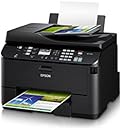
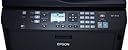
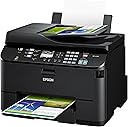
🚀 Elevate Your Office Game with Epson's All-in-One Powerhouse!
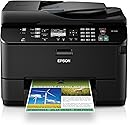
The Epson WorkForce Pro WP-4530 is a versatile wireless all-in-one color inkjet printer that combines printing, copying, scanning, and faxing capabilities. Designed for busy workgroups, it features the fastest automatic two-sided printing, a cost-effective printing solution, and a robust 20,000-page duty cycle, making it an ideal choice for professional environments.
| Controller Type | Vera, Amazon Alexa, iOS |
| Printer Media Size Maximum | Paper Roll |
| Included Components | Ink Cartridges, Printer, Auto Document Feeder |
| Print media | Envelopes, Card stock, Labels, Glossy photo paper |
| Scanner Type | document |
| Max Input Sheet Capacity | 330 |
| Max Copy Speed (Black & White) | 16 ppm |
| Display Type | LCD |
| Compatible Devices | Smartphones, Tablets |
| Maximum Color Print Resolution | 4800 x 1200 dpi |
| Maximum Black and White Print Resolution | 4800 x 1200 dpi |
| Warranty Type | limited warranty |
| Color Depth | 24 bpp |
| Dual-sided printing | Yes |
| Maximum copies per run | 1000 |
| Wattage | 16 watts |
| Max copy resolution color | 4800 x 1200 dpi |
| Max copy resolution black-white | 4800 x 1200 dpi |
| Duplex | Automatic |
| Hardware Interface | USB 2.0 |
| Ink Color | Black, Cyan, Magenta, Yellow |
| Resolution | 4800 x 1200 |
| Additional Printer functions | All In One |
| Control Method | Voice |
| Processor Count | 1 |
| Series Number | 4500 |
| Number of USB 2 Ports | 1 |
| Total USB Ports | 1 |
| Model Series | 45 |
| Specific Uses For Product | business |
| UPC | 103438829660 010343882966 |
| Global Trade Identification Number | 00010343882966 |
| Manufacturer | Epson |
| Item Weight | 30.4 pounds |
| Product Dimensions | 18.1 x 16.1 x 13.4 inches |
| Item model number | C11CB33201 |
| Is Discontinued By Manufacturer | No |
| Number of Items | 1 |
| Manufacturer Part Number | C11CB33201 |
E**9
One Year Update
This printer Epson WorkForce Pro WP-4530 Wireless All-in-One Color Inkjet Printer, Copier, Scanner, Fax (C11CB33201) has been a dream. For the kiddies out there, I'll translate: it's been "sweet".I often work from home, and with kids printing school reports I need a reliable, fast, duplex printer. I've been buying high end, networked, duplexing ink jet printers for years. They've had all sorts of issues, including features that just plain don't work (and I'm a computer professional).This has just about every useful feature needed in a home or small office printer. So far, no problems at all.Other reviews list the specs, so I'll skip that. Here's what stands out for me:Pros1. Epson frequently updates both the printer firmware and their software. This shows they're committed to maintaining it, fixing bugs and a the occasional enhancement. HP abandoned me and my previous printer.1. It has a 'quiet' mode! It prints just slightly slower, and much quieter. This is great for late night printing. In fact I just leave it on all the time.2. It will scan multi-page documents unattended. Had to send a number of documents to a company. Long distance fax kept "erroring" out. Just place the pile on top of the printer, and walk away while it scans your docs.3. Fax works well with >95% of fax numbers I've tried. (Note, try turning off v.34, then ecm error correction, if you have repeated fax errors with a specific number. Turning off ecm fixed my errors with one guy's cheap fax machine)4. Fax, Copy, Scan all work with the auto document feeder, and support duplex as well. No bad surprises.5. Large paper feeder == fewer trips to load paper == time saved.6. Second paper feeder allows me to keep my secondly most often used paper on hand, so no more getting up and manually feeding special paper. I use it for glossy photo paper, but you can use it for a higher quality paper, envelopes, whatever you like. So now if I want to print a nice photo, I just change printer properties to use the second feeder.7. Fastest printer I've had. Sure laser is great for speed but you have to tolerate the "toner" cloud of fine dust particles that surrounds laser printers (and anyone who sits near them.) No thanks!8. Pic quality is acceptable to most.9. Fastest setup I've ever had (once the hardware is ready. lot's of tape to remove as usual.)10. Ink cartridges last a long time, although I always buy the largest capacity when available, as it is almost always cheaper.11. Works fine with both Windows and Mac's.12. More reliable than any HP I've owned.13. Yes, you can print from your Andriod device. I assume you can print from work, etc.Cons1. Has a few quirks, as all printers do. Cannot recall any at the moment, so I guess they're not that memorable.2. Software could "look" a little more modern.3. Software Help is missing some detail. For example they don't explain what "color smoothing" is.4. Help for the software should popup on the UI rather than have to open an old fashioned help file.5. The browser interface looks like it was thrown together in a day, hardly does anything.
D**I
If I could give this printer ZERO stars, I would
Do NOT, repeat DO NOT buy this printer. I thought I was getting a good deal, as Amazon had this offered as one of their "Daily Deals" for a substantial discount. I was relocating and needed another printer in my new abode. Based on solid reviews, I placed the order more than a month before my move in order to take advantage of the deal. This was against my better judgment since I had some very bad experiences with Epson printers in the past....stay tuned.Fast forward 4 weeks to my move day - I set up the printer, and all seemed to go well. Connecting to my WiFi network via Mac OS 10.6 went smoothly, and for a several days I was pleased. Then this morning, after printing out a single page document, the printer locked up and displayed "Printer Error. Turn power off then on again. For details, see your documentation or visit Epson.com"......hmm, that's odd. So of course I followed the directions, and once again got the same error. So I unplugged the unit, waited an hour, and got the same error. I went to the Epson web site as directed by the message, and found absolutely nothing helpful.About this time I started getting a little ticked, so I went off to do some work.After a couple more hours, I tried the same routine and received the same error, so I called Epson. After an arduous navigation of their automated answering gauntlet I was connected with a fellow who led me through the same steps I had already done, and the results were the same. He told me since the unit was more than 30 days old they could only issue me a refurbished unit under warranty. I told him this was unacceptable since my printer had only been operating less than a week. He said they go by the sell date, not the initial date of use. In addition, they needed to put a credit card hold on my card for 90% of the MSRP to ensure I'll send them the broken printer (like I want to keep the POS), which ended up being $100 more than I paid for the printer new. Great! He then tells me it will take up to 7 business days to get me a replacement printer...more good news.All told, I successfully printed maybe 10 sheets on this device before it experienced a fatal error, and now I have to wait a week without a printer and will be receiving a refurbished unit to replace my new device. Which part of this sounds like a good experience???In the end, this is a totally unacceptable transaction, and I will revert to my previous policy of not buying another Epson product ever again.UPDATE: 10/25/12: IT GETS WORSE! My replacement refurbished printer arrived, and it is clearly a USED product, not refurbished. The printer has scratches and other cosmetic issues, and SEVERAL PARTS HAD COME OFF AND I HAD TO RE-ATTACH THEM WHERE I COULD! In addition, the printer WILL NOT INITIALIZE - it keeps telling me to replace the ink cartridges, despite the fact that I am USING THE CARTRIDGES THAT SHIPPED WITH THE UNIT. NOW WHAT? Not only did I have to physically repair the product, but now, for the second time in one week, yet one more Epson POS is DOA, and I STILL don't have a working printer. In all my years of consuming electronics and computer gear I have NEVER experienced anything remotely CLOSE to this disaster that is the Epson Workforce 4530. RUN, do not walk, away from this printer to any of several dozens of better alternatives out there - oh, ad BTW, I would strongly suggest something, ANYTHING other than an Epson. As I said above, I've had bad experiences with Epson printers in the past but thought I'd give them another shot - shame on me.UPDATE 2, 10/26/12: After speaking with Epson customer service for close to an hour, and repeating all the steps I had already tried, only to have the printer remain DOA, the best they could do for me was send me either ANOTHER refurbished printer, or more ink cartridges, which would arrive in "2-7 working days"...this would bring my total time waiting for a working Epson printer to three weeks, and meanwhile I have no printer to use in my home office. This was unacceptable, but unfortunately the best they could do. So, I called Amazon.com's customer service, since I've been a steady customer of theirs for almost 20 years (yes, there was an Amazon 20 years ago). To their endless credit they agreed to refund me 100% of my purchase price, despite the expiration of the 30 day window.End of story, I'm sending the dead replacement printer back to Epson, and the dead original printer to Amazon. If you've stayed with me this long, please heed my warning to buy something, anything, other than the Workforce 4530, unless you want an unpaid job as a field quality control technician for Epson, as that's what I've begun to feel like after spending hours trying unsuccessfully to get not one, but two, of their printers to work.
Trustpilot
1 week ago
2 months ago