🖨️ Print Like a Pro, Anywhere, Anytime!
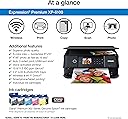
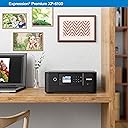
The Epson Expression Premium XP-6100 is a sleek, wireless inkjet printer designed for millennials who demand high-quality photo and document printing. Featuring a 5-color ink system, ultra-fast 4x6 photo prints in 15 seconds, and hands-free voice-activated printing, it combines professional-grade output with modern convenience. Its compact design fits effortlessly into any workspace, while versatile connectivity options including Wi-Fi Direct and memory card slots ensure seamless printing from all your devices.


| ASIN | B07PDNS5CZ |
| Additional Printer Functions | Copy, Scan |
| B&W Pages per Minute | 15.8 ppm |
| Best Sellers Rank | #10,158 in Office Products ( See Top 100 in Office Products ) #3 in Desktop Photo Printers |
| Brand | Epson |
| Built-In Media | Expression Premium XP-6100 color inkjet printer, setup and instruction manuals, CD-ROM containing software and drivers (Windows and Mac (7)), power cord, 5 Claria Premium Ink cartridges: 1 302 Black ink cartridge; 3 302 color ink cartridges: Cyan, Magenta and Yellow; 1 302 Photo Black ink cartridge |
| Color | Black |
| Color Depth | 24 bpp |
| Color Pages per Minute | 11.3 ppm |
| Compatible Devices | Camera, PC, Smartphones, Tablets |
| Connectivity Technology | Wireless |
| Control Method | Voice |
| Controller Type | Amazon Alexa, Vera |
| Customer Reviews | 4.0 out of 5 stars 5,338 Reviews |
| Display Type | LCD |
| Dual-sided printing | Yes |
| Duplex | Automatic |
| Global Trade Identification Number | 00010343944169 |
| Hardware Interface | USB |
| Ink Color | Black |
| Item Dimensions D x W x H | 5.39"D x 7.8"W x 2.2"H |
| Item Height | 2.2 inches |
| Item Type Name | Inkjet Printer |
| Item Weight | 14.6 Pounds |
| Manufacturer | EPSON PRINT |
| Maximum Copy Resolution Black and White | 5760 dpi |
| Maximum Copy Resolution Color | 5760 x 1440 dpi |
| Maximum Copy Speed Black and White | 15.8 ppm |
| Maximum Print Resolution Black and White | 5760 x 1440 dpi |
| Maximum Sheet Capacity | 100 |
| Maximum print Resolution Color | 5760 x 1440 dpi |
| Media Size Maximum | 8.5 x 11 inch |
| Model Name | Expression Premium XP-6100Â |
| Model Number | XP-6100 |
| Model Series | Expression Premium |
| Number of Trays | 2 |
| Other Special Features of the Product | Voice-Activation |
| Output sheet capacity | 100 |
| Paper Size | 3.5" x 5", 4" x 6", 5" x 7", 8" x 10", 8.5" x 11", A4, B5, A5, A6, half letter, executive |
| Power Consumption | 13 Watts |
| Print media | Paper (plain) |
| Printer Connectivity Type | Wireless |
| Printer Output Type | Color |
| Printer Type | Inkjet |
| Printing Technology | Inkjet |
| Resolution | 600 x 600 |
| Scanner Type | Photo |
| Series Number | 6100 |
| Special Feature | Voice-Activation |
| Specific Uses For Product | High-quality photo printing, Professional-looking CDs/DVDs |
| Total Usb Ports | 1 |
| UPC | 010343944169 010343924536 |
| Unit Count | 1.0 Count |
| Warranty Description | 1-year limited in the U.S. and Canada |
| Warranty Type | Limited |
| Wattage | 13 watts |
N**M
Great product
Found this very easy to set up. I set up as wireless in about 15 minutes. Printer is working well and I like that it doesn't take up a lot of space. I had purchased this to replace an Epson that was about 15 years old and purchased it on sale so am well pleased with the price. I have yet to print photos but expect it to print well.
C**R
Everything worked well but some setup info hard to find
First of all, I had to go to a bricks-and-mortar store to find out where the paper tray was. I wanted to put the printer into a utility closet with an outlet and print without moving it, and until I could see the paper tray, I couldn't purchase it. Just showing the front of the printer without the open paper tray was not enough. I set up this printer with my MacBook Pro running OS 10.14.6. The power button is all black -- it lights up nicely when it. is on but is a bit difficult to find when it's off, although the setup sheet does show the location. I had trouble getting AirPrint to work. The setup sheet gives you enough information to get what I think is called Direct Print to work over your wireless network, but that's not enough for AirPrint -- you have to set up Wifi Infrastructure Mode, and the Epson online help is no help. Using Google, I eventually found an Epson YouTube video that showed how to do this from the printer's front control panel. Before I downloaded and used the 7100 User Guide, I also set up Epson Connect and the iPrint app, and after they did not help with AirPrint, I wondered if I would ever use them at all (but I did use iPrint, see below!). These different wireless print options and a one-sentence description of what each is good for should be on the Setup Sheet. Color print from MS Word, Excel, and Notes on iPhone and iPad worked perfectly the first time (once I had AirPrint). Then I started checking functions from the User's Guide, including several I've never done with any other printer. Duplex color copy and scan worked perfectly the first time, even though my input was an old and slightly wrinkled drawing. I did both from the Automatic Feeder Tray with the printer control panel. Photo print from Preview came out really well, even though I had only Another Brand photo paper instead of the Epson Ultra Premium Glossy paper I prefer. Photo print from a camera memory card, using the front printer control panel, also came out very well (my photo wasn't so great, so I won't say it was excellent yet) and I was able to preview what was on the memory card and select a layout right from that panel, without my computer. I didn't try transferring those photos from the printer to the computer because I put the memory card away before I saw that was possible, but I did confirm the Mac could see the printer over the network. I checked the printer supply levels from the printers and scanners icon in System Preferences. Finally I printed a layout of four 4x6 photos from my iPhone using iPrint. Worked fine. I am amazed at what this printer can do.
S**H
Terrible Quality and Customer Service
Terrible printer. It is so inconsistent! 1 print will be great, then the next print is faded or washed out. When I try to get help from Epson they just ask if you're using Epson inks and then they won't respond to the problem for another 45 days. I used all Epson products, all bought from Amazon. I run a print club of my paintings and I print more unusable copies than useable. Very inefficient and wasted money on ink and paper. You can see from the picture that the 1st and 4th prints are really good but the rest are washed out. The Epson reps did not know how to fix this.
M**S
Good printer
I bought this printer as a replacement for my older epson printer. In this one works well and is a little more compact.
M**R
So far, so good; prints well, scans well
I replaced an Epson XP-830 with this machine because this was the newest model and would use the same ink cartridges. It prints well and scans well. Unlike my previous machine, it does not have fax capability. It does, like its predecessor, print on CD/DVDs and has a back feed slot for heavier media, like card stock or envelopes, though only one at a time. I have not printed photos yet. I am able to reuse the partly used cartridges from my previous machine. However, in setting up the machine for the first time, you are advised by Epson to use the cartridges in the box first because they're designed for a first priming of the ink system. It recognized the used cartridges and the amount left when the initial ones ran out. I highly recommend buying the 410XL cartridges instead of the standard 410's; they cost a bit more, but you get more than twice the ink for a bit less than twice the price. The mixed box set contains an XL black cartridge but only standard color cartridges. The XL colors have to be bought individually, but they're worth it. There are third-party inks out there that cost much less than brand name, and you use them at your own risk. Many people say they're just as good and that the Epson inks are a ripoff; I'll only say that I have tried third-party inks and have definitely had problems more than once. My two criticisms of the machine: one, the main paper tray is low-capacity, extremely flimsy, and sometimes difficult to remove; if you want high-capacity printing, this printer is probably not for you. Second, the display icons are irritating, and the system will not stay in home display mode after printing, you have to hit a cancel button. Still, I will not hesitate to buy this printer again so long as it lasts out its warranty period and a little more. I've been far happier with Epson photo printers than HP, Canon, or Brother. I would also check the paper specs carefully. I wanted to do some printing on 3X5 sheets, but paper will not feed properly on any size less than 3.5" width. Not their fault that I didn't notice.
S**O
This is a great printer !
Let me start off by saying I am 71 years old. I’m not computer illiterate, but I like things easy to install. This printer has. Touch screen that makes installation a breeze. It found my WiFi very quickly and I was able to have it recognized by my windows computer, my Mac laptop and my iPhone without any issues. It was great value for the money and seems to print well from all devices.
G**G
PROBABLY THE EASIEST PRINTER ON THE MARKET TO INSTALL AND USE.
Absolutely the easiest piece of technology to install and setup with wifi. Just take your time and follow the simple directions. Do Not plug the electric cord in to an outlet until directed to do so. After installing the cartridges and answereing the questions on using a USB cord (you need to buy one if you choose to go that way) the machine takes over. I chose the wireless WIFI method and the printer AI took over. No problem with WIFI hooking up or turnig the power off and on when ready. I have owned many printers and this one does it all, mainly by itself.
J**F
Competent and Inexpensive, But Devours Ink
This printer does most things quite well. I love the auto duplex feature: you don't have to reload the paper to print on both sides, it does it automatically. It can print on envelopes, though you have to figure out how to open the hidden back panel to get to the rear feeder. It has a multi-sheet document feeder, which is a required feature for me. I like the compact size, and how the LCD panel and paper tray automatically retract when you're done printing (or when you select the Close Output Tray on the LCD). This gives the printer a compact and sleek look when you're not using it, and also prevents dust from getting into the interior. It is also a very nice looking unit. But it does devour ink. I didn't do page counts or anything, but that is my impression. You have a choice between standard size ink cartridges and XL larger capacity ones (which are the same size on the outside), and I ended up switching to XL pretty quickly. They sell combo packs of either the regular or XL, but unfortunately, the combo XL pack combines a *regular* size Black with XLs for the color cartridges, so instead I just order XL's all individually, and there doesn't seem to be a price difference. On the positive side, when it runs out of black ink in the main cartridge, it offers to use the alternate black that is installed as part of the color printing system, but you have to answer Yes to the popup prompt to agree to this on every print request, which is an annoyance. One other thing I should mention is that the printer is on the noisy side. It offers a "quiet" setting, but I admit I haven't tried it, because it says it slows down printing. I had to send my first unit back due to a couple of issues with the document feeder and a streak appearing on copied or scanned pages. Tech support was helpful, and they sent me a replacement and provided free shipping back to them for the original unit. Though the replacement unit is refurbished, it is perfect, so I'm happy with my support experience.
Trustpilot
1 month ago
2 months ago