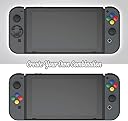


🎯 Level up your Switch game with precision and style!
The Skull & Co. D-Pad Button Cap Set is a sleek, durable upgrade for Nintendo Switch and Switch OLED Joy-Cons (excluding Switch Lite). Featuring a responsive cross and circular D-Pad, plus vibrant multi-color button caps, it enhances control precision while protecting original buttons from wear. Easy to install and fully wireless compatible, this set is a must-have for gamers seeking pro-level performance and standout style.


| ASIN | B07LGF9WWY |
| Brand Name | Skull & Co. |
| Colour | SFC |
| Compatible Devices | Nintendo Switch, Switch OLED Joy-Con Stick |
| Customer Reviews | 4.0 4.0 out of 5 stars (732) |
| Enclosure Material | Plastic |
| Global Trade Identification Number | 08011727334332 |
| Manufacturer | Skull & Co. |
M**R
Surprisingly effective!
This works amazingly well and is an excellent solution for those who still want all the functionality of a joycon with a decent d-pad. Most other options (hori pad etc) are either very expensive or don't allow for wireless play. I've just tried this with Street Fighter 30th Anniversary Edition and I am easily able to pull off dragon punches etc. Seems sturdy, simple to apply. Definitely recommended.
S**N
Great!
I like the fact that these are very cheap to buy and do a very good job. The dpad works far better than the standard 4 buttons. There is a pivot for the dpad(it is the sticky foam square that comes perforated in little circles. Just fit 1x dead centre to the back of the dpad before installation. (See pictures ) Installation is easy, just fit 2x double sided stickers inside the left and right button cover and make sure the arrow inside one of the dpad holes is aligned with the up button.
C**N
Works well with Legion Go
Oddly enough, the circular d-pad cap works really well as a quick mod for the d-pad on the Lenovo Legion Go. I had use super glue in the end though because the adhesive that comes with these caps is incredibly weak. Super glue is a more permanent solution but it's also less intensive and risky than taking the Legion Go controller apart and changing the d-pad with a 3D printed alternative manually. As a d-pad, the circular cap works brilliantly - no longer am I wearing my thumbs down trying to get consistent diagonals in Street Fighter 6 or half-circles in King of Fighters XV. It's super responsive and I would argue it's even better than the Steam Deck's d-pad, which I found mushy and prone to misinputs. As long as you have super glue to hand, this makes the perfect solution to the Legion Go's shoddy d-pad.
S**S
Utterly useless.
I thought this looked worth a try because it was a lot more affordable than a d-pad joycon and especially a Switch Lite. I had low expectations but it’s worse than I expected. Firstly the stickers are rubbish - The instructions tell you to put them on the buttons and pull the backing off, but the sticker comes off with the backing. I wasted a lot of the stickers trying to get them to stay. An online video said to scrape them with your fingernail first and that helped. The circular d-pad was the one I chose to stick on (I love a good SEGA style 8-way d-pad) I applied the pivot to the middle and put it on correctly. I tried playing Sonic Mania and it was immediately evident that diagonal directions didn’t work at all, making the circular d-pad completely useless. So I removed that with the intent on trying the cross d-pad, the stickers came off with it, but none of the other stickers would stay attached to the buttons, no matter how much pressure I applied. I’m guessing the residue from the previous stickers must have done something to the buttons to make them less... sticky?? So yeah... This is pointless.
R**S
Excellent product
First of all, I was a little put back with the negative comments but I have skull & co products for both my switch oled and switch lite ( grips, cases and analog covers ) so I thought give them a go seeing they are cheap but definitely glad I bought them, they do work and feel very much stuck on, would recommend for the d-pad if your wanting the d-pad and also the classic uk snes colour buttons... even though I have actually replaced the actual buttons for that on other joycons but saved me opening my new white oled joy cons
T**S
Comfortable but accuracy suffer - it's a no for fighting games.
I recently upgrade from a Lite to a full sized Switch (to use on TV). The d-pad on the Switch Lite was surprisingly accurate and great for fighting games; I knew the joycon's pseudo d-pad was going to be a poor substitute hence the reason for purchasing this product. Applying the glue dots and the pivot point was quite straightforward (have patience, people!). Once the d-pad and button caps are on and you've given then a good rub to ensure the adhesive takes grip they feel quite solid. I've tried both the plus and circle d-pad (I've stuck with the circle) and they both feel great - so much more comfortable than the 'd-pad buttons' on their own. So why the low score? Unfortunately it's not really the product's fault - it just can't patch over a bad design on Nintendo's part. As Skull & Co's instructions mention themselves, the d-pad buttons aren't actually symmetrical - left and right have a wider distance between them than up and down. What this means in practice when this product is applied is that it only takes a tiny bit of pressure to activate up or down. In turn - that means constant unwanted diagonals! So that's fighting games out. I tried it with Gunbird 2 (a shmup) and found that I had to really concentrate to get purely horizontal movement. Comfortable - just not accurate. /Andy
A**M
Nostalgic af!
These are great quality buttons and they were so easy to fit. My Switch looks like my old SNES now and although they're just stick on buttons - they look legit.
R**?
Great for customisation
Love these! The buttons can be tricky to apply, so I recommend taking your time to get it right. If they aren't in the exact right place on the switch lite, they can interfere with how the button works but once you've got it right they stay in place. Had them in place for over a year now on the yellow console and had no issues with them falling off or moving. (The pink console was bought more recently. The thumb grips are by the same company too and again, no issues with those.) I just wish they'd come with some clear A, B, X, Y stickers to go over the top but once you know the button layout of the console its not really an issue.
P**N
Werkt prima
A**S
Nintendo switch dpad sorununu ortadan kaldırıyor. Hızlır kargo için teşekkürler.
J**T
If you want to customize your Switch or just identity, you will never go wrong with this add on. No need to open your console, just stick it and the visual of your Switch body will never be the same again.
J**4
It does not fit on switch 2 joy cons the tape doesn't hold correctly I've forced it with super glue because I like to feel of the buttons and the d-pad I can finally play Street fighter in handheld mode
B**E
This product definitely exceeded my expectations. I didn’t think such a simple and low cost solution would be effective but the d-pad works great...much better than the stock 4 button setup and even better than the pro controller d-pad as well. It’s responsive, accurate, and makes it much easier to pull of complex moves in fighting, etc games. It looks like a normal part of the controller and is a good size...slightly bigger than a Xbox one d-pad. The button caps work great as well. They install easily and don’t affect button performance at all. They look good, add a bit of size to the buttons which I prefer and they have a smoother texture. Personally I arranged them so that the colours match the Xbox colours (A = green, B = red, etc) since I play on both systems and it makes it easier when I go between the 2. That being said it would be nice if at least one of the 2 included button sets had the letter labels on them instead of just being solid colours. One thing worth pointing out that I have noticed is that several of the reviews and YouTube videos for this product are not installing it correctly. Make sure to follow the included instructions and the 3 key points.: 1) Install the rubber pivot on the dpad underside. Many of the videos I have seen are not doing this. There is a small rubber pad that comes in the package and it has 6 small removable discs on it (they are hard to see). You must stick one of these on the bottom of the d-pad in the middle to act as a pivot point. 2) Only use 2 adhesive stickers to attach the d-pad. I’ve seen videos using them on all 4 buttons but you just want them on the top and bottom buttons. 3) Make sure the d-pad is positioned the right way up. It may look symmetrical but it’s not....there is an up arrow on the backside of the dpad and you want to make sure this is over the top button when you install it. The kit is an excellent value...it’s a simple solution and you get enough to do 4 joycons (2 dpads and 2 sets of button covers) . It is much cheaper than the other options out there so I would definitely recommend giving it a try if you’ve been missing having a proper dpad.
Trustpilot
2 days ago
2 weeks ago