Buy anything from 5,000+ international stores. One checkout price. No surprise fees. Join 2M+ shoppers on Desertcart.
Desertcart purchases this item on your behalf and handles shipping, customs, and support to Uruguay.
💡 Upgrade your legacy gear with modern flash power — don’t get left behind!
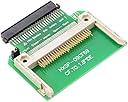
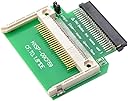
The chenyang Memory Card Adapter converts CF Compact Flash cards into 1.8-inch 50pin IDE SSDs, delivering stable 1.8A power with configurable master/slave jumpers. Designed for silent, vibration-free operation, it’s ideal for upgrading older devices like Toshiba laptops or portable music players, offering a cost-effective, durable alternative to traditional hard drives.


| ASIN | B00S6AK592 |
| Best Sellers Rank | #32 in Computer Memory Card Adapters |
| Brand | chenyang |
| Color | CF to IDE1.8"-50Pin |
| Connector Type | CF-IDE |
| Current Rating | 1.8 Amps |
| Customer Reviews | 4.2 out of 5 stars 294 Reviews |
| Finish | Electric |
| Finish Type | Electric |
| Item Dimensions | 3.94 x 3.94 x 0.39 inches |
| Item dimensions L x W x H | 3.94 x 3.94 x 0.39 inches |
| Manufacturer | CY |
| Mfr Part Number | FBA-EP-035 |
| Model Number | FBA-EP-035 |
| Number of Ports | 1 |
| Package Quantity | 1 |
| UPC | 646070720006 646070665338 646070699203 646070669206 |
| Unit Count | 1.0 Count |
R**R
Works With An IRiver H-120 Portable Music/Audio Player
Working with an IRiver H-120 portable music/audio player, upgraded from the ~20GB micro hard drive storage media to a Sandisk 64MB Compact Flash storage media. Supposedly the larger Compact Flash is slightly faster or more robust than the smaller SD flash storage media. The adapter will have 3-4 pairs of extra pins, just denote pin one, marked on the adapter and align with the storage media. Notice similar with the OEM micro hard drive storage media. TIP: Get Kapton tape for insulating the electronics. TIP: The master/slave jumper will likely require bending (out of way of obstructions) or de-soldering/replacing with an angled two pin header. I opted for de-soldering/replacing, as I have all the specialty tools. The jumper header on the compact flash adapter to IDE is likely 2.00mm (possibly 1.27mm), noticed while I was replacing with a 2.54mm jumper header with slightly bending the over-sized pitched header pins into the PCB holes prior to soldering. TIP: There are two plastic/PVC tabs on either side, may need a thin grinding disk for removing, required if using on a IRiver H-120 device.
A**R
IPOD 4th generation Fix
I had a 4th generation Ipod that was given to me by dear friends of mine. I used it a lot in the past, but it quit working and was in a box for years. It was 20 GB, which was a lot of storage back then. Call me a "dinosaur" but I still prefer to own my own music and to organize it into folders of different playlists that I created. It is great to have an Ipod so I can connect it to my car and have the same music as at home. I find it wonderful especially driving on trips. I decided to fix the nonfunctioning Ipod; thus I bought a new battery, a CY memory card adapter, a compact flash memory card adapter type I, and 200 GB SD card. First, I replaced the battery. Then I changed out the drive to a solid state driver using the adapters and SD card. On Youtube one can find instructions on how to do this. Once completed I charged it up and..... to my surprise, it worked perfectly. Now I have a 200 GB Ipod. One can increase the memory even more by adding a better SD disc, but 200 GB is enough for me, at least for now.
J**A
Works for iPod 4th gen - with caveats
Put a sd to cf adapter in it to update an old iPod 4th gen. Don’t know why but it only works with 64gb and under... it might be an issue with cf adapter. I only need 64gb - I’m a happy camper!
R**Z
Works great for the iPod classic 4th gen
It’s good to watch a few videos before you first flash mod. I bend the jumper over and cut the two solder joints down a bit then cover with kapton tape. You will have to cut the little alignment piece from the iPod ribbon, the one that fits into the hard drive hole to align the pins. Read the board it tells you which pins to align. Go from right to left and you will be fine. I used SanDisk extreme CF and the iflash cf to SD in 64G without issue. I format the cards to exfat and worked great. I’ve modded 3 iPods so far without issue.
A**N
Didn't Work for My application
Didn't work in my HPi100 MP3 player. It's unclear if its defective or an incompatibility.
D**O
Used to upgrade Zen Vision M
Also used it to upgrade Zen Vision M from 30 GB hard drive to 128 GB SD card. Opted for the IDE connector to CF. Paired with CF to SD card adapter. Works great! FYI, some of these Zen Vision players use Zif connectors others use IDE. Make sure you're buying the right one on this Amazon listing. Also, you may have to reload firmware if you're looking to upgrade things.
M**E
Great for iPod solid state conversions
Works well in iPod Gen 3. The jumper needs to be slightly bent at an angle to clear the case.
B**B
Tough to fit, shorted out
Flash-modding my old 4th Gen iPod. Had trouble fitting this on to the ATA cable correctly due to the plastic tabs on both the cable and the adapter. Was able to finally get the adapter in place and "locked" (I would definitely file the card's tab down a little before install), but by then the board had shorted out. Red LED no longer lights up when connected to iPod motherboard.
H**L
Card Adapter CF Compact Flash Memory Card to 50pin 1.8 Inch IDE
I came back for a second review, it deserves to be said. The first one did not worked, however the replacement that was shipped worked fine. I upgraded an old IPOD 4th Gen. Click Wheel. If you have an old dinosaur in your drawer collecting dust, this one is fine to bring it back. Bought a 16G SSD from Amazon. Hope this review can help someone out there.
E**L
Article reçu non conforme
L'adaptateur reçu n'est pas le bon. Il s'agit d'un CF vers IDE 44 broches mâles et non d'un CF vers IDE 50 broches femelles. Donc inutilisable. La description de l'article n'est donc pas conforme tout comme les photos qui sont trompeuses.
M**T
Funktioniert in Fujitsu Lifebook P1610
Funktioniert in Fujitsu Lifebook P1610, welches eines 1.8" PATA-Anschluss hat (Toshiba Festplatte). ABER: CF-Karten (etwa Sandisk Extreme) verfügen heute nur noch selten über einen Fixed Disk-Modus (abgesehen von teuren Transcend Industrial-Karten) und werden von Windows, wenn sie an IDE-Adaptern hängen, als Wechseldatenträger eingebunden – mit der Folge, dass: - pagefile.sys (Auslagerungsdatei) - UDMA-Modus, Schreibcache - hiberfil.sys (Ruhezustandsdatei) nicht auf die CF-Karte geschrieben oder aktiviert werden können. Auch dieser Adapter ändert das nicht, er ist passiv. Für Windows 2000 und XP gibt es jedoch einen Treiber (cfadisk.sys, xpfildrvr1224_320.zip), der ursprünglich für Hitachi MicroDrives gedacht war. Dieser wird über den Standard-Disk-Treiber von Windows installiert. Nach einem Neustart wird die CF-Karte als Festplatte erkannt und nicht mehr als Wechseldatenträger, wodurch die genannten Einschränkungen entfallen. Aber kein Vorteil ohne Nachteil: Man kann mit dem Treiber (zumindest unter Windows, denn Linux ist es völlig egal, worauf es läuft) nur eine einzige sichtbare Partition auf dem CF-Laufwerk haben. Es ist empfehlenswert, jedwede weitere Partitionierung nur noch mit GPARTED (Boot-CD) vorzunehmen.
D**B
Required to Convert Vintage iPods HDD to Use Flash Memory
Following a popular Instructable guide, I bought this adapter in conjunction with a flash memory card to successfully convert my 2004 model iPod to solid state storage and remove the physical HDD which was failing. If you attempt this, I recommend that you also buy a cheap kit of plastic tools for removing the casing. These are illustrated in the picture. The part has kept the iPod going for several more years so I can highly recommend it if you are not yet ready to consign your vintage iPod to the grave.
A**O
Ottimo
Funziona alla perfezione, l'ho utilizzato per sostituire l'hard disk di un vecchio iPod Photo A1099 con una scheda CF da 64GB (originariamente l'iPod montava un disco tradizionale Toshiba da 30GB). Uniche accortezze, se utilizzato con iPod: 1) attenzione al posizionamento del pin 1 (foto esemplificativa allegata); 2) il jumper per il master/slave deve essere presente (quindi chiudere il circuito) e i due pin vanno preventivamente piegati a 90 gradi (non come si vede in foto sulla sinistra, che sono dritti), altrimenti il coperchio posteriore dell'iPod non si chiude; 3) come in foto, dall'attacco nero dell'adattatore va rimosso il dentino presente sulla destra, altrimenti non si riesce a fare il contatto col cavo flex dell'iPod
Trustpilot
2 days ago
1 month ago