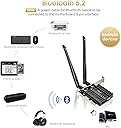
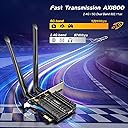
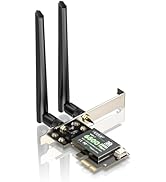
🚀 Upgrade your desktop’s network game with lightning-fast WiFi 6 & Bluetooth 5.2!
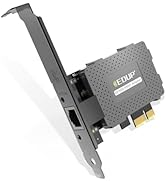
The EDUP PCI-E WiFi 6 Network Card delivers cutting-edge 802.11AX dual-band wireless speeds up to 1800Mbps, powered by the latest MTK7921LEN chipset. Featuring Bluetooth 5.2 for enhanced device connectivity and a robust heat sink for stable operation, this PCIe adapter is designed for Windows 10/11 64-bit desktops seeking reliable, high-performance networking with low latency and extended range.


| ASIN | B084P8KHMH |
| Best Sellers Rank | #408 in Internal Computer Networking Cards |
| Brand | EDUP |
| Built-In Media | 1* PCIE Network Card |
| Color | Black |
| Compatible Devices | Desktop, Keyboard |
| Compatible Operating System Family | Windows |
| Customer Reviews | 4.0 4.0 out of 5 stars (1,280) |
| Data Link Protocol | Bluetooth, USB |
| Data Transfer Rate | 1800 Megabits Per Second |
| Hardware Interface | Bluetooth, PCI |
| Item Dimensions L x W x H | 5.12"L x 1.46"W x 8.31"H |
| Item Weight | 0.23 Kilograms |
| Manufacturer | EDUP |
| Mfr Part Number | EP-9658GS |
| Minimum Required Operating System Version | Windows 10 |
| Model Number | EP-9658GS |
| UPC | 723172895594 |
| Unit Count | 1.0 Count |
| Warranty Description | 2 yeas warranty |
Q**E
Decent WiFi 6 card, a little hard to navigate and setup drivers though
When I first unboxed this card, setting the card up was easy, but what was a little confusing to me at first was setting up the drivers. When going onto their website, they had many different versions of the driver that were familiar, (EP-9658GS is the correct one). I should mention that the link provided on the instructions to install the drivers didn't work so I had to find my way around the main website to find the download section for their WiFi drivers. In order to set up the card, you of course need some WiFi USB stick to install the drivers if your motherboard doesn't come with one. When I first plugged in the card, its heat sink came really close to not fitting and barely touches the graphics card because of how big it is, but it worked well for the most part. Now about the functions itself. The only downside to this card in terms of connectivity is the quality of the WiFi router, so I'm only limited to what plans I have. This card works really well and its pretty fast for gamers and day to day routines. The Bluetooth on the card works just as well and my Bluetooth headphones and speakers sound decent when connected to the card. Overall, the card in general works really great with the only limiting factor to how fast your speed is based on your internet plan, it's WiFi 6 so its just pretty good in receiving data in general.
J**N
Better than expected! Smooth install, and getting >160Mbps reliably
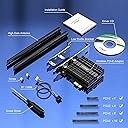
I was expecting the typical no-name device with unintelligible documentation and having to search the internet for sketchy drivers. Instead, I was surprised to open a nicely-packaged device with a nice, colorful booklet in clear english, two different-sized mounting brackets, extra screws, and even a little screwdriver! And no driver-hunting, the box helpfully includes the drivers on a USB thumb drive. The card is a PCIe x1 card, but also requires an internal USB connection (presumably for Bluetooth). Almost any build will have at least one extra of these extra USB ports on the board (I had two extras on mine). Connect the card into the PCIe x1 socket, screw it to the chassis, and then connect the USB wire. On boot, you won't be prompted to install the drivers with Windows 10, but as in the instructions, just insert the thumb drive, and launch the two .exe file driver installers. The drivers install in seconds (one for WiFi, and one for BT), connect to your network, and away you go. I'm getting a solid 160Mbps connection to my 802.11ax router that is about 20 feet away through a wall. I have a LOT of network congestion, and expect that when I shut down a couple competing networks, the bitrate will be higher. Bluetooth devices connect instantly and I have not suffered dropouts yet. I will report back with any challenges in this department should things change. Overall, very happy with the setup and expect to use this for a long time as I don't have a cost-effective way to get an ethernet cable to this PC.
A**7
Faulty Product and poor customer support
I have been trying to get Wi-Fi to work for 2 weeks and I am still having problems. I have tried with both windows 11 and windows 10 but with both OS's but i'm still having problems. In windows 10 after installing the driver, it is just not seen by windows. In windows 11 the OS will see it occasionally, and other times it is as if it wasn't even installed. In device manager it can be found under hidden devices but its says its not connected to the computer. When it is detected and Wi-Fi appears in settings, then it isnt even able to see any Wi-Fi networks. As for Bluetooth it worked right after I installed the drivers, but after some time it will disconnect and stop working. the only way to get it to work again is to uninstall and reinstall the drivers, but then an hour or so later it will disconnect again and I've had to reinstall the driver again. When installing it it was mostly easy, but I did have some clearance issues with the silver bracket that shows on the back of the case, but after some time i was able to get in in the slot. I sent an email to to the email on their websites support page, and i have also sent a support ticket in, and in both cases I haven't gotten a response. its been almost a week in both cases. I don't know what I'm going to do at this point. I want to get it to working, but if I cant ill have to send it back. The reviews seemed great, the price was great, and i really wanted it to work. 1/5 stars
J**L
Works perfectly on my Windows 10 machine, but.........
Installed just hours ago. 15 June 21 Works perfectly on my Windows 10 machine as advertised, but if you don't have an open 9-pin USB integration slot on your mother board then you might have a problem. On mine I have two 9-pin pickups, but both were already being used for the USB. I unplugged the one with less connection wires attached and plugged in the EDUP WiFi 6 Card AX 3000Mbps PCIe Network Card and it worked perfectly immediately with Windows 10 automatically picking up the latest new drivers. Simple plug it in and it works, no drivers supplied on the stick required to be installed. (Note that this is home built full size ATX computer using Windows 10 on the ASRock X99X Fatal1ty motherboard that I built up back in 2017) In fact, it worked so good that even without the supplied antennas installed It did wonders for my WiFi and Bluetooth connections. After installing the antennas there is a noticeable range improvement, so don't forget them. No noticeable interference from any cables nearby so far too. That could have been just luck, but I like it. :o) That's the good news. The not so good news is, what about the plug I just disconnected to make it happen? Well, I've went through everything I can think of and can't find anything about my computer that isn't functioning properly with that cable unplugged, which doesn't make sense. Yet, there it is. Since I didn't follow that cable to the other end to figure it out because I have everything tucked away so neatly that it would be a major chore to do so, I'm not sure where it's going! I suspect I'm going to stumble upon what that cable is supposed to be doing the hard way later on so if there is some kind of an adapter that can be used to plug both of them in at the same 9-pin slot on the motherboard it would be helpful to know about it. Edit: What a difference a day can make. I stumbled upon this right after I posted my initial review. "9pin USB Header Male 1 to 2 Female Extension Splitter Cable Connector Adapter (Male 1 to 2 Female)" That's the ticket, Laddie. ;o)
W**L
Works really well out of box on Windows 10 and Linux Mint
When I picked up this card, I was a bit skeptical since it’s from a brand I’ve never heard of before. But, when I realized that it’s an Intel Wi-Fi card inside, it was really nice to see. As some people know, Intel does a great job at Linux support with their hardware, so it’s expected that the driver would be integrated into the Linux kernel. Anyway, Linux tangent aside, here are the Pros and Cons (+ and -) in my experience in the last few days. + The card performs very well on routers that support Wi-Fi 6 (802.11ax), I can achieve the full speed of my internet connection easily. All of my downloads have increased in speed due to my previous card using Wi-Fi 5 (802.11ac). + If you have an open USB 2.0 internal header on your motherboard, the integrated Bluetooth works excellently. My Bluetooth headphones were able to connect easily and the audio came in clear without dropouts. - The heat sink for the card was larger than I had expected. I have my card in a smaller PCIe slot above my graphics card and the heat sink was scarily close to the PCB of the graphics card. I was able to mitigate potential shorting by jamming a piece of small paper between the heat sink of the Wi-Fi card and my graphics card. Overall, it’s a very excellent card that I will recommend to friends and family if they need an internal Wi-Fi card capable of Wi-Fi 6.
N**L
Correct Drivers!
The listing is incorrect or has not been updated. The product I received is, EP-9658, with a realtek RTL8852BE chipset. WiFi and Bluetooth both work with the correct drivers. Install was easy, the kit even included a mini screw driver for changing to the included low profile braket. However the direction are outdated, old (broken) driver link and no driver disk is included. I'm getting about 350mbps, according to speedtest.net and fast.com Might do a little better with a different router or a little closer, but I think it's reasonably good. I will leave it 5/5 only because I believe Amazon needs to keep better track of what they ship and their product listings.
C**N
Couldn't use it... longterm...
Upon installation, I noticed the PCI next to the PCI-E was preventing the card from moving into the final mm of space it should rest in. But I kept it held in with the plate screws to see if it made a difference. The product booted right up, and Bluetooth 5, which I've yet to use until now, was amazing. It handled my mouse, pi keyboard, bose headphones, and Xbox Controller flawlessly. I knew it was better, but this was outright phenomenal. Impressive technology. Unfortunately, the wi-fi speeds were spotty. They would work, then lose connection, but I already knew the issue. The heatsink would not allow the card to stay seated firmly, since it wasn't actually completely seated anyway. I had to return it. I guess I'll buy one w/o a heatsink after the holidays, mine works fine for now, but I wanted plug-and-play for Fedora Linux and FreeBSD without the BSD hassle of setting up a network with my current Broadcom card. I will say though, that BT5.0 was undoubtedly the best feature of this card. Having so many devices connected, working in unison, and still having no lag or delay while well over 10 feet from my tower was truly impressive. My current BT4.1 cannot do this. Not even close. The plug-and-play for Linux/BSD was great, but alas, the card would not stay seated due to the misaligned heatsink blocked by my PCI slot. I will invest in the non-heatsink version later, for now, I will get through the holidays and wish upon a star I get BT5.0 back in this office soon.
H**F
Great wifi adapter
Super fast internet fit perfect easy to install and setup
T**I
شغالة بشكل جيد
كرت واي فاي جيد، بعد ما حملت الدرايفر حقه اشتغل معايا ولا فيه اي مشكلة ويشبك في شبكات بتردد ٥ جيجا هرتز، ما جربت البلوتوث حقه بس من ناحية النت عن تجربتي يستاهل سعر المنتج English version: Good wifi card, after downloading the driver for the wifi i used it and had no issues with it, I didn’t try bluetooth but the wifi experience deserve the price for the product, it can even connect to 5Ghz signals
H**7
Alles richtig Gemacht
Hallo, Das Produkt funktioniert einwandfrei bei mir. Die Seite wo man die Treiber runterlanden kann ist zwar etwas mau aber der rest ist tadellos
C**R
Great quality for the price
Card works very well and I have a stronger wifi connection compared to the usb adapter I was using. I also havent experienced any drop outs since switching to card (dropped out at least once or twice daily with usb adapter though it is an old one) Only thing is this card did not end up automatically installing with plug n play, i had to connect to the internet and search for drivers. I can see how this could be annoying for some.
M**E
De ótima qualidade
Entrega tudo perfeito
C**N
Muy buen producto Calidad-Precio
Lo he estado probando por mas de una semana y realmente estoy muy satisfecho con su desempeño, reconoce la banda de 5Ghz a una distancia de 8 metros con 2 paredes entre el router y la pc sin desconexiones, con buena señal constante y sin perder ni un poco de velocidad, es bastante estable en tema de velocidad, siempre mantiene las que mi ISP proporciona, la calidad de materiales que se utilizan son buenas comparadas a otras marcas más caras que no te ofrecen buenos materiales por lo que pagas. En cuanto al Bluetooth 5.1 va bien, no se desconecta ninguno de mis dispositivos aunque no he logrado ver hasta cuantos metros tiene de alcance. En general me parece un excelente producto por el precio que no le pide nada a las marcas más conocidas.
Trustpilot
2 months ago
5 days ago