Buy anything from 5,000+ international stores. One checkout price. No surprise fees. Join 2M+ shoppers on Desertcart.
Desertcart purchases this item on your behalf and handles shipping, customs, and support to Uruguay.
📺 Elevate your entertainment game with one remote to rule them all!
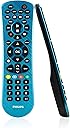
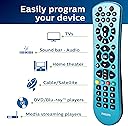
The PHILIPS Universal Remote Control (SRP6249B/27) is a stylish, electric blue infrared remote that manages up to six audio/video devices including Samsung TVs, Roku media boxes, and more. It features preprogrammed codes for quick setup, supports thousands of devices across major brands, operates on two AAA batteries, and offers a 30-foot control range—all packed into an ergonomic design perfect for the modern home.


| ASIN | B084YVXFVQ |
| Additional Features | Universal |
| Battery Type | Alkaline |
| Best Sellers Rank | #8,295 in Electronics ( See Top 100 in Electronics ) #355 in Remote Controls (Electronics) |
| Brand | Philips |
| Button Quantity | 6 |
| Color | Blue |
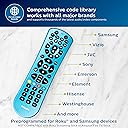
| Compatible Devices | ['Sony TVs', 'Samsung 'Hisense 'Westinghouse 'LG 'Toshiba 'Sharp 'Vizio 'Insignia 'Philips 'TCL 'Panasonic 'Roku Streaming Players', 'Apple 'Smart 'Blu-Ray 'DVD 'VCRs', 'Home Theaters'] Compatible Devices ['Sony TVs', 'Samsung 'Hisense 'Westinghouse 'LG 'Toshiba 'Sharp 'Vizio 'Insignia 'Philips 'TCL 'Panasonic 'Roku Streaming Players', 'Apple 'Smart 'Blu-Ray 'DVD 'VCRs', 'Home Theaters'] See more |
| Compatible Television Models | LG 55NANO90UPA, Sharp 4T-C50EQ3EM2AG, Sharp 4T-C70BK2UD, Sharp 8M-B80AX1E, Sharp LC-32HI3322E, Sharp LC-40CFE6242E, Sharp LC-40CFE6351E, Sharp LC-40CFG4042E, Sharp LC-40CFG6022E, Sharp LC-40CFG6352E, Sharp LC-40CFG6452E, Sharp LC-40FG3342E, Sharp LC-40FI3012E |
| Connectivity Technology | Infrared |
| Controller Type | Button Control |
| Customer Reviews | 4.1 out of 5 stars 9,132 Reviews |
| Global Trade Identification Number | 00030878488525 |
| Item Weight | 0.02 Kilograms |
| Manufacturer | Jasco Products Company, LLC |
| Max Number of Supported Devices | 6 |
| Maximum Number of Supported Devices | 6 |
| Maximum Range | 30 Feet |
| Mfr Part Number | SRP9263C/27 |
| Model Name | Perfect replacement Universal remote control |
| Model Number | SRP9263C/27 |
| Special Feature | Universal |
| UPC | 030878488525 |
| Unit Count | 1.0 Count |
| Warranty Description | 90 day limited |
C**E
Great deal. Great remote!
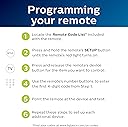
I love this remote! It is super easy to program, it has some really cool features, and it works flawlessly!
M**H
Good Remote
Bought this to replace a Black Web universal remote, which was so old the words/symbols on most of the buttons were worn off, but was still functional and worked well with my tv and DVD player. But the BW finally died and I bought this remote which I had on my Amazon list to eventually replace my BW because I couldn’t find another BW remote in my Amazon and other retailer searches.. This remote was easy to set up for each of my devices and allowed me access to all the functions and menus on each device, when the correct code was used. All the codes I tried worked to turn my tv on/off but some did not work the menu button to allow me access to my tv menu. I had to try five or six codes before I found the one that allowed this remote to work like the remote that came with my tv. Since this remote doesn’t have some of the buttons the remote that came with my tv have, I had to try different buttons to find the ones that serves the same function as those missing buttons. The only drawback is it’s not backlit, but I’m not going to take away a star because I failed to realize that until after I’d ordered it. 🤷🏽♀️
G**S
Numbers work!
I have a TCL Roku TV and the numbers do work for selecting channels. You have to use the complete channel number, for example 4.1, then press enter. The only shortcoming I find is this remote does not have instant replay. It will go forward and backward on a streaming program, but I miss instant replay, which goes back a few seconds only. Overall, this saves me having to switch from one remote to another. Follow-up: I find sometimes the numbers don't work! My solution is to go to Home, Settings, then TV Picture settings; scroll down to Live TV, and click. Numbers work again. Maybe that refreshes the input. There are probably other ways to fix this glitch, or to avoid it. After that, I can punch in the channel number and don't have to press enter...
D**N
Pretty much perfect...
For price, ease of programming, and overall functionality...this is the value pick of the month. Couple details: it's light, like there is nothing in the case but the 2 AAA batteries and a tiny ghost that jumps from the front to control your stuff. Sort of an emerging plastic cost saving trend with manufacturers these days. It's mostly a good thing, rounded edges and very little weight behind it, should survive all the inevitable falls for a good long time, just don't step on it too much if you can help it. Ergonomically a B+ Although thin profile, buttons feel good and seem to indicate they will stay that way, layout is intuitive enough to memorize in a day or two. All required functions working on TCL Smart/Roku, Marantz DACT, LG Blueray and Display, 90's Sony CD and Yamaha AV surround receiver, Samsung Smart Display. Based on that random list, probably works on everything. Saw a couple transmit range complaints here, which I suppose depending on very high ambient light environment...maybe? Tested at about 22 feet as highly responsive and consistent. Geek trivia: Maximum range on any IR remote technology is about 30 feet. If you need beyond this for your palatial estate's luxurious function hall, spend the extra 10K for a home theatre pro AV control system. Want an actually awful IR remote? Try the brand new stock TCL/Roku...now we are talking bad. No range, slow/unresponsive, almost non existent off axis. This replaced that and others for now...and it remotes like a boss at half the cost.
S**J
Brand new remote, did not work. Fingerprint magnet.
Remote does not operate properly. Tried 2 sets of brand new batteries, and that wasn’t the problem. Only when pressing hard on some of the device buttons, does the indicator light go on, but it doesn’t for any others. Can’t get the Setup Button to work to even program the remote. At one point while randomly pushing buttons, my TV turned on (I wasn’t able to put any codes in to program it in the first place, so that was weird), but the few buttons that worked, didn’t seem to match their function. (Input Button did display my Input options, but when I hit the Home button to exit that screen, it selected that function instead of the home screen, which turned my tv off...but back on)...none of the other buttons worked. Cosmetically, this particular color (black/shiny), holds finger prints too well. Even with clean hands, the moment you touch it, it leaves prints. The backside is a matte black and doesn’t have this issue. Included pictures to show how marked up it got just from holding it and pressing on the buttons for a few minutes (the “cloudiness” around the edges and buttons are all from clean hands). The remote is thin and light, so no real complaints on that. One Star for volume control because I was never able to test it. I bought another Philips remote that was for 4 devices for another room and that one works fine. I intend on returning this and investing in another one of those or just a new remote entirely. Took me awhile to try to and set this tv up, so the remote has just been in its package next to the tv the whole time, up until today.
J**E
Everything works, except very limited success with the "Input" button
I purchased the 4-device remote to replace a much more expensive universal remote (Harmony) that after more than 10 years of perfect use, no longer will program correctly, even when I bought a brand new fresh one. I ended up liking this cheap little Philips remote, since at least I got everything programmed -- my old Sony HDTV, Verizon Cable Box, Sony Blu Ray player, and Roku Express. My TV has 4 HDMI ports, which each of these is hooked up to. Therefore, I need this remote's Input button to take me to the appropriate HDMI port each time I want to use the device. However, everything works with this remote EXCEPT the Input button. My original remotes for the Sony TV, and Verizon Cable Box, and Sony Blu Ray ALL have Input buttons that work (tho not the Roku Express). However, this Philips remote simply won't program them in. EXCEPT for the Blu Ray. The Input button DOES work for that one. Therefore, in order to change inputs, no matter which device I'm currently "on" and watching, if I just press the "DVD" (Blu Ray) button first, and then the "Input" button, it will simply open the HDMI screen on my TV so I can scroll to pick which HDMI I want and it takes me there. If the Blu Ray player is not "awake", I can use it's button plus "Power" to wake it. It's not terribly hard to do this, but I do wish it would simply work the way it is supposed to. Also, the volume button and channel buttons also seem to work like the DVD button, when pressed before the Input button. I will probably try another version of the (expensive) Harmony remote (some are cheaper on Ebay), and return this remote if the Harmony remote works correctly, since the Harmony programs much more detail that I would like. We mostly get what we pay for I guess.
S**7
Great universal remote for the price
We have ordered this remote several times, as my kids tend to lose or break things. It is super easy to program to our tv, streaming device, and dvd player. The compatability is diverse as we have used it on Proscan and Sony tvs, Roku steaming devices and multiple dvd players. And it's straightforward to use. The battery like is great and the build quality is fine (my kids are just hard on things). If you're in the market for a universal remote, we definitely recommend this one as it is a great value for the money. It has some color options too, which is nice because black remotes tend to get lost in couches easier.
W**.
Easy to program.
So easy to program. I was able to set up Direct TV and all of my streaming on the first try. This is the first time I have been able to get everything programmed to just one remote. I couldn't be happier.
S**A
Works fine
Great!
N**Y
Worked on my girlfriend's tv
My girlfriend had a tv but not a remote. Every time she wanted to watch something you'd have to get up and fiddle with buttons behind the tv, that you couldn't even see. It was really hard. Now we can press a button and the tv turns on and you can adjust the volume from the couch. Amazing! Also it is blue so as long as your couch isn't blue it is easy to find.
N**U
Remote is not working
Remote is not working properly
A**S
Doesn’t work with my Bose
Easy to program but doesn’t work with my Bose
P**R
Don't buy
Didn't connect with Sony bluray player. Can't connect with Jio set top box. If it couldn't connect then what is the use of it.
Trustpilot
4 days ago
5 days ago