📸 Capture every moment, no strings attached!
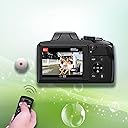
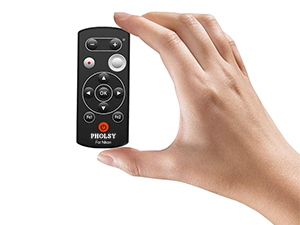
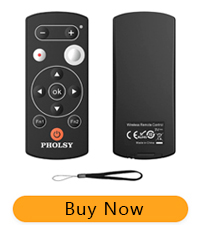
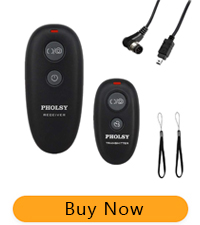
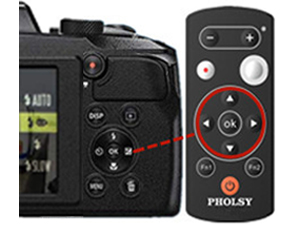
The PHOLSY ML-L7 Bluetooth Camera Remote is a lightweight, compact wireless shutter release designed for Nikon Z series and COOLPIX cameras. It offers up to 10 meters of wireless control over shutter release, focus, exposure, and video recording, enabling photographers to shoot hands-free with precision. Compatible after firmware updates on select models, this remote enhances creative freedom by allowing seamless remote operation without disrupting your workflow.


| ASIN | B07SRRRD1G |
| Batteries | 1 LR44 batteries required. (included) |
| Best Sellers Rank | #333 in Camera & Camcorder Remote Controls |
| Customer Reviews | 4.1 4.1 out of 5 stars (845) |
| Date First Available | June 9, 2019 |
| Is Discontinued By Manufacturer | No |
| Item Weight | 1.06 ounces |
| Item model number | LSYML-L7 |
| Manufacturer | PHOLSY |
| Product Dimensions | 3.7 x 1.6 x 0.4 inches |
M**O
half the price, same functionality
Works as described. If it has a decent lifespan it's a good alternative to the Nikon brand one. Just want to note that like another reviewer I thought I had to re-pair the remote to the z7ii every time I turned the camera off. Turns out that no, that's not necessary, you just need to turn ON the REMOTE again if the camera goes off/sleep/too far away. Once I hit the remote power button after turning the camera back on it functioned normally. It seems the OEM Nikon one does the exact same thing. From the mfg's website: ✔ Please Note: Once the camera get into the standby mode or go beyond operation range, the remote will disconnect automatically. To make them connected, you need to restart the remote and wake up the camera
B**S
Wireless Shutter Release works well
Easy to assemble and use. Triggers camera well but has to often be reset on the camera. Somehow loses connection. Otherwise, does the job.
T**N
👍
Worked well with my a6700
N**A
Stop working after a few months
This controller worked fine at the beginning, but after 8 months more or less the release button doesn't work anymore. I am really sad, I guess I should have bought the Nikon one. The rest of the buttons work fine, but I was only interested in the release button.
J**I
I had to repair it every time I turned the camera on
When I upgraded from my d7500 to the z7ii I discovered that my old wireless remote wouldn't work. I had high hopes for this Pholsy as it's identical to the one sold as "Nikon." It's a nice option to have two programmable buttons on the remote so you can access the camera's menus, or use one as the camera's OK button. But, unless I'm doing something wrong, you must re-pair the remote to the camera (or at least the z7ii?) each time you turn it on. That's especially puzzling since the remote function button on the camera has the option to "save" the remote!? I guess that means that it's saved for the current session. I may still use it with the self timer so that I can get into a shot; but I just bought a wired remote to use for the upcoming eclipse, landscapes, and macro shots.
S**L
For Nikon z6ii users DO NOT FOLLOW included instructions
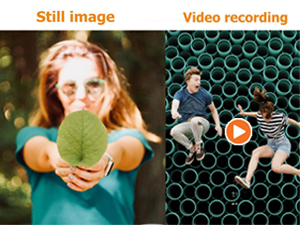
This remote works great with the z6ii z7ii BUT do NOT follow the included instructions. For Z owners, you must update your camera firmware to 1.40 first. Then, go into the camera [SETUP MENU] Choose [Wireless Remote (ML-L7 options] Press and hold the PHOLSY Power button for 3 or more seconds THEN choose [Save Wireless Remote controller] in the Nikon Z camera MENU. The camera pairs immediately and saves the PHOLSY remote in the camera firmware. From here you can assign the Fn1 and Fn2 buttons in the camera to custom functions. The remote works for both Video and Stills and even the + & - buttons operate the zoom to check focus. Very handy once it is setup. Works about as well as the official ML-L7 from Nikon.
F**O
Very flexible and a handy addition to the camera bag
While I haven't had any heavy field use with the remote yet, I am finding it useful for both macro and zoom shots. The controls are easy and mostly intuitive if you are familiar with your Nikon camera. I use it with a P950. The camera's Bluetooth pairs easily with the Pholsy control. Bluetooth can be a battery hog. So, remember to deactivate it in your camera when not using the remote. It's a good value.
P**G
Works as advertised
REVISED REVIEW After my negative review about being unable to pair with the new Sony A6700, PHOLSY contacted me off the review. They told me I had received an older model of this remote. They further said they had corrected the stock at Amazon and I should return and reorder. And they gave me a discount for my trouble. The new version paired immediately with the A6700 and worked exactly as described. PHOLSY gets 5 stars both for the remote and for excellent customer service. Well done guys.
み**輩
α7V用に本当は有線が欲しい所、無線しかなく且つ純正は高いので買って見ましたが正解でした。 ペアリングは問題無く出来、カメラの電源を入れ直しても都度ペアリングをし直す必要もなくとても使い勝手が良いです。 また、シャッター半押しの感触も良く操作性も良いです。 電池持などはこれから。
H**.
Die Kopplung der Fernbedienung mit meiner Canon EOS M50 Mark II hat einwandfrei funktioniert. Und wenn man dank einer anderen Kundenrezensionen weiß, dass man den Auslöser auf 2 Sek./Fern setzen muss, kann man die Fernbedienung auch nutzen. Nur den Schraubendreher zum Öffnen des Batteriefachs kann sich der Hersteller sparen, der passt nicht und ist somit nur unnützer Müll. Alles in allem macht diese Fernbedienung aber genau das, was sie soll.
P**S
Working good with Z7ii
C**Z
Great remote for my Sony ZV-E10 camera. It does everything the Sony remote does, but at a cheaper price. It is also smaller than the Sony which is on the left in the photo. Works really well and the included wrist strap is very handy.
D**S
Cette télécommande est parfaitement compatible avec le Canon EOS-R. Elle permet la prise de photos et de vidéo à distance en Bluetooth. Il faut activer le bluetooth sur l'appareil et synchroniser la télécommande avec le Canon. Ensuite pour le prise de photos il faut sélectionner grâce à la touche M-Fn un des mode de retardateur et vous pouvez alors déclencher avec la télécommande, en instantané ou avec un délais de 2sec en fonction du réglage sélectionné sur la télécommande. On peut aussi déclencher la vidéo. Pour cela il faut activer le fonctionnement par télécommande dans le menu de l'appareil et se positionner dans un mode vidéo pour lancer l'enregistrement, c'est très pratique pour les vlogueurs. Un produit très pratique et qui permet de déclencher à distance, sur trépied pour être certain de ne pas bouger, de lancer l'enregistrement de vidéo...
Trustpilot
1 week ago
1 week ago