Buy anything from 5,000+ international stores. One checkout price. No surprise fees. Join 2M+ shoppers on Desertcart.
Desertcart purchases this item on your behalf and handles shipping, customs, and support to Uruguay.
🎨 Elevate your digital canvas—draw, design, and dominate with Kamvas 13!
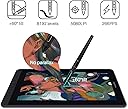
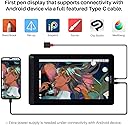
The HUION Kamvas 13 is a 13.3-inch pen display tablet featuring a battery-free PW517 pen with 8192 pressure sensitivity and tilt support. It offers dual USB-C ports for flexible connectivity, a full HD IPS screen with 120% sRGB color gamut and anti-glare protection, plus 8 programmable shortcut keys. Compatible with Windows, macOS, and select Android devices, its slim 11.8mm design makes it ideal for remote work, learning, and creative professionals seeking vibrant, precise digital drawing on the go.


| Active Surface Area | 13.3 Zoll |
| Asin | B08519KV4Y |
| Best Sellers Rank | 6,838 in Computers & Accessories (See Top 100 in Computers & Accessories) 16 in Graphic Tablets |
| Box Contents | Pen Display, Digital Pen, 3-in-1 Cable, USB Extension Cable, Pen Holder PH05A, Pen Nib x 10, Pen Nib Clip, Glove, Cleaning Cloth, Quick Start Guide |
| Brand Name | HUION |
| Colour | Purple |
| Compatible Devices | Desktop, Laptop, Tablet |
| Country Of Origin | China |
| Customer Reviews | 4.3 4.3 out of 5 stars (2,072) 4.3 out of 5 stars |
| Display Type | LCD |
| Item Dimensions L X W | 37L x 22W centimetres |
| Item Weight | 900 Grams |
| Manufacturer | HUION |
| Manufacturer Part Number | Huion |
| Model Name | GS1331 |
| Model Number | GS1331-Purple |
| Native Resolution | 8192 |
| Network Connectivity Technology | USB |
| Operating System | Windows 7 or later, macOS 10.12 or later, Android(USB3.1 DP1.2 or later) |
| Pressure Sensitivity | 8192 Levels |
| Product Features | Supports Android Devices; Pen Tech 3.0; Battery-Free Pen; 120% sRGB Color Gamut |
| Screen Size | 13.3 Inches |
| Specific Uses For Product | Editing; Gaming; Painting; Teaching; Writing |
| Target Audience | Student, Teacher |
User
Low budget high quality
My old Cintiq 13HD needed replacing but I was on a budget. I took a chance on this Huion tablet and I am so impressed! Cable management is so much better than my Cintiq, the size is more compact and sits nicer on my desk. Quality build, looks and feels really good. Stylus felt a bit scratchy but since applying a screen protector this is no longer an issue. Drawing is smooth and have experienced no input issues. Installation was very easy, the software was also easy to acquire from Huion website, installation and setup was straightforward. I have this connected to a high performance i9/RTX windows 10 enterprise laptop and have not experienced any compatibility issues. This really is a fantastic drawing tablet and I'm very happy with this purchase.
User
Nice piece of tech at a reasonable price
Some people say there's not much difference between a drawing tablet and a display tablet. I think they're wrong!I own a Wacom CTL-672 that won't track properly and destroys the pen nibs within days. I also own a XP-PEN Deco 01 V2 which is okay, but looking at the screen instead of where you're drawing takes a bit of getting used to and it always felt like I was spending longer to get the results I wanted.When you upgrade to a display tablet, you realise that those cheaper drawing tablets were somewhat holding you back. Being able to see your strokes directly under where you're applying the pen nib makes drawing easier. It's not the same as drawing on paper, but it's very close. The cursor on your computer is almost exactly where the nib touches on the screen and since you're looking directly at it while applying pressure, it feels more authentic.There was no stand included with this tablet, which was disappointing but I ended up buying the Huion stand made for their Kamvas 16, which is solid. You really do need a stand because tilting your head down will eventually make your neck and back ache. Buy a stand at the same time you buy the tablet rather than later!Actually looking at the tablet screen and drawing on it, I have no issues so far. The screen isn't as bright as you'd expect but it's by no means too dim to work on. I think the built in screen protector might be affecting the amount of brightness. Speaking of the screen protector, it makes the surface feel a bit like paper. There's resistance, but not too much, which feels nice. The screen colours seem decent and I don't feel like any part of the spectrum is unbalanced.The stylus pen is quite chunky and has a rubberised cover where your finger tips sit. There are 2 buttons in this area which work well as middle click and right click, though you can customise these in the driver software. The buttons themselves seem a little less solid than the buttons on the XP-PEN stylus, but they work fine. The stylus feels good to use for several hours without any fatigue. Using the included glove prevents sweat and oils making their way onto the stylus and tablet screen. Whenever you're not using the stylus, it can be placed in one of two ways in the stylus holder. The stylus holder also contains spare nibs.There's 2 ways to connect this tablet. The first way is the same way many tablets connect, with a 3 way cable that has 1 connection to the tablet with 1 USB data cable, 1 USB power cable, and 1 HDMI video cable back to the computer. The second way is with a USB-C cable, which not only needs to have a long enough connector to fit into the tablet (Huion's own vastly overpriced cable seems to be the only one that fits without any issues) but your computer also has to be capable of delivering a compatible signal over that USB-C cable. Some modern mobile devices are capable of delivering a signal, though I don't own any of those and couldn't test that feature.All in all, very pleased with this tablet and impressed at how cheap it is for what you get.
User
It works
I'd recommend it!PROS:- Great value for money, I certainly feel like I got more than what I paid for. even though the back of the device appears to be plastic it feels pretty premium and very durable, the display has a paper-like surface that I find really pleasant to use. I think it's a screen protector on top of the display rather than etched glass, but it was applied cleanly and very neatly at the factory so no complaints here!- I installed the drivers from the Huion website and plugged it in and it just worked seamlessly, no messing around with settings, no troubleshooting required.- You can configure your hotkeys and pen buttons, pressure sensitivity, and other settings per-application if you want to, rather than for the device as a whole.- This is the third Huion tablet I've bought (The first with a display) - I've seen their pens improve massively over time, from requiring a battery, to being rechargeable, to now not requiring charging at all. The pen this device came with is without a doubt their best yet. There's very little wobble at the tip and the materials feel very nice in the hand, the portion of the pen that you hold is rubberised too which is a nice upgrade over the hard and/or shiny cheaper-feeling plastic of pens past. There have been some changes to the shape of the pen too, the back portion is flatter and it sits much more comfortably in the hand than a lot of other more cylindrical pens (at least for me)- Tilt and pressure sensitivity work great, line width and shape changes very smoothly, there's no noticeable wobble on lines, and there are none of those flicks you sometimes get at the end of quickly-drawn lines with other pen tablets. (very impressed with this!)- There's no air-gap between the pen tip and the line you are drawing, it really feels like the line appears directly under the pen tip. Some other display tablets I have used in the past haven't been the best for this.- I was worried about having a device with a big glass panel sent to me in the mail but it came in perfect condition and was very well packaged. I had to open the Amazon box, then an unmarked brown box, then the tablet's box - then the plastic sleeve that the tablet was inside, and then there was a screen protector protector on top of the tablet's matte screen protector - they did NOT want to risk this thing getting damaged in transit hahaCONS:- There's a little ips glow and backlight bleed on the bottom two corners and the right middle of my tablet's display, it's really only visible if you're displaying a completely black screen, so most wouldn't even notice - but it is there, it's not the worst I have seen but best to be aware of that if that kind of thing bothers you or would affect your use of the device.- The half-glove that comes with the tablet was damaged, there are two small holes at the seam, were I to wear it they would get even bigger and the glove would just fall apart.- To do the one-cable setup you need to use Huion's own incredibly-expensive USB C cable, even if you have your own USB C cables that are capable of carrying the signal you won't be able to use them because the tablet's USB C port is a slightly different shape and is recessed. The 3 headed cable that comes with the device works fine and should be enough for most people but it would be nice if one of this tablet's unique features (one-cable connectivity and the ability to connect to Android devices) was something it could do out of the box.
User
It's so smooth!
It's so easy to use and takes under 5 minutes to get it set up. My teenage daughter has used it constantly for the last 3 months with no issues and finds it much easier than the tablets without screens after using a wacom for the last 2 years. The screen is very responsive and good quality it makes digital drawing much quicker and easier. As a parent I obviously needed to see what all this digital drawing/art fuss was about so gave it a go and wow! It's just like drawing on paper but so much better, my daughter quickly taught me the basics and I quickly got to grasps with the layers, it was so much easier than using a pencil and rubber. It felt so smooth and was instantly responsive. The pen was also great, just the right size, and didn't cause cramp also the grips are in a good position. I loved it and lost a few hours doodling away, I can see the appeal. Parents if you're reading this because your child likes digital art, I'd recommend this, it's very good quality for the price in comparison to some others and will definitely help your child unlike their art class. After all, children today won't be retiring until at least 2075 so who knows what jobs they will be doing. Plus, Nfts have made digital art big business. So definitely a must for any digital artist.
User
Amazing Value for Digital Artists – Smooth, Responsive, and Portable!
The HUION Kamvas 13 has completely upgraded my digital art workflow. From unboxing to drawing, everything about this tablet has impressed me. The screen is vibrant and sharp with great color accuracy, and the matte finish gives it a natural, paper-like feel that’s super satisfying to draw on.The pen is lightweight, comfortable, and highly responsive—no noticeable lag or jitter. Pressure sensitivity and tilt work beautifully, allowing for smooth, nuanced strokes. Setup was quick, and it connected to my laptop with no issues. I love that it supports USB-C to USB-C, so I can use it with my Android phone too when I’m on the go.The customizable shortcut keys on the side are a nice bonus and really help speed up my workflow in programs like Photoshop and Clip Studio Paint. It’s also surprisingly lightweight and easy to carry, making it a great choice for students, hobbyists, or even pros on a budget.Overall, the Kamvas 13 delivers performance that rivals much more expensive tablets. If you're looking for a reliable, high-quality drawing display without breaking the bank, this is it. Couldn’t be happier with my purchase!
User
Not Great with Older Macbook Pros (Intel i7 - 2016)
I purchased this as a great deal during the Amazon Spring Sale.But have tried it solidly for 2 weeks, I am having to return for a refund.The screen itself arrived in a very nice almost premium feel package. There were no instructions, so I have to watch a quick Youtube video on how to set it up. Then had to download the driver app from the Manufactures website. This was all fairly easy. Setting up the various buttons on the tablet and the pen are very easy. The pen comes with a round holder which comes apart and contains extra nibs and a tool to remove the old nib. nice touch! the screen is bright and fairly well colourspace calibrated. have a lovely paper like feel, so very easy to draw and touch.Now for some niggling issues, its not like an iPad or any other tablet where you can pinch to zoom. you also can't move an image with your fingers either.the 13" model does need a fair amount space than a regular Wacom Tablet so you do need to be prepared for that. Also, a stand will be a must for most people otherwise you will end up with neck cramp and very bad posture.Now all of these will not have made me decide to return the item.Its the connectivity problems that I am having.Although the tablet comes with the standard USB-3 and HDMI cable, its far from the way it performs on a newer USB-C port.I am not changing my laptop anytime soon as it works seamlessly with Photoshop. It has an Intel i7 with 16GB RAM, so pretty quick machine still, but the old tech and new tech do not match Seamlessly.I have to disconnect the HDMI due to freezing issues. Sometimes, it takes 10 seconds to catch up with pen strokes. The Cable comes with 3 in one form and is fairly thick for a connectivity cable so there should be no issue. When I tried it on someones else Mackbook with a USB-C, it was worlds apart, a real joy to work with.So, its a good tablet, but has issues with older Gen Mackbooks. will have to replace for £50 Wacom once again!
User
Using the Kamvas for photo Editing, some thoughts after a while.
I bought this for photo editing not drawing I'm not an artist, and couldn't draw a circle unaided. I have owned conventional drawing tablet (no screen) in the past but never got on with the whole looking at the monitor and using the pen on the tablet bit, it put me off taking it further.The cost of Professions Drawing monitors from the well known brands is way out of my league and I could never justify it.Having seen these on Amazon and considered the price not outrageous I decided to take the risk and try again.I wanted one to allow me to have better control when making selections or creating custom masks for correction or retouching photographs as they always have dust, hair, creases or scratches. Using a mouse to try and follow a shape always leads to the mouse going off track and faffing about, using a pen seems so natural an so much more accurate, and to be able to see on the tablet and draw on the area I was looking at is brilliant. Using the tablet for retouching with old photographs or negatives is a revelation.It is so much quicker than using a mouse, plus the buttons on the tablet allow you to zoom in and out without stopping to navigate around the photograph.The other buttons on the side can be set in the software to perform other functions as you decide and can be set to act differently in individual programs.As the pen is pressure sensitive I find that I adjust brush size less often as the harder I press the larger the effect.Is it perfect ?The size at 13in can seem at first too small but as you zoom in and out to retouch it's actually no problem neither is that its not 4K for the same reason, and means its easier to hold and transport being smaller. It also requires less real estate in the terms of desk space imagine putting your existing monitor face up on the desk next to everything else there.Screen quality is very good with clear sharp images, the design means that there is very little difference between where you think the pen is and its actual location (think looking a a ruler from above or the side, parallax) meaning you are drawing where you think you are.You will need the stand to use it comfortably and at the right angle for prolonged use and this isn't included in the price. If you want to use it just via a usbc cable (rather than the 3 in 1) that is also an extra at about £25. The plug on the tablet is at the bottom of a moulding and so a standard cable wont reach unless you feel like trying to trim the plug down, maybe not the greatest design choice (form should follow function).The Kamvas is not a touch screen which at first seems counter intuitive after all theI pads/phones/tablets we are all used to, and you will find yourself trying to tap on it but you do get used to it.I use the tablet purely for the retouching and masking aspects of editing because I find that the pen is not very good at sliders when adjusting colour or exposure I preferer to use my mouse for that but maybe that's old habits.I haven't been able to find out how to set an accurate colour calibrated profile and make it stick when I reconnect it so I wouldn't rely on the tablet to assess the image in that way a larger monitor is always better for that anyway.I have no regrets in purchasing this kamvas tablet and would do so again with the new one looking even better.Would I like a larger one, yes but I couldn't justify the extra cost at the time.Having now used it I would certainly like to be able to have one of the larger ones. I've found it really useful particularly with a lot of old photographs my mother has dug out, that I'm trying archive, so they can seen well into the future but many require some work to be seen at their best.
User
A good price for a good product
I've been a digital artist for roughly 13 years and have been using a graphics tablet for a lot of that time. I finally decided to make the move to a pen display tablet (this) from my last tablet, also a Huion, which was very good quality for its price - easily comparable to the Wacom tablets I've used in the past.Granted I've only been using this tablet for a short while, but I like the fact that it can be used as both a pen display tablet/screen and as a graphics tablet with the screen off - drawing on the screen feels more natural, but it also means that I can use it in a way I've used a tablet for years.I will say that the increased sensitivity takes some getting used to if you're coming from a tablet with lower levels of pressure sensitivity, but this quickly becomes easy to use and allows a greater level of mimicry of traditional tools. The tablet is also easy to adjust if you find the sensitivity offputting. Installing the driver and getting the tablet set up is not particularly difficult.This is a good entryway into a pen display tablet for a seasoned amateur artist and excellent overall.
User
goed tablet maar accesoires mocht duidelijker
Het is een prachtig tablet. Werkt heel goed. Driver vlot geinstalleerd na afzetten antivirus (effe zoeken hoe).Nadeel : het is niet duidelijk wat je erbij krijgt. Geen power adapter, geen USB C kabel. Enkel een 3 way cable. Dat mocht duidelijker, één ster minder.
User
Excellent produit pas cher !
Prof de Dessin j'étais sceptique sur les tablette écrans et j'ai essayé celle-ci chez un ami, 10 mn après je la commandais sur Amazon a un prix imbattable. Je l'utilise avec le logiciel Rebelle 8.2 et elle a un écran sans reflet avec un bonne etendue des couleur qui approche les 100 % du Gammut ( 120% du sRVB). Stylet Ergonomique avec des boutons programmables et boutons sur la tablette en elle même aussi. Gestion de la pression précise et de l'angle du stylet aussi. Je suis étonné de la qualité par rapport a la marque Wacom modèle Cintiq qui sont beaucoup plus cher pour un résultat très proche . Tres bon produit pour conclure
User
Very Good.
My son is completely in love with this. Very satisfied.
User
Buen producto
Una maravilla
User
Great price to quality - Goede prijs-kwaliteit
Ik heb de Huion Kamvas 13 al enige tijd in gebruik. Tot zover een toppresteerder gezien andere merken zelfs tweedehands een hogere prijskaartje heeft. Deels is dat mogelijk te relativeren aan de bouwkwaliteit, maar voor deze prijs krijg je waar voor je geld. Ook gezien je features (vb. 8192 drukniveaus op de pen) krijgt die bij andere teken tablets in een hoger prijssegment zitten.Het enige gebrek dat ik kan noemen is dat hij niet met een standaard wordt meegeleverd, maar deze is gedurende schrijven met korting erbij aan te schaffen.-I've been using the Huion Kamvas 13 for a while. So far it's been a top performer considering other brands have a far higher price tag even second hand. Partially that could be contributed to possible build quality differences, but for this price you're getting your money's worth. Also considering you're getting features(i.e. 8192 pressure sensitivity levels on the pen) found in a higher price segment.The only shortcoming I can mention is that the stand is not included, but that as of writing purchasable with a discount.
Trustpilot
4 days ago
1 month ago