Buy anything from 5,000+ international stores. One checkout price. No surprise fees. Join 2M+ shoppers on Desertcart.
Desertcart purchases this item on your behalf and handles shipping, customs, and support to Uruguay.
🚀 Upgrade your Wi-Fi game—never miss a beat or a binge!
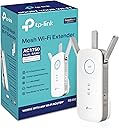
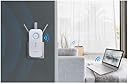
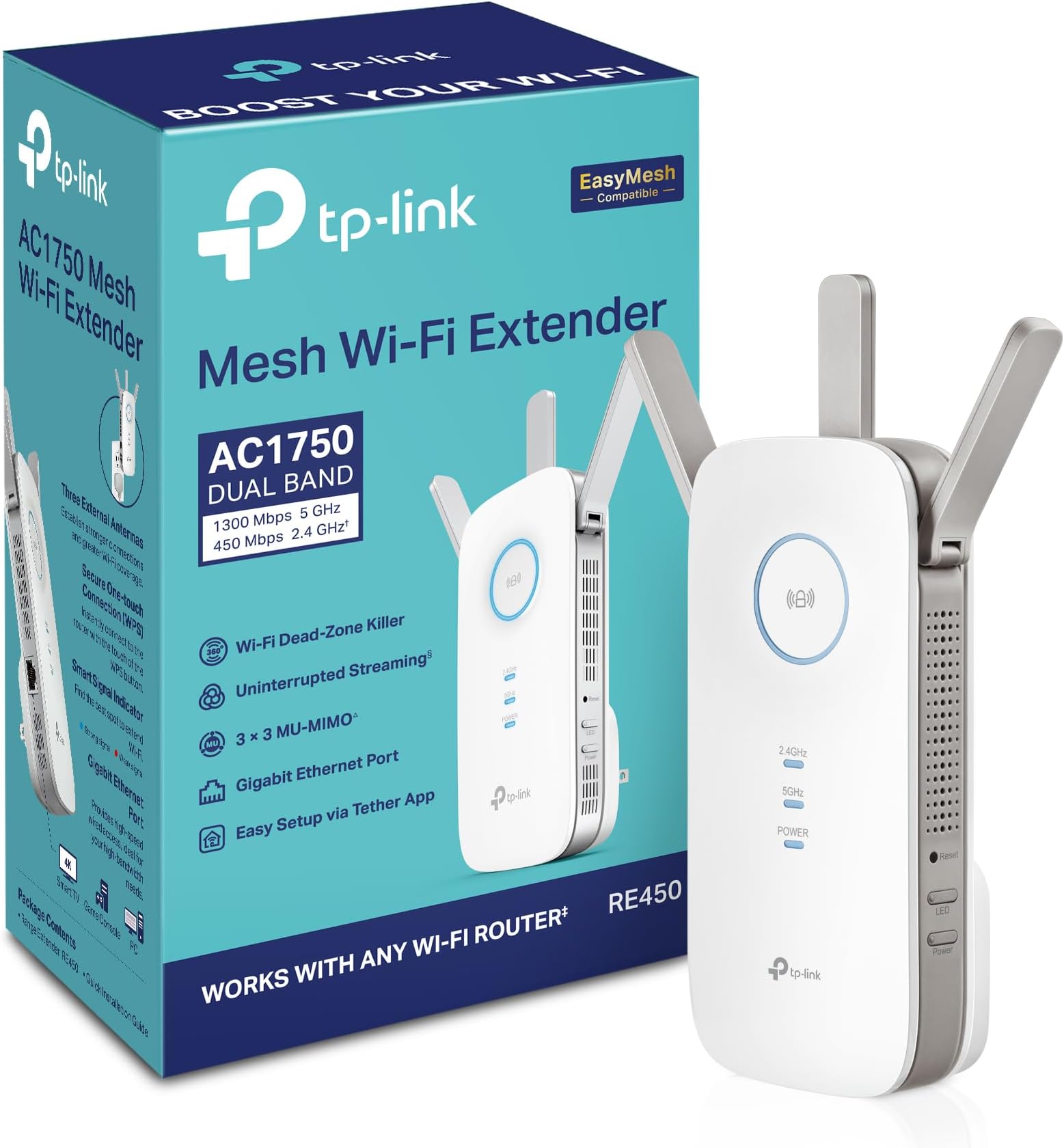
The TP-Link AC1750 RE450 Wi-Fi Extender boosts your home network with dual-band speeds up to 1750 Mbps and coverage up to 2000 sq ft. Featuring three adjustable antennas, a Gigabit Ethernet port, and an intuitive Smart Signal Indicator, it ensures easy setup and reliable connectivity for over 30 devices. Recognized as PCMag’s Editor’s Choice, this extender eliminates dead zones and stabilizes your wireless signal for smooth streaming, gaming, and smart home device performance.


| ASIN | B010S6SG3S |
| Best Sellers Rank | #124 in Repeaters |
| Brand | TP-Link |
| Built-In Media | AC1750 Wi-Fi Range Extender RE450, Quick Installation Guide |
| Color | White |
| Compatible Devices | Router |
| Connector Type | RJ45 |
| Customer Reviews | 4.1 out of 5 stars 31,387 Reviews |
| Data Transfer Rate | 1750 Megabits Per Second |
| Frequency Band Class | Dual-Band |
| Frequency Bands Supported | 2.4 GHz, 5 GHz |
| Global Trade Identification Number | 00845973092405 |
| Item Dimensions D x W x H | 2.6"D x 3"W x 6.4"H |
| Manufacturer | TP-Link |
| Mfr Part Number | RE450 |
| Model Number | RE450 |
| Range | 2000 Square Feet |
| Special Feature | Adjustable |
| Special Features | Adjustable |
| UPC | 840102182484 845973092405 |
| Unit Count | 1.0 Count |
| Warranty Description | 2 year manufaturer warranty |
| Wireless Communication Standard | 802.11ac |
| Wireless Compability | 802.11ac |
❤**️
Finally, Frustration-Free Wifi Reception.
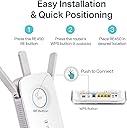
I ordered this Wifi extender because I needed an upgrade from a tiny Netgear model that was only capable of 300 mbps. That may be fine for inside the home, but I needed something that could extend about 125 feet and still be relatively fast. I believe I got that from this TP-Link Extender. SETUP: Setup couldn’t have been easier. You actually have two options: One with setup online and the other setup using the WPS button on your router. Both options are detailed in the included instruction manual. I chose the WPS option. All I had to do was plug in the extender, press the big round button on the front of it, and then press the WPS button on my router. That was it. The extender took care of the rest. It found the router and connected within seconds. I then moved the extender to a location about 125 feet away from the router. PERFORMANCE: I will include photos of a speed test I ran back in July with my old Netgear and the speed test I ran today with this new TP-Link extender. You can see my speeds have increased quite a bit, especially the download speed. And as I stated this is all at a distance of about 125 feet. I can tell a big difference when I am cruising the internet. It is so much less frustrating now. Of course this TP-Link extender is a higher quality extender than my old Netgear one so it should be expected to perform much better. INCIDENTALS: This extender was larger than I was expecting. It measures 6.5” in height, 3” in width, and a little over 1.25” in depth. There are three antennas which add an additional 2.5” to the measurements. The antennas are multi-positionable. FINAL THOUGHTS: Overall I am super pleased with this extender. I am happy to have found one that is dual banded, fast, and a breeze to set up.
P**L
Works fine for me, beware of the bad reviews
This is for the AC1750 WIFI Extender RE450: I feel like the way some of these reviews are being written it is making it appear that this extender is actually a router which is a giant no. I did see some reviews where they discuss this product isn't working properly which leads me to think it's a firmware issue or user error. Other reviews seemed to think that this would increase their internet speed over wireless, which is not necessarily true. Weak wifi signals will cause drops in connection which may make it seem like your internet is going slow, but it's really packet loss. So by boosting the signal strength you obtain a stable connection that doesn't lose as many packets which makes it seem like the internet is going faster when in reality you just aren't losing as much data in transmission and you're not waiting for your device to receive all the packets it expects. THAT SAID: I just received this product today and out of the box had it up and running in less than 5 minutes (I did not use the WPS method) and immediately noticed a stronger signal to all of my devices. THIS DOES NOT BOOST YOUR INTERNET CONNECTION SPEED. It merely ensures that your wireless connections are stronger to your router, thus giving you as much internet connection benefit as possible from your modem over a wireless connection. I cringe when I read reviews where people do speed tests and claim they see no benefit from this device. If this is you, you're doing it wrong. I went from a weak 5ghz signal (1-2 bar) transmitting at around 120 Mbps, to a solid 4 bar transmitting at 866.5 Mbps and have not noticed any hiccups in stability at that speed over the last few hours. This is on the farthest device from the extender through walls that have plumbing in them. I'm running 11 devices on my wifi network including phones/pc/laptop/security cameras and when it comes to the security cameras when I used to load them up over wireless there was usually a delay (device offline) before the images would come up. This extender has solved that and the images now pop up immediately. This alone makes me happy. While I'd prefer the device to not be such an outlet hog (You're going to sacrifice an outlet for this) I appreciate that I can turn the LED's off as well as use the ethernet port for a non-wifi device. For the price I can't really complain that there's only 1 ethernet port, but I wasn't buying this for that need. Overall so far I'm super happy with the extender. If it can hold up for at least 2 years I'd consider it a fair price, great product, and would buy it again.
B**Y
A bit pricey, but it works like a champ!
If you follow the directions, this WiFi extender is a snap to get up and running. After I did the required setup, I moved it into the location where I was having problems. Voila! I had a strong, consistent signal and my reception problems disappeared. I would caution those who are not technically adept to be sure you KNOW your username and password for your 2.4GHz and 5GHz existing wireless networks. Without that information, you'll be dead in the water and won't be able to complete the setup screen. That will sound obvious to those of you who are experienced in setting up network devices, but in my experience many people never change the router default password for wireless. I'm also deducting one star because I have a minor issue with this otherwise fine piece of electronics. The shape of the unit requires that the plug below it, (in a duplex outlet) either be empty, or have a small, unobtrusive or flat-top plug. Otherwise, the bottom of the WiFi extender will hit the plug and you won't be able to plug it in. I was able to find a 1-foot extension cord that had a flat top that I used in the bottom outlet that allowed another device to be plugged in the bottom while the AC1750 fit above it. The Wirecutter recommended this range extender, and I trust their judgement. Immediately after installing it, my reception problems were gone! The interface is a snap to use, and I had absolutely no problems or anomalies when I then put it into it's final location. I also updated the firmware in the unit, and it can now also act as a WAP as well as an extender. DHCP can be left in Auto, On or Off, depending on your requirements. If you're just using it as an extender, you can ignore that setting altogether as Auto works perfectly and recognizes that another DHCP server is on-line. For me, since I don't need DHCP, I turned it off. One other feature I liked was the ability to turn the LED indicators on and off according to a schedule. My AC1750 is located in our bedroom. The LEDs are pretty bright, but using the configuration page I shut them off from 9PM to 10AM so during normal sleeping hours I don't even know it's there. Nice feature. I've only owned this unit a couple days, but I am very impressed with the coverage I'm getting. Hearing that, it may seem picayune to deduct one star based on the issue with the plug, but at this price, there could have been an option to mount the unit directly to a wall with an adapter and then plug in only a power supply, not the entire unit. Nonetheless, this is a well designed unit that will go a long way to giving you complete WiFi coverage in your home.
E**C
There is absolutely nothing more I could ask for in this unit or a range extender. Period.
I own a TP-Link Archer C5400 router that is several hundred feet away and behind several very sturdy walls. On a good day, I would barely get 200 kilobytes a second. This is actually pretty good considering every other brand I had tried (and there were a LOT I had tried), would not even connect let alone give me any sort of data. Once I installed this product into my room, it was as if I was hard-wired directly into the router. I may not have the fastest internet service available but being able to go from 200 KBps to over 5 MEGABYTES a second, wirelessly at that, is far beyond any expectation I had held. When it is hardwired via the ethernet port into my TV, I get full 4K video streaming without any stutter or delay. When I use the wireless function for gaming, my ping is extremely low and I can game online for the first time in years. I had mediocre hopes for this device to be honest. I was just hoping I could get a stable connection and maybe, just MAYBE 1 megabyte per second. This unit has beyond far exceeded my expectations. Not only does it play well with the android tethering app and enables me to control this unit and the router separately, it is nearly almost exactly plug and play. Almost anyone can install this with basic computer skills even without reading the instruction manual or having even mediocre networking knowledge. I would say I would purchase this again but this single one unit covers every single inch of my house that I do not even need to order another unit. Kudos to TP-Link again for providing me with quite possibly the best router and wireless range extender experience possible. Please do note that when I reference the router that I am speaking of the previous router from TP-Link that I had purchased as this unit IS NOT a router. And on a bonus side note, the customer service provided by TP-Link has far exceeded the customer service I have received from any product I have ever purchased, whether it was another form of electronics or otherwise. I cannot say for sure how well this product would work if not paired with a TP-Link router but based on how this unit is functioning, I can almost guarantee that it would work with any wireless router setup. This is a product that not only do I highly recommend with full confidence but would swear by it on my word. If you are experiencing poor reception or speeds that are far below what your service provider advertises (and I would test it hardwired on a speedtest site first to make sure your provider is not just feeding you fake rates), then this is exactly the product you are looking for and beyond.
D**D
GARBAGE - Can't believe they actually sell this device!
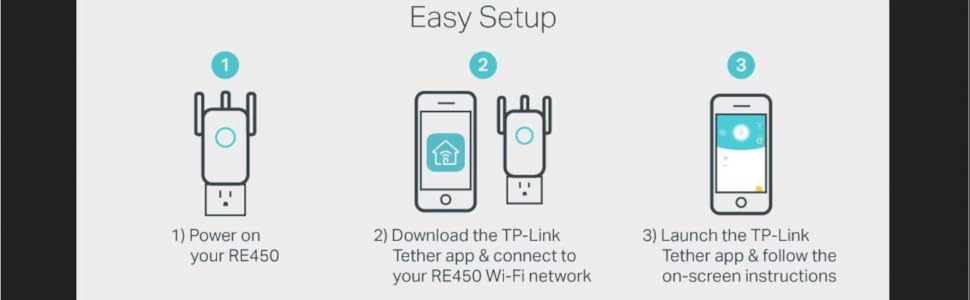
Where to begin... This is my SECOND unit. Both have the same issue. Allow me to state up front that I am very tech savvy & knowledgeable about these matters. WiFi extenders are simple devices. You attach one wirelessly to your primary WiFi source & it extends the signal to areas far away from the primary WiFi. You should only need to set it up once & then forget about it, just like you do with your primary WiFi source. I have two Wireless Gateways available, a Motorola Cable Gateway & a T-Mobile LTE Gateway. Both are extremely reliable & function perfectly. My wireless devices connect perfectly to either. I have never had issues with connectivity with either Gateway with any device. Except for trying to get the RE450 to function, neither Gateway has ever required a reboot to restore an error or for connectivity issues. Not a single time. Enter TP-Link's RE450.... Setup - Setup for the RE450 is extremely easy through the Tether mobile app. I have no complaints with the Tether app or setup procedure & experienced no issues configuring the device. Just make sure you know your Primary WiFi SSID & Password before beginning the setup process. You first create an Administrative password for the RE450, enter the connection credentials for your 2.4 & 5 Ghz WiFi network, then decide in which mode you wish to operate the RE450. You can choose AP Mode (Access Point) to convert a wired network into a wireless network, or Extender Mode to extend your primary WiFi wireless range. Most users will likely choose the latter. The RE450 can use the same name & password info as your Primary WiFi which makes it transparent to you, or you can give the RE450 radios their own unique IDs. I suggest the latter else you never know to which system you are connected. The cloned mode would be fine *IF* the RE450 was reliable. Unfortunately, it is not... Issues - Again I have tried two of these. Both are on the latest firmware & have been reset multiple times. I ordered the replacement believing it couldn't be that bad & I must have received a defective unit. Unfortunately both have the exact same problem. 2.4 Ghz Connectivity - Both units have problems connecting to the 2.4 band on both my Motorola & T-Mobile Gateways. It seems the only way to get the RE450 to link with the 2.4 Ghz band is to reboot the Gateways. Only then will the RE450 link the 2.4 Ghz band. For a brief moment everything is connected & works well. Hard Lockup - Alas, in a short order, sometimes as little as 5 minutes, the RE450 locks up & ceases to function at all on either band. She looks lovely with her blue lights, but the device has hard crashed & you can no longer access the RE450. Its 2.4 Ghz band will appear in a WiFi scan but you can not connect. The 5 Ghz band simply vanishes. At this point neither the power, light control, or WPS buttons have any effect. The solution? Remove it from the wall outlet & wait a few seconds, plug it back in, pray the 2.4 Ghz band connects else reboot your Primary, wait a few minutes for the next hard lockup. Conclusion - Two brand new factory sealed RE450 units are both experiencing the exact same issues. The replacement has been here for 2 hours & required 10 reboots already! Both do the same thing with either of two perfectly functioning gateways from different manufacturers. TP-Link - How can the RE450 be this bad??? In fairness, I have not contacted TP-Link tech support, but I have already done what I'm sure they will suggest. The devices are on the latest firmware. They have been reset multiple times. I have written quite a few reviews & this is one of only two times I have rated something an absolutely worthless piece of garbage. This device deserves a ZERO STAR rating. UPDATE: I have since learned you can get the RE450 to function in a somewhat limited sense IF you only connect a single band to the Primary WiFi. Pick either a 2.4 or 5 ghz connection to the Primary & it works. For receiving connections you are able to keep both bands operational. This isn't a particularly desirable solution as it severely limits the speed of the RE450. *Note - I have also tested the RE650 & RE350. Both are on the latest firmware & have the identical issue with the exception of the hard lockup. On these units the 5 ghz band vanishes. The 2.4 band remains visible & permits a "limited access" connection with no access past the extender.
P**P
Can be useful, but only under the right conditions
I bought this device to extend our wireless up to the third floor in our house. I have a TP-Link AC1750 router on the first floor, which sends a usable 2.4ghz signal up to the third floor, but the 5ghz is pretty poor. So I purchased this in hope of making 5ghz usable upstairs. Setup was not as easy as claimed. I followed the instructions, and got onto the extender's wifi network with my laptop. The instructions then tell you to then open a browser and connect to the repeater's configuration URL, but the provided hostname would not resolve. I discovered you can use the router's IP address, 192.168.0.254, instead of the hostname. After that, configuring went as planned. It detected my router's 5ghz and 2.4ghz networks and connected to them without problems. I gave the extended networks different names, so I could identify them when testing. Performance in 2.4ghz is very poor. With the router on the first floor, I moved the extender to the second floor, and took my laptop up to the third floor. The extended signal gets one more bar than the real one, but performance is much worse. Using dslreports and speedtest.net, pings are doubled and download speeds are halved. So it provides no benefit at all on 2.4. On the other hand, at 5ghz the picture is a lot better. Ping is about the same as with the native network, which already exceeded my expectations. But the real good news is that download and upload speeds are considerably better using the extender- around 85mbps down through the extender versus around 16mbps without it. So I will keep it where it is, and use it upstairs. The performance I observed makes a lot of sense. 2.4ghz has a ton of range, and not that much performance to begin with. Unless you are extending a network a really long way -- like between two houses -- the extender will always do more harm than good. 5ghz has much more bandwidth, but attenuates a much more quickly with distance and going through walls or floors. So the extender actually does a useful job here.
M**E
Simple & Straightforward
I don’t normally review items I purchase unless there is something negative to report so other consumers can be aware. This review is the opposite. First, it shipped earlier than expected. It came from Arizona and I’m in PA. It shipped and was delivered 5 days earlier than anticipated which was great. Received it today and was excited to try it. Secondly, the set up couldn’t be much easier. It didn’t come with some complicated manual. It came with a quick start guide for the manual. Was it quick. If I didn’t have to do anything on the laptop, this thing would literally be plug and play. Plugged it in, searched for the SSID on the laptop and followed the instructions. With basic knowledge of your home’s network and how it works, it will be a breeze. Lastly, it looks good in the outlet and though I haven’t viewed it in the dark, I can’t imagine the light for the signal indicator and the indicator lights for the frequency bands are going to be bright at all to even really notice. It gave us our strong internet in the attic like it was intended to do. Our gateway is located in the kitchen of our home and I plugged it in the second floor bedroom above where the gateway is to act as a halfway point like they suggest. I haven’t experienced any connection drop like some people have stated but it’s only the first night using it. The main reason I purchased it was for streaming TV and gaming. To test it I ran a connection speed test for my PS4 without any streaming going on on the laptop and connected to the gateway itself and not the extender. I received ~26mbps download and ~5mbps upload. Next, the laptop connected to the gateway and the PS4 connected to the extender while the laptop was streaming from the gateway, I received ~20mbps download and ~4mbps upload. Not much of a drop off at all and that’s what we needed. Overall, as of right now, I am pleased with the simplicity and ease of use of this extender. It will serve it’s purpose as long as it holds that connection all the time. I may update this review at a later date after some heavier use and some time has passed. Great product and well worth the money for those on a budget and that don’t have a huge home to try and extend coverage through.
H**K
Increased wifi speed 20x. I'm blown away.
i am blown away by how well this worked. We have an almost dead zone in my parents' family room, where we like to sit and watch tv at night. The connection is weak and flits in and out. I first tried an Airport Express, but that only works well with an Apple router, and even when I found my old Apple router, maybe that extender doubled the speed of my connection. It wasn't great. Worse yet, the Apple extender kept losing the signal, and I'd have to unplug and replug it every day. So I returned it, and based on reviews on a few tech sites, claiming this had great range and fast speeds, I bought the AC1750 extender. I am blown away. 1. Set up. Easy as can be. We have an xfinity router from Arris, password protected. All I had to do was plug the extender in, let it boot up, press the WPS buttton on the router, then press the "lock" button on the extender, and half a minute later it was done. (In fact, I had to press the wps button a second time on the router, as the first time nothing happened.) That was all I had to do, and it worked! 2. Function. We tried a few different electrical outlets in the family room. The first "only" increased the internet speed by a factor of ten. Just on a lark I plugged it in in a different outlet in the same room. Now our connection in that room is faster by a factor of 20. It's insane. I've attached a Speedtest image. The 4-5 mbps download speeds in that image are before I installed the extender. The 37-58 Mbps speeds are from the first location of the extender. And the 88-89 Mbps speeds are from the final location. That's the same speed I get when standing next to our actual Arris router in the kitchen. I simply cannot believe this thing works as well as it does. It's been a day and so far it hasn't lost the connection at the final location. It did not however like the previous location, and was blinking its disatisfaction, so you just move it. The only real negative I found is what someone else reported: you can log into the extender via a URL once. The second time you try, you get an error, and then it's far more complicated to log in without resetting the entire thing. Also, I tried to update the firmware and kept getting error messages when unzipping the firmware download. Still have solved either of those problems. But that aside, this is an amazing device. I've tried three other extenders in this house, and this is the only one that has consistently worked, not dropped the signal, and has boosted the signal to speeds equal to standing right next to the main router. It's only been 24 hours that I've had this extender, and I'll update this review if things change, but this thing is simply amazing. UPDATE: It's been a few weeks and this thing hasn't lost the signal once. Can't praise this enough. It's exactly what I've been looking for, for several years now.
R**K
CONSIGLIATO
FACILE INSTALLAZIONE , EFFICACE
K**L
Really quite impressed with this device.
You will NOT require a degree in computer science or relevant networking certification in order to set this up, the app for your phone/tablet will do all the hard work for you, and the instructions are very clear as long as you follow each step and do not try to skip the first one (place it within 10ft of the router first time when setting up) As the room I was trying to cover is a bit of a dead zone I was unable to put it where I wanted in the house, as I also wanted to use the Powerline Lan feature for my system whilst extending the wifi for other devices. BUT as it says in the instructions the idea is to place it in a place that extends the wifi between the router and the target area, which using the socket outside the room it has done very well, only had a couple of drop outs but not sure that wasn't the site I was streaming from. The powerline lan works incredibly well, I have several others and have only ever managed to achieve half 5-6Mb/sec this one caps out my top internet speed of 14Mb/sec from a virgin 100mbit line. So VERY impressed with that, I have also had zero network drops since I switched to this powerline lan. Tested on a default virgin media hub v3 and an AC1750 router connected to the hub in modem mode, it had no issues finding and setting up the extender.
H**N
Very good
Very good product
B**L
FANTASTIC DEVICE… BUT HERE’S THE THING…
The fact is, this actually is a pretty decent, reliable and affective device — WHEN IT IS CORRECTLY INSTALLED, USED AND MOST IMPORTANTLY… UNDERSTOOD… The reality is that in this day and age, most people have excellent base-routers in their homes. Even the crappy service provider ones are fairly decent devices. The issue with these things, though, is that they are mostly exceptional devices only when they’re using their 5ghz connections. Where most people believe they’re having connectivity problems and their routers need ‘extending’ or ‘boosting’ is almost always when the device they need assisted is trying to connect to their dual-band base routers which can accept either a 2.4ghz or 5ghz device, but in many, if not most, cases the device needing help is ONLY a 2.4ghz item. And then this is where the problems begin. Home dual-band router these days will almost always prioritize an incoming connection-request from a device into its 5ghz frequency field, even if that request is coming from a 2.4ghz-only device. Result of this is usually connection failure. And so… the unsuspecting person believes it’s an issue with their router needing a boost. Wrong! It’s an issue with their router needing a little discipline! Lol. Not a boost. It needs to be taught to recognize those 2.4ghz devices out there and then to immediately allow those devices a priority to connect immediately to its 2.4ghz band — instead of its 5ghz band. Most routers, especially many newer ones, don’t do this especially well. So… those routers need help. And that’s when and where this beautifully affective extender comes in. This extender will very specifically have you set up two separate extended bands… one for your router’s 5ghz and another for its 2.4ghz. Once that’s done, and you’re ready to connect something to your WiFi, and it doesn’t work the first few times you try it, then try connecting those things to the now-available newly created ‘extended’ 2.4ghz band. Or if you’re using your phone to connect an item with its own app, like say, smart plugs and/or bulbs, then you absolutely MUST switch your phone’s internal WiFi signal over to that newly created 2.4ghz ‘extended’ network. I guarantee all your connectivity problems with those devices will disappear. So what’s really happening here is you are making ‘visible’ your home router’s 2.4ghz network to anything that wants to connect to it, whereas beforehand, that network was very likely ‘invisible’ to you prior to using this new extender because unfortunately while all these new dual-band routers are great, they definitely do not like things automatically connecting to their 2.4hhz bands. So you have to ‘force’ that connection down their throats as-it-were. There are other work-arounds to get your home router to connect to those ‘difficult’ devices, but this is by far the easiest solution — albeit it does mean having to spend some money on one of these WiFi extenders. And it just so happens this is a really good one to do just that. Don’t blame your router. It just wants to dictate to you which frequency your device must try to marry with. It usually still is, though, very, very good at projecting its own indigenous signal great distances reliably. You just have to find a way to have its 2.4ghz band show up in your devices. And that’s what these ‘extenders’ will do for you. So actually, they’re your friend, not your enemy — especially this particular TP-Link unit.
F**H
خياااال هالجهاز ومناسب بالسعر
ما شاء الله ارتحت كثيير لما اخذته .. كانت الشبكة بنص البيت وكان النت ضعيف .. اخذت هالجهاز الجميل وحطيت شبكتي بمكان بعيد فيه النت تمام وصار يبث بشكل خيالي وثابت .. تجربتي بعد شهر تقريباً
Trustpilot
1 month ago
1 month ago