


Desertcart purchases this item on your behalf and handles shipping, customs, and support to Uruguay.
🚀 Elevate your workflow—one mouse, endless possibilities.
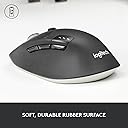
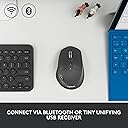
The Logitech M720 Triathlon is a versatile, multi-device wireless mouse engineered for professionals who demand endurance and efficiency. Featuring a 24-month battery life, 6 customizable buttons, and seamless switching between up to 3 computers via Bluetooth or Unifying Receiver, it delivers precision with a 1000 DPI optical sensor and ergonomic comfort. Compatible across major operating systems, it’s designed to keep pace with your dynamic workstyle while minimizing downtime.






| ASIN | B087Z6LSHW |
| Additional Features | Wireless |
| Antenna Location | Office |
| Are Batteries Included | Yes |
| Are Batteries Required | Yes |
| Battery Average Life | 24 months |
| Best Sellers Rank | #10 in Computer Mice |
| Brand | Logitech |
| Built-In Media | Logitech Unifying receiver, batteries |
| Button Quantity | 6 |
| Color | Black |
| Compatible Devices | Laptop |
| Connectivity Technology | Bluetooth, USB |
| Customer Reviews | 4.5 out of 5 stars 13,197 Reviews |
| EU Spare Part Availability Duration | 2 Years |
| Enclosure Material | Rubber |
| Hand Orientation | Right |
| Hardware Platform | Linux, Mac, PC |
| Item Dimensions L x W | 4.5"L x 2.9"W |
| Item Type Name | Wireless Mouse |
| Item Weight | 4.76 Ounces |
| Manufacturer | Logitech |
| Mfr Part Number | 910-006036 |
| Minimum Required Operating System Version | Windows 10 |
| Model Name | M720 Triathlon |
| Model Number | 910-006036 |
| Mouse Maximum Sensitivity | 1000 Dots per Inch |
| Movement Detection | Optical |
| Movement Detection Technology | Optical |
| Number of Batteries | 1 AA batteries required. (included) |
| Number of Buttons | 6 |
| Operating System | Windows 10, 11 or later, Linux +no software support legal footnote, Chrome OS, macOS 10.5 or later, iPadOS 13.4 or later, Android 5.0 or later |
| Power Source | Battery Powered |
| Range | 5.0 meters |
| Special Feature | Wireless |
| Style Name | M720 |
| Theme | Office |
| UPC | 097855162144 |
| Unit Count | 1.0 Count |
| Warranty Description | Manufacturer’s warranty can be requested from customer service. |
R**Y
Great quality for a great price.
I've had the M720 for over five years, used primarily for gaming with my desktop setup. I've purchased a second one to use with my new gaming laptop. I shopped for other options, and I didn't find anything I'd consider comparable for under $40. I recommend combing through the various features of this mouse presented in the listing, as it has a lot to offer. Below are six reasons I chose the M720 a second time, separated and numbered for convenience. 1) I've never had a connection issue with either the dongle or Bluetooth. Again, it's been over five years. 2) The battery life is amazing. I have to change the single AA battery once a year, MAYBE twice some years. The new mouse also came with a Duracell already inside, and a plastic tab to pull out, indicating that it is fresh. 3) The responsiveness of the cursor on-screen to the mouse's movement is accurate and feels natural. 4) I've never had need of the three side buttons, but it's a really nice feature. I very rarely accidentally press the side buttons, but when I do, it's quick and effortless to correct. 5) The finish is matte rubber, which to me looks much higher quality than shiny, hard plastic. The texture is smooth and soft, doesn't stick to your skin during long periods of use, and feels good. It's also worthy to note that the bottom of the mouse is no longer white like in the photos, it is now black to match the rest of the design. I like it better. 6) The shape, size, and weight of this mouse are perfect for me. The indentation on the left side holsters my thumb comfortably, while the high, rounded part on the top fits securely in my palm beneath my index and middle knuckles. It does not require much of a grip at all. My hand rests naturaly and operates the mouse with minimal effort. It's a great multi-functional choice, capable of supporting me through many hours, and is suitable for browsing, work, and gaming.
J**E
About as perfect as I have seen in 40 years of using nice
Overall: Everything is pretty great about this mouse: I have experienced no issues and have found no flaws with this mouse over the few months I have used it. Moreover, the ability to seamlessly use it across devices as awesome (simply press a single button to connect to each device.) Usage (main): software development (Visual Studio, Visio, etc) Portability (tested on MS only): Works seamlessly on/across three separate Windows (11) laptops. Ergonomic: Feels great in the hand. Scroll: Two different scroll settings worked flawlessly. Settings: numerous adjustments like dpi, paging, etc - flawless and robust
D**E
I love this mouse! Best mouse I've ever had.
This mouse is awesome! I did get a defective unit when I first bought it (the scroll wheel was malfunctioning), but Amazon replaced it and the replacement has been working perfectly for 11 months now. Having Bluetooth support for 3 devices is SO convenient. I currently have it paired with two different laptops and a Fire TV device, and can switch between all 3 devices at the touch of a button. (Amazing how useful a real mouse can be on a Fire TV device when using Android apps not designed for remote controls!) While this mouse comes with a USB dongle, I haven't needed it. I've spent over 30 years in IT and, of course, I've owned and used countless different mice over the years. Mechanical mice, Sun Microsystems optical mice that required a special mouse pad, optical mice, etc. The Logitech M720 is my favorite of them all, hands down. The size and shape fits my hand perfectly. (It might not work as well for those with small hands.) My only nitpick is that I find it way too easy to press the hidden thumb button by accident; I wish it required more force to activate. But I just mapped that button to do nothing, which solved the problem for me. One special note I'd like to add. One of the laptops I'm using with this mouse is my new MacBook Pro. I hate Apple's idea of "natural" scroll direction for a mouse scroll wheel; it's opposite from windows and feels completely non-intuitive to me. I certainly don't want to have it different from my Windows laptop. However, Apple's preferences settings are badly designed -- they don't allow you to set the scroll direction independently for the mouse and trackpad! On the trackpad, the "natural" scroll direction is good. On the mouse, it's bad. Apple forces you to choose both at the same time and doesn't provide the ability to use "natural" scroll direction on the trackpad and Windows-compatible on the mouse. However, Logitech's software FIXES this user interface disaster! After I installed the "Logitech Options" software for MacOS, it has its own UI and settings for the mouse, and defaults scroll direction to "standard" instead of "natural", while the trackpad continues to use "natural" scrolling. Now the mouse and trackpad both scroll the same direction on my MacBook and on my Windows laptop. Woohoo!
5**E
An upgrade from commodity mice
I own a number of Logitech mice, and have been buying them for many years, going back to the early 1990s. They've always been the best quality and design. I really do like this mouse, but it's not without a few issues. For one, the scroll wheel is too loose feeling, and not of the same quality as previous left/right/middle button scroll wheels on the other Logitech mice I've owned. The build quality of this feature really does need to be improved even if it means raising the price 20 bucks. The other issue is the forward/backward buttons on the side are too close to the device switcher button. This is a major design oversight, and what happens during usage is you'll accidently hit the switcher button, and deactivate the mouse! This is a button that should (and is on some models) be on the bottom of the mouse! This issue also kind of breaks the usability of the mouse for someone who doesn't understand it. They press the device switch, and the mouse just stops working. For someone like my mom with mild cognitive impairments, this is a deal breaker. This device switch can't be deactivated either. Logitech designers, please do put buttons like this near frequently used controls. Really, I don't understand how this feature got through design review. If design reviews are challenging to your company, please contact me, and I'll review it for free. The other issue isn't really with the mouse itself, it's the Logitech Options software on MacOS (Ventura). I have a 2017 MacBook Pro with the latest software. The Logitech Options mouse software frequently unloads or crashes after taking the laptop out of standby and has to be restarted. Even when it is running, it will lose the customer settings, scroll wheel settings, and mouse sensitivity settings. It's bad, and requires constant restarting or coaxing. Being software, I do hope Logitech fixes these bugs, but as of today, the software is junk and makes the mouse a pain to use, but is not a deal breaker. I use it anyway, and just deal with the software issues. The mouse itself works well in bluetooth mode, (even on an Apple) is fairly comfortable, and has decent ergonomics. I would prefer a larger mouse because my hands are large, but I guess that's my problem. Other than the wheel, the workmanship is good and I expect this mouse to last at least 3 years.. For the price, you really can't beat it. The left/right scroll on the scroll wheel is the best feature at this price point even if the wheel is loose. With all it's issues this device is still so much better than those cheap commodity mice. For the price, I'd recommend it. Just be warned, it's not going to be easy to use on a Mac, and the device switching button is going to get hit now and then deactivating the mouse.
A**N
Reliable Multi-Device Mouse
I absolutely love this mouse. It feels great in hand and works flawlessly every time - no connectivity drops or lag issues. The multi-device switching is super convenient for going between my laptop and desktop without constantly re-pairing. Battery life has been excellent, I barely think about charging it. Here's a bonus tip: I lost the original USB dongle but was able to buy a replacement Logitech Unifying receiver and re-pair it to this mouse without any issues. Saved me from having to buy a whole new mouse. The fact that you can easily replace the receiver if needed is a huge plus for longevity. Solid build quality, comfortable for all-day use, and the programmable buttons are handy once you set them up. Great value for a reliable wireless mouse that just works. Highly recommend if you need something dependable across multiple devices. looks great, feels great, and the tracking is spot on.
Q**R
Great product
Paired easily with my computer, works exactly as listed.
D**W
It's a keeper!
very nice mouse, quality that you can feel, not a lightweight cheap feel like others. tracks, scrolls, multi unit switchable. It's all here!
J**I
Amazing mouse with an amazing price
Scroll wheel feels a bit sluggish, but will not lower the rating due to the good pricing of this product! Also it is not too heavy and I prefer this over the MX Master 4!
L**O
Ergonomic, quality, and multi-device
I liked the ergonomy of this mouse, I bought it to use it for multiple devices, such as a Macbook and PC. It has worked well for macOS BigSur and Windows 11 using Bluetooth. It recognizes the right clicks in Mac, and it has a lateral button to display multiple screens on Windows or Mac. However, you cannot scroll to different desktops because it is not a gesture's mouse. Nevertheless, I like it because I switch between three computers: Personal, Consulting and full-time job by just pressing the multi-device button. It has a USB dongle in case you want to use it on another computer or with a docking station as well. If you use the dongle that consumes one of the multiple device configurations. Overall, I am satisfied with the purchase, I will post more about it in a few months to tell about the performance and to validate the battery life, as it's advertised.
B**L
Very nice
Very good material and design
A**O
Maravilloso mouse
Es un mouse muy completo, la batería le dura mucho, la calidad del materia es buena, tiene botones para personalizar y realizar ciertos comandos que son muy prácticos en el día, de igual manera es muy sencillo realizar el cambio de dispositivo hasta en tres equipos esto con un solo click. Excelente precisión, tienen un botón para realizar desplazamientos rápidos o lentos en la pantalla, lo cual se agradece al estar revisando documentos de muchas páginas.
R**Y
Worth it
Very noce mouse
A**N
Sometimes it takes a while to get used to a mouse
When I received this mouse, I was not really sure if I should keep it for my daily office work. I am glad I did. The mouse is a tad heavy, which works well on a mouse mat and glides effortlessly. This is a battery operated mouse and after using it for three weeks it still shows 100%, not many of my rechargeable mice have done this. Connects to three Bluetooth sources and one on the dongle, plenty for working in the office. I have big hands and I needed to take time to get used to this mouse. I think after about three days I was very happy to find the mouse beside my keyboard and since it has become a good buddy of my setup. Not only that, but I do game quite a bit and for games where I use a mouse it is more than adequate. I know it is a Logitech mouse and their options+ software really is annoying, but it keeps the firmware up to date. The scroll wheel is precise, but in free flow it does need some changing parameters here and there in Windows. Great mouse, hope to be able to enjoy it for a long time.
Trustpilot
2 months ago
2 weeks ago