Buy anything from 5,000+ international stores. One checkout price. No surprise fees. Join 2M+ shoppers on Desertcart.
Desertcart purchases this item on your behalf and handles shipping, customs, and support to Uruguay.
🚀 Elevate your office game with Epson’s wide-format wireless wizard!
The Epson WorkForce Pro WF-7820 is a versatile all-in-one inkjet printer designed for high-volume, wide-format printing up to 13" x 19". Featuring PrecisionCore Heat-Free Technology and DURABrite Ultra inks, it delivers fast, vibrant prints at 25 ppm black and 12 ppm color. With automatic duplexing, a 50-sheet ADF, 250-sheet paper capacity, and seamless wireless connectivity including Alexa voice control, it’s built to boost productivity in modern home offices and professional environments.


| ASIN | B08DXHQ9F5 |
| Additional Printer Functions | Copy, Fax |
| B&W Pages per Minute | 25 ppm |
| Best Sellers Rank | #2,627 in Office Products ( See Top 100 in Office Products ) #18 in Ink Tank Printers |
| Brand | Epson |
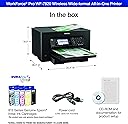
| Built-In Media | WorkForce Pro WF-7820 printer, quick setup guide, CD-ROM with drivers, power cord, 4x DURABrite Ultra Ink cartridges (1x Black ink cartridge and 3x color ink cartridges: 1x Cyan, 1x Magenta, 1x Yellow) |
| Color | Black |
| Color Depth | 24 bits_per_pixel |
| Color Pages per Minute | 12 ppm |
| Compatible Devices | PC, Smartphones |
| Connectivity Technology | Wireless |
| Control Method | Voice |
| Controller Type | Amazon Alexa, Vera |
| Customer Reviews | 3.8 out of 5 stars 1,585 Reviews |
| Display Type | LCD |
| Dual-sided printing | Yes |
| Duplex | Automatic |
| Global Trade Identification Number | 00010343924635, 00010343942516 |
| Hardware Interface | Ethernet, USB |
| Ink Color | Black |
| Item Dimensions D x W x H | 20.3"D x 38.4"W x 18"H |
| Item Type Name | Inkjet Printer |
| Item Weight | 39.9 Pounds |
| Manufacturer | Epson |
| Maximum Copy Resolution Black and White | 1200 x 1200 dpi |
| Maximum Copy Resolution Color | 1200 x 1200 dpi |
| Maximum Copy Speed Black and White | 40 ppm |
| Maximum Media Size | 13 x 19 inch |
| Maximum Print Resolution Black and White | 4800 dpi |
| Maximum Sheet Capacity | 250 |
| Maximum print Resolution Color | 5760 x 1440 |
| Model Name | Workforce Pro |
| Model Number | WF-7820 |
| Model Series | WorkForce Pro |
| Number of Trays | 1 |
| Other Special Features of the Product | Ethernet,Wireless |
| Output sheet capacity | 250 |
| Paper Size | 13 x 19 inch |
| Print media | Paper (plain) |
| Printer Connectivity Type | Wireless |
| Printer Output Type | Color |
| Printer Type | Inkjet |
| Printing Technology | Inkjet |
| Processor Count | 1 |
| Resolution | 4800 x 2400 |
| Scanner Type | Flatbed |
| Series Number | 7820 |
| Special Feature | Ethernet,Wireless |
| Specific Uses For Product | home office |
| Total Usb Ports | 1 |
| UPC | 010343950382 010343942516 010343924635 010343924512 |
| Unit Count | 1.0 Count |
| Warranty Description | 1-Year Limited |
| Warranty Type | limited warranty |
O**N
Nice printer
Printer work according to what I was expecting . Prints 🖨 great and fast / copy fast . Set up is easy but wifi and wireless connection is very tricky with phone set up . it may take some extra time . I look at videos on you tube for wifi & wireless set up . The APP there's a few App . I install the Epson smart App on my phone. Or the Epson iprint . The panel display will walk you through set up . also work great for me great display . I also like the lower tray went ready to print it comes out automatically and closes automatically went turning printer off .
A**R
I would rather deal with a dot matrix printer...
Let's start with the positive - scanner works fine. I am not a huge fan of having to use a separate program to initiate and scan but with that said, the scanner part of this "printer" is decent, fast, clear and has some functionality (two sided capabilities, rotation, etc.) that is appreciated. It would be nice if it would have OCR option so that you don't have to use a separate program to convert but that is just a convenience thing. Well wait, who doesn't like convenience when it seems like this could be a simple option?! Now for the negative part of this "printer". Issues: - 9 times out of 10 it will not print upon command and usually requires me to unplug, wait 30 seconds, plug and restart printing. Simply turning it off and on with the power button usually doesn't solve the problem hence the unplugging. And even unplugging sometimes doesn't do the trick. Don't worry, it will print the document randomly if you don't cancel the print job usually when you least expect it to and have a minor uptick in the heart rate. - Will not print in black and white (even if selecting the option to print only in B&W) once the color cartridges run out. Yes, it allows you maybe to do this a few times with a warning that it can only do that because the color is out however that is temporary and it will eventually not allow you to print in B&W until you replace the color. Completely ridiculous to me... - Speaking of color cartridges, these do not last long. I rarely print in color however I have had this printer for less than a year and have replaced once and now have to replace again. Also finding that these color cartridges are hard to find locally at like walmart or target and when in a pinch, that is bad. So as stated above, when you color goes out, need just a straight B&W print job and can't find the cartridges around town - you are S.O.L. If you are wanting a multi-use "printer" that just scans - this is a decent option. If you are wanting something more than a scanner that prints ink on paper, do not put this in your cart and move on.
R**Y
incredible wide format printer
I had a WF 4530 that I bought over 10 years ago - that printer was a tank and the ability to scan was HUGE. That printer recently died on me - over a decade with inkjet - with no issues despite long stretches of no use - I can't complain one bit. I bought the 7820 WF - it's an upgrade in every aspect. Quiet. Fast. Great print quality. Edge to edge printing. Wide format (if/when I need it). I've added a photo to the review of a printout I did using HP photo paper (4x6) to give you an idea of the quality - for home printed inkjet it's (IMO) top of the scale. One note: Don't use windows 10 or windows 11 drivers - download and install the drivers from Epson - they give you scan to pdf, scan to your computer, and the printout resolution from the windows drivers is horrible - the epson drivers are really needed.
M**Y
WAS a good printer
I was excited to purchase a printer that could print LARGE prints for my small business. After 2 months of using this printer, I had to find a company that sold just the replacement chips. My cartridges would be halfway full of ink but printer would throw a code saying ink was out. Now after using this printer for less than 6 months, it will not read any new chips (on brand new cartridges even). When I purchased it on July 16th for under $200, I thought it was a great deal. Now I know they were trying to get rid of their junk printers!!
J**C
Large-format printer, fairly reliable and quick but so-so on ink usage
Large-format scanner/printer. Accepts paper from the front (main) cassette OR through a back paper tray if you need to print something on different paper. Individual cartridges for ink. Not particularly economical on ink (and the ink of course is expensive) but the cartridges are individual (one each red, yellow, blue and black) and after a couple years of use, I've NEVER had to clean the print heads - printing is always clean and clear. Has had some issues connecting to wifi so have found the cable connection to the computer is best/more reliable. It's hard to find an absolutely perfect printer but this one comes close. I use it mostly for large scanning/printing as it goes up to 11 x 17 inches. One drawback to note is that after only a short time, the document feeder pulls the documents through crookedly, so scans/prints from the document feeder do NOT come out straight (for both single and double-sided scans.) This model is a few years old so there may be more recent Epson models on the market as of 2026.
E**7
Reliable, Fast, and Excellent Print Quality — A Great All-Around Printer
I’m extremely happy with this printer and would highly recommend it to anyone looking for a reliable, high-quality device. Setup was quick and straightforward, and it connected seamlessly to both my Wi-Fi and mobile devices. Print quality is excellent—text is crisp, colors are vibrant, and photos come out looking professional. It’s also impressively fast and much quieter than printers I’ve owned in the past. I appreciate the user-friendly interface and the efficient ink usage, which helps keep long-term costs down. Overall, this printer delivers great performance, convenience, and value, making it a fantastic addition to my home office.
D**W
Epson quality has sunk into the nameless abyss
Really shocked that this is how bad Epson products have gotten. This MFC isn't even comparable to models that came out 20 years ago. First off the scanner is extremely poor quality. My Brother MFC from 2009 can pick up light blues and reds and brightness of the paper better then this Epson can. Which is just sad. Very poor color gambit for the scanner, it would be better to take photos with your phone and send them to the printer then use the scanner. I scan in watercolors and ink paintings/sketches and had to pull out my decade old scanner rather then use this one. Then there is the quality of the prints, which is mediocre at best. Colors don't reproduce well and you can't adjust the profile enough to get it to print correctly. Then there is the insane amount of ink this thing uses. The amount of pages you can print per cartridge is a complete lie, think half if not a 3rd of the page count unless you are only printing on a 5.5x4 sheets of paper. Cartridges are overpriced and they can not be refilled, Epson installed a one use only chip in each of their cartridges and even if it had only used half the ink in the cartridge it won't print with it anymore. They also force updates that will deactivate any cartridge you haven't replaced in a while even if it is a genuine Epson cartridge. This printer's only purpose is to be a money pit for ink cartridges you don't actually need. Never buy Epson, they have become a dishonest unethical company with a shotty product line. *update, Epson gets worst. Firmware got updated by accident. Apparently now no cartridges work with printer, even bought from Epson. Everyone is unrecognizable by the printer. Epson has gone overboard on making their printers n compatible with remanufactured cartridges that they decided to make even their own cartridges no longer work. Turning the printer into a 50lb paper weight. NEVER BUY AN EPSON PRODUCT!!!!
T**L
All printer suck this one sucks less. :). Love it.
If you ever saw office space the movie there is a scene where he get mad at his printer and we all relate because printers have a lot of moving parts that can go bad. I have not got or set up a printer for many years. So it was a tad hard but honestly not really. It takes time because it does so much. And I wanted to rush but they truly did everything they could to baby sit us. Google the printer type with the word download. That is what I did and you come to a page you find and down load set up software. I set it up with usb. But also wireless. A tad tricky but only because I was not following directions. It takes some time to find all the packing tape and that’s fine. It’s bigger than most printers. So when I was looking for printers they were 400 or 1-2 thousand. And then this one less than two hundred. In business two hundred is like disposable. At home it’s a nice dinner. So I am impressed for the money what ya get. Personally. The screen is huge. And clear. And you can read it from many angles. It’s animated. Touch. It’s flexible you can tilt it. Better than the old brother with with a thumbnail. I also set it up on my phone. It was not hat hard and printed a photo and it printed color edge to edge and it’s on standard paper. Look nice. And like a photo in a magazine. Can’t wait to print something 13 by 19. We own a venue restaurant and do shows can’t wait to make show posters. I’m going to buy one for home but want to see what printing cost is.
C**S
Muy efectiva, buena calidad
Es una máquina muy efectiva y de gran desempeño
A**R
Clearly a very high quality printer
Honestly amazing printer for the price, couldn't be happier with the purchase. Keep in mind - in 2026 a LOT of printers are actually scams, $79.99 printers with $150 ink cartridges and that sort of thing. However, after trying out the Epson EcoTank for a couple of years, this brand has won me back. The cartridges cost on this model are justified in my opinion - not super expensive, but VERY high quality pigment-type ink that results in literally print shop quality prints in wide format which is exactly what I needed. Setup was a breeze, printer worked flawlessly within 5 minutes of putting it on my desk, and I'm honestly just blown away by the quality of the product right down to the smallest detail. Epson really hit it out of the ballpark with this one.
A**A
Ótima Qualidade
Indico a compra sem pensar. Melhor custo benefício não tem.
J**A
Boa multifuncional
Boa qualidade de impressão, velocidade, entre outras funcionalidades. O inconveniente é o uso de cartucho, pois torna-se inviável seu uso pelo custo, salvo a adaptação de bulk ink.
T**L
paper stopped feeding
This started out as a great printer then now it won't take paper from the front only in the back. Also won't update anything.
Trustpilot
2 weeks ago
5 days ago