Desertcart purchases this item on your behalf and handles shipping, customs, and support to Uruguay.
🚀 Elevate your perspective — fly light, shoot sharp, and never miss a moment!
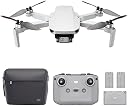
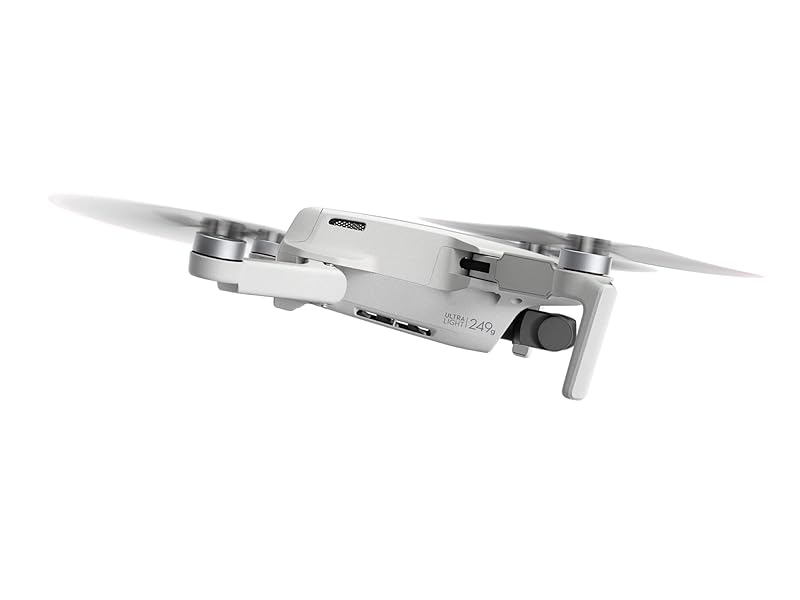
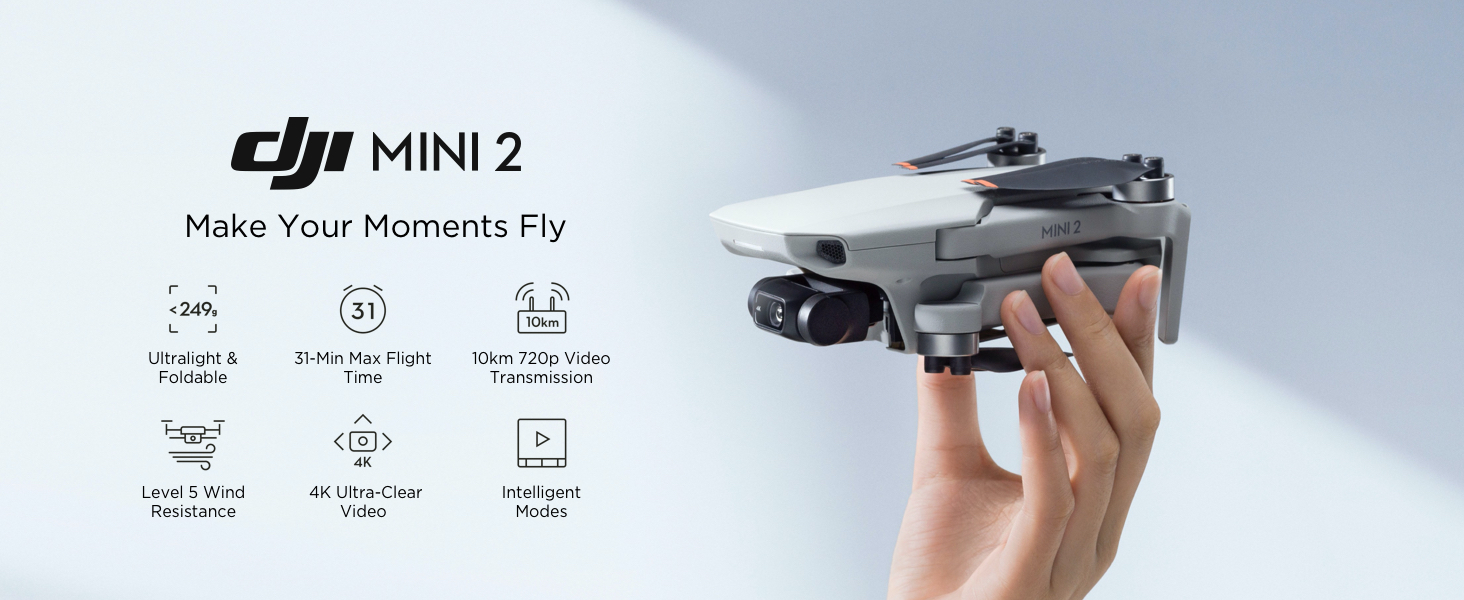
The DJI Mini 2 Fly More Combo is an ultralight, foldable drone weighing just 249g, equipped with a 4K camera and 3-axis gimbal for stable, stunning footage. It offers up to 31 minutes of flight time, OcuSync 2.0 technology for 10km HD video transmission, and intelligent QuickShot modes for effortless professional-quality videos. Perfect for beginners and seasoned flyers alike, this combo includes extra batteries, spare parts, and a carrying case to keep you airborne longer and ready for any adventure.


| ASIN | B08JGX61H7 |
| Age Range (Description) | Adult |
| Age Range Description | Adult |
| Battery Cell Composition | Lithium Polymer |
| Best Sellers Rank | #360 in Toys & Games ( See Top 100 in Toys & Games ) #1 in Hobby RC Quadcopters & Multirotors |
| Brand | DJI |
| Brand Name | DJI |
| Color | Gray |
| Connectivity Technology | USB |
| Control Type | remote |
| Customer Reviews | 4.7 out of 5 stars 14,738 Reviews |
| Effective Still Resolution | 12 mp |
| Included Components | Aircraft x 1, DJI Mavic Mini 2 Intelligent Flight Battery × 3, Remote Controller x 1, Spare Propellers (Pair) ×3, Type-C Cable × 1 |
| Item Dimensions L x W x H | 6.25"L x 7.99"W x 2.2"H |
| Item Type Name | drone |
| Item Weight | 8.78 ounces |
| Manufacturer | DJI |
| Maximum Range | 4000 meters |
| Media Type | VideoTransmission |
| Model Name | DJI Mini 2 |
| Model Number | CP.MA.00000306.01 |
| Number of Items | 1 |
| Operating Temperature | 40 °C |
| Optical Sensor Technology | CMOS |
| Part Number | CP.MA.00000306.01 |
| Remote Control Technology | OcuSync 2.0 |
| Skill Level | Beginner |
| Supported Image Format | DNG, JPEG, RAW |
| UPC | 190021030787 190021030817 |
| Unit Count | 1 Count |
| Video Capture Format | MP4 |
| Video Capture Resolution | 4K HD |
| Video Output Resolution | 4K |
| Warranty Description | DJI Warranty Applies |
| Wireless Communication Technology | Ocusync 2.0 |
R**M
Fun and easy to use. Very reliable.
Love this drone. The pictures are good quality. Easy to fly and battery lasts well. Returns to its spot easily. Stable and suitable for beginners. Controls are easy to get the hang of. Very useful.
B**B
Does everything that you would want unless you are a pro, and then it will do most of that as well
Wanted to get a drone for myself since I am retiring soon and want to take videos of my Kites. I fly really big kites and I thought it would be great to film them in action. I started looking for drones online and somehow, every session looking for them always stopped DJI. Best this, best that is what most sites said about the drone. (More on that later), But all of the reviews only had great things about DJI drones. The mini 2 has a 4K camera as well as 1080. You can change back and forth very easy. The basic model is $499 and I thought that this was a little steep. But I do remember buying ones about $100 dollars in the past and they all lasted about 30 minutes before it attached itself to a tree or wanted to be set free and just flew away. There was an option of getting the combo kit for $599 which is even more. But with the homework, I noted that I would save money by buying the combo kit. You get two more batteries, a charger that holds three batteries at once. You also get a rather sharp looking case as well. Also a few more spare props. Just two batteries and the charger were $150 online and this did not include the case so I bought the bullet and ordered the combo kit. It only took a day to get here. It is a good thing that I watched the videos of the Mini2 online to include the first-time setup and flying videos. I would recommend that you view these before flying, unless $600 is no issue to you. It is not hard to fly but unless you are already a drone pilot, watch the vids. The next day, I took my drone to the fairgrounds out for the first spin. Getting it into the air is really easy since I watched the vids. Could have done without them but they really help. I flew two batteries of flying time which about an hour plus a few minutes. It flies high and you will lose it from sight easy at about 60 meters out. But there is a map on the app and you can figure out which way it is going and turn it around if need be. One of the best features of this drone is the return to home function. It will come home if you push the button or it will come home when the battery is getting low. I used this function and it came with about three inches of where it took off from. Went out on two other days and used all three batteries. Was getting really good at flying it by now. Good thing about having the combo kit is that you can charge the batteries and the controller at the same time with different cords. Now, let’s get back to that Best this and best that part of the story. The wife and I went down to a local stream to look at the salmon coming upstream. After all of the other people left, I put the drone in the air. Was getting great footage with the 4K video when the wife started asking me a question and I turned to talk to her and was not watching what I was doing. I must have moved the drone backwards and it hit a very small climb and then went down hard in the water. Must to have wanted to migrate with the salmon. I was instantly upset and put down the controller and figured out how to get myself in the water. When I got to the drone the red light was still on when I removed it from the water. I immediately removed the battery and came back to shore. The drone was in water that was 34 inches deep and it was there almost two minutes. I live in Washington state and the water was COLD. I dried the unit for 24 hours with low heat. Today when I came home from work, I told the wife it was time to see what happens. I started the controller and then the drone per the instructions. My screen said that I had a battery fault. I got sick to my stomach and the shut off the drone and inserted another battery. Ok, time to see again if it would fly. All pre- flight checks were sat and then I tried to lift off. Next thing I know, my little drone was flying at my head level saying hi. All items checked out great. I think that the best rating you can give is a 5 so I give it a 10. There are a lot more features on this drone that I did not talk about. I have read reviews of pros saying that there are not enough features with the video, but it sure works for me. I am not going to be selling movies to any company anytime soon. I have not found any issues with the unit. $600 dollars in the water for a few minutes due to myself and she was perfectly fine. You can assure that I will always buy DJI from here on. Never saw the words “Water Proof” on the box. This drone is packed with great features for us average guys/gals going out to record things we like, Buy it, you will love it.
D**L
First impression compared to the original Mavic Mini
Update: I bought the Mini 3 Pro which I thought would be an upgrade in all aspects. While I love the Mini 3's new obstacle avoidance and built-in display on the remote (no more phone calls interfering with flights), I found the range to be slightly worse than the Mini 2 while navigating the path in this video. Also, the Mini 2 has a nicer form factor in all-around, the way the body is shaped, the battery latch, etc. I ended up returning the Mini 3 Pro because of the poor signal range, but I will buy it again if they fix this issue and make the range better than the Mini 2. Mini 2 Review: Rather than list all the new features, here are the practical differences that I noticed the most compared to the original Mavic Mini. I took this out on a very windy day with gusts >30mph. In this video, the Mini 2 holds stable in high wind. Most importantly, the range is better with OccuSync 2.0. I use this to monitor abandoned railroad tracks. The original Mini 1 would lose video reception after about 1200 feet following the tracks, hovering low between dense trees. The new Mini 2 reaches about 40% further in this dense environment, only losing the signal after it is blocked by a concrete bridge. The range difference is most dramatic, however, while flying higher with clear line of sight, where the distance is supposed to be more than double (10km is much further than I would want to test). There are 3rd party clip-on Yagi signal boosters that may extend the range even more. After the increased range, my next favorite new feature is the much improved remote controller. The Mini 1 has a bad design where larger phones, such as the iPhone Plus or Max series, do not fit on the mount, and the cable doesn't reach with a phone case. The Mini 2 phone mount is so much better! The antenna also functions as a spring clip so the phone sits on top in a better viewing position, and the larger phones easily fit. Another wonderful design improvement is the cable storage inside the antenna compartment, so it's easy to grab-and-go just the controller and aircraft without having to separately carry the little cable. The controller now a return to home button, and cine / normal / sport selector switch right on the controller. This is nice as it reduces the panic when I'm trying to locate the return to home on my phone screen when someone is trying to call me on my iPhone. The other new feature I love is the ability to do 4K video, wide-angle, 180°, and sphere panoramas (vs. 2.7K on the Mini 1). It's hair-raising to see the video results play back on the computer. It feels like cinematography quality video with a cute little thing that fits in the palm of your hand. Looking closely at the two side-by-side, both models are identical in physical form, so the the same physical accessories designed for the Mini 1, such as the propeller guard will work on the Mini 2. I was curious about the weight difference so I weighed them on a precision lab scale. Mini 1 without battery: 5.27 oz. Mini 2 without battery: 5.56 oz. Mini 1 with battery: 8.68 oz. Mini 2 with battery: 8.37 oz. DJI made up for the slightly increased weight of the fancy new internals with a lighter battery design. Is there anything I don't like about the updated model? Just one very minor thing -- the kit comes with a soft padded case that is similar to a camera bag or binocular bag with a shoulder strap. I much prefer the semi-hard case that came with my original Mavic Mini Fly More Combo. The gray semi-hard case looks nicer, is easier to pack in a hurry, and offers better protection. However not a big deal, as many 3rd party accessories are available. Overall I HIGHLY RECOMMEND the Mini 2, even if you already have the original Mini. (Save some time, stop reading a million reviews, and click the BUY button). Also, this would make an amazing gift for "someone who already has everything" if they haven't tried drones before. It's super easy to fly because of the self-correcting stabilization (just before this review I accidentally hit a tree branch and it recovered itself after doing a flip, and came back home -- yay!)
J**F
Easy to fly and a fantastic camera
I've loved remote control vehicles for most of my life; back in the 80's my dad got me a buggy that would go about 20 mph on asphalt and an old Futaba radio with the crystals you had to swap out. I had an absolute blast with that thing. Over the years I had gas and electric cars and trucks and the little indoor helis and quads. But I never really got good at the flyers. I'd carefully fly them around inside the house, but they were generally too light to use outside so I could never really practice effectively. And if I wanted to turn off the stability controls and go full ham, I'd lose control almost immediately. Well, I still would like to actually be good at flying those types of devices. The DJI Mini 2 won't get me there, but I'm willing to bet it will help. You can't turn off all of the helper electronics and start doing flips like you can with the sport quads, but that's not really the point. The point is the camera, and the camera is fantastic. I'm going to start splitting this review up into sections because I can already feel like it's going to be a long one. === The Camera === This isn't one of those cheap no-name drones with a terrible camera that gives you a dark, laggy, choppy view until it blacks out at 60 feet away. To be honest, I'm not even sure how they do it, but I get full signal strength and clear 720p transmission well beyond where I start getting nervous and bring it back to me. You can set all sorts of options, including manually adjusting the exposure in flight or leaving it on automatic, setting it to 4:3 or 16:9 (the former gives you the full 12MP image, while the latter fills your screen better but you lose some pixels on the top and bottom), and you can shoot stills in JPG or JPG+RAW. Video can be shot at 1080p, 2.7K, or 4K. While flying, your recordings and photos will show up on your phone immediately, but in preview resolutions. I'm not sure what the still photo size is, but the videos are 720p (so the photos may be 1280x720 depending on your aspect ratio, but I don't remember off the top of my head). This allows you to view and share immediately. The full resolution images and videos are located on the micro SD card, so you can pop that into your computer to see everything in its full glory. You can also create a wi-fi connection to the drone to transfer the full resolution stuff directly to your phone if you don't want to wait. I only had to set this up once, and it seems to be able to do the transfers every time now, without any extra interaction from me (other than telling it to start the transfer). This alone is fantastic to me, I'm so used to devices that require you to drop your wi-fi connection in your phone settings, choose the new device, connect, do your thing, then disconnect and reconnect to your original wi-fi connection. This is all done behind the scenes seamlessly after initial setup on the Mini 2. What a breath of fresh air! === Basic Flying === This is the ultimate in beginner-friendly flying. You can't (accidentally or otherwise) turn off the host of helper sensors keeping the craft stable and safe. It limits your movements to ensure you don't end up upside-down or flailing helplessly out of control. Releasing the sticks quickly brings it to a stable hover. The three main flying modes (Cine, Normal, and Sport) are all fully aided by sensors, the only difference is how quickly it will allow you to move and change direction. Someone brand new to flying might want to start in Cine mode, as it is the most forgiving and the slowest moving. All three of these modes have separate settings for how fast and smooth the camera gimbal works, and these settings can be modified for each mode. === Batteries === Since I got the Fly More package, I got three batteries. I haven't really tested them for real-world flight time yet, but that will naturally change a lot based on your flying style, the amount of work it needs to do to counteract wind, etc. They last a good amount of time, though - nothing like the little sport quad I have that gets about 6 minutes per battery. The controller has its own battery, which as far as I can tell is not replaceable. It's charged via USB-C, and has the option (which you enable in the DJI app on your phone) to charge your phone while it's connected. The Fly More package includes a charger that holds all three batteries and charges them in sequence via USB-C. I found this interesting because most multi-battery chargers charge everything equally in parallel, but of course for something like this you'd want all of the power charging one battery first so it gets to 100% quicker, and the others can charge while you're using the full one. === DJI Fly (the phone app) === Wow. I'm speechless. The world is filled with absolute garbage apps. Everything has an app now. My grill even has an app. And the vast majority of things that have apps have garbage apps that might get updated for the first month or two after product release, but then are allowed to languish and die with none of the bugs ever worked out, and no support ever offered. It's one of the worst things about connected devices. DJI Fly is gorgeous. It's stable. It's usable. It's all of the things that every good app should be. It shows a live view of the camera along with TONS of useful information that is somehow always there but never in my way. Pre-flight status information tells you when it's a good idea to take off (for example, it will stop you from taking off until you have a good GPS lock, unless you choose to override and take off anyway). Your photo and video options are all clustered on the right side, and the top right shows you things like the battery charge remaining, approximate flight time remaining, signal strength to the controller, GPS lock, etc. The bottom left shows things like your current speed horizontally and vertically, it's current height off the ground, and the drone's current ground distance from its home point. Tapping the map icon on the bottom left brings up a detailed map (with the camera live view going into the corner in an overlay window), and the map shows the path that the drone has taken since launch, as well as its current orientation, your current position, and the home point position. If you lose track of where your drone is and the camera imagery isn't helping, you can just use the map to point your drone towards you and start flying back. If you don't want to take your hands off the controls, you can set the Function button on the remote to quickly swap between map mode and camera mode. The DJI Fly app has integrated maps to show you where there are restricted airspaces around you. You can tap on a restricted airspace to see what the restrictions are. The app will actively prohibit you from getting into trouble by inadvertently entering a no-fly zone without authorization. It will even warn you as you get closer to a restricted area without entering (where you can still legally fly, but you're approaching restricted airspace). Distance and altitude limitations are easily set in the app. The altitude limitation is particularly useful since you can't legally fly above 400 feet without a waiver in the United States. I have my ceiling set to 400 feet, and when I hit it the drone stops climbing and I get a nice lady in the app telling me I've reached maximum altitude. === Controller === The new controller for the Mini 2 is excellent. It has a nice beefy battery that can optionally charge your phone while it's connected and still have plenty of battery life for a number of flying sessions. It has a Function button that can be mapped to several different functions in the app. Two functions actually, because you can set it to do something when clicked, and another thing when double-clicked. Camera movement is controlled with a wheel under your left finger, the button to start/stop recording (or to take a picture) is under your right finger, and another button on the right switches between still and video modes. While I've never tried it myself, it is possible to use the controller to pilot the drone without a phone attached. Obviously you won't get a camera display, and your flight is limited to something like 60 feet from you in any direction, but it can be done. === Conclusion === As someone who has been into photography for over 25 years now, I've always wanted a drone with a camera. But I never thought I'd be able to get one at this quality for this price. I'm completely blown away. If I continue to use and enjoy it for a while, I do plan to upgrade to something a little more feature-rich, like the Mavic Air 2 (or whatever version is out at the time). But this is the perfect drone to start with, to decide if I will ever need to move up and spend the extra money.
A**B
Outstanding quad copter with great features for the price.
I wanted to get a below 249 gram quad copter but not because of the no-register rule. Instead I want it for portability and less intimidating to public when in use. I have had it for about a month and already DJI has issued 3 Firmware addressing several glitchs and adding new features. I find that as soon as owners note issues DJI very quickly corrects them or adds new features as owners suggest them. That shows excellent support of their products....something other brands can aspire to. Due to cost price point there will be a couple of features left out that higher priced models might have. In this case they left out object avoidance sensors other than straight down. I don't find that an issue at all. The MINI 2 is an upgrade over the original MINI. The main upgrade are Ocusynch 2.0 connection, 4k video, and adding DNG (RAW video to JPG. Those are all big upgrades. .Ocusnych is a much more stable connection, 4K video is highly desirable and being able to shoot RAW images gives a lot of more control over still images in post processing. Once a couple of minor issues were tweaked with firmware updates it has proven to be very stable in flight, good connectivity, and image quality is very good. For the average newbie, this is currently best starter UAV available and easily competing against drones at twice the price. It is pretty easy to fly also. PLEASE though....if you get any drone read all the rules about flying from the FAA. The rules have just been proposed for additional rules Jan 1st 2021. While currently the weight of this UAV is under the 249 gram requirement for registration, I suspect that will soon change. I also recommend that even though it isn't required to register it now, that you do register it to show the FAA that you are a responsible pilot. Owners that flaunt the rules and fly in violation will cause the FAA to get much more restrictive if they see a lack of safety by pilots. You should also know that if you violate the FAA rules like flying over crowds, over traffic, in restricted air space, out of Line Of Sight, flying too high, etc. you are risking huge fines and jail time and yes....it happens. This is not to scare you off but encourage you to know the rules and follow them.
L**E
Long Awaited Upgrade
I bought the Mavic Mini Fly More Combo over one year ago. It has been one of the best under 250 grams photography drones I have flown. DJI has done a nice upgrade job as the Mavic Mini 2 has everything I was hoping for in the original Mavic Mini. Starting with what I like best (in order of priorities) of the Mavic Mini 2 which prompted me to upgrade : - 4K video at 30 fps. This put us on par as other popular 4K drones nowadays. It also supports 1080p at 60 fps for slow motion. The video is stunning with better saturation than the Mavic Mini. - The availability of OcuSync 2.0 which provides much better video transmission (and distance : 10 km vs 4 km) as compared to the Mavic Mini’s Wifi system. It also has less interference from areas with heavy Wifi signals. - Improved wind resistance (about 24 mph / sec on the Mavic Mini 2 vs 18 mph on the Mavic Mini) for more stabile flights. No more worries about taking it out in the windy weather. - Improved features for photography including digital zoom (2X zoom for 2.7K / 4K and 4X zoom for 1080p), panorama, raw format, and auto exposure bracketing. - Faster speed with the new improved motors for those who want to use it for filming sporting events. The above improvements alone have made paying $100 extra for the Mavic Mini 2 fly more combo over the Mavic Mini worth every pennies. Here are some of the other features worth mentioning : - The Mavic Mini 2’s controller is similar to the one used in Mavic Air 2. It has better ergonomic for the hands and eyes (phone is mounted on top of the controller instead of the bottom). - The charging unit can also be used as a battery pack with a standard USB port for charging other devices. This battery charger can only charge one battery at a time. I would recommend to use the charger from the DJI package as it does charge faster as compared to other standard USB power adapters. - Although DJI stated that the Mavic Mini’s batteries are not compatible to the Mavic Mini 2’s. The Mavic Mini’s batteries do work on the Mavic Mini 2. So use them at your discretion. - The Mavic mini 2 uses the same DJI Fly App so there are no worries about compatibility with the existing phones for those who are already using the Mavic Mini. Note : existing Mavic Mini users need to install the latest DJI Fly App by using the QR code provided - The carrying case is similar to those camera bags with a shoulder strap. It is like carrying a flying camera in a small bag. It also allows us to carry extra items as compared to the molded carrying case in the Mavic mini. However, it might not provide the same kind of protection as compared to a molded carrying case. Some Caveats - The Mavic Mini 2 Fly more package does not come with prop guards which the Mavic Mini Fly more combo provides. However, the good news is that the prop guards for the Mavic Mini are compatible with the Mavic Mini 2. - The props’ orange markings do not identify the prop’s spin direction which requires extra care when change / replacing the props. If you are still thinking about getting a cheaper 4K drones from other brands, I would suggest to invest a bit more to get the Mavic Mini 2 for much better features, reliability, and fun.
M**O
Great drone, software could be much better
First, let's cover the hardware. DJI has clearly put a lot of thought and engineering into making a compact, flyable drone that's easily transportable. Fit and finish on the various components is excellent, and the fact that the drone folds into a compact package for transport makes taking it along with you a snap. No complaints at all in those areas. The fly more combo is a "must have" in my opinion, as it'll help you keep flying rather than spending too much of your time waiting for batteries to charge, or having to order extra propeller blades in the event of a minor crash. The software, however, is another story. Does it work well? Yes. It's really a pleasure for the flying aspects. It's dead easy for a beginner (that was both the wife and I) to successfully take off, fly the drone successfully, and land. I had bought it for her as a gift, and we're both new to drone flying, so that was a real plus, and quite frankly, the place where the software was most useful. What is not very useful is the lack of documentation that came with the drone regarding that software. There's little in the way of additional information that proved immediately useful. Many terms aren't clearly defined, as regards how they are used in the software, and it took a considerable amount of extra Internet research to figure out what was meant. In addition, the Android version of the software appears to have been adapted from what was originally developed for use on Apple's IOS devices like iPhones and iPads. On Android, using a Pixel 4 as the controller display, the single most annoying aspect was lack of a clearly indicated means of leaving the app. Add to that the fact that it's unclear just what certain software controls are meant to do, at all, and frustration levels quickly mount. Especially difficult was attempting to determine just where photos and videos are being stored. Are they stored on the internal memory or the micro SD card? Can't really tell. How does one move information from one to the other? How do you get the drone to download to a PC via the USB cable? And worse, considering the entire purpose of the software beyond flying is to be able to retrieve footage you've recorded in flight, how do you successfully get all your photos and videos onto the SD card in order to be able to just copy it from the micro SD to a computer of some sort? That particular adventure took another couple of hours of Internet search, watching instructional videos, and trial-and-horror. And no, that's NOT a misspelling of "error". So... What should one expect? First, plan on spending a lot of time figuring out software for virtually every aspect of use with the exception of actually flying the drone. I'd recommend you do a lot of reading about it on the Internet (and watching videos to see what it looks like in practice). Second, DJI should seriously evaluate their UI. Far too much has been crammed into a single app. And far too little is provided in terms of documentation of the steps to accomplish many of the non-flying functions. Third, DJI should recognize that not all users are familiar with (or even like) the IOS sort of approach to software design. Fourth, the software should make retrieving one's photos and video footage the absolute clearest and easiest beyond that portion of the app used in flying. I think it would benefit all users if the portion of the app that handles files and file transfers was made separate from that used in configuring or flying the aircraft. Fifth, why not make ALL the data the drone is collecting easily available for use by the purchaser? I have seen reference to flight data, for example, being recorded by the aircraft, but have not found a ready means of downloading it. It would be nice to be able to analyze that data using commonly available software tools to see just how well, for example, what one thought one flew matches with what the flight actually was. While we've got lots of criticism of the app (just in case you hadn't noticed already), neither of us are displeased with the purchase. The Mavic Mini 2 flies easily and well, and it really is fun to use. And, once one gets over the completely unnecessary software hurdles, it's not all that difficult to remember what to do the next time one is attempting to retrieve those files. If you're interested in getting into drone flying, I'd recommend having a look at this one. It's not terribly expensive, and you'll quickly be up and flying.
S**H
I would buy again.
There has been so much written on these I almost don't want to write anything but I think reviews are important. Yes it is worth every dollar. I bought a phantom 2 in 2015 and it was great. This new one pack so much tech in there that I am blow away. I first pulled it out of the box and it was so small I was like OMG is this a joke? What a turd. I was so wrong. Once you get it in the air it is super stable and handles like a dream. I am blown away how wrong my first impression was. I am used to bigger drones and more meat on the stick so to speak. This thing it cool. Only wish I could hook up googles to it but there in no easy way. That feature is for the more expensive models. So I played with it and at 300 feet you cant really here it so anyone who doesn't look up wont know it is there. I live in a rural pro gun area and people will shoot at it. I don't blame them because i wouldn't want to be spied on but all don't linger over anyone's property. I was over my own house at 100 feet and someone walked out in the street to see what I was doing. Fair enough. I always told people don't worry about a drone at high altitude because the zooms suck. This one is spooky how nice it will digitally zoom in if you have it in 4k mode. I was over a house under construction and zoomed in and was like holy smokes. It is very clear. Sadly this could be used to spy on you pretty darn good if you are under 100 feet. The key to this is fly respectfully. I was up at 200 feet at night and caught a really cool rocket launch but right away saw an issue. The lens will not tilt up and the rocket flew right out of view pretty quick. I got a good shot of the lift off and some smoke coming from the rocket but I was over 10 miles away at night so it wasn't the best. I would buy this in a heartbeat if I lost it because it is so cool. I will be buying the big brother Mavic 3 when it comes out in 2021.
C**D
Fantastic and easy to use drone. (edit 1 year later: Works in winter! BUY THE WARRENTY)
This is my review after 4hrs of use over 2 days. Got quoted over $1200 for aerial photography. Figured I would buy this and try it out and worse case scenario sell it for $100 less used. Quick conclusion - it is awesome! Hardware: Fit and finish of everything is fantastic although the electric motors are fully exposed with no dust caps but not sure if a long term issue. Controller pairs perfectly to my old iPhone 6S and old tablets too. Using an iPad as a screen makes flying even better although balancing the larger tablet means you need to be sitting down. Impressed that kit includes cables for attaching to miniUSB, lightning and USB-C. 3 batteries are a must and the nice thing is if you start charging immediately after draining your first battery you can get to about 75% charge on it by the time you have drained your 3rd battery (you can charge using the 3 battery charger by attaching to a external battery bank - I have a $20 20000mAH one from Costco that works). Usage: I have been playing video games for more than 40 years so the controller is very intuitive EXCEPT the wheel to control pitch of the camera gimbal. This stupid wheel is REVERSED. Down should always be push while up is pull. In this case the you pull the wheel to the left to go down and it is totally unnatural and I constantly screw up my videos. Extra frustrating because you can totally customize the 2 joysticks in the Fly app but they do not offer an option for the pitch of the gimbal. That aside, it flies awesome. Takeoff is automatic, you just press and hold the takeoff button on your screen. Landing you just hold the control stick down. You have 3 flying modes (cine, normal, sport) and you can customize them all (except gimbal pitch!) in the DJI fly app. Use normal to fly around to location (sport seems to eat batteries way faster) then switch to cine to film. It holds up to wind surprisingly well for only being 250g - it was blowing pretty good and other than reduced battery life I saw no movement. I have seen some online videos with problems flying low over water so I have avoided doing that. Camera/video is fantastic. I shoot with a 7dmkii and Olympus E-M5 II both with excellent lenses and this drone is very comparable. The stabilization and 4k video is amazing. The auto settings are very good but you can also have manual control for white balance, iso and shutter speeds. You can shoot your photos in JPG or RAW+JPG. Video however has no options for d-log or other codecs. Attached is a photo that is a JPG with no post-processing. In conclusion: Battery life is as published, around 30 min each. Drone is super stable and easy to fly. If you avoid running into things I do not see how you can crash it. Photo and video are fantastic. DJI fly app is robust, crash free however missing some options that would take the experience from 4* to 5*+. Recommended accessories: Sunshade - am trialing some will respond back. Not a huge problem but when shooting certain angles during sunset and sunrise there is some flare. ND filters - apparently for smoothest video you want shutter speed at 2x your frame rate. For 30 FPS you want 1/60. To do this with the f2.8 lens you need ND filters. Am trialing some and will respond back on the actual experience. Longer connection cable for using with tablets. Am trialing some will respond back Landing pad. I just bought a $6.99 24" folding photography reflector. Unfold and toss on the ground and use that to takeoff and land from to avoid grass, dirt, ect. Works great and way cheaper. You will want a high speed microSD card as 4k video needs FAST. With 3 batteries you will want at least a 32Gb card but 64Gb would be better. Cons: The electric motors are fully exposed with no dust caps. Not sure if dust, condensation, ect will become an issue. I have seen aftermarket aluminum covers that look great but would void warranty. Think it would have been good to have these installed as base. DJI fly app seems a bit crippled to try and force upgrade to more expensive models. It is good but could be better. I do not want a larger drone as above 250g in Canada there are much more restrictions and a need to obtain a license. I hope to wait for SDK release and hope another developer offers improvements like Litchi or others. Wishlist: 1) Ability to program photography/video by waypoints. Looks like was purposely left out from the DJI fly app to encourage to upgrade to more expensive models however I specifically want to stay under 250g to avoid getting a license. I would love to be able to program waypoints, speed, camera angle, height, ect then press run to let the drone fly. No reason the app can not do this as the quickshots show what can be possible. The computer can fly way smoother than my fingers so please let us do that! 2) Ariel stitching of photos. There are "quickshots" in the app that already do this for panno, sphere, ect. You can specify a focus point on the map and the drone performs the quickshots based on that focus point. Would be awesome to draw out a large scale focus point on the map, a desired elevation of the drone then have the drone fly and take photos in a grid to then stitch together for a large overhead landscape photo. 3) Wish they offered bulk purchases of extra batteries. 4) The gimbal pitch wheel should be push (right) for down and pull (left) for up. At a minimum the app should allow you to customize this like you can for the joysticks. Edit: A year later I still love this thing. I would STRONGLY suggest for new users to buy the add on loss protection warranty. YOU WILL run into trees and the like. I have hit trees a couple times when I was not fully aware of my camera angle and once a clothesline I did not see). I was also flying it in winter at -20 celcius and then there were high winds that I could not get back to my location and the battery died before I could fully locate (be sure during winter to aim to be back at your home point with 10 min battery life remaining.) Fortunately I had a photo just before loosing contact that I was able to roughly orient and I found it 500m away on top of the snow - phew. It is durable and despite being scratched the rotor blades are still working. I have broken one of the legs from a fall but it still works. So surprisingly durable. Save at least 10min battery life during winter. Consider getting the add on insurance.
L**E
Divertido, vale la pena
Excelente producto, me he divertido mucho con él, sin fallas desde que lo compré. Las imágenes son buenas.
M**O
Articolo danneggiato
A**A
Sensacional
Ele é SENSACIONAL. Comprei de presente para o meu marido e é incrível. Tudo super compacto, as baterias duram 30min cada mais ou menos. Ele é super rápido e pequeno, as imagens são em 4k, já fizemos imagens tops! Chegou super rápido e o produto já é homologado que era uma dúvida nossa. Recomendo a compra.
H**2
Very excellent product.
When my company moved to a new office last year, we purchased this product to shoot a video introducing the new office. This product is packed with all the features a beginner needs for easy shooting. DJI provides information on possible shooting locations, and GPS and altitude sensors will tell us if there are any problems. Since the machine is automatically attitude-controlled, the video was not blurred by a slight wind. Owing a large drone is difficult for beginners, so I believe this product is the best solution for beginners.
Trustpilot
1 month ago
1 month ago