Buy anything from 5,000+ international stores. One checkout price. No surprise fees. Join 2M+ shoppers on Desertcart.
Desertcart purchases this item on your behalf and handles shipping, customs, and support to Uruguay.
🚀 Scan Big, Scan Fast, Stay Ahead of the Curve!
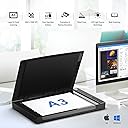
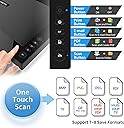
The VIISAN VF3240 is a professional-grade large format flatbed scanner designed for A3-size documents and artwork. It delivers ultra-fast 4-second scans at 200 dpi with a maximum optical resolution of 2400 x 2400 dpi and 48-bit color depth, ensuring vibrant, detailed digital reproductions. Featuring a frameless design, energy-efficient LED light source, and Auto-Scan functionality, it streamlines high-volume workflows. Compatible with Windows and MacOS, it supports multiple drivers for broad software integration, making it ideal for graphic designers, educators, and digital publishers seeking premium quality without premium cost.


| ASIN | B08DKK2LDD |
| Best Sellers Rank | #79,375 in Office Products ( See Top 100 in Office Products ) #5 in Flatbed Scanners |
| Brand | VIISAN |
| Color Depth | 48 |
| Connection Type | USB |
| Connectivity Technology | USB |
| Customer Reviews | 3.8 out of 5 stars 169 Reviews |
| Greyscale Depth | 16 bits |
| Item Dimensions D x W x H | 15.51"D x 22.24"W x 2.4"H |
| Light Source Type | Three-color (RGB) LED |
| Manufacturer | VIISAN |
| Media Type | Photo |
| Minimum System Requirements | Windows 7 |
| Model Name | VIISAN VF3240 |
| Optical Sensor Technology | CIS |
| Product Dimensions | 15.51"D x 22.24"W x 2.4"H |
| Resolution | 2400 |
| Scanner Type | Receipt, Photo, Document |
| Standard Sheet Capacity | 240 |
| Warranty Description | 1 year warranty |
| Wattage | 9 watts |
M**I
Whoa! Amazing Bang for the Buck!
EDIT: Since I bought and use this scanner, I'm now getting questions. People ask questions that are not really related to the SCANNER but more to the SOFTWARE that you use. Things such as file formats, OCR, etc. If you are on a Macintosh you use either the native Image Capture App, or a 3rd party one that I don't know about. (VueScan does not support the Viisan). This scanner is tabloid size so that's the size it takes up on your desk. It's NOT any noisier or quieter than any other scanner I've used, but I will say the "overview" pre-scan is a bit noisier than the actual scanning which is fairly quiet. There's negative commentary about LINES or missing pixels; these are not inherent to the scanner itself (design flaw) but to the specific unit YOU received. Got lines? Return it for an exchange. Mine's fine. I've attached four scans here. All done with Mac Image Capture. First is a brochure with "descreening" box ticked. Second is old deteriorating paper art from 1977; those grooves are the paper not the scanner. Third is an old photo from 1949, original. Fourth is the same photo after a few clicks in Photoshop. I will say that every photo I've ever scanned--on this scanner or with my now gone Epson Perfection V500 Photo--has been "dark" and needed work in Photoshop. That's without exception. This Viisan scanner is on par with my old Epson, good enough for most work. If you are a photo retouching professional, and need something this big, you probably would spring for an Epson at 4x the cost. Now onto the original review: There's a limited market for tabloid or "B" sized scanners; mostly graphic designers with perhaps scrapbookers. Most scanners of this sized are significantly more costly, such as the Epson 12000XL which is well over $3,000; this unit is under $500, thus a fraction of the price of the competition. Well, it stands up quite well. I tested it against my V500 Photo, and results were exceedingly close, and I cannot say one was better than the other. It's fast in scanning, easy to connect by USB. Would be nice if there were an Ethernet port instead as I seem to be maxing out my USB ports in number or power. (USB hubs don't work well.) I only used it with the Macintosh Image Capture application, and it's fine. I was hoping that Viisan would have made their Viiscan software for the Macintosh (majority of graphic designers use Macs of course) but they have not--a strategic error since it appears as if the Viiscan offers features that the Image Capture does not. I have not tried any 3rd party software. Overall exceeded my expectations. If you need tabloid size scanning and don't have thousand$ to spend you will not be disappointed.
A**N
Big, fast, easy
I am very satisfied with my Viisan 3240 large-format scanner. I have been using it with ABBYY FineReader 12.1.14 for Macintosh, on a 2015 MacBook Air / 2.2 GHz Intel Core i7, 8GB RAM, 512GB SSD running macOS Monterey 12.5 Beta. As advertised, this device is about twice as fast at scanning its entire 11 x 17 / A3-sized area, in 4 seconds, as my other one (a CanoScan LiDE 700F) is at scanning its 8.5 x 11 / A4-sized area (which is 30% shorter), both at 200 dpi. 300 dpi scanning is quite fast too — I assume 6 seconds to scan the whole area. As some other users have noted in their reviews, the Viisan VF3240 is a bit noisy, a little more so than my CanoScan. But the noise does not bother me much and it is sort of what I expect, from the scanning mechanism moving rapidly beneath the glass of the whole 17" / 42 cm length of an A3 page. Scans of pages that take up less than the entire area are correspondingly faster. The brightness of the scanner’s lamp seems good, and so far it does not appear to result in dark, blurred text near the central spine of book pages. I have not run into any problems in the short time I have owned this scanner, which I received on May 31st, 2022, so I cannot comment on any technical support issues. I have been using it to scan mostly text and not graphics, and currently have no real need to be concerned about color issues, so I cannot comment on those or other matters related to scanning photos or art. I also have only used the device with FineReader, not any bundled software or other applications. At least in FineReader, one can start a scan from the software side, without needing to press any physical buttons on the device, which seems to be an inconvenience of at least one other large-format scanner I was considering before opting for this one. At the time of purchase I had not seen the Viisan VF3240 ($450) up close, and I was considering whether to buy the VF3120 ($370) instead. But the doubled speed of the VF3240 definitely makes it worth the higher price. Overall, the VF3240 is a very impressive, fast, easy-to-use device, capable of handling large page sizes. It works well with FineReader for macOS, and I would highly recommend it to anyone with a similar setup.
G**E
Viisan: 1 ... Epson: 0
**NOTE TO MAC USERS** You don't have to use Viisan's scanning software, which I read was awful. You do need to download the driver, but after that you can just use Apple's built-in "Image Capture" app. ***************************** I do a lot of scanning, and have gone through five Epson scanners in the past decade. I can't vouch for the longevity of Viisan's unit yet, but in initial quality Viisan is superior to Epson in every way. This is despite the fact that the first time I used the lid-lift feature on the Viisan to allow scanning thicker materials (like books), the thin plastic joint snapped. Yeah, it's a low bar Epson has set. The lid still works fine, it's just a bit wobbly without the stabilizing joint. This is also despite the fact that the unit is noisy, as every review mentions. Not just noisy when it's trucking the interior parts back and forth, it hums loudly while scanning. I really don't care about the noise, personally. I deducted a star for the snapped joint only. The Good aspects are the price, the size, the speed, and the quality of the scans. When I was scanning identical material with an Epson, I always had to Auto-Tone the image in Photoshop because it'd look washed out. And even with Auto-Tone, I couldn't get the black black enough from an Epson scanner. The Viisan produces gorgeous, PERFECT scans. No post-processing needed. Even the black is perfect. I've been scanning at 1200 DPI (it allows up to 2400) color photos in half the time the Epson scanner took. In what's important to me, Viisan is heads and shoulders above Epson. If this unit lasts more than a couple years, I don't see how Epson can compete in the long run.
G**.
Document scanner only, not good for color artwork
Large format is nice and it scans fast, but Image quality is poor if you are scanning printed images (magazines, brochures, etc...) It said it could handle high quality artwork images and photos and technically, it can, but the resulting scans are useless if you want to do anything with those images, be it printing or posting online. Also, none of the software works with a Mac, you have to use the built in Image Capture app.
M**H
This is a great scanner!
I have been using the VF3240 scanner for over two years now. I love it and am so glad I chose it. The detail it captures is impressive. I have worked for over thirty years in the printing industry and as a graphic and fine artist. The large-scale scanning bed is perfect for my 12" x 16" highly-detailed pencil drawings. I sell 1:1 prints of my art work and need the scanner to pick up every nuance of the drawings, and the VF3240 does just that! Recently the USB cable plugged in the back of the scanner was struck, bent sideways, and pulled away from its circuit board, so it no longer could communicate with my PC. I didn't know how to get it repaired so I sent an email to VIISAN requesting help or advise. I heard back from them the very next day, and even though my scanner was no longer covered under warranty, they offered to replace it with a fully refurbished unit. I am so greatful for their offer. I'm glad to know there are manufacturers that take pride in their product and care about their customers. If you are in the marked for a large-bed scanner the VIISAN VF3240 is the one to get! I give them 5 stars!!
S**M
The lower price reflects the quality
I purchased this to do scans of large documents and photos that I wanted to be scanned at 1200 DPI. The scanner can only do 600 DPI using Windows WIA, so the 1200 or 2400 DPI does not apply. The first problem is that the scanner would not power on. I pushed the power button several times. I did hear Windows acknowledge the USB connection, but the power light on the scanner never came on. I cycled power several times using the power blob, pressed the scanner's power button several more times, then it magically lit up. I used the scanning application that came with the unit. I selected the Magazine type from the scanner menu and scanned a large magazine at 1200 DPI. The scanner appeared to go back and forth several times to scan the image. When it was done, a small portion of the scanned magazine was displayed, with a dashed line around some text. I could not get rid of it. It appeared to be the OCR feature that had selected some text. There was no option to disable OCR. Next, I scanned it as a photo at various resolutions. Only one word come to mind - SLOW. This thing was so slow I was afraid I'd have to get out and push. I'm not sure what caused it but suspect it had to make multiple passes to completely scan the page. The 1200 DPI page perhaps took a couple of minutes, I didn't time it but waited quite some time. I did not try 2400 DPI which would probably take twice as long. To scan the pages I need, it would probably take me weeks. The scanning application had very few options that could be changed. There were only a few document types selectable, and I didn't find any way to add a custom type or size. The largest document type I could find was A3, and the largest size was 419 mm, far short of the advertised largest scan size. When I scanned my 426 mm page it cut off a significant portion of the page. The review window is only in portrait mode, even though the scanner is a wide format device, meaning that you have to twist your neck to look at the scan. If you rotate it, it gets squished into portrait mode so you can't really see the scanned page clearly. This could be perhaps the worst scanning application I've used, with confusing menus, lack of features, and a poorly designed user experience. The scanner itself may be usable, but the software included rendered it nearly useless.
M**G
Amazing Large Format Flatbed Scanner for the Price!
I am a professional artist getting ready to create a graphic novel. I plan to pencil the panels, scan them in, and do inking and coloring digitally. Since the comic pages I'm physically drawing on are 11" x 17", I needed a flatbed scanner to get the pencils into my PC for the inking/coloring work. When I started looking at scanners, I was shocked by how expensive large format scanners are! That's when I found this one. I was skeptical due to the price (being so low compared to other large format flatbed scanners), but decided to take a chance. And I'm very glad I did! The scanner came quickly and was nicely packaged, keeping well protected during shipping. Setup was super simple and the software installed on my Windows 11 PC without a hitch. Using the scanner was also very simple and this thing is actually pretty fast! Sure, if you scanning at the highest DPI it's going to take some time, but even that wasn't too bad. But scanning in 11x17 pages of pencil work at 600 dpi was quite fast. Best of all, the scan was beautiful and clean. I don't know where some of these negative or low-star reviews are coming from. My experience has been fantastic with it thus far and I would definitely recommend this large format flatbed scanner to anyone.
A**R
Bad custom software leads to poor quality scanning. Scan resolution Limited in WIA.
I ordered this, as I needed a scanner that supports A3 sizes, as much of my work is on A3 sized paper, and it is very difficult to find a decently priced scanner that scans larger than A4. Typically I photograph my art, but I have never been happy with the result, as pencil tends be very reflective, and it can be difficult to get around that. Just as a Note, I use Windows 11, I see a lot of people talking about Mac support, but I did not see anyone talking about Windows, so just FYI, the software issues are not just on the Mac side. I am also using the driver and software from their website, so if they are at all organized as a company, this should be the latest version of the software, however there does not seem to be a history of software versions like you might expect, their user manual does have versioned updates, so they appear to only have ever uploaded this version, or only want you to use this version. Their bundled scanning software is the only way to get the full advertised resolution. However, their software only seems to scan the image overly bright, setting the brightness lower in the software seems to be a post process, so lowering the scan brightness you see the white areas clipped but darker. My Test scan is a sketch I did in one of my Moleskine sketchbook, which has a more creme colored paper, so the scan should never clip to white the way it does, the paper simply is not bright enough for that. I suspect, in order to get the full 2400dpi they are using a lower bit depth, a lossy compression method, or some other method that results in lower overall quality. Scanning at lower resolutions in their software does not solve the image quality however. Using the WIA support in the latest version of Photoshop works exactly the way you expect, the image quality is good, but you are limited to 600dpi, so it appears that their software is the limiting factor, either they are trying to get around some kind of limitation, or they are intentionally gating you to force you to use their software, and there is no reasonable argument to force someone to use their software vs just using the far more convenient WIA directly into your Application of choice.
M**N
AVOID!
Bought this and set it up about 3 weeks after it arrived. Needed it for scanning A3 sheets but it has a fault where the scan jumps in the first few seconds so it wont scan the full bed size properly. Had to resort to taking photos of the images instead. Have contacted the seller 3 times and had no reply. Nothing you can do until they reply apparently. Amazon won't allow a return but the product is faulty. so I have lost £300 on something I can't use and have no way of doing anything about it.
A**S
parfait, aucun problême
Scanné 400 pages de grands album photos à peu près A3. Très bon résultat. Moins cher que de scanner dans le commerce. Il faut un peu de patience, mais pas trop.
M**N
Scanner för A3
Bra produkt som gör ett bra jobb, lättanvänd
R**S
Aufpreis für extra App, wegen Windows 11
Klasse Gerät, zum Scannen und digitalisieren meiner alten Bücherschätze: leider funktionieren nur die Grundfunktionen, und zum Umwandeln in E-Books benötigt es eine extra App, die leider kostenpflichtig ist! :(
A**R
Installation
Having difficulty installing the software
Trustpilot
2 weeks ago
1 week ago