We remain fully operational. Our teams are working around the clock to ensure your deliveries continue safely.

DOWNLOAD THE APP


Copyright © 2025 Desertcart Holdings Limited
DOWNLOAD THE APP

Buy anything from 5,000+ international stores. One checkout price. No surprise fees. Join 2M+ shoppers on Desertcart.
Desertcart purchases this item on your behalf and handles shipping, customs, and support to Uruguay.
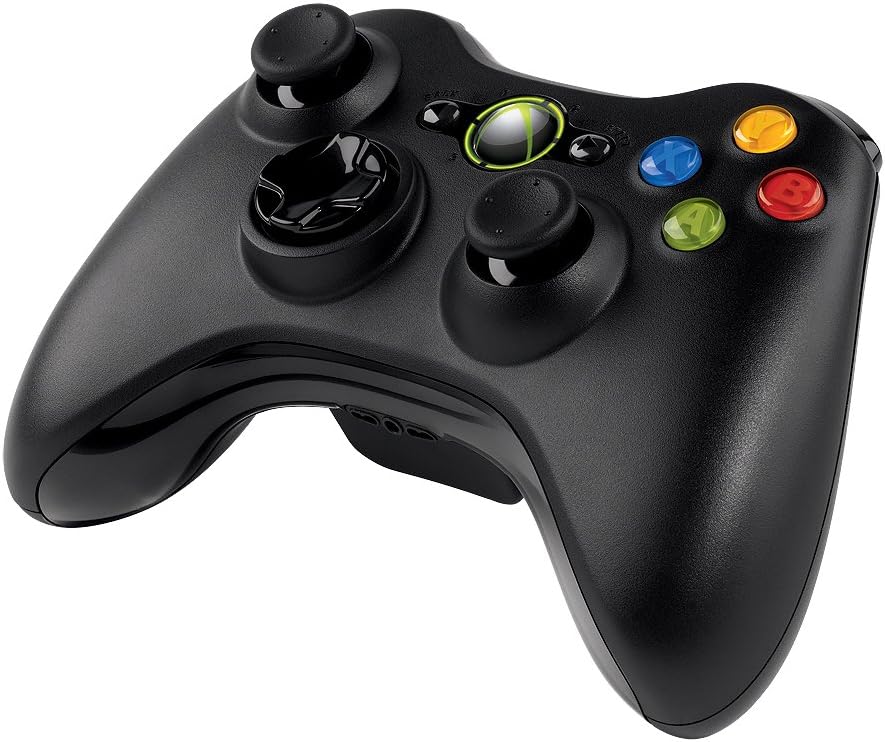
🎯 Level up your game with wireless freedom and pro-grade precision!
The Microsoft Xbox 360 Wireless Controller delivers a premium gaming experience with a 30-foot wireless range, universal compatibility across Windows PCs and Xbox 360, and immersive vibration feedback. Its ergonomic design ensures comfort during extended sessions, while easy plug-and-play setup makes it the go-to controller for serious gamers seeking freedom and precision.


| ASIN | B004QRKWKQ |
| Additional Features | Wireless |
| Best Sellers Rank | #12,233 in Video Games ( See Top 100 in Video Games ) #24 in Xbox 360 Gamepads & Standard Controllers #182 in PC Gamepads & Standard Controllers |
| Brand Name | Microsoft |
| Button Quantity | 14 |
| Color | Black |
| Compatible Devices | Windows |
| Compatible Video Game Console Models | Microsoft Xbox 360, Microsoft Xbox 360 E |
| Connectivity Technology | Wireless |
| Controller Type | Gamepad |
| Customer Reviews | 4.3 4.3 out of 5 stars (2,756) |
| Hardware Platform | PC |
| Item Dimensions | 9.09 x 5.51 x 2.56 inches |
| Item Weight | 8.13 Ounces |
| Manufacturer | Microsoft |
| Manufacturer Part Number | JR9-00011 |
| Model Name | NSF-00023 |
| Model Number | JR9-00011 |
| Package Quantity | 1 |
| Power Source | Battery Powered |
| UPC | 617407459043 795327759563 031112677972 088021328778 041114204687 712131667587 080000576941 045555998884 667562773423 971478062657 151903583814 021111967686 885370114867 071021020391 885370239430 885370239423 031112082998 012305150830 |
C**Y
Best gamepad I've used on a PC
I've went through a number of gamepads over the years, dating back to when they connected to the PC via an analogue gameport. I've had pads from the likes of Thrustmaster, Saitek and a few others, most recently using a PS2 controller via a USB Adapter , which was far from ideal. Over time, the layout of the Xbox 360 controller has become something of a standard for PC games that use a joypad. Many games already include mappings for the controller, and Steam's big picture mode more or less assumes that you're using one. I was looking for a new controller, so with all this in mind I decided to go for the wireless version of the gamepad for windows. The last time I used an Xbox controller was on the original Xbox with one of the original humongous controllers. I don't have the smallest hands in the world, but that thing made them ache after an hour or so. Not so here; the controller is a nice size, the analogue sticks are positioned well in range of my thumbs, and the overall balance of the gamepad feels good. It also doesn't resort to any of that nasty grippy rubber paint that was all the rage not that long ago. That stuff doesn't last in a tropical climate, tuning into a sticky, messy goop that then has to be removed. As others have mentioned, the Windows version of the pad uses AA batteries. Myself, I see this as a bonus. Instead of relying on a LiPo pack that may or may not survive more than a year's worth of use (I've heard really bad things about the kit that adds a Lithium battery to the controller) NiMh rechargeable AA's tend to be quite robust, and they're dirt cheap. If they were ever to die, replacements these days are about $1.50 apiece. Ever since low self-discharge cells became the norm, having them go flat by themselves is no longer an issue. Thank you Sanyo for your Eneloops and Amazon for your Amazon Basics AA's; I have a pile of both types at home. The integration of the gamepad into Steam's big picture interface is impressive. Having it mapped to the Xbox 360 controller layout was a smart move on Valve's part as they were able to concentrate on the on-screen prompts being consistent, etc. It makes me wonder how SteamOS will be once it launches. Software-wise, the gamepad ships with next to nothing. A driver CD is supplied, which installs drivers and little else. This is the source of the controller's greatest failing; unless you're playing a Games for Windows Live game (hereby referred to as GfWL), there is no way supplied to turn the controller off once you're done. It supposedly turns itself off after a short period of inactivity, but I've heard that can be unreliable (I'm testing this at the moment, and it's yet to turn itself off since I started writing this review). Many resort to disconnecting the batteries once they're done to turn the controller off, which is a workable (if clunky) solution. If this were what we were stuck with, I'd have docked a star, perhaps 2 for this alone. It doesn't detract from the gamepad while in use, but it's an annoyance that seems doubly odd given a mechanism exists to explicitly turn the gamepad off from software, but that software isn't provided with the gamepad to cover all eventualities. Only the abomination that is GfWL gets that level of control. Thankfully, the community at large had a bit of a poke about, and the "Xbox360 Controller Manager" was born. This is a little tool that sits quietly in your system tray and responds to a long press of the guide button (the silver button in the middle) with a prompt to turn that controller off. The tool itself takes single-digits of MB of memory, which is background noise in this day and age. For those of you that haven't already discovered this essential little piece of software, you can get it here: http://pety.me/XboxExt/ Save it wherever, add a shortcut in your "Startup" start menu folder, and then forget about it. Using it will become second nature, and you'll forget that it's a 3rd-party application. Honestly, this utility removes the one problem I had with the gamepad, and does it so effectively that I can't help but wonder why Microsoft didn't ship it with something similar. Overall, I highly recommend this. The biggest niggle I had with it was solved by its users, and if you're looking for a wireless controller for Windows, there really isn't any reason not to get one. P.S. I'm done with this review, and the controller still hasn't turned itself off. Thankfully, there's an app for that...
M**C
I was hesitant, but the controller is great
I was pretty hesitant on getting this controller. I'm NOT a Microsoft or Xbox fan so this was actually my third choice for a PC controller. First I had a wired Logitech controller which worked great but had minor issues... And was wired. Then I set up my PS3 controller to work with my PC. It had some technical issues but overall worked pretty good. I decided to stop however since I had to resync it to the ps3/PC when I went back and forth. But I can honestly say that I am happy I went with this wireless controller. Pros: -easy to setup and use. Basically just plug it in and push the center button when you want to turn it on. -great response and most games nowadays are designed to have a controller option. I've played 5-6 games on Steam with it and they've all worked fine. -I've only been about 5-7 feet away, but I've had no connectivity issues at all. That includes changing positions and going back and forth with the m/kb. -battery life appears to be pretty good. I've used it for probably 10-15 hours and the double A batteries that came with it still say they're full. Cons: -the left stick appears to get "stuck" on occasion and the character will sort of just drift to the left. It fixes itself as soon as I move the stick again but it is noticeable and has happened in every game I've played. Unsure if this is the controller or some sort of software issue. It's not too frequent so it doesn't bother me too much. -kind of an uncomfortable controller. Anyone who plays xbox won't have an issue but I've been using a Playstation for years so it's kind of awkward for me. Also, using the dpad just feels unnatural. Menu navigation or for action buttons it's fine, but using it as the primary directional keys in a 2D game is just weird. Doesn't feel right to me at all. -no way to program the buttons for third party usage. For example, the Logitech one I have included a program to basically allow you to map whatever keys you want to the controller. This made it possible to use it with emulators or other games that don't support controllers. No such luck here. Not surprising, this is part of the reason why I don't like Microsoft. Overall 5/5, all things considered. Definitely recommend to any PC gamer. I've been playing Dark Souls and Titanfall with it and can't imagine going back to another controller or m/kb.
R**G
this is the original microsoft controller. amazing quality. very good!
J**S
PROS: * Funciona perfectamente con una PC (Steam, emuladores y otros juegos) * INCLUYE EL RECEPTOR INALAMBRICO!!! (Original obviamente) * Incluye baterías aunque sugiero el uso de recargables por cuestión de comodidad y protección al planeta * El receptor que incluye sirve hasta para 4 controles o para otros accesorios como volantes de Microsoft, etc. * Aunque incluye disco de instalación, sólo con conectarlo a la PC se instalan los controladores rápidamente. * Funciona con celulares Android sin problemas sólo consigue un USB OTG y listo * Construcción de primera (No como los controles recientes que vienen muy chafas) * Precio * Funciona con Xbox 360 CONTRAS: * Revisen con Microsoft la garantía porque no siempre es válida al comprar en amazon ya que los productos los traen de USA. * Al ser vendido por Amazon USA no se pueden tramitar facturas
S**L
I know it's subjective, but this controller is the best controller of the past generation. It's the reason that I've been playing my Xbox 360 for such a long time and not giving my PC any gaming love. I've had an epiphany though, and I'll share it with you. The controller has been the only reason that I've been playing the Xbox 360. (Note, that as a serious gamer, I've never bothered to play FPS's on a console.) I have a PC that can do what the console can do, plus some. More to that, on the PC, you can use Steam and get great deals on games, plus the new releases generally start off at least $10 cheaper than their console counterparts. Not only great deals, though, the games you get for PC can be played on PC (and often Mac or Linux - cross-platform game purchase!) indefinitely, whereas, if you want to play the games in the future on a console, then you have to tear out that old console to play it, assuming that it still functions (I've gone through 3 Xbox 360's and 2 Wii's). Now that I have this controller and it's working flawlessly on the PC, I'm getting the only part of the console experience that I actually wanted and I'm converting my friends, because this, PC people, is a serious no-brainer!
V**R
Es un control de Xbox 360 con con receptor inalambrico para conectar a cualquier equipo con conexión USB, viene con disco de drivers, sofware y pilas incluidas, muy buena opción para quienes gustan de usar un buen control en algunos juegos que es necesario en lugar de teclado y mouse.
T**N
Unit is defective and not new, the internal battery contacts were corroded and a few edges of the unit were scuffed with scrapped markings.
Trustpilot
1 month ago
2 months ago