We remain fully operational. Our teams are working around the clock to ensure your deliveries continue safely.

DOWNLOAD THE APP


Copyright © 2025 Desertcart Holdings Limited
DOWNLOAD THE APP
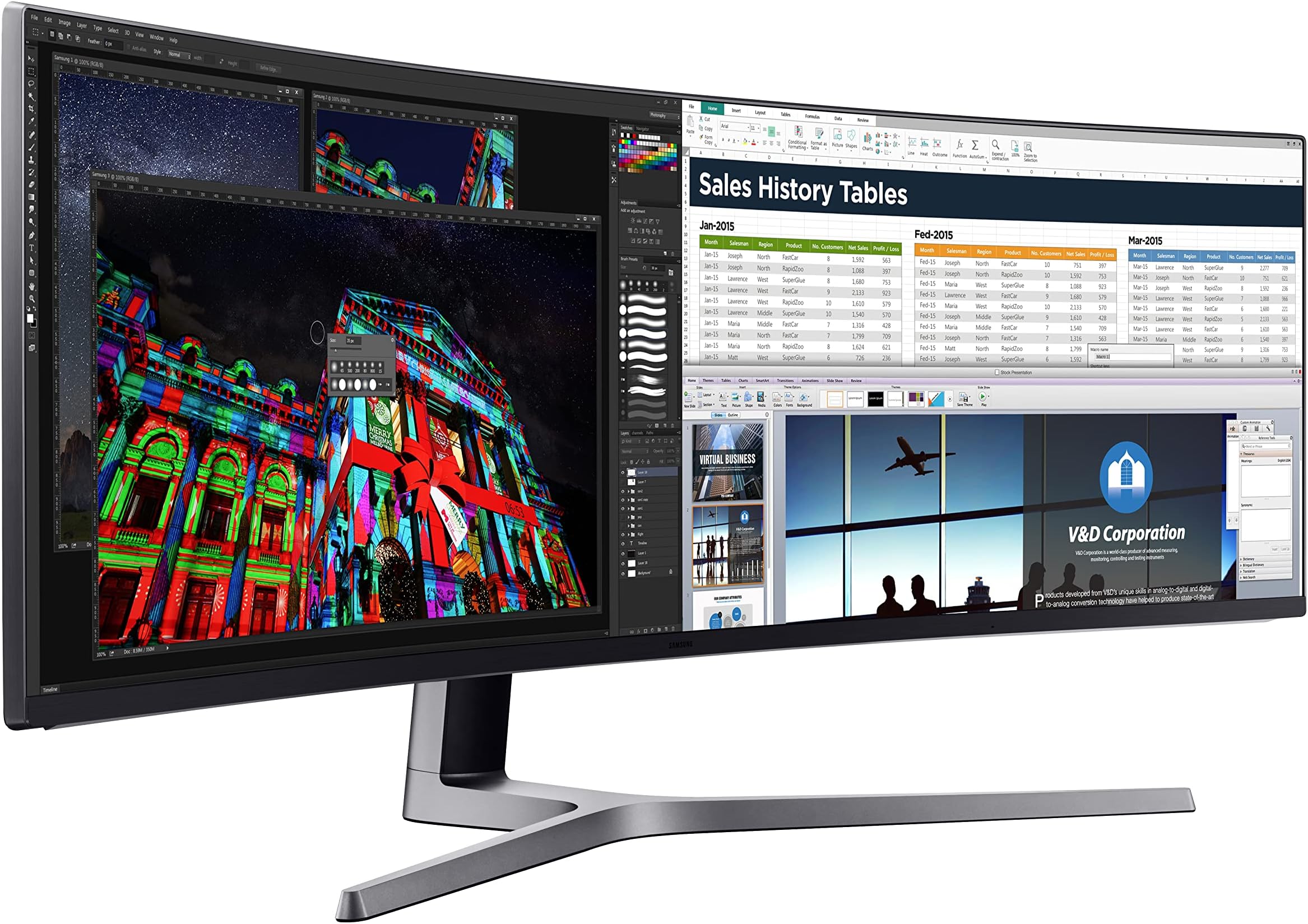







🚀 Elevate your game and workspace with the ultimate panoramic powerhouse!
The Samsung CHG90 is a 49-inch super ultra-wide curved QLED monitor featuring a 32:9 aspect ratio and 3840x1080 resolution. Designed for gamers and professionals alike, it offers a blazing 144Hz refresh rate, 1ms response time, and FreeSync 2 HDR support for smooth, vibrant visuals. Its 1800R curvature and ergonomic swivel stand create an immersive and comfortable viewing experience, making it a top-tier choice for multitasking and high-performance gaming.


| ASIN | B072C7TNC5 |
| Adaptive Sync | FreeSync |
| Additional Features | Curved, High Dynamic Range, Ultrawide Screen |
| Aspect Ratio | 32:9 |
| Brand | Samsung |
| Brightness | 350 cd/m2 (typical), 250 cd/m2 (minimum) |
| Built-In Media | Display Port Cable, HDMI Cable, Install CD, Monitor, USB 3.0 Cable |
| Color | Black |
| Compatible Devices | Laptop, Desktop, Gaming Console, Multimedia Devices |
| Connectivity Technology | HDMI, USB |
| Contrast Ratio | 3000:1 |
| Customer Reviews | 4.4 4.4 out of 5 stars (1,791) |
| Display Resolution Maximum | 3840 x 2160 |
| Display Technology | QLED |
| Display Type | QLED |
| Global Trade Identification Number | 00887276229218 |
| Hardware Connectivity | HDMI |
| Has Color Screen | Yes |
| Item Dimensions D x W x H | 38.2D x 120.3W x 52.5H centimeters |
| Item Type Name | Monitor |
| Item Weight | 33.06 Pounds |
| Manufacturer | Samsung Electronics DAV |
| Model Name | CHG90 |
| Model Number | LC49HG90DMNXZA |
| Mounting Type | VESA Compatibility - Mountable: 100 x 100mm |
| Native Resolution | 3840x1080 |
| Number of Component Outputs | 1 |
| Picture Quality Enhancement Technology | QLED |
| Pixel Pitch | 3.082 |
| Power Consumption | 113 Watts |
| Refresh Rate | 144 Hz |
| Resolution | FHD 1080p Ultra Wide + |
| Response Time | 1 Milliseconds |
| Screen Finish | Curved |
| Screen Size | 49 Inches |
| Series Number | 405955546 |
| Shape | rectangular |
| Specific Uses For Product | Gaming |
| Total USB 2.0 Ports | 1 |
| Total Usb Ports | 1 |
| UPC | 887276229218 |
| Viewing Angle | 178 Degrees |
| Voltage | 240 Volts |
| Warranty Description | 1 Year Manufacturer |
K**N
it's really bad
I bought this monitor, it's really bad, first, it's not 4K, driver not update for a year and have an issue with performance and sync, Burn cell in two spots Samsung support wants me to provide a dark test result ?! I don't know what is that
F**I
Very good
Amazing screen with a very reasonable price 👌
A**N
Awesome!
Love it! Using with Mac mini for trading screen
H**.
calidad y segura entrega
M**H
Awesome monitor. Been great for gaming, just make sure your PC supports the resolution. Even though it's "only 1080p", picture quality even in game is great.
R**T
I've now had several days with this monitor. Setup was relatively easy. Most of the time spent was preparing my desk. At first, I have to admit I was more than a little disappointed with the quality of the video. QLED black levels, while marginally better than my previous Samsung 2333 monitors, are not all that impressive, especially once you've seen the true blacks that OLED delivers. Text looked quite poor on Windows 10 - markedly worse than my old monitors - heavily aliased, just yuck. I fiddled forever with clear type and monitor settings combinations, but nothing looked good. But over the past few days, I swear it's gotten better. I think I may simply be rationalizing because I could find no information regarding "QLED burn-in" times. Maybe I've just adjusted to poorer quality text? But something else has happened that I did not expect. Despite the less-than-ideal image performance, I've fallen head over heels in love with this amazing piece of technology. Almost overnight, it has transformed the way I work and the way I play. I've been running a dual 23" 1920x1080 monitor setup for the past 10 years. This screen is simply those 2 screens merged together. But what a difference the merger makes! I was excited to use the Easy Setting Box software to make the transition to a single screen smoother. But now I realize I have absolutely no need for it whatsoever. With so much operating space, working with multiple windows has become almost a joyous activity. The sense of freedom afforded by a giant contiguous workspace cannot be overstated. As a software developer, I find myself sizing most of my windows to slightly LARGER than 24" - not full screen, just extra wide - where I can keep lots of subpanels and tools comfortably on screen at all times. Desktop backgrounds look incredible. Games: I don't really play video games. Scratch that. Now I do. You HAVE to play video games on this beast. Until VR reaches its inevitable critical mass, the CHG90 is here to let you feel the future without donning a faskmask. A surprising number of video games support the near-comedic 3840 x 1080 resolution and they look friggin' incredible. All that real estate adds up to better field of view and massively intensified immersion. I feel like dragging people off the street into my office just so I can show them this thing. I feel almost guilty possessing something so unabashedly "future". I was worried that my little GTX960 video card wasn't gonna cut it - but it works fine on games like Call of Duty, where, with some lowering of settings, I can still get 60FPS. The productivity and gaming enhancements afforded by this mystical device are truly transformative. Yes, I wish the pixel density was higher, but I'm simply too impressed with the overall impact to complain. The more time you spend in front of your computer screen, the more highly I recommend this product.
J**N
This is a great monitor. I would be very cautious, or maybe just as cautious as one should when buying a monitor. When I first got it, there were strange horizontal lines in the picture. They were an issue with some pixels it seems. The issue was most clearly seen on a light blue or white background. I am not showing any of these photos here because it is not a great indication of how the monitor looks in actuality. I am simply going to say that it looks great, and having a 144Hz monitor will change your life for gaming. My worst experience was with getting it exchanged for a working model. Here's a timeline of what happened and some advice. Only took a couple of days to get it sorted but it was a pain for sure. Day 1 - I received it and unboxed it. It took some time to setup as it is so large. I was also being very particular on hiding wires and such. That evening when I turned it on I saw the issue, at first i was wondering since it was a 1080p if I was just seeing the pixels (I wasn't). Day2 - Called Samsung first. At first call (the number listed in manual) I was sent through a very bad phone tree to finally get a person on the phone (this only took about 20 minutes ). Once I told them my monitor model they said it was a "commercial model" and they had to forward me to their business line. This was actually quite fast. I was connected quickly (another phone tree) to a Samsung rep who was very helpful, and informed me that the other line could have easily answered my question. The rep asked me to send them some photos - I took some on my phone and them replied to an email they sent me. They said this was a known defect, and it could be repaired (no cost), but why should I get it repaired and not replaced. They informed me to contact amazon. Next I called amazon, well actually I used the website to try and start a return/replace. The website said I could not simply do a return and that I had to either chat or have amazon call me/ I elected for amazon to call me. They did and then I waited on hold. Then the amazon rep stated that a return could not be processed unless we called Samsung to ensure it was not a user error or something. I informed them I had already called, they stated they could hear me well then proceeded to call Samsung. I was then told the Samsung rep couldn't hear me that well, from the amazon rep - but anyhow after about 3 minutes of the person trying to get me to troubleshoot the problem, and then requesting more photos they (Samsung) actually decided to look up my number and found the previous call. Immediately the Samsung rep said they could fix it and went through how they would. The amazon rep was quick to point out that Samsung could fix it and wanted to just drop off the call and let that happen - had to fight to make sure that didn't happen. Then another 30 minutes of them trying to arrange a pickup of the monitor for my house later they asked if I still had the box and had the ability to disassemble (duhh - I put it together). So that's what I did and the return processed the way I expected it to a full 2 hours before this call. My advice: quickly test the monitor, see if it works, Keep the box (obviously), and call Samsung first like I did if you have an issue. Then ask them for some sort of a tracking number for your issue before returning to amazon. Also make sure to stand strong to make sure amazon will take your return. For such an expensive item they seem to want to pawn it off on the manufacturers.
T**.
I'm not rich but during this lockdown I've been in from of a low cost monitor for my entertainment because my bigscreen stopped working months ago and I decided it was time to replace it but I wanted to spend a little more than usual for something different and fresh. I window shopped for big screen T.V.'s and computer monitors and I decided to comine the two and bought this extremely wide screen low verticle sized gaming monitor that had a review saying watching a movie on this was truly the way movies were meant to be watched and he was right. At first it was hard to get used to but then halfway through the movie I was in love. The cinematic way the movie is seen isn't just a word but a visually different movie all together. You'll notice parts where the monitor takes advantage of it's truly low and wide ratio's and like a website you'll see three different sized screens on your movie with three different things going on with motion effects. Even when a title is shown the monitor implements a motion effect a big screen doesn't have. And gaming is something you have to experience all together in person. A 360 degree effect is pulling you into a world where you feel like your in the game with this wrap around curved screen. The only downfall is you need to download dolby from a pltform and luckily my xboxone had it available and it pulled up while I was setting the settings up along with my stereo which is another thing you'll need but in this day and age if you're going to buy a highly advanced TV or in this case monitor you should have a tv stereo hooked up for that clear surround sound and heavy bass for lifelike explosions. So I promote this as the way to watch entertainment which is really all internet based so go with the computer monitor thats really wide with an Amazon stick and the XBoX Series X which is coming out in a couple of months with applications that desktop computers don't even have available yet which is going to set the bar in what the word 'CONSOLE" is going to replace which is the desktop computer. The only thing I see after that is Holographic Entertainment which wont be efficient until iy has been on the market for at least 5 years to iron out all bthe kinks so Food For Thought.
Trustpilot
1 month ago
3 weeks ago