Buy anything from 5,000+ international stores. One checkout price. No surprise fees. Join 2M+ shoppers on Desertcart.
Desertcart purchases this item on your behalf and handles shipping, customs, and support to Uruguay.
โก Power up your home networkโfast, flawless, and fuss-free!
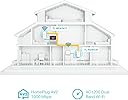
The TP-Link TL-WPA7617 KIT AV1000 Powerline Adapter combines high-speed 1000 Mbps Powerline technology with AC1200 dual-band WiFi to extend reliable internet throughout your home using existing electrical wiring. Featuring one-touch WiFi cloning, a gigabit Ethernet port for wired devices, and easy management via the tpPLC app, it delivers seamless coverage without new cables or drilling. Ideal for 4K streaming, gaming, and smart home connectivity, this kit ensures fast, stable internet in every room.


| ASIN | B08QSK84JL |
| Best Sellers Rank | 1,010 in Computers & Accessories ( See Top 100 in Computers & Accessories ) 7 in Powerline Network Adapters |
| Box Contents | 2ร Ethernet Cables, AV1000 Powerline Wi-Fi Kit: TL-WPA7617 & TL-PA7017P, Quick Installation Guide |
| Brand | TP-Link |
| Brand Name | TP-Link |
| Color | White |
| Colour | White |
| Compatible Devices | HomePlug AV & AV2 standard powerline adapter compatible devices |
| Compatible Operating System Family | Windows |
| Compatible devices | HomePlug AV & AV2 standard powerline adapter compatible devices |
| Country of Origin | China |
| Customer Reviews | 4.3 out of 5 stars 1,888 Reviews |
| Data Link Protocol | Gigabit Ethernet |
| Data Transfer Rate | 1000 Megabits Per Second |
| Data link protocol | Gigabit Ethernet |
| Hardware Interface | Ethernet |
| Hardware interface | Ethernet |
| Item Dimensions L x W x H | 7L x 5.2W x 12.4H centimetres |
| Item Weight | 660 Grams |
| Manufacturer | TP-Link |
| Manufacturer Part Number | TL-WPA7617 KIT |
| Minimum Required Operating System Version | Windows 7 |
| Model Number | TL-WPA7617 KIT |
| Product Warranty | 3 year Manufacturer |
| Product dimensions | 7L x 5.2W x 12.4H centimetres |
K**E
Wonderful piece of kit - 3 year review
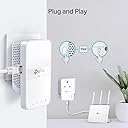
EDIT after 3 years of usage: I can confirm it works ultra reliably. I get a stable 600-700Mbps over the wireline connection. One key factor is where you connect the devices, ideally they should be on a single ring with no spurs. Additional spurs of extension cables used in between deteriorate the signal, if you keep it in mind and plan accordingly then it works wonders. Not a single reboot needed in 3 years of constant use. I had honestly been sceptical about it working over the power cables, but it does work perfectly. Make sure you plug it directly into sockets and not via extension leads, especially if they are loaded with other devices as the speed may drop significantly (or not be able to connect at all), so rather run a longer Ethernet cable to the nearest socket than an extension lead from it. Note that you need the main unit connected to your router, and the secondary unit (or several units) where you want it in your house. I can achieve close to the nominal 1Gbps when they are on the same ring, and slightly less when on different circuits. It works for me accross circuits but I suspect that it may to some extent depend on your fuse box, the manual recommends of course connecting both to the same circuit which indeed works best. One additional good thing is that, unlike typical wireless extenders, the primary and secondary units do not communitate wirelessly so do not cause extra interference of use up the bandwidth. Having said that, you have 1 Gb Eth port to use, but can also use built in 2.5 and 5GHz Wifi as either an extension of your home network, or as a separate network. Setup is easy, you can just plug them in and they work. You can additionally pair them (which you might want to do to avoid others trying to connect) by just pressing a button on each device, and clone your main wifi settings by pressing another button and the WPS button on your router - which you can use to extend your Wifi network. No need to connect to it to configure anything - but if you want to, you can do so via an app, web interface (via its wifi), or desktop tool. You can configure quite a lot of things actually such as MAC filtering etc. if you wish. Highly recommended.
S**M
Best for gaming performance
The powerline functionality is the best to reduce latency and other issues faced during gaming. I experience no lag or disconnection issue generally seen with WiFi. The app is easy to use with instruction and easy setup. Extender functionality is an added bonus and stronger than most WiFi routers
V**A
Work well in houses where WiFi signal has issues
These work very well in houses where WiFi signals have issues due to brick walls and other obstacles. They will work across different circuits with varying levels of success, from fairly good to ok for controlling lights . You need to try it and the connection does improve with time but can vary throughout the day depending on what electrical loads you have. I have had both TL- WPA8631P and TL-WPA7617 kits all working together but now only use the single Ethernet plug (to my WiFi router) and the two WiFi plugs (one with a mains socket and 3 Ethernet connections, one with just one ). The plug on the same mains circuit regularly gets over 180Mbs and connects our 4k tv plus tablets and phone back to the router (plume based). The other gets between 35 and 75Mbs and creates a bridge to the WiFi in my shed allowing me to stream audio or YouTube videos without issue as well as other โhard to reachโ network devices. The tpPLC app is useful for showing status and basic setting but changing any network settings will take you to a web interface which can be fiddly. The only reason you might want to do that is to block a device from connecting if the signal is strong but the connection not good enough, or to alter the WiFi power. Do not alter anything else otherwise it may not work properly. The WiFi plugs can appear on your Tether app if you use it but can be hit and miss. It is useful but doesnโt have the same configuration capabilities .
N**Y
Fantastic product
Installed 50 meters away in a hut and the WiFi is amazing! Working brilliantly.
B**U
Replacement but happy with these
I purchased these 7 months ago as I moved to a house with a home office at the end of a garden some 30metres away from the house where the standard Sky wifi would not reach. I know very little about these but after a lot of research I decided to go for these powerline adapters. For 7 months, they worked great - enabled me to work from home, videocalling, downloading big files etc in my outdoor office. The wifi extender also means my entire garden has a good wifi coverage so anyone out and about still has a good signal. I also have a cctv in my office and Alexa - all works great. The adapters needed resetting few times, but only about 3-4 times max in the past 7 months. IN the last week, they however stopped working altogether. No idea why, contacted the manufacturer, they werent very helpful in finding the issue but they told me to speak with Amazon. Luckily Amazon sent out a replacement without any issues, even after the time. Just set up the replacement - all seems good so hoping these will last a lot longer than 7 months.
M**T
Solved our weak WiFi problem instantly
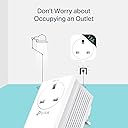
Really impressed with this powerline kit. were struggling with poor WiFi signal in parts of the house and this made a noticeable difference almost immediately. Setup was very simple โ basically plug in, pair, and it was ready to go within minutes. Much easier than running long ethernet cables or trying multiple WiFi boosters that never seemed reliable. Connection has been stable for streaming, video calls, and general everyday use, even in rooms that previously had weak coverage. The passthrough socket is also useful because you donโt lose a plug socket completely. Obviously performance will depend a bit on your home wiring, but for us it worked far better than expected and has made the internet much more reliable around the house.
A**R
Does NOT work as advertised.
Firstly, the TP link is very neat and looks smart. However, it does not work as stated in the description. I followed the instructions, which were very clear, and set up my TP Link. The WiFi booster, DID boost the signal but the speed was 1/3 of the speed of my distant router connection. I also used an ethernet from the Adaptor to my Laptop and the speed was still nowhere near what was advertised. My Router runs at approx 900-1000 Mbps. My standard connection through WiFi to my router is around 150-200. I was hitting top speeds of 90mbps with a direct powerlink and 60Mbps through the WiFi Booster Adaptor. It seems for my circumstance, I'm better off with a distant WiFi connection to my router. On a plus note, the plug-through capability is a great feature so you don't lose a socket and the size is about what you'd expect. If you're looking to connect to WiFi far away, this will work, but the speeds will not be as advertised and there are probably cheaper options which work the same.
J**N
Good then not
Good when it worked but now neither work at all no lights when plugged in
K**N
Great
Thanks ! Straight forward and suited me just well.
Trustpilot
2 months ago
3 days ago