Buy anything from 5,000+ international stores. One checkout price. No surprise fees. Join 2M+ shoppers on Desertcart.
Desertcart purchases this item on your behalf and handles shipping, customs, and support to Uruguay.
🚀 Upgrade your workflow with speed and stamina that won’t quit!
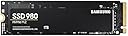
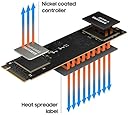
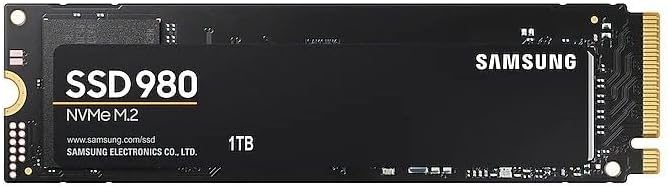
The Samsung 980 1TB NVMe M.2 SSD leverages PCIe 3.0 x4 technology and HMB to deliver blazing sequential read speeds up to 3,500MB/s. Designed for gamers, professionals, and value seekers, it combines high endurance (600 TBW) with advanced thermal controls and a 5-year warranty. Samsung Magician software enhances performance monitoring and optimization, making it a top-tier internal storage solution for laptops and desktops.


| ASIN | B08TJ2649W |
| Best Sellers Rank | #23,392 in Computers & Accessories ( See Top 100 in Computers & Accessories ) #140 in Internal Solid State Drives |
| Box Contents | Solid state drive, Quick guide |
| Brand | Samsung |
| Brand Name | Samsung |
| Cache Memory Installed Size | 160 |
| Color | Black |
| Compatible Devices | Desktop, Laptop |
| Connectivity Technology | PCIe |
| Customer Reviews | 4.6 out of 5 stars 52,137 Reviews |
| Data Transfer Rate | 3500 Megabits Per Second |
| Digital Storage Capacity | 1000 GB |
| Form Factor | M.2 |
| Global Trade Identification Number | 08806090572210 |
| Hard Disk Form Factor | 2280 Inches |
| Hard Disk Interface | PCIE x 4 |
| Hard Disk Type | Solid State Hard Drive |
| Hard-Drive Size | 1 TB |
| Hardware Connectivity | PCI Express 3.0 |
| Hardware Platform | PC |
| Importer Contact Information | Samsung Electronics Pvt.Ltd., 6th Floor, DLF Centre, Sansad Marg, New Delhi-110001 |
| Installation Type | Internal Hard Drive |
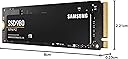
| Item Dimensions L x W x Thickness | 8L x 2.2W x 0.2Th Centimeters |
| Item Type Name | Internal SSD |
| Item Weight | 8 Grams |
| Manufacturer | Samsung, Samsung Electronics Co., Ltd. Semiconductor Business Test & Package Center, #158 Baebang-Ro Baebang-Eup, Asan-city Chungcheongnam-Do, 31489 Republic of Korea |
| Manufacturer Contact Information | Samsung Electronics Co., Ltd. Semiconductor Business Test & Package Center, #158 Baebang-Ro Baebang-Eup, Asan-city Chungcheongnam-Do, 31489 Republic of Korea |
| Manufacturer Part Number | MZ-V8V1T0BW |
| Media Speed | 3000, 3500 |
| Model Name | 980 |
| Model Number | MZ-V8V1T0BW |
| Network Connectivity Technology | PCIe |
| Number of Items | 1 |
| Packer Contact Information | Samsung Electronics Co., Ltd. Semiconductor Business Test & Package Center, #158 Baebang-Ro Baebang-Eup, Asan-city Chungcheongnam-Do, 31489 Republic of Korea |
| Product Features | Hardware Encryption |
| Read Speed | 3500 Megabytes Per Second |
| Special Feature | Hardware Encryption |
| Specific Uses For Product | Business, Gaming, Multimedia |
| Unit Count | 1 Count |
| Warranty Description | 5 year manufacturer |
H**A
fast and durable
its good, works fast and have not found any issue or what so ever
A**T
Good Product
Good Product
K**N
Don't worry about the heat, it can be optimized using Samsung Magician
Though this Drive transfers the data at high speeds, in case you are worrying about the heat, it can be modified based on your requirements. Below are the observations: 1. if you are checking for the budget SSD, yes you can opt for any other as the SSD speeds are required only in case your requirement/job is moving data daily multiple times, else go for this otherwise, as most of the time Samsung 980PRO can be faster in OS loading 1 Sec and Game loading time just by 1-5 seconds more when compared to WD SN350 NVME PCIe Gen 3.0. 2. By default the SSD will be in standard mode not in full performance mode, we need to select the performance and restart the PC to get high-speed transfers enabled. 3. For coding and programming damn sure this SSD is not required. 4. I was not aware that heat issues can be optimized and settled for 1 TB instead of 2 TB. 5. If your requirement is more data storage, choose high-capacity SSDs and optimize it to standard mode and it can be enabled to performance mode when the transfer speed is actually required. 6. If you are upgrading your existing SSD/HDD, Clonezilla is the open-source software to clone/copy the old SSD as it is to the new one without any Windows OS-related issues. The original OS can be migrated using this. But we need to be careful as this is not UI-friendly when compared to Samsung's Data Transfer Application. 7. I opted for Clonezilla as I am upgrading my WD SSD to Samsung 980PRO and Samsung's Data Migration software did not work for me. Clonezilla cloned 300GB data in 20 mins and the entire process took only 30 mins. 8. Though the 980PRO is in standard mode the transfer speed is around 3500 MB/s according to Crystal Disk Mark. If the performance mode is enabled for sure the speed will increase. ((Again the CPU and system requirements will affect the data transfer speeds. I am getting around 145 MB/s while transferring 9GB data (not a single large file) from a USB 3.2 Sandisk Ultra pendrive using a Type C - 10GB/s port, observed these speeds when the SSD is in standard mode)). I tried to share the information which I was not aware of, other details are already covered in other reviews.
J**E
Boot time reduced from 15mins to 18 secs. Works fantastic. Easy to install and use.
It is easy to install. I bought this for my laptop, Asus vivobook 15, before I had Toshiba HDD which was very slow FYI. It took around 15 minutes to boot and when windows update starts laptop totally lags and not able to use anymore. After installing SSD, the boot time is 17 seconds. The packaging is good. Value for money I would say. System is not heating like before it is good. This is my initial review. Let me use it for some more time and give you a better review. (P.S they don't provide the screw to lock your SSD, you have to arrange it)
P**R
Best Quality SSD
First time it take only 10-15sec to boot. I was surprised that it just take very less time, when i clone my old ssd with new 980 1tb. Performance is good enough… 2300mbps write and read speed on standard mode(Samsung magician app). I was not tested on performance mode. Free space 931gb out of 1000gb(1TB). I face no heating issue. 38-45 Celsius on December. 980 doesn’t have dram but 980 plus have..
A**9
Faster Than You Think
Samsung’s 980 is an inexpensive M.2 SSD that lacks DRAM, but it packs the company’s fastest flash yet. Samsung’s 980 is a very fast DRAM-less M.2 NVMe SSD that runs both cool and efficiently. For those penny pinchers on the hunt for a solid PCIe 3.0 x4 M.2 NVMe SSD, Samsung’s 980 is a good choice. - Pros + Competitive performance + Large, fast-recovering dynamic SLC cache + Attractive design + AES 256-bit hardware encryption + Software package + 980 Pro-like endurance and 5-year warranty - Cons - Slow write speeds after the SLC cache fills The Samsung 980 non-Pro was announced end of March 2021 and made waves because it is a DRAM-less SSD, a design choice usually reserved for value drives without maximum performance, yet Samsung picked the "980" name, which is used on their flagship "980 Pro." Under the hood, the Samsung 980 in today's review uses a relatively new controller called "Pablo," or S4LR033—a 4-channel PCIe Gen 3 controller design we've seen on some external Samsung SSDs before. The flash chips are 128-layer 3D TLC, same as on the Samsung 980 Pro. As mentioned before, a DRAM chip is not present, which is a cost-optimization measure, but has the drawback that random write performance is reduced.
S**.
Easiest way to Glow up your PC
I went for 980 500GB variant, as it seemed to be most value for money... especially considering my HP pavilion supports PCIE Gen 3, so going with 980Pro which was costlier and is PCIE gen4 made no sense. For those who don't know, even though Gen4 is backward compatible, it actually performs at lower read write speed on a Gen3 motherboard than an actual Gen3 SSD. I used Hasleo clone tool to clone my HDD to the SSD and continued with the GPT partition, my motherboard supports EFI booting. I had to choose the Bootfile during booting from the SSD as there was no way to change the priority, then it logged into the windows on the SSD, then I deleted and recreated the HDD windows partitions..And now the laptop directly boots into the SSD windows. Took me 30 minutes for the entire process including SSD installation, partitioning and Windows cloning. The laptop is pretty fast now. Even my download speed has increased significantly, which I didn't expect, probably because of some buffer being used by the Windows which was earlier on HDD and now on SSD. I mean, I downloaded the Samsung Magician, which is a 307 MB file, it downloaded instantly and i am using Airtel 5g mobile network. I would suggest everyone to install Samsung Magician, it not only tells you different parameter such as temperature and health of your SSD, but lets you perform different diagnostic scans. But, most importantly it allows you to do "Over Provisioning" on your SSD, which is basically allocating certain percentage of your SSD, which will increase the life of the SSD. So, if you have no space issue, you can allocate about 5-10% of your SSD which is supposed to drastically increase the performance and health of the drive. I got the 500GB, so I allocated 10%, which decreased my drive capacity by 46GB.
A**N
Best bang for your buck.
Hello Amazonians, My existing setup is as follows: Laptop: Legion y740 15inch with RTX2070 MaxQ HDD: 1TB 2.5 inch (7mm) 7200rpm (stock) SSD: 128GB m.2 NVMe Pcie 2242 m+b key (stock) with Win10Home Wanted to upgrade both the: A.) existing 1TB 7200 rpm HDD as well as the B.) 128GB m.2 NVMe pcie SSD With: A.) 2TB Samsung 870 EVO 2.5inch SATA SSD B.) 1TB Samsung 980 m.2 (2280) NVMe pcie SSD m key (for Win10 OS). As i only use the Lenovo Legion y740 15" for gaming purpose so with games having humongous download sizes, 1TB HDD was filling up faster (was left with only 250GB of 1TB space) and also the 7200rpm drive was real slow for game load times (waiting of 3-5 mins) for a game load. As of the current Gen, a NVMe pcie based m.2 SSD is the fastest drive in the market and Samsung 980 is the latest iteration from its new lineup of m.2. Ofcourse there are the PRO version m.2's as well but those are just out of budget and out of scope from a gaming/home use kind of scenarios unless one is into heavy video editing, designing and vfx purposes. Installing both the SSDs is fairly simple as just the screws are to be removed (follow your laptop manual for the same) and pop in these in their respective slots. A word of caution though: m.2 slot on the laptop/desktop motherboard are mostly "M Key" based (female notch placed at the right side of a m.2 SSD that goes into the male notch on the motherboard). Also, most laptop/desktop motherboards easily support varying lengths of m.2 SSDs like 2242 2260 and the longest 2280 (22 is the width in mm where as the last 2 numbers i.e. 42, 60 and 80 are the lengths in mm). Also, a 2.5 inch (7 mm or 9 mm) HDD/SSD enclosure can also be bought so that you can keep your old HDD/SSD as a portable HDD/SSD within the enclosure. I bought the transparent ORICO 2.5 mm model 2193U3 HDD/SSD enclosure (have reviewed that as well) and i keep my 7200 rpm 1TB HDD inside this enclosure after having it replaced with the 2TB Samsung 870 EVO. Likewise, there is also an enclosure for the m.2 NVME PCIE SSD available from the same brand, ORICO. Check it out at amazon.in as well. So, I made a BOOTABLE win10 usb (using the Windows Medial tool online) so that I can install the OS on the newly installed m.2 2280 ssd and the entire process took less than 30 mins from hardware installation to OS inatallation from USB to the new m.2 ssd. There is Less to No Comparison of Quality and Price of Samsung SSDs with other brands like Sabrent, Crucial, WD etc. Kindly like the review if it helped made your buying decision that much easier. Cheers and e-peace
ب**د
منتج ممتاز جدا جدا وانصح بشرائه
J**L
Solid drive
Fast SSD, just make sure you're updated on firmware.
P**R
Still using it!
Used it for a few years now, strong, high speed storage. I bought a 2TB for in my laptop now, and use this drive in a portable enclosure. Be aware that you always need an external backup with ssd drives, since they loose their content when malfunctioning. However, this is prone to all ssd drives and hardly happens.
F**K
Perfect.
Perfect. Werkt de dag van vandaag nog steeds!
S**E
Samsung 980 1TB PCIe 3.0: Un Año Después, Sigue Sorprendiendo
Después de un año usando el Samsung 980 1TB PCIe 3.0, puedo decir que este SSD sigue impresionando. Desde el primer día se notó la mejora en el rendimiento de mi PC, y después de un uso constante durante un año, sigue funcionando igual de rápido y sin problemas, lo que demuestra que es una inversión que vale cada centavo. Rendimiento y Velocidad Desde que lo instalé, la diferencia fue abismal. Los tiempos de carga se redujeron drásticamente, tanto al iniciar el sistema operativo como al abrir aplicaciones pesadas como juegos y programas de edición. Este SSD alcanza velocidades de lectura y escritura secuenciales de hasta 3,500 MB/s y 3,000 MB/s respectivamente, lo que se nota especialmente en tareas de transferencia de archivos grandes y en el rendimiento general del sistema. Lo sorprendente es que, después de un año de uso intensivo, sigue funcionando igual de rápido. No he notado ningún tipo de degradación en el rendimiento, lo que es impresionante considerando que lo uso para todo, desde gaming hasta edición de video y diseño gráfico. Fiabilidad y Durabilidad La durabilidad es otro aspecto donde el Samsung 980 brilla. A lo largo de este año, he sometido el SSD a bastantes horas de uso diario, y no ha dado señales de desgaste o errores. Samsung ofrece una garantía limitada de 5 años, lo que añade tranquilidad, pero honestamente, con lo bien que ha funcionado hasta ahora, parece que va a durar mucho más. Además, cuenta con la tecnología de control térmico de Samsung, que mantiene las temperaturas bajo control incluso bajo carga pesada, evitando problemas de sobrecalentamiento que podrían comprometer el rendimiento a largo plazo. Facilidad de Instalación y Software La instalación fue sencilla; al ser un M.2, solo necesitas conectarlo a la placa base y listo. Samsung también ofrece el software Magician, que facilita la gestión del SSD, permitiendo monitorear el estado del disco, realizar actualizaciones de firmware y optimizar el rendimiento con solo un par de clics. El software es intuitivo y muy útil para mantener el SSD en perfecto estado. Relación Calidad-Precio Si bien no es el SSD más barato del mercado, la relación calidad-precio es excelente considerando la fiabilidad y el rendimiento que ofrece. Después de un año, sigue siendo una inversión que vale la pena para cualquiera que quiera mejorar su PC, ya sea para trabajo o entretenimiento. La estabilidad y la velocidad se mantienen impecables, lo que justifica el precio. Conclusión Después de un año con el Samsung 980 1TB PCIe 3.0, sigo recomendándolo sin dudarlo. Su rendimiento sigue siendo espectacular, y no muestra signos de envejecimiento. Es perfecto para quienes buscan velocidad, durabilidad y una experiencia sin complicaciones. Si necesitas un SSD fiable y rápido para mejorar tu PC, el Samsung 980 es una opción difícil de superar incluso después de un uso prolongado.
Trustpilot
2 months ago
5 days ago