



Buy anything from 5,000+ international stores. One checkout price. No surprise fees. Join 2M+ shoppers on Desertcart.
Desertcart purchases this item on your behalf and handles shipping, customs, and support to Uruguay.
🚀 Elevate your desk game with seamless multi-display power!
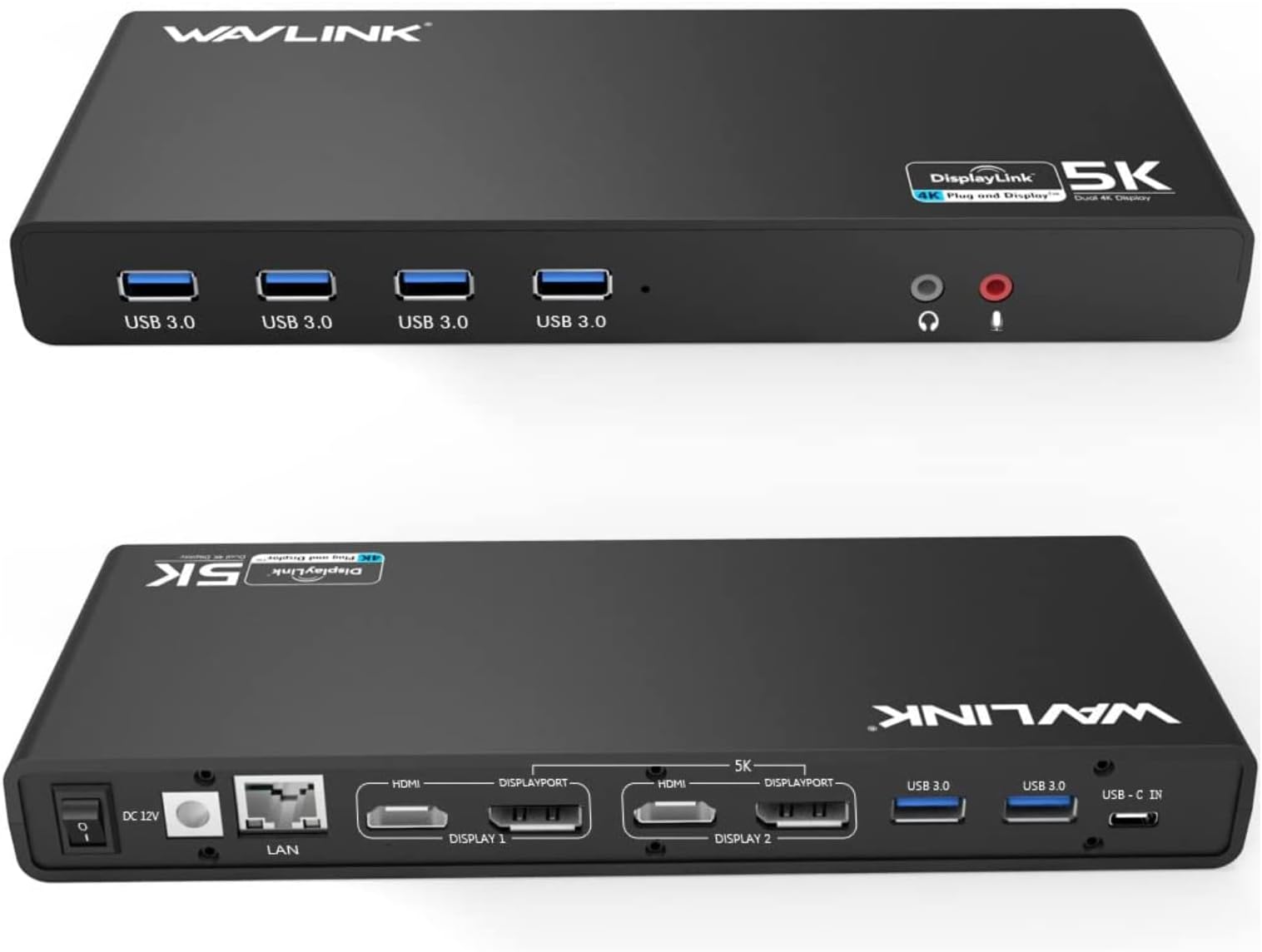
The WAVLINK USB 3.0 Universal Laptop Docking Station transforms your laptop into a powerhouse workstation with dual 4K or single 5K video outputs, six high-speed USB 3.0 ports, and gigabit Ethernet. Compatible with USB-C, USB-A, and Thunderbolt 3 devices on Windows and Mac, it’s the ultimate solution for professionals craving expanded screen real estate and reliable connectivity in a sleek, compact design.


| ASIN | B07DCLK55V |
| Best Sellers Rank | 38,161 in Computers & Accessories ( See Top 100 in Computers & Accessories ) 369 in Docking Stations |
| Brand | WAVLINK |
| Brand Name | WAVLINK |
| Colour | Dual 4K Horizontal |
| Compatible Devices | Laptops and desktops with USB Type-C, Type-A, or Thunderbolt 3 ports |
| Compatible devices | Laptops and desktops with USB Type-C, Type-A, or Thunderbolt 3 ports |
| Country of Origin | China |
| Customer Reviews | 4.2 out of 5 stars 1,563 Reviews |
| Data Transfer Rate | 5 Gigabits Per Second |
| Enclosure Material | Acrylonitrile Butadiene Styrene (ABS) |
| Hardware Interface | 3.5mm Audio, DisplayPort, Ethernet, HDMI, USB 3.0 Type A |
| Hardware interface | 3.5mm Audio, DisplayPort, Ethernet, HDMI, USB 3.0 Type A |
| Item Dimensions L x W x H | 32L x 15.5W x 6H centimetres |
| Item Weight | 8.8 Ounces |
| Manufacturer | WAVLINK |
| Manufacturer Part Number | WLAMJP2C-UG69DK1-A |
| Minimum Required Operating System Version | Windows 7 |
| Model Number | 8541562306 |
| Number of Ports | 11 |
| Operating System | Windows, macOS |
| Product Features | Multiple Display Outputs, Wide Range of Ports |
| Product Warranty | 1 year warranty |
| Special feature | Multiple Display Outputs, Wide Range of Ports |
| Total USB Ports | 6 |
| Total USB ports | 6 |
| Unit Count | 1.0 count |
M**H
Works Exactly As Required
Purchased to enable extension to 2 monitors from a MacBook Air (M2). Need to also download DisplayLink Manager for iOS. Easy to setup and working quickly and as required. I do need to lookup on if I can configure 1 or both screens to display in portrait mode (rotated 90 degrees), not sure if it can but it may be due to the DisplayLink Manager settings rather than the hub, so check online about a version of DisplayLink Manager which would support this.
P**C
Dock Worked for Months, Then Started Glitching After Sleep Mode
When I first set everything up, the dual‑monitor setup worked perfectly. After about six months, the issue started: whenever the laptop woke from sleep, it wouldn’t return to the previous display state. Instead, both external monitors would glitch, flicker, or fail to reconnect unless I unplugged and re‑plugged the cable. I eventually replaced this dock with a Dell dock, and the problem disappeared completely. I’m still not certain what caused it, but one possibility is the mixed‑resolution setup, one monitor was 2K and the other was Full HD. The mismatch may have been triggering the glitch during wake‑from‑sleep.
A**A
Perfetto! 5 stelle. Top.
Collegato come da manuale, acceso... qualche attimo per configurarlo (ho preferito scaricare il driver originale, anche se già era stato riconosciuto da windows) e... tutto perfettamente funzionante. Consegna super veloce e accurata. Soldi ben spesi, almeno per il momento!
A**ー
使い勝手が良いです
ノートPCのマルチモニター用で購入しました。PC本体+ディスプレイポート×2の3画面が可能になりました。 USBもこの機器から可能なため、本体には1本のケーブルで拡張可能です。 持ち運びもするため、全てが1本化出来るのが良かったです。
M**N
Amerikaanse stekker
Deze was niet voorzien van een Europese stekker. Beetje vreemd..
F**N
Très bon matériel de multi- connexion
Très facile à installer et matériel très stable
R**H
Nunca más problemas de puertos y líos de cables
Compré este dock para varios motivos. Tengo un Macbook pro (M2 - 2022) lo cual solo tiene 2 puertos Type C (el ordenador no lo recomiendo si lo usas para trabajar y no te lo llevas mucho) Entonces me faltaban muchos puertos para teclado, ratón, webcam, 2 SSD Externos, Ethernet, y sobre todo para poder conectar 2 pantallas externas, ya que lo uso para trabajar. COn este dock resuelvo todo los problemas. La gestión de las dos pantallas se hace a través de un software DisplayLink manager, yo no lo sabía, pero es super sencillo de instalar y te permite también trabajar con el ordenador cerrado usando solo las pantallas externas (se que esto es lo que quieran hacer mucha gente y no tengas que abrir y cerrar cada vez). Lo unico es que no carga directamente, pero bueno, por mi no era un problema. Recomiendo 100%
Trustpilot
1 month ago
2 weeks ago