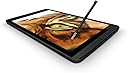
🖋️ Elevate every stroke—where creativity meets precision.
The NVIDIA DirectStylus 2 is a passive stylus optimized for the NVIDIA Shield Tablet, leveraging GPU acceleration to deliver low-latency, pressure-sensitive input. Its uniquely shaped chisel tip enables smooth, natural lines ideal for both artistic creation and professional note-taking, all without batteries or buttons. Compatible with integrated apps like NVIDIA Dabbler and Squid, it transforms your tablet into a powerful digital canvas and productivity tool.


| ASIN | B00LMRKZP0 |
| Brand | NVIDIA |
| Compatible Devices | Tablet |
| Compatible Tablet Computer Models | Nvidia Shield Tablet K1 |
| Customer Reviews | 4.1 out of 5 stars 110 Reviews |
| Item Dimensions | 6 x 1.8 x 0.6 inches |
| Item Weight | 22.68 g |
| Item dimensions L x W x H | 6 x 1.8 x 0.6 inches |
| Manufacturer | NVIDIA CORP |
| Mfr Part Number | 930-81761-0100-000 |
| Model Number | 930-81761-0100-000 |
| Number of Batteries | 1 Lithium Ion batteries required. |
| UPC | 850438005661 |
B**B
Great Tool for Taking Notes on Nvidia Shield
I started the habit of taking meeting notes in OneNote on my Samsung Note 4 phone. That worked pretty well and I liked having the notes immediately available on my pc. However, I was looking for the same functionality in a bit larger format. I didn't want anything as big and expensive as the big Samsung tablets, or an Ipad or Surface, so after looking around I bought the Nvidia Shield K1 8" tablet. It was just the size I was looking for and I thought the higher screen resolution would be the answer to my note taking search. That's when I discovered what having a "screen digitizer" really means. The Nvidia Shield K1 (and most similarly priced tablets) don't have digitizers. Trying to take notes with the typical rubber tipped stylus on the Nvidia Shield was a huge disappointment and I feared that I had just invested in nice android tablet, but not one for note taking. Without a digitizer, you can only write slowly, usually in large block letter. Certainly not ideal for taking notes during a meeting. Then, I decided to take a chance on the Nvidia Shield DirectStylus 2. Wow, what a difference. This stylus makes writing on the Nvidia Shield tablet a great experience. Now, don't think that this will equal the quality of handwritten notes on a tablet with a screen digitizer, but it comes really close. It is not an "active" pen, there are no buttons or batteries. I don't know why the shape an consistency of the rubber tip should make a difference, but it really does. If you don't need to use your tablet to take handwritten notes, then probably any rubber tipped stylus will work to flip pages and click icons. But if you want to use your Nvidia Shield for note taking, this little tool is well worth the money.

M**I
Active stylus features that impress from a stylus that is GPU-driven
After reading how this stylus works, I knew I wanted to try it. I have not been disappointed. It's a passive stylus that thinks it's an active one. It uses the GPU of the Shield Tablets to bring pressure sensitivity action. It works really well. It is smooth and those looking for stylus functionality will be pleased. The NVIDIA Dabbler app shows off the ability to paint and draw with realistic effects such as watercolor paint bleeding into the fibers of the "paper" as it dries. Some might find this as a gimmick but I like it. Squid is a note taking app also included and again shows off the usefulness of the stylus. Buying through Amazon was a little more expensive than NVIDIA directly but overall I'm satisfied. Give it a try if you are someone who likes to use a stylus.
A**C
Good but not worth the price
Its a great stylus, has a good weight to it and doesnt feel cheap at all but all that isnt enough to justify its cost sadly i used it and just didnt like my experience, but to be fair this isnt all the styles fault, the blame also goes to tablet as well, the palm rejection just isnt good i couldnt go one writing session with out continously having to erase small marks my palms made. Other than drawing and writing its as good a normal sylus for normal swiping and highlighting. Sad for my long review just wanted to warn others who are planning to get the direct style 2 for writing and drawing
A**R
Best pen I've ever used
If you have a shield tablet, you have no reason to avoid getting this. pros: - The input precision feels like using a mouse, it's great for loop drive linux, splashtop, and x86 emulators. - For painting it's just as sensitive to pressure as a drawing tablet that actually links to the pen. - No batteries or bluetooth needed. - Nub is really durable and shouldn't need the pen to be replaced for a long time. - It's very comfortable to hold for it's size. cons: - Nub is not replaceable, eventually, years from purchase, you may need to buy another whole new pen. - Newer versions of the tablet don't have a slot for the pen (unless you wanna do a case mod for it).
C**Y
Gets the job done
This one of those extras that you have to decide if you really want or need it as it isn't included with the tablet and it isn't cheap. That being said I ordered one and while it works well if you use the dabbler app or just like to use a stylus, I wish it had a clip or something to attach it to. And unfortunately the case I already have does not have a keeper for a stylus.
R**T
Stylus with extra insight...
It is specifically designed for the use with the NVIDIA SHIELD tablet, only downfall is that the new SHIELD tablet has no place to hold it within the device. However, if you want an awesome tablet, under $200 for the tablet only, but blows away all other tablets, but it! You will not be disappointed. However, but it with the additional accessories....charger, stylus, controller. It's amazing!
I**S
Does not fit the tablet slot
Does not fit in the HP Stream 7 tablet stylus slot. It also does not connect well on the screen, sometimes requiring several taps before it's recognized by any device using this technology. I have the advice named tablet and several stylus phones in my family. Results are the same with each device. Price is too high for a sporadically working, hit and miss item.
K**R
Works great ...
Works great and feels OK in my rather large hands ...I've tested it with a number of the drawing software packages found in Playstore .... much better than the eraser like drawiing pens ..... finer control .... not as good as a dedicated Wacom pad such as my Bamboo Pen pad used on Windows (tm) laptops, desktops.
A**Y
Nice, weighty
Exactly as ordered. Nice, weighty, stylus.
C**N
Calidad y diseño
Particularmente siempre me han gustado los productos Nvidia por su calidad, buen diseño y rendimiento. Me gustó el producto el cual uso en la Nvidia Shield Tablet, quería utilizarlo con otros dispositivos pero al parecer no son compatibles. El tacto y sensibilidad que te brinda la Stylus es bueno, ya sea para dibujo o escritos.
C**R
Fragile tip
This is a good addition if you like using a stylus like me. However the stylus tip is very fragile and I have had to glue it back on twice with superglue.
G**A
Perfetto
Acquistata per il mio Shield K1, è parecchie spanne al di sopra di altre penne generiche che ho in casa grazie alla punta molto più sottile. Il tablet la rileva perfettamente come penna,differenziando a seconda del contesto le azioni rispetto al tocco con le dita. La punta è piuttosto rigida, quasi indeformabile. La scrittura con questa penna risulta, di primo impatto, soddisfacente. Non al pari di carta e penna, ma personalmente non trovo grandi differenze con il tecnologicamente migliore digitizer montato su altri modelli. Molto utilizzabile anche in alcuni giochi, come ad esempio Hearthstone, dove la precisione non è necessaria ma migliora il feeling durante le partite. Nel complesso la consiglio a chiunque abbia preso uno Shield K1, che ne è sprovvisto al momento dell'acquisto. Una piccola nota: difficilmente funzionerà su altri modelli di tablet / smartphone; occorre uno schermo molto sensibile. Quantomeno, il mio Moto G non da segni di funzionamento.
N**A
Tolle Ergänzung für das NVIDIA SHIELD K1
Der Stift liegt recht gut in der Hand. Das NVIDIA SHIELD K1 reagiert zügig und genau auf die Eingaben des Stiftes. Ich nutze ihn sehr gern.
Trustpilot
1 month ago
3 days ago