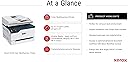
🚀 Elevate your home office game with Xerox C235 — where speed meets smart simplicity!
The Xerox C235 Colour Multifunction Printer is a compact, wireless all-in-one laser printer designed for busy home offices and small teams. It delivers fast print speeds up to 24 pages per minute with high-quality 600 dpi color output, supports automatic two-sided printing, and offers seamless connectivity via Wi-Fi and mobile printing protocols. Featuring a 2.4-inch color touchscreen, 250-sheet capacity, and robust security features, it streamlines printing, scanning, copying, and faxing with intuitive controls and smart software enhancements. Certified for eco-friendly operation, the C235 balances performance, convenience, and sustainability in a sleek, space-saving design.
| Additional Printer Functions | All In One |
| Asin | B09B1BC6KJ |
| B W Pages Per Minute | 22.0 |
| Best Sellers Rank | #89,195 in Computers (See Top 100 in Computers) #212 in Laser Printers |
| Brand | Xerox |
| Built In Media | Toner Cartridges, Power Cord, Quick Start Guide |
| Color | Black |
| Color Depth | 24 bits_per_pixel |
| Color Pages Per Minute | 22 ppm |
| Compatible Cartridge | Xerox Toner Cartridges for C235 Printer |
| Compatible Devices | Laptops, PCs, Smartphones & Tablets |
| Control Method | Touch |
| Controller Type | Android |
| Customer Reviews | 4.3 4.3 out of 5 stars (137) 4.3 out of 5 stars |
| Display Type | LCD |
| Dual Sided Printing | Yes |
| Duplex | Automatic |
| Global Trade Identification Number | 00095205069341 |
| Hardware Interface | Ethernet |
| Ink Color | Black, Cyan, Magenta, Yellow |
| Is Electric | Yes |
| Item Dimensions D X W X H | 17.3D x 21.9W x 20.4H centimeters |
| Item Type Name | Multifunction Printer |
| Item Weight | 18 Kilograms |
| Manufacturer | Xerox |
| Maximum Copies Per Run | 250 |
| Maximum Copy Resolution Black And White | 600 dpi |
| Maximum Copy Resolution Color | 600 x 600 dpi |
| Maximum Copy Speed Black And White | 22 ppm |
| Maximum Media Size | A4 |
| Maximum Print Resolution Black And White | 600 dots_per_inch |
| Maximum Print Resolution Color | 600 x 600 dpi |
| Maximum Sheet Capacity | 250 |
| Model Name | C235V_DNIUK |
| Model Number | C235V_DNIUK |
| Model Series | Xerox C235 |
| Number Of Drivers | 2 |
| Number Of Ethernet Ports | 1 |
| Number Of Trays | 2 |
| Other Special Features Of The Product | Auto-Duplex, Network-Ready |
| Output Sheet Capacity | 250 |
| Paper Size | A4 centimeters |
| Print Media | High-resolution paper, Paper (plain) |
| Printer Connectivity Type | Ethernet, Wi-Fi |
| Printer Output Type | Color |
| Printer Type | Laser |
| Processor Count | 1 |
| Resolution | 600 x 600 |
| Scanner Type | Sheetfed |
| Series Number | 235 |
| Specific Uses For Product | Office |
| Total Usb 2 0 Ports | 1 |
| Total Usb Ports | 1 |
| Unit Count | 1 Count |
| Upc | 095205035582 |
| Wattage | 650 watts |
User
Farb Laser Drucker
Super Farb-Laserdrucker 👌Funktioniert auch übers Handy
User
At last a decent printer
For years we have used inkjet printers from the Epson/HP/Canon products and those all performed adequately. However with infrequent use they all exhibited problems at times particularly frustrating when you attempt to print simple pictures on A4. The most recent MG5750 threw a printhead error ( ! ) and so I switched technology.The Xerox C235 was chosen because it has a small footprint and easily fits the space vacated by the previous device. Also the per-copy costs on this printer are allegedly low, not the cheapest but lower than some other competitors.The first picture I printed was well received by the main critic, who exclaimed how it actually looked like the image on an iPad. This is a first, after years of fiddling with settings and failing to produce an image that matched what was on a screen this is a revelation. So even though this purchase was quite expensive I am well-pleased with its performance.The C235 was delivered a couple of months ago. One or two days after placing an order it arrived in excellent condition. The device is quite heavy but not a problem for an average man. It took me a while to figure out how to remove all the packaging and transit retainers but 30 minutes later it was powered and connected to WiFi.We don't need the fax (untried) but we do need print/copy/scan and these all work well. The various machines that we have can all print via WiFi, however scanning is dependant upon which operating system you are using. With W7 and a direct USB connection the scanner works fine, also the device will still accept print jobs via WiFi when a USB connection is in place. If you want to scan over WiFi the you need to run Windows 10.I use Linux Mint, again printing is not a problem but with the scanner it would not function over WiFi until I upgraded to Mint 21 (which I think uses Ubuntu 20 as a base). I did not try Linux with a direct USB connection but expect that it would perform as well as previous devices. However after installing the latest version of Mint on one of my machines I was impressed to discover that Simple Scan would read all the pages from the multi-sheet feeder on the C235, so that is a welcome improvement with multi-page scanning.Overall I am please with this purchase.
User
L'encre ne sèche pas
Utilisation pour mon bureau au domicile. L'encre ne sèche pas. Ça se connecte automatiquement à mon téléphone ou pc. Elle est géniale. Peut être l'encre un peu chère mais comme je ne l'utilise pas souvent ça va rester longtemps...
User
Excellent produit
Installation et mise en route simples comme bonjour. Pour des réglages plus fins (envois par mail par exemple), il vaut mieux télécharger le guide complet en français sur le site de Xerox.La qualité d'impression est au rendez-vous. La rapidité est très correcte si on excepte la 1e page en sortie de veille qui peut être particulièrement longue.
User
It does everything
Great printer
Trustpilot
3 weeks ago
1 week ago