Buy anything from 5,000+ international stores. One checkout price. No surprise fees. Join 2M+ shoppers on Desertcart.
Desertcart purchases this item on your behalf and handles shipping, customs, and support to Uruguay.
✈️ Own the skies with fingertip precision and cockpit authenticity!
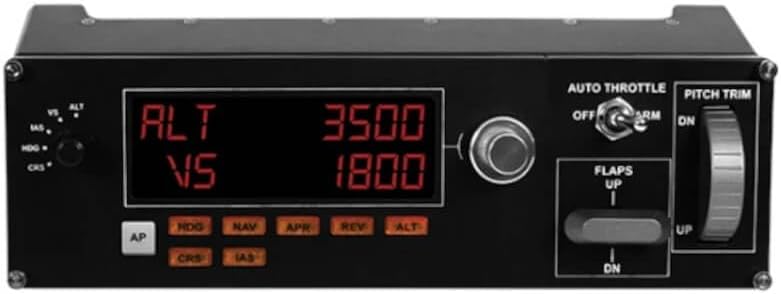
The Logitech G Pro Flight Multi Panel is a USB-powered, multi-instrument cockpit controller featuring 10 programmable buttons and a real-time LED autopilot display. Designed for serious flight sim enthusiasts, it integrates seamlessly with popular simulators like FSX, X-Plane, and Prepar3D, offering tactile control over altitude, throttle, flaps, and trim. Compatible with Windows 7 and newer, it mounts easily on the Pro Flight Yoke or custom setups, delivering a professional-grade flight experience that reduces reliance on on-screen controls.


| ASIN | B01LWRNBI0 |
| Additional Features | Multi-Instrument Cockpit Panel with Real-Time LED Display |
| Best Sellers Rank | #8,508 in Video Games ( See Top 100 in Video Games ) #27 in PC Game Flight Controls |
| Brand | Logitech G |
| Brand Name | Logitech G |
| Button Quantity | 10 |
| Color | Black |
| Connectivity Technology | USB |
| Customer Reviews | 4.5 out of 5 stars 945 Reviews |
| External Testing Certification | Não aplicável |
| Global Trade Identification Number | 00097855127938, 10097855127935 |
| Hardware Platform | PC |
| Included Components | Mounting Bracket, Pro Flight Multi Panel, QSG, Screws |
| Item Dimensions | 11.1 x 2.24 x 3.31 inches |
| Item Type Name | Logitech G Pro Flight Multi Panel (945-000028) |
| Item Weight | 14.78 Ounces |
| Manufacturer | Logitech, Inc |
| Model Name | Pro Flight |
| Number of Buttons | 10 |
| Package Quantity | 1 |
| Power Source | Information Not Available |
| Special Feature | Multi-Instrument Cockpit Panel with Real-Time LED Display |
| UPC | 752397168138 097855127938 |
| Unit Count | 1.0 Count |
| Warranty Description | 90- Days |
M**W
Works as should (But after stressful configurations)
Bought this the month of August 2025 - I tried with Msfs 2024 - incompatible product right out of the box. I updated drivers, adjusted power settings on USB ports, so much trouble shooting only to find out i got this product to work using a 3rd party Software called, SPAD.NXT (I used a 14 day free trial - i had to pair each button up through spad.nxt and msfs recognized it.) Product is now fully operational but was a pain to set up. Not sure if its a Msfs 2024 update problem or if its a logitech driver issue- none the less expect an additional 30$ payment for 3rd party softwares in order for product to work with msfs 2024. I am not sure about 2020 - sorry. After set up and configuration i can honestly say, I love this multipanel. Makes my flights seem more real and I can use the mouse less which for me is the ultimate goal. I rate 5/5 stars cause I just love simming and this product works but just mind you .. its stressful configuring it to 2024
C**Y
Excellent product but
When purchasing make sure to purchase a powered usb hub (B08PDS465Q) is what I purchased and make sure to install the Logitech plugins for the games you play. They are required and I highly recommend running the plugins as administrator after launching the game you want to play.
A**Z
Logitech panel
Amazing device for MSFS , very realistic for IFR.
H**.
Working Finally
My 1st impression was poor and I started the process to send it back. Now for the rest of the story......just about to box it up and return to Amazon when I did the following. I uninstalled the driver and files I got from Logitech support. I started MSFS 2020 to see if everything was working but I immediately ran into problems. The file and drivers were uninstalled but none of the associated controls would work. The dials would now light up when hovered over but you could not turn anything. I know the driver was uninstalled but somehow there was something that was left behind making MSFS unusable. Looked like I would have to reinstall to rid myself of what logitech had put on. I tried on last thing..................I reinstalled the Multi-Panel driver, hooked the panel back up and WOW everything was working perfect. I decided to keep it rather than reinstall MSFS because it was working perfect.
A**R
Great addition to my flight sim!
Awesome product!
C**Y
Works great with MSFS 2020 and even when paired with the Bravo Throttle Quadrant
This works great with MSFS 2020, but anytime you make adjustments, you will need to reset it by clicking off and on the corresponding button. For instance, if you set altitude to 12,000 and you want to climb higher or lower, you would rotate the dial to the altitude desired and then press on the ALT button to disengage it and then once again press on it to engage the altitude setting. I am not a pilot, but in a sim plane, the altitude dial accepts changes by rotating the dial only, so I am not sure which is correct. Just want to point out this very minor inconvenience to others, but it is 100% worth it to have this multi-panel as part of your sim hardware. For those that may be wondering, I had it paired with the Honeycomb Bravo Throttle Quadrant. I no longer own the throttle, and while many of the functions on this panel and the Bravo throttle are redundant, it was still a better experience using the Logitech multi-panel rather than the panel on the quadrant. The added bonus of the LCD screen made it much easier to view information rather than having to zoom in to the instrument panels on your monitor during a flight.
L**O
This panel doesn't work well with X-plane 11 but is Ok with MSFS2020
This panel doesn't work with X-plane 11 as advertised, the AP and ALT lights keep flashing while AP is OFF, once engaged lights become steady but the stab trim is moved to full nose up position for no reason, selections from the rotary button to change IAS ALT HDG etc works fine but push buttons don't have any effect in the sim. Terrible Logitech customer support on this product.
G**Y
Good addition to MSFS 2024 and MSFS.
A good edition to my flight sim. Takes a bit of time to get the controls worked out for each plane but glad I have it.
Trustpilot
2 weeks ago
5 days ago