✨ Elevate your workspace with clarity, power, and style — all in one sleek 27" 4K monitor!
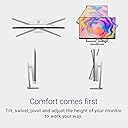
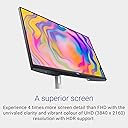
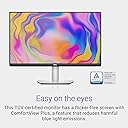
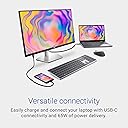
The Dell S2722QC is a 27-inch 4K UHD IPS monitor featuring 3840x2160 resolution, HDR support, and 99% sRGB color coverage for exceptional image quality. It offers versatile connectivity with USB-C delivering 65W power, dual HDMI ports, and USB 3.2 Gen 1 ports. Designed for both productivity and leisure, it includes AMD FreeSync for smooth visuals, built-in speakers, and ergonomic adjustability. Its minimalist Platinum Silver finish and ultrathin bezels create a modern, clutter-free workspace backed by a 3-year advanced exchange warranty.


| ASIN | B09CGY99X5 |
| Adaptive Sync | FreeSync |
| Aspect Ratio | 16:9 |
| Best Sellers Rank | 676 in Computers & Accessories ( See Top 100 in Computers & Accessories ) 13 in Monitors |
| Box Contents | Monitor panel, Power cable, Quick setup guide, Safety/Environmental/Regulatory Information, Stand (riser and base), USB Type-C to USB Type-C 3.2 Gen 2 cable |
| Brand Name | Dell |
| Cable Length | 1 Metres |
| Colour | Platinum Silver |
| Colour Gamut Value | 99 |
| Compatible Devices | Laptop, Desktop, Gaming Console |
| Contrast Ratio | 1000:1 |
| Customer Reviews | 4.3 4.3 out of 5 stars (2,889) |
| Display Technology | LED |
| Display Type | LED |
| Global Trade Identification Number | 05397184567616 |
| Hardware Connectivity | HDMI, USB 3.2 Gen 1, USB Type C |
| Has Color Screen | Yes |
| Image Brightness | 350 |
| Item Dimensions D x W x H | 2.2D x 24.1W x 14.4H centimetres |
| Item Type Name | Flat panel |
| Item Weight | 4.7 Kilograms |
| Manufacturer | Dell |
| Maximum Display Resolution | 3840 x 2160 Pixels |
| Model Name | S2722QC |
| Model Number | S2722QC |
| Mounting Type | Desk Mount |
| Native Resolution | 3840x2160 |
| Network Connectivity Technology | HDMI, USB Type C |
| Picture Quality Enhancement Technology | [IMPLIED] |
| Pixel Pitch | 0.15 |
| Power Consumption Size | 24.8 Watts |
| Product Features | Anti Glare Screen, Flicker-Free, Height Adjustment, Pivot Adjustment, Swivel Adjustment, Tilt Adjustment |
| Product Warranty | 3-year Advanced Exchange Service & Premium Panel Exchange |
| Refresh Rate | 60 Hz |
| Resolution | 4K UHD 2160p |
| Response Time | 4 Milliseconds |
| Screen Finish Type | Matte |
| Screen Size | 27 Inches |
| Series Number | 22 |
| Shape | Rectangular |
| Specific Uses For Product | Business, Desktop |
| Total HDMI Port | 1 |
| Total USB 3.0 Ports | 3 |
| Total USB Ports | 3 |
| Total Video Out Ports | 2 |
| Viewing Angle | 178 Degrees |
| Voltage | 240 Volts (AC) |
| Warranty Type | 3 Years Warranty |
A**B
S2722QC - Great Monitor for Mac
This review is for the Dell S2722QC monitor. I purchased this for use with my new M4 Mac Mini and it works very well indeed. I initially planned on getting the Studio Display from Apple, but I simply could not justify the £1,500 price tag. I paid about £270 for this Dell monitor, and I am very happy with it - sure, it's not quite as crisp and glossy as the Studio Display, but it's still 4k and looks excellent and it's less than 1/5th of the price. So if you want this for a Mac, it is definitely worth a punt! You will like it, I am sure! As for the bad points, unlike an iMac, the various ports on the back are a bit tricky to get to. They are fine for one time setup of the monitor, but there is no way I could use them on a daily basis. I also like how it has a VESA mount - i have never used one before, but I am thinking I might give it ago as I can get the 100 x 100 mount for about £25, and it would be nice to be able to position the monitor as I like. You can still move the monitor around with the default stand (i.e. up, down, tilt, rotate etc), but the VESA mount will offer even more flexibility. So in summary, if you are a Mac user looking for a decent display that is affordable, the S2722QC is what you need. I really don't think you will be disappointed with it! 2 Week Update: I still really like this monitor! I bought an HDMI cable which means I can now connect my 2015 MacBook Pro to the monitor, so I can connect a keyboard and mouse and just use it as if it were a desktop, which is very handy! I also forgot to mention about the sound - I don't even know if this monitor can output sound or not, but I imagine it will be rubbish if it can. I have just been using headphones via my Mac Mini, which is my preference, so I would suggest doing the same, or connecting better speakers. And also, in comparison to my old 2013 iMac, this Dell monitor sleeps / wakes in much the same way, but it isn't as quick as the iMac unfortunately (and I imagine the Studio Display from Apple would be seamless like the iMac was, but still not worth the ridiculous price tag!). So when I put my Mac Mini to sleep, the Dell detects this and the monitor goes to sleep. Then when I move my Magic Mouse or hit the Magic Keyboard, the Dell wakes up after a second or two. So not instant, but no big deal. The buttons to navigate the monitor menu are also easy to use, so if you want to switch to a different input (HDMI 1, HDMI 2, USB C etc) it is quite easy. When I am using my MacBook via HDMI, and then shut it down, the Dell automatically switches back to my Mac Mini, which is handy. All in all, if you want this for a Mac (particularly M4 Mac Mini), it is a great monitor and I would highly recommend it! Really glad I got it! 5 MONTH UPDATE: Having used it for 5 months now, my original review still stands. This is an awesome monitor and I am so glad I bought it instead of paying stupid money for Apple's Studio Display!
P**L
Pleasantly satisfied
My older monitor was working fine but I wanted a 4K monitor for the 4K content available and for my digital photography. I was a bit apprehensive at first as to whether it would work as well as I hoped. Setting up was rather easy as it was just a matter of reconnecting the cables from the old monitor to the new. The swivel and tilt options were very good and had better tilt and vertical up-down placement of the new Dell model, the picture quality is excellent and a little surprise pleased me in that the screen size of the Dell was in fact bigger than the previous Acer monitor which was 23.8' and the Dell is 27' - I had thought they were the same size initially. The only quibble which is no fault of the monitor is that text appears tiny, but this of course is inherent of the 4K resolution and that can be resolved by using CTRL and + combination when required or desired. Bottom line - delighted with such a quality item at such a good price. Addendum:: TIP - Right click on your desktop>Display settings>Scale and layout>Change the size of text apps and other items. I chose 175% now my text and icons are a much more comfortable and viewable size, sorted!
Y**N
Great 4K Monitor for MacBook Pro – Just Don’t Rely on the Speakers
I'm really happy with this Dell monitor overall. The design is sleek and modern, and the build quality feels solid and premium. The 4K resolution is sharp and vibrant, and the brightness levels are more than enough for my needs. It also works flawlessly with my MacBook Pro (M1 chip), which was a big plus. The only downside is the built-in speakers — they sound quite tinny and lack depth. I expected better sound quality, so that’s the reason I’m giving it 4 stars instead of 5. That said, if you're planning to use external speakers or headphones, this monitor is an excellent choice.
G**Y
Beautiful monitor
I bought this Dell 4K monitor to upgrade from a full HD monitor and what a difference! This monitor is clearly well made, and looks beautiful and unobtrusive in my home office. The bezel is thin on the top and sides, with a slightly thicker bar at the bottom incorporating the Dell logo and physical configuration buttons in a pleasing slightly angular design. The rear of the monitor is white with a very nice subtle textured design. The stand feels secure and is easy to mount, and the monitor can also be used with a VESA mount if desired. The 4k resolution is clear and crisp, and text in particular looks beautiful on screen. The 4K resolution allows me to have more content visible on screen, and combined with the 27" screen size I can comfortably have two or more windows open side by side for efficient working. Perhaps my favourite feature is the USB-C connection, as this allows me to easily swap between laptops (work and personal) using only one USB-C cable, and connect my cabled mouse and webcam directly to the other USB 3 ports on the monitor so I don't have to physically swap and reconnect these to each laptop each time. Overall, I'm really happy with this monitor.
N**T
Good value
Good quality and good price.
M**K
Use these monitors for work. Picture on these monitors is great. What I have been disappointed with is the in-built speakers. They are very tinny and while I was not expecting great quality, they are certainly below what I did expect in a monitor on the price point.
A**R
Pleasure to use. Reduced eye strain. Only pity is that it's been superseded by a more expensive model.
5**I
Il Dell S2722QC è un monitor 4K UHD (3840x2160) da 27 pollici progettato per chi cerca un display versatile, adatto al lavoro, al multimedia e all’uso quotidiano, con la comodità della connessione USB-C. Dell è da sempre sinonimo di qualità nel mondo dei monitor, specialmente nella fascia business e produttività. Ma questo modello riesce a distinguersi anche per un ottimo compromesso tra prestazioni, design e prezzo. Presenta un design minimalista e moderno, tipico dei monitor professionali Dell: -Cornici sottili su tre lati, che lo rendono perfetto per configurazioni multi-monitor. -Regolazione completa con inclinazione (-5°/+21°), altezza, pivot o orientamento verticale -Cable management integrato, con un passacavo nel supporto per una scrivania ordinata. Nitidezza 4K e Colori Precisi -Risoluzione 4K UHD (3840x2160) – Un Salto di Qualità Il pannello IPS da 27 pollici in 4K offre una densità di pixel elevata (163 PPI), che si traduce in: -Testi ultra-nitidi, perfetti per coding, lettura e documenti. -Dettagli impeccabili in foto, video e design grafico. -Spazio di lavoro ampio, ideale per multitasking con finestre affiancate. Prestazioni del Pannello IPS Color Gamut: 99% sRGB – Accuratezza cromatica ottima per lavoro creativo (non al livello di un monitor da photo editing professionale, ma più che sufficiente per la maggior parte degli utenti). Luminosità: 350 cd/m² – Buona per ambienti illuminati, ma non eccezionale in condizioni di luce molto intensa. Contrasto: 1000:1 – Standard per un IPS, con neri non profondi come su un VA o OLED (se cerchi un monitor per film con neri profondi, questo non è il top). Angoli di visione: 178° – Nessun problema di sbiadimento anche guardando da lati estremi. HDR10 – Supporto Base, Non Eccezionale Il monitor supporta HDR10, ma con una luminosità limitata e nessuna retroilluminazione a zone. HDR migliora leggermente contrasto e vividezza, ma non aspettarti un’esperienza cinematografica come su TV high-end. Utile per streaming (Netflix, Disney+ in 4K), ma non è il suo punto di forza. Verdetto immagine: Ottimo per produttività e multimedia, con colori accurati e nitidezza eccezionale. L’HDR è un extra, non una ragione per comprarlo. Connessioni e Funzionalità Uno dei punti di forza è la sua versatilità nelle connessioni: USB-C con Power Delivery (65W) – Collegando un laptop (MacBook, Dell XPS, etc.), puoi: -Trasmettere video 4K a 60Hz. -Ricaricare il dispositivo- Comodissimo, eliminando alimentatore del notebook dalla scrivania Collegare periferiche USB tramite i porta sul monitor. Altri ingressi disponibili: 2x HDMI 2.0 (supportano 4K@60Hz, ma non HDMI 2.1). 1x DisplayPort 1.4 (migliore per 4K a 60Hz senza compressione). 2x USB-A 3.2 (per mouse, tastiera, chiavette). Uscita audio 3.5mm Verdetto connessioni: Ottimo per chi usa laptop con USB-C, grazie alla ricarica e alla trasmissione video con un solo cavo. Usabilità e Esperienza d’Uso Menu OSD e Controlli Tasti fisici sotto la cornice inferiore del monitor Interfaccia intuitiva, con opzioni per calibrazione colore, PIP/PBP e modalità di risparmio energetico. Tecnologie per il Comfort Flicker-free – Riduce l’affaticamento degli occhi durante lunghe sessioni. ComfortView (filtro luce blu) – Utile per lavoro notturno, anche se non al livello di un Kindle. Gaming? Solo Casual Refresh rate 60Hz – Non adatto a gaming competitivo (servirebbero almeno 120Hz). Input lag medio (circa 10ms) – Per giochi single player va bene, ma per FPS o esports è troppo lento. Nessun FreeSync/G-Sync – Quindi potresti vedere tearing in giochi veloci. Verdetto finale usabilità: Eccellente per lavoro e multimedia, mediocre per gaming. Se cerchi un monitor 4K ben bilanciato, con USB-C e una qualità dell’immagine eccellente per il prezzo, il Dell S2722QC è una scelta solida e affidabile. Lo ricomprerei
S**N
Great picture quality, sharp text and was shipped quickly. Very nice slim bezels and design. I wish more USB ports were available. But for the price, I can't complain.
F**K
Geweldige monitor! Strak beeld geen spijt van.
Trustpilot
3 days ago
4 days ago