Buy anything from 5,000+ international stores. One checkout price. No surprise fees. Join 2M+ shoppers on Desertcart.
Desertcart purchases this item on your behalf and handles shipping, customs, and support to Uruguay.
🔕 Silence your keyboard, amplify your focus.
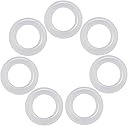
This 120-piece set of clear silicone O-rings is engineered to reduce typing noise by over 30%, soften keypress impact to minimize finger fatigue, and fit Cherry MX and compatible mechanical keyboards. The transparent design maintains your keyboard’s RGB glow while delivering a quieter, smoother typing experience—ideal for professionals seeking ergonomic comfort and a distraction-free workspace.
| ASIN | B01N75JL0F |
| Best Sellers Rank | #230 in Computer Keyboard & Mouse Combos |
| Brand | ThreeBulls |
| Brand Name | ThreeBulls |
| Color | White |
| Customer Reviews | 4.5 out of 5 stars 6,372 Reviews |
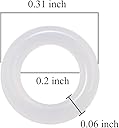
| Item Diameter | 0.31 Inches |
| Item Weight | 1.44 ounces |
| Manufacturer | ThreeBulls |
| Material | Silicone |
| Material Type | Silicone |
| Model | 8541647655 |
| Nominal Inside Diameter | 0.2 Inches |
| Nominal Outside Diameter | 0.31 Inches |
| Number of Pieces | 120 |
| Part Number | 4328356418 |
| Set Name | 120 O-Ring Set |
| UPC | 713902280240 |
| Unit Count | 120.0 Count |
M**N
Excellent value and clearly improves my keyboard sound and feel
I recently installed the ThreeBulls 120-pcs Clear Rubber O-Rings on my mechanical keyboard and they’ve made a noticeable difference. The set includes enough rings to dampen all my keycaps, and the transparent design means you don’t lose the look of your world-showing RGB lighting. After installing them, typing feels smoother, quieter, and less “pingy” — the hollow sound under heavy keypresses is significantly reduced, which has been great for shared spaces or when gaming late at night. Installation was straightforward: I popped off each keycap, placed an O-ring around the stem, reinstalled the cap, and moved on. Because the rings are clear and thin, they barely change key travel but just enough to soften the bottom out. I found that my fingers felt less jarred during long typing sessions, and the sound profile shifted from a higher-pitched “klack” to a more muted, refined “thock”. For the price, getting 120 rings is generous and gives you extras in case you decide to adjust or replace later. The build quality held up during multiple days of use — no rings popped out, and none became loose or shifted underneath caps. They also didn’t interfere with the fit or stability of the keycaps. My wrist rest might get more attention than ever because my desk is quieter now. If you're looking for a simple, budget-friendly way to upgrade your mechanical keyboard’s acoustic profile and typing feel without changing switches, this O-ring set is an easy win. For value, performance, and usability, it easily earns five stars in my book.
E**R
Awesome: dampen sound easily without sacrificing too much in terms of feel.
I was always kind of skeptical as to how well o-rings could quiet a keyboard. I always thought that even if they did, they would feel weird. But I figured I would give these a try anyway as the loud thwacks on my mechanical keyboard, while satisfying, could be pretty distracting for anyone working near me. I am happy to say that these were pretty easy to install, they definitely dampened the sound by a significant amount, and best of all, they didn't really compromise the feel significantly either. Feel is definitely a bit different, but you definitely get used to it in a hurry. I don't know that I will ever use a mechanical keyboard again with these.
K**2
Works great
These are a huge improvement. I had to add 3 rings to each key so it raised them slightly but the laptop didn't recognize the keys so I have only 2 rings on the keys and it's okay. I tried to capture it in the video but you can't really tell. I would definitely recommend.
C**N
Works to Both Dampen Noise and Stabilize Keys
I'm putting these on a Logitech G512SE with the "Clicky" switches - similar to Cherry MX Blues, and note that it's important to get clear o-rings if you have illuminated keys because the o-ring does overlap with the key letter/number cutouts on this specific keyboard. While they don't block the key light, you can see a faint outline and different transparency of the o-ring through the letter cutouts. While the out-of-the-box typing experience was fine, adding these o-rings significantly dampened the "clack" sound of the key plastic bottoming out on the switch housing, to the point where I can only hear the sound of the switch being actuated rather than the combination of both the switch click and the key bottoming out (with the larger keys being the exception). Instead of the usual hollow bouncing of plastic, I now only hear the much quieter click of the key switch on the small keys. It still dampens the large keys (space bar, shift, enter etc.) but it's not as dramatic of a sound difference compared to the small letter keys. Just on the sound dampening front, the o-rings do the job well and are a winner. As noted by another reviewer, due to their thickness (which is about 1.8mm thick) they have roughly halved key travel. If you like your key travel distance, I would stay away from these and find o-rings with a smaller profile. But for me, I've always had an issue with the key travel being too deep so these were perfect. Because of shorter travel, I can really capitalize on the short actuation distance (distance for key press to register), making typing a lot easier, faster, and smoother. On top of all that, the o-rings have fully stabilized the keys whereas before, some of the keys could be tilted or wiggled about depending on the angle the press was coming from and they tended to be very "bouncy" which also has been completely negated by the o-rings. Overall, these o-rings were the perfect thickness to both noticeably quiet down overall typing noise and allow for adequate key travel on my specific keyboard. They also completely stabilized the keys resulting in a much more satisfying, solid, and smoother typing experience. These are a very affordable and necessary mod for any mechanical keyboard.
A**.
Reduces volume for office use with little change in feel
These are thin O-rings that should fit any style mechanical keyboard switch compatible with Cherry MX's. Now, o-rings are a divisive topic when you look at discussions among mechanical keyboard users online. However, many people, including myself, like them. These o-rings take the annoying "thwack!" out of the bottom of the keyboard stroke, yet they are thin enough that they don't change the feel of the keyboard much. They reduce the travel distance just a little but give a bit of a "bounce" at the end of the stroke if you bottom out, which to me is a good kind of feedback. Some people say that putting o-rings on your keyboard effectively turns it into something resembling a cheap membrane keyboard. I disagree with that opinion - it only feels slightly different from the way the keyboard came before I modified it with o-rings. If you don't care about what people around you think when typing on this then I would not bother with these. However, I have to take phone calls as part of my job, and when I type while they are trying to listen to me, they find it quite loud and annoying. These o-rings reduce the volume of my keyboard enough to make using it tolerable to callers, so I am quite happy with them. The only thing I cannot comment on is the durability of these o-rings over a long period of time; however at such a cheap price, as long as it lasts longer than a year I am getting a good value.
H**I
Helps reduce some sound, different key feeling
First off, let me say, that these are expensive for what they are. They are just rubber little things made in China. From my package, one was already half torn. Double check when installing, so you don't have a key with a half torn ring. They do work, but it's not a huge difference, it's marginal. But if you're just looking for any sound reduction no matter how small, then you have no choice really. It basically removes the higher end of the sound, instead of clack clack clack, you get more of a thump. It does change the way the key feels, best way I can describe it is it makes them feel more solid or stiff. You DEFINITELY are giving up more of the original key feeling than you are gaining in sound reduction. Didn't like that honestly, but I wanted any sound reduction I can get. After awhile though, I've gotten use to the key feeling with rings installed, and honestly, in some ways prefer it over without the o-rings. Overall, I think it really comes down to preference, just note you will feel the difference more than the sound reduction.
A**O
The misunderstanding
its perfect for my application has it made it SUPER quiet, the thing that confuses most is that some switches come with the click, thats an internal problem that would require you to replace the switches, THESE ARE KEY DAMLANERS NOT SWITCH SILENCERS, for me they work great
J**J
Great bottom-out padding, no RGB interference
The keyboard o-rings are great! I am a professional computer programmer, not a PC gamer. Since I type for a living, enough that I regularly wear out keyboards, I have a strong opinion on how my keyboard works. I just bought a Logitech GPro keyboard, and I love the clacky blue switches that came with it, but the keys have no bottom-out cushion. I'm a "loud typer", and after a few hours of banging away on this new board, my fingers were getting very sore. I purchased and installed the o-rings under every key, and now the board is a lot more comfortable to type on. The GPro is an RGB lit keyboard, and with the key lights turned on, I can just make out the outline of the translucent o-rings on about half of the keys. I would think that if I had purchased opaque rings of any color, they might have interfered with the switch LED's. Not so with these translucent ones, the light goes right through them. The rings dampen the overall sound of the keyboard a little bit, but it is all in the bottom-out sound. I still hear and feel the internal key switch click, but the annoyingly hard hit of the keycap against the switch body is now gone. The keyboard still sounds clacky like it should, but it also sounds a lot less hollow now. The full throw of each key is reduced by maybe a millimeter, but it is all a reduction in bottom-out. The switches sill activate with the same amount of throw. I haven't tested for it, but I do feel like I'm typing just a little faster now, as the keys don't travel as far and they have a little more bounce back. These translucent o-rings are a great addition to an RGB keyboard that doesn't come with bottom-out cushions, and I recommend them.
M**E
Werkt niet
Werkt niet
J**R
Bonne réduction du bruit
J'étais un peu hésitant à la vue de certains commentaires expliquant que la réduction de bruit ne marchait quasiment pas mais dans mon cas la différence est très nette. Cela dépends peut être du clavier mais sur mon roccat vulcan 121 switch rouge la réduction du bruit des touches est bien présente, il n'a plus le claquement en bout de course.Je dois aussi préciser que j'ai mis deux joints par touches, du coup je n'ai pas pu faire la totalité du clavier mais juste les lettres , le pavé numérique, la ponctuation ainsi que les touches entrée, espace, échap et les flèches directionnelles.Bref ce sont les touches que j'utilise le plus. En ce qui me concerne je suis plus que satisfait du résultat.A voir dans le temps si cela fonctionne toujours aussi bien.
J**R
It sort of helped in some cases. Really depends on which keyboard
I was hoping that it would make blue switch more quiet, but it didnt. I guess the clicking noise is un-avoidable. This product sort of increase the height of my caps if tri-paired per cap which helped me to emphasized the most used caps. Its always good to experiment anyways. This goes to my keyboard btw but I dont know about others. Thanks anyways.
S**Z
More than enough for 104 keys keyboard.
Used up on all keys and have extra to double dampen it. Great Product. Transparent great for RGB keyboards.
N**A
Outcomes will Vary
These can be a miracle with the right keyboard pairing. I got these o-rings to dampen the sound on a $60 Keychron C2 Pro that I got as a gift for my wife. Without the o-rings her keyboard has a terrible nosiy sound, and you can feel the vibrations when bottoming out the keys. Her keyboard is fitted with linear red pre-lubed switches. With the o-rings the bottom out sound is dampened to something much more pleasant with only one ring per key. They type feel more pleasant with one o-rings as it isolates the vibrations from the keyboard chassis. Two rings are definitely quieter, but not with the tradeoff with the diminished type feel. I do prefer a crisp typing experience. I did need to use two rings per stem in the space key though, but it's not as noticeable on the space bar. I got curious and installed these on my Ergodox that's been modified with Boba U4T's and poured silicone in the chassis. There was an extremely subtle impact to the sound with one ring. Two rings weren't much better. The type feel with tactile switches and o-rings are really bad. I think it's because it feels far more shallow than a linear switch. With tactiles you lose the perception of depth from the pre-travel in the switch. I didn't feel it improved the keyboard so it was removed. Perhaps if I didn't pour silicone in the base, and if I had linear switches installed, these might have been a notable improvement. I also tried them on my low profile Keychron K7 Pro. Since the stem design is different on low profile, these o-rings will actually raise the resting height of the keys about a half millimeter. There wasn't a very notable difference to the sound or quietness. The type feel was similar, but I did prefer the sound without the rings, so they were removed. I did keep it installed on the space key though.
Trustpilot
3 weeks ago
2 weeks ago