Buy anything from 5,000+ international stores. One checkout price. No surprise fees. Join 2M+ shoppers on Desertcart.
Desertcart purchases this item on your behalf and handles shipping, customs, and support to Uruguay.
⌨️ Elevate your workspace with silent power and seamless control
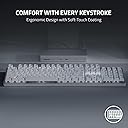
The Razer Pro Type Ultra is a premium wireless mechanical keyboard designed for professionals seeking quiet, ergonomic comfort and unmatched productivity. Featuring silent linear switches rated for 80 million clicks, HyperSpeed wireless technology, and the ability to connect up to 4 devices simultaneously, it offers a luxurious typing experience with fully programmable keys and smart controls. Its fingerprint-resistant keycaps and cushioned wrist rest ensure all-day comfort, making it the ultimate tool for focused work and multitasking in modern office or remote setups.


| ASIN | B09J72K6SM |
| Additional Features | Backlit, Wrist Rest |
| Antenna Location | Office |
| Best Sellers Rank | #486 in Computer Keyboards |
| Brand | Razer |
| Built-In Media | Item |
| Button Quantity | 78 |
| Color | White |
| Compatible Amazon Tablet Models | Amazon Fire 7 12th Generation, Amazon Fire HD 10 13th Generation, Amazon Fire HD 8 12th Generation, Amazon Fire HD 8 Kids Pro 12th Generation |
| Compatible Devices | Laptop, PC, Tablet |
| Compatible Operating System Family | MacOS, Windows |
| Compatible Tablet Computer Models | Amazon Fire 7 12th Generation |
| Connectivity Technology | USB-C, Wireless |
| Customer Reviews | 3.9 out of 5 stars 476 Reviews |
| Enclosure Material | Acrylonitrile Butadiene Styrene |
| Hand Orientation | Ambidextrous |
| Is Electric | Yes |
| Item Dimensions L x W x H | 17.28"L x 5.16"W |
| Item Type Name | PC Gaming Keyboard |
| Keyboard Backlighting Color Support | Single Color |
| Keyboard Description | Wireless |
| Keyboard Layout | QWERTY |
| Manufacturer | Razer |
| Mechanical Keyboard Switch Model | Razer Yellow Mechanical Switch |
| Mfr Part Number | RZ03-04110200-R3U1 |
| Model Name | Pro Type Ultra |
| Model Number | RZ03-04110200-R3U1 |
| Number of Keys | 104 |
| Number of Sections | 3 |
| Power Source | Battery Powered |
| Recommended Uses For Product | Office |
| Series Number | 304110200 |
| Special Feature | Backlit, Wrist Rest |
| Style Name | Contemporary |
| Switch Type | Linear |
| Theme | Productivity |
| UPC | 810056145170 |
| Unit Count | 1.0 Count |
| Warranty Description | 2 year manufacturer |
A**W
The backlight is... frustrating, not great for gaming
This is a really excellent keyboard for typing. The best I've ever used. Buttery smooth in a way I didn't realize a keyboard could be. A joy. Noticeably better than any other keyboard I've used. And it looks absolutely gorgeous. I just look at it on my desk from time to time. Just really well done. I added some fancy keycaps and occasionally swap them out for different designs, but mostly I leave the white keycaps in place because it just looks so good. For gaming, the keys are a little TOO responsive. By that I mean I will rest my fingers on WASD and spacebar, and accidentally push them just because the weight of my fingers can push the keys and trigger the switches. Like the slightest pressure activates the key. For typing text, AMAZING. For resting my hands on the keys to play games, not the best. If you're primarily gaming with your keyboard, choose another. If you're primarily typing text, this is the one. My biggest problem is the LED backlighting. The photos usually make it look like they are neutral white; neither warm white nor cool white. But the LEDs are cool white with that slight blue tint to them. This wouldn't be such a problem, but you'd think since they are white LEDs and not RGB, they would use neutral white. This problem is compounded by the yellow switches. The cool-white LED light reflects off the yellow switches. So now you have a mix of blue and yellow shining out from under every key and it just looks a bit muddy and ugly. I know they want to be able to say "our yellow switches" to keep in the parlance of the mechanical keyboard world, but they should have been white or clear. And the LEDs should have been neutral white. Update: I can now push Fn + Esc to swap Function keys/Media keys. So they are now, once again, swappable. The function keys can be edited now in the synapse software; the media keys still cannot be edited and will say as much in synapse if you don't switch them to Function keys first.
L**Y
Best dang keyboard and I've tried a lot of them.
Broke my Logitech G513 keyboard which was previously the best dang keyboard. I liked it because it had black keys that were backlit in white. Logitech, in their infinite wisdom apparently discontinued it because this Razer is now the BDK keyboard you can get if you're not a gamer. It's pricey to be sure. But it feels great and the key action has just the right feel without being too clicky. Wireless means that your desktop is just a bit cleaner. It remains to be seen how these white keys look after a couple of months worth of use (hey Razer why not offer a version with black backlit keys?) but they're removable and washable. The backlighting is lovely and you can turn it down/off. As others have said, if you're going to use it for business, do update the firmware and take the time to load teh Razer Synapse software so that you can customize the keys. I did not like that the function keys didn't work like function keys. With that software, now they do. Get a Razer. You deserve it.
S**N
Totally useless keyboard if you use more than 1 finger to type
I hate this keyboard after the 2 hours of use. There are several cons and pros, but one thing is making this board useless. Missclicks every second word. I use to keep my fingers on buttons while typing. So, for example in default position I have fingers on W, F, J, I, O, P. These and other buttons always triggering after very slight touch. A lot of missclicks, really lot. I spend 2x more time writing this review, because I was correcting every second word. I understand such issue on very budget keyboards, but this costs 160$, and they didn't even include user's manual in the box. I need to go to the official site or google how to enter to pairing mode. Upd. after a month of usage. I can't sell it because no one wants spend 100$ on used KB, and I can't just throw it to the trash because again it is so expensive. Pros: 1. High quality materials. 2. Up to 5 devices support. 3. Long battery life. 4. The response time is very low. Sometimes keys are triggered even before I press them. That's incredible. Cons: 1. Too heavy. 2. Keys on the closest row (ctrl, windows, alt...) are placed too low. So, you hardly can press Ctrl+Shift combination, which I use a lot in various scenarios. 3. You can't just hold fingers on keys, because they can be unintentionally pressed. You need to keep fingers in the air. Not an option for gaming, or if you have any level of tremor. 4. Lots of missclicks if you have medium/big fingers. Whenever you even very slightly touch a key next to your target key, it is triggered. I think this keyboard is most precise tool ever created by human, it feels even if I push a key by 0.1 nanometer. 5. LIGHTS!!! Since I can do blind typing, the lights are superfluous to me, since I can remember location of keys. But this keyboard just wants me to see its shiny yellowish lights. Each time I shutdown PC, the lights are turning on, and this cannot be disabled. I need to manually turn off the keyboard from the rear in order to turn off lights. That's a very stupid "feature". Can anyone from Razer explain what's the point? 6. Software. By default the function keys are multimedia keys instead of F1-F12 functionality. To change the default you have to install their software, which is not designed for real people. It is pop-ups so often, and it is asking me to create an account. Jesus, it is just a keyboard! I simply need to plug and play. If you have software installed, you can switch between function keys by pressing fn+Esc. Why I need the software for this purpose? Why to not make it a built-in feature? And of course I can't install this soft on my workplace. 7. Bugs: sometimes KB automatically is switching do default settings. Sometimes F1-F5 and "~" buttons just not working, I need to push them several times. If you didn't use KB for several minutes, the first key pressed is ignored, it needs 2-3 seconds to wake up.
C**M
Amazing product
I never write reviews but this is a fantastic product. I saw a lot of people saying this is a loud keyboard and it absolutely is not. My previous keyboard was very clicky and I'm quite impressed how quiet and satisfying it is to use. It's beautiful and has a good battery life. Impressed with the bluetooth, i'm able to connect to both my work and home pc seamlessly. A bit pricy but well worth it imo
J**H
Not a great keyboard overall.
I love that the backlighting on this keyboard is soft, not crazy bright but does a very good job of showing the keys off properly. The key presses are quite silent for a mechanical keyboard, not completely gone but still quiet. The wrist rest is amazing, very happy with it and I like that it can be removed quickly if necessary. The wireless function is amazing and being able to switch between devices quickly is extremely useful. However... The function keys defaulting to their media keys and not being able to be changed is quite literally a deal breaker for many. Especially as a developer, trying to do things in dev tools where the F keys are necessary it's nearly impossible to get used to. You cannot change the default function without "mapping" the keys and then you lose the multi media capability entirely. It's almost impossible for this to have been a mistake on their part, someone read something wrong for this big of an issue to be put into a product. Additionally, placing the mute button right next to the escape key gets hit constantly. I don't know if others have this issue, but as I rest my hands on my keyboard, I am finding that I am always activating the keys unintentionally. Not sure if this is just an issue where the weight of my hands is too much for the keys, but I should be able to rest my fingers without depressing the button enough to cause it to repeat. For the price that this keyboard runs, it should definitely allow for more productive work. I was fortunate I didn't have to pay out of pocket for this, but I was fairly blinded by how it was marketed and I kept thinking to myself that it was just me and the issues would work themselves out over time. Well, months later I know that not to be the case, and this keyboard just isn't for me. As someone who uses a Razer keyboard on a daily basis, thinking this would be an easy transition did not pan out. I would not recommend this for anything other that super casual gaming if you're looking to get something that can be used both for work and gaming though.
R**5
This is a great keyboard, just expensive and needing some functions added.
So I'm coming from Logitech MX Master Keys and MX Master 3 (Mouse). Neither of those devices are for gaming, but they are fantastic for productivity, with near limitless programmability and full cross-platform support for a Mac OS or Windows user. I use both daily. So here we have a keyboard made by a gaming company that promises productivity for multiple devices. Seemed promising. And I am a gamer who works from home. Gave it a go. So obviously, unlike the MX Keys, this doesn't have full cross platform support. No worries. Bumbled around in Mac OS for a while and found the keyboard modifiers to switch the "Command" and "Option" placement so that the functions would carry over from Mac OS to the "Start/Windows" and "Alt" keys respectively so that it's seamless. Nice. If you use Windows, Razer Synapse gives you all the functionality you could need to compete with Logitech Options, being able to bind nearly every key to whatever you need it to do if you have the patience to program it. Options comes more ready to go out of the box to integrate into Microsoft Office and the like, but overall Synapse gives you more flexibility if you know how to use it well. So we're good to go there. Razer would still benefit from adding true cross-platform functionality to attract a larger audience and give back some of those wonderful hot keys and shortcuts and gestures to Mac users (they advertise their Mercury Thunderbolt 3 dock as a Mac accessory even though it's not purpose built for it, so it seems they do want to attract more Mac users to their peripherals). The other piece is the price. For a full size keyboard, it is great that it supports multiple devices like the Logitech, but without true cross platform support, it's just not as strong of a value as the Logitech. The Logitech product is $99-100 and this one is $160 (and seldom goes on sale). It's a mechanical keyboard which is pleasant to type on, but I think your typical Mac user won't think that nor the plush wrist wrest that I'm enjoying right now justifies the $60 price increase. And for many non-Mac OS users, there are other multi device supporting keyboards (both mechanical and membrane) for less. That said, this keyboard supports 4 devices to Logitech’s 3. Final critical point, which I don't care about really, but worth noting: Razer advertises these switches as silent. For anyone who uses a membrane or scissor switch keyboard, this is anything but. I enjoy the clacks as I type, but others may not. Especially if you sit close to colleagues. Razer’s Red Optical Switches they use on the Huntsman lineup are actually a quieter typing experience and otherwise very comparable in performance as it pertains to travel distance before registering input, force required to press down a key, etc. Now for another positive point not related to productivity: this keyboard is blazing fast. If you play FPS or other high speed games, this won’t disappoint. Not only is it low latency when compared to the hundreds other gaming keyboards on the market manufactured by other brands, it is quicker than many of Razer’s own keyboards, with a 0.7ms response time over wired connection, and 1.3ms over HyperSpeed Wireless. There are presently only about 6 keyboards measured on RTINGS (a fantastic resource) that have lower latency, all are either Razer or Corsair. And the perceived difference between 0.1ms and 0.7ms is negligible. This keyboard will not disappoint in gaming performance. If you don’t like the smooth keycap feel that it comes with, try some DoubleShot PBT caps like I have. I'm going to write a separate review for the Pro Click mouse from Razer, which I also purchased. That item is priced identically to the MX Master 3, but has more glaring features lacking than the keyboard comparison. Overall, I wouldn't recommend to anyone that has only a Mac in their life, that demands high customization. Nor would I recommend it for someone who is price sensitive. If you are neither, and are someone who may be: A) A Razer enthusiast B) need something to support numerous windows devices simultaneously C) Don't need RGB D) Want something competitive against true gaming keyboards when you’re not working This will meet and exceed those expectations, and they'll do fantastic for gaming as well. The latency is low, polling rate on the mouse is up to 1000hz, which will do well for many enthusiasts of FPS and other fast-response genres. Anyhow, hope this helps. It is a good product, but it's too pricey for some for a mere office keyboard. Albeit few, there are gaming keyboards that cost less when on sale that will outperform it. But this is gonna be the best of both worlds if you’re looking to keep a professional looking working space that supports numerous devices and looking to game when off work.
D**O
Read the Reviews... LOUD and Intermittent
I Love the weight and feel of this keyboard, and it's lights are cool! But....it's claims to be "Minimum Sound" are absurd .....This thing is NOISY. Even worse, it is always sleeping when I start to type, thus my first few keystrokes are not registered. It requires software and custom programming for the function keys to work like a normal keyboard. It is billed as wireless but it requires recharging to be wireless and who wants to wait for their keyboard to charge so they can use it? I gave it a fair trial and while I like it's ergonomics, it's flaws overwhelm it's assets. Returning it after a week. I liked my Logitech MK710 but had to replace it before it's 3rd birthday because the letters rubbed off so many of it's keys that using it is difficult. Back to searching for a comfortable, quiet keyboard and disappointed that the false advertising for this one tricked me into trying it!
L**N
It's fine- annoying software quirks
It's good. For me, one of the keys snapped (Esc) and I've just had to live with pressing on the nub because the key switches themselves are not very replaceable. The biggest frustration I have with this keyboard is the Fn key defaulting. Every FREAKIN time I restart windows, the Fn keys will default back to the media keys. I'm a programmer, so the first time I hit F1 and it mutes instead of selecting the file in the hierarchy, I get so annoyed. It goes back to the keyboard profile AS SOON as you open Razer Synapse. Until then, the keys default to media. I've tried the hotkey for changing it, and it also doesn't do anything without Razer Synapse. This feels like such an easy thing to have in the keyboard and not have to open synapse, but this keyboard requires the software. That alone takes 2 stars away for me, since I want to be able to plug this in to a random computer and have an expectation of how it will respond. the key switches are fine. not super clicky, so a decent keyboard for shared space or night use. durability? well.. key broken from dropping it off my lap one time. The keyboard still function though, so meh. quality is good, love the backlit keys, hate the f***ing software
A**R
Love it but too sensitive
Its really nice and i love it. But its too sensitive and almost always I misspell words because of its high sensitivity.
H**.
Excelente producto, pero la entrega no me pareció que fuera la adecuada de parte de Amazon
Fue una confusión, todo bien con el paquete, pero lo entregaron de forma incorrecta y sin aviso
M**A
Love it
So far no complaints about this keyboard. I’ve been waiting for razer to come out with this since they announced it and was very happy to see i can order it off amazon. About the silent part it definitely still had a noise as you can hear in the video but if you own a gaming keyboard from razer you know that they can get very clicky and loud so compared to their other models yes its much quieter. I pared it with a Microsoft mouse and the colours match well. I just decided i didnt need a $120 mouse for what i do but the keyboard im very happy with. The wrist rest is also very soft and comfortable
R**N
Solid product
works well with my Macbook pro and my PC both on separate profile si I'm able to use a single keyboard and mouse for my 2 computers.
J**P
Horrible key switches, bad customer support
Started spamming keys a few months after getting it. Was replaced through warranty and the replacement had the same defect. Tried warranty again and had the same experience. Eventually they gave me a black widow which had the same spamming issue. The customer support is AI so its a horrible experience to get things replaced, plus they make you pay for shipping.
Trustpilot
3 weeks ago
2 weeks ago