Desertcart purchases this item on your behalf and handles shipping, customs, and support to Uruguay.
🚀 Elevate your network game with 10GbE power and unmatched versatility!
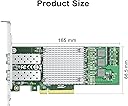
The Ipolex 10Gb SFP+ PCIe NIC Network Card, powered by the Broadcom BCM57810S chip, delivers ultra-reliable 10Gbps dual-port connectivity. Designed for professionals demanding high-speed, low-latency networking, it supports a wide range of operating systems and hypervisors, including Windows Server, Linux, and VMware. With advanced hardware offload features and flexible bracket options, this card is the perfect upgrade for modern workstations and servers aiming to future-proof their network infrastructure.


| ASIN | B09BVMNR32 |
| Best Sellers Rank | #151 in Internal Computer Networking Cards |
| Brand | ipolex |
| Color | 1pc |
| Compatible Devices | Desktop |
| Compatible Operating System Family | Linux, Windows |
| Customer Reviews | 4.4 out of 5 stars 206 Reviews |
| Data Link Protocol | Ethernet |
| Data Transfer Rate | 10 gigabits_per_second |
| Hardware Interface | PCIE x 8 |
| Item Dimensions L x W x H | 5.91"L x 1.18"W x 8.86"H |
| Item Weight | 0.21 kg |
| Manufacturer | ipolex |
| Mfr Part Number | BCM-57810-2S |
| Model Number | BCM-57810-2S |
| Number of Items | 1 |
| Product Dimensions | 5.91"L x 1.18"W x 8.86"H |
| Unit Count | 1 Count |
I**N
Very Reliable, Easy Install, Recommended
My use case is a personal development network with two high end desktop workstations, one with AMD Ryzen 9 and the other with Intel i7. Both are running Ubuntu Linux 22.04.2 PRO and I am using a Mikrotik CRS306-4S-1N switch. Both Desktop systems have dual 10G NICs and cable into the switch with 6COM 6C-SFP-10G-T SFP+ 10G RJ45 Adapters and CAT8 cabling. As soon as everything was plugged in the systems came right up and everything was fast and sweet. Don't forget to plug in the backhaul cable from the switch to your in-house network feed otherwise no DHCP and the 10G connections don't com up. Highly recommended. This is plug and play and the most practical sense. Installation time was about an hour and that include putting boards in two machines, running cables, attaching adapters and installing switch. "Settings/Network/Ethernet/Wired/enp11s0f0 showed connected at 10000 Mb/s immediately. My one extra thought though is that the dual channel boards are only a little bit more, and by the time you bother to open up the box and install a board, you might as well think of the future, IMHO.
M**T
Works out of the box and are reliable
We have quite a few of these running on VMWare servers and I also went ahead and stuck one in my desk station because, why not have a 10GB dual NIC in it? They perform well and have had 0 issues running 24/7 and are a good economical option for adding dual NIC capable of 10Gig (the HP branded ones can be expensive). No compatibly issues with VMWare or Windows Server or Window 11. We have them in HP and Dell servers and my desktop is a custom built ASUS with an AMD CPU.
R**N
Yes it works with Windows 11
Was a little worried if this card would work with Windows 11 or not, but it does. You just have to download the full driver package which as all the drivers for Windows, Linux, ect. and unzip it into a folder. Then go to the device manager and select the device and click on upgrade driver. Then just point to the folder and BAM it finds the driver for Windows 11. Don't know which driver it liked, but who cares, Windows 11 likes it and it now works and tested at almost 10g speeds.
C**D
Works flawlessly with Windows 11
I was a bit worried about operating system compatibility, because the product desription doesn't explicitly list Windows 11 as being supported. I was prepared for manual driver installation, but I was pleasantly surprised that Windows recognized the card and automatically installed/configured the software for it. The network card works and perfoms as expected. I am using this network card in a generic PC with an MSI MPG Z490 motherboard (MS-7C79), running Windows 11 Pro Ver.10.0.22631. I'm using 10Gtek 10GBase-SR LC transceivers and LC OM3 fiber cables.
A**R
No Windows 10 or 11 drivers.
It should be noted that this chip set is no longer supported by Intel, while Linux supports the drivers, and they work great, there are no windows 10 or 11 drivers. The company's website only directs you to the Intel website drivers, which only have drivers for BSD, windows 7 and a couple of Microsoft servers. But with some internet searching, you can find drivers for Windows 10, which work perfectly fine on Windows 11. I found some on a Dell support website. That's why I give them a 4.
M**1
Worked right out of the box!
I had previously purchased an Intel based 10Gbp SFP+ here on Amazon for around the same price, but had nothing but trouble. In the previous purchase, I tried in several Linux computers and it would never work. I returned it and decided to try out a Broadcom based dual SFP+ solution. I was *delighted* when I popped this one into my first server and Proxmox found it without issues. I've run it now for a number of days and I'm getting a clean 10Gbps connection in my home lab!
Z**O
Can't get it to work with Linux VMs on Proxmox
Got this for my Proxmox machine; It works fine with a Windows 2019 VM but TrueNAS Scale and Ubuntu VMs not so much – they get a valid IP via dhcp but no network connectivity so I think there are issues with Linux drivers or kernel. I just ordered a SolarFlare SFN6122F which TrueNAS reports works (see TrueNAS resources: 10 Gig Networking Primer), if it does, then I’ll be returning this. ‘lspci -vvxnn’ below: Ethernet controller [0200]: Intel Corporation 82599ES 10-Gigabit SFI/SFP+ Network Connection [8086:10fb] (rev 01) Subsystem: Beijing Sinead Technology Co., Ltd. 82599ES 10-Gigabit SFI/SFP+ Network Connection [1dcf:030a] Control: I/O+ Mem+ BusMaster+ SpecCycle- MemWINV- VGASnoop- ParErr- Stepping- SERR- FastB2B- DisINTx+ Status: Cap+ 66MHz- UDF- FastB2B- ParErr- DEVSEL=fast >TAbort- <TAbort- <MAbort- >SERR- <PERR- INTx- Latency: 0, Cache Line Size: 64 bytes Interrupt: pin A routed to IRQ 16 IOMMU group: 5 Region 0: Memory at 84180000 (32-bit, non-prefetchable) [size=512K] Region 2: I/O ports at 3020 [size=32] Region 3: Memory at 84204000 (32-bit, non-prefetchable) [size=16K] Expansion ROM at 84100000 [disabled] [size=512K] Capabilities: [40] Power Management version 3 Flags: PMEClk- DSI+ D1- D2- AuxCurrent=0mA PME(D0+,D1-,D2-,D3hot+,D3cold-) Status: D0 NoSoftRst- PME-Enable- DSel=0 DScale=1 PME- Capabilities: [50] MSI: Enable- Count=1/1 Maskable+ 64bit+ Address: 0000000000000000 Data: 0000 Masking: 00000000 Pending: 00000000 Capabilities: [70] MSI-X: Enable+ Count=64 Masked- Vector table: BAR=3 offset=00000000 PBA: BAR=3 offset=00002000 Capabilities: [a0] Express (v2) Endpoint, MSI 00 DevCap: MaxPayload 512 bytes, PhantFunc 0, Latency L0s <512ns, L1 <64us ExtTag- AttnBtn- AttnInd- PwrInd- RBE+ FLReset+ SlotPowerLimit 0W DevCtl: CorrErr+ NonFatalErr+ FatalErr+ UnsupReq+ RlxdOrd+ ExtTag- PhantFunc- AuxPwr- NoSnoop+ FLReset- MaxPayload 256 bytes, MaxReadReq 512 bytes DevSta: CorrErr+ NonFatalErr- FatalErr- UnsupReq+ AuxPwr- TransPend- LnkCap: Port #0, Speed 5GT/s, Width x8, ASPM L0s, Exit Latency L0s unlimited ClockPM- Surprise- LLActRep- BwNot- ASPMOptComp- LnkCtl: ASPM Disabled; RCB 64 bytes, Disabled- CommClk+ ExtSynch- ClockPM- AutWidDis- BWInt- AutBWInt- LnkSta: Speed 5GT/s, Width x4 (downgraded) TrErr- Train- SlotClk+ DLActive- BWMgmt- ABWMgmt- DevCap2: Completion Timeout: Range ABCD, TimeoutDis+ NROPrPrP- LTR- 10BitTagComp- 10BitTagReq- OBFF Not Supported, ExtFmt- EETLPPrefix- EmergencyPowerReduction Not Supported, EmergencyPowerReductionInit- FRS- TPHComp- ExtTPHComp- AtomicOpsCap: 32bit- 64bit- 128bitCAS- DevCtl2: Completion Timeout: 50us to 50ms, TimeoutDis- LTR- 10BitTagReq- OBFF Disabled, AtomicOpsCtl: ReqEn- LnkCtl2: Target Link Speed: 5GT/s, EnterCompliance- SpeedDis- Transmit Margin: Normal Operating Range, EnterModifiedCompliance- ComplianceSOS- Compliance Preset/De-emphasis: -6dB de-emphasis, 0dB preshoot LnkSta2: Current De-emphasis Level: -6dB, EqualizationComplete- EqualizationPhase1- EqualizationPhase2- EqualizationPhase3- LinkEqualizationRequest- Retimer- 2Retimers- CrosslinkRes: unsupported Capabilities: [e0] Vital Product Data Unknown small resource type 06, will not decode more. Capabilities: [100 v1] Advanced Error Reporting UESta: DLP- SDES- TLP- FCP- CmpltTO- CmpltAbrt- UnxCmplt- RxOF- MalfTLP- ECRC- UnsupReq- ACSViol- UEMsk: DLP- SDES- TLP- FCP- CmpltTO- CmpltAbrt- UnxCmplt- RxOF- MalfTLP- ECRC- UnsupReq- ACSViol- UESvrt: DLP+ SDES- TLP- FCP+ CmpltTO- CmpltAbrt- UnxCmplt- RxOF+ MalfTLP+ ECRC- UnsupReq- ACSViol- CESta: RxErr- BadTLP- BadDLLP- Rollover- Timeout- AdvNonFatalErr+ CEMsk: RxErr- BadTLP- BadDLLP- Rollover- Timeout- AdvNonFatalErr+ AERCap: First Error Pointer: 00, ECRCGenCap+ ECRCGenEn- ECRCChkCap+ ECRCChkEn- MultHdrRecCap- MultHdrRecEn- TLPPfxPres- HdrLogCap- HeaderLog: 00000000 00000000 00000000 00000000 Capabilities: [140 v1] Device Serial Number xxxxxxxxxxx Capabilities: [150 v1] Alternative Routing-ID Interpretation (ARI) ARICap: MFVC- ACS-, Next Function: 1 ARICtl: MFVC- ACS-, Function Group: 0 Capabilities: [160 v1] Single Root I/O Virtualization (SR-IOV) IOVCap: Migration- 10BitTagReq- Interrupt Message Number: 000 IOVCtl: Enable- Migration- Interrupt- MSE- ARIHierarchy+ 10BitTagReq- IOVSta: Migration- Initial VFs: 64, Total VFs: 64, Number of VFs: 0, Function Dependency Link: 00 VF offset: 128, stride: 2, Device ID: 10ed Supported Page Size: 00000553, System Page Size: 00000001 Region 0: Memory at 00000060e0300000 (64-bit, prefetchable) Region 3: Memory at 00000060e0200000 (64-bit, prefetchable) VF Migration: offset: 00000000, BIR: 0 Kernel driver in use: ixgbe Kernel modules: ixgbe
B**N
Works in my Synology DS-1621+
After swapping the tall bracket with the included low-profile bracket, the card slipped right into the Synology NAS and was recognized on bootup. I connected to my switch using the same manufacturer's SFP+ adapters and all went smoothly. I have no prior experience installing fiber cabling, so it was a relief how easy this went. In my case, I left the bonded Gigabit copper Cat6 connected until I went into the Synology software to configure this NIC. In hindsight, that was probably unnecessary. I have not tested performance/throughput objectively, so my comments are about compatibility and installation.
G**I
Funziona una bomba
l'ho installata su pfsense per collegarlo ad uno switch mikrotik in 10G. Il sistema l'ha visto senza nessun problema e le performance sono ottime. La consiglio per la sua facilità d'uso e per il prezzo.
A**R
Five Stars
Worked perfectly how I needed didn't even need a driver
M**.
Affordable next-generation networking
Arrived within estimate and product as described. For those interested, these seem to ship with SFP vendor locking disabled, so non-Intel SFP should work.
S**I
Excellent network card, works like a charm for 10Gb connections.
Works great, you need to install the drivers on windows 11 manually by downloading them from the website, you can either Google the product name or just scan the qr code on the network card. Getting 8.7Gb speed, but this is cause my ISP provides that much. Very satisfied with this network card.
Trustpilot
2 months ago
1 day ago