💼 Elevate your data game with speed, space, and style.
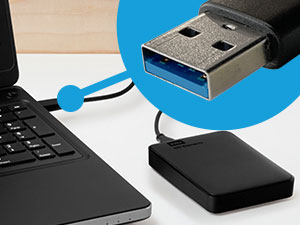
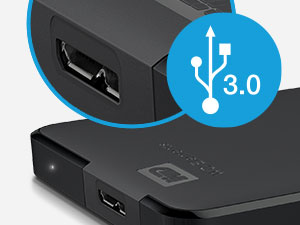
The Western Digital WD 1TB Elements Portable External Hard Drive delivers reliable, high-capacity storage in a sleek, compact design. Featuring USB 3.2 Gen 1 connectivity, it offers fast data transfer speeds up to 5Gbps, perfect for backing up photos, videos, and documents on the go. Its plug-and-play functionality ensures effortless use with Windows and Mac systems, making it an essential tool for professionals seeking dependable, portable storage.


| ASIN | B06VVS7S94 |
| Additional Features | Portable |
| Best Sellers Rank | #2 in External Hard Drives |
| Brand | WD |
| Built-In Media | External Hard Drive |
| Cache Memory Installed Size | 1 |
| Color | Black |
| Compatible Devices | Desktop, Laptop, Gaming Console |
| Connectivity Technology | USB |
| Customer Reviews | 4.6 out of 5 stars 311,787 Reviews |
| Data Transfer Rate | 1 Gigabits Per Second |
| Digital Storage Capacity | 1 TB |
| Enclosure Material | Cotton |
| Form Factor | 3.5-inch |
| Hard Disk Description | Mechanical Hard Disk |
| Hard Disk Form Factor | 2.5 Inches |
| Hard Disk Interface | USB 3.0 |
| Hard Disk Rotational Speed | 1 RPM |
| Hard-Drive Size | 1 TB |
| Hardware Connectivity | USB 3.0 |
| Installation Type | External Hard Drive |
| Item Dimensions L x W x Thickness | 4.35"L x 3.23"W x 0.59"Th |
| Item Type Name | WD 1TB Elements Portable External Hard Drive - USB 3.0 - WDBUZG0010BBK-WESN |
| Item Weight | 0.29 Pounds |
| Manufacturer | Western Digital Technologies, Inc. |
| Media Speed | 1 Accelerated Reader |
| Model Name | Elements Desktop |
| Model Number | WDBUZG0010BBK-WESN |
| Number of Items | 1 |
| Read Speed | 100 Megabytes Per Second |
| Special Feature | Portable |
| Specific Uses For Product | Personal |
| UPC | 718037855448 |
| Unit Count | 1.0 Count |
| Warranty Description | Limited Warranty |
A**S
Reliable External Storage - Perfect Capacity and Performance!
The WD 2TB Elements Portable External Hard Drive has been exactly what I needed for reliable, high-capacity storage! This drive delivers outstanding performance and convenience for backing up files, expanding storage, and transferring data. The 2TB capacity is perfect for storing massive amounts of photos, videos, documents, and backup files. Having this much portable storage has eliminated my constant worry about running out of space on my laptop. The USB 3.2 Gen 1/USB 3.0 connectivity provides excellent transfer speeds that make backing up large files quick and efficient. No more waiting hours for file transfers - this drive moves data fast enough for practical daily use. The portable design is ideal - compact enough to slip into a laptop bag but substantial enough to feel durable and reliable. The sleek black finish looks professional and the size is perfect for travel or desktop use. What sets WD apart is their proven reliability. This drive has performed flawlessly for months of regular use without any errors, corruption, or performance degradation. Western Digital's reputation for quality storage is well-deserved. The plug-and-play functionality works perfectly with Windows systems - no software installation or complicated setup required. Simply connect and start using immediately for seamless storage expansion. This external drive has provided peace of mind for data backup and practical storage expansion. Outstanding reliability, capacity, and performance at an excellent value. Highly recommend for anyone needing dependable external storage!
R**Y
Seamless Storage Solution at an Unbeatable Price
The WD Elements Portable External Hard Drive is a fantastic choice for Mac Air users seeking reliable storage without breaking the bank! It's incredibly user-friendly with true plug-and-play functionality, solid build quality that inspires confidence in (data's safety) encryption and comes at an accessible price point and outstanding value. Whether you're backing up important files, storing your media library, or need extra space for creative projects, this drive handles it all with ease. A smart investment that simply works.
A**Y
Reliable 5TB portable drive that just works – perfect for backups and extra storage
I’ve used a bunch of these WD Elements drives over the years, and this one is exactly what you’d expect – simple, no-frills, and it does the job really well. Plugged it into my Windows laptop and it showed up right away, no software install needed. Same thing on my Mac – plug and play, formatted it quick and good to go. USB 3.0 speeds are solid for a spinning drive – copying big video files or game backups takes time but it’s consistent and way faster than USB 2.0 junk. The 5TB gives you a ton of space. I use it mainly for Time Machine backups, storing old photos/videos, and keeping Steam libraries I don’t play often. Fits everything I need without worrying about space for a long time. The drive itself is pretty quiet – you hear a faint hum when it’s working
R**I
Works great. 5 stars
Priced right, plenty of storage, easy to use and arrived quickly. I even came with a back-up program that was easy to set up. A small price to pay for the peace of mind that backing up provides.
K**N
Product works fantastically, but a warning to other users.
I want to clarify, this HD does exactly what it's meant to, exceptionally. It is plug n play, it requires no formatting or complicated software, its transfer rates are great & it has a rugged protective design that means it'll last a long time. BUT I want to let folks know, specifically, if they're utilizing USB wireless devices such as a keyboard, mouse, etc; You must plug this in as far away from the recievers for those devices as possible. In fact, if you have a laptop, I recommend using a far longer cord & putting the HD as far away as the Hard Drive allows. To be clear, I'm not sure this is a real manufacturing or producer error, this just seems like signal interference inherent to the power output of the hard drive. It WILL cause your mouse, keyboard, etc to lag. It can cause wireless connections to drop. If you have a little plug in USB reciever for any device you use on your computer, move it to the opposite side from the HD. In fact, try to keep the HD out of the line of signal entirely AND as far away from it as possible. If you plug a WD Elements Portable External Hard Drive & experience: - Lag of keyboard input - Lag of wireless mouse input - Intermittent or disruptive wireless disconnections - Signal or Detection dropout of a microphone or webcam using a wireless reciever It is because of the WD Elements Portable Hard Drive. It is not an error, it's not malfunctioning, it is just disrupting the signal. Get a long USB transfer cord, or turn your laptop, or MOVE your wireless recievers so the HD is not between them & the device. I swear, it's working fine, it's super easy to work around, you do not need to refund/return, etc. The product is great, I'm just writing this to thank the seller & also to make sure anyone googling this has a clear, reliable, understandable result in search as to what to do. Your computer isn't dying, nothing's wrong, it's just way too much in the airways.
B**.
Fantastic Drive
I’ve had and have been using this drive for nearly four years. It works flawlessly. I had to reformat it to use it on my Mac and Windows computers but that only took about 15 seconds, 20 tops. Works great and is quite reliable. Do yourself a favor and get this drive.
K**R
Great Hard Drive and Easy
Was stupid af and thought it was a 3.6 no I just can't read sometimes! It's great and holds just about everything I need and almost another lifetime more. Not a bad price and so far very reliable, thank you!
B**A
Western Digital WD 5TB Elements Portable External Hard Drive
It's about a 3/4 inch thick but still small enough to carry in your pocket. Powered 100% from the USB port which is a huge plus no extra wires. Depending on if you use the included software (I did not). You can format the drive to work on Apple, Windows, Linux anything you need it for. I set mine GPT & NTFS format so I can use it on Linux or Windows. However you setup will determine it compatibility. If you set the drive for easy removal the speed will be slow like all USB drives. But set the drive to "Safely Remove" (cache setting under the hardware tab, under properties). Then the drive is very fast, just remember ALWAYS UNMOUNT before removing. Right now I'm using it as VM (Virtual Machine) back-up drive on Proxmox. I don't run the VM's off the drive, I store back-ups to the drive so I can move them to different machines. Pros: Super easy to use just plug it in. Huge size can store plenty of files. The drive has about 4,800,000 usable MB's. So that can store 240,000 20 MB pictures, 1,200 4 GB movies. It's a very nice looking drive. Compatible with Windows, Apple and Linux. (depending on drive format) every OS will let you format it. Cons: I only have one I wish it was 10 TB's! :) beast-usa
Trustpilot
5 days ago
2 weeks ago