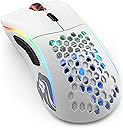
🎯 Dominate your desk with the Glorious Model D Wireless — where speed meets style and stamina.
The GLORIOUS Model D Wireless Gaming Mouse is a 69g ultra-lightweight, ergonomic mouse engineered for pro-level performance. Featuring lag-free 2.4GHz wireless with 1ms latency, a marathon 71-hour battery life, and a BAMF sensor delivering up to 19,000 DPI and 1000Hz polling rate, it’s designed for competitive gamers seeking precision and comfort. Customizable RGB lighting with 16.8 million colors and a flexible USB-C charging cable complete this high-performance package.


| ASIN | B09J585C6N |
| Average Battery Life (in hours) | 71 Hours |
| Batteries | 1 Lithium Ion batteries required. (included) |
| Best Sellers Rank | #3,965 in Video Games ( See Top 100 in Video Games ) #198 in PC Gaming Mice |
| Brand | GLORIOUS |
| Color | White |
| Customer Reviews | 4.4 4.4 out of 5 stars (263) |
| Date First Available | February 2, 2022 |
| Department | womens |
| Hardware Platform | PC |
| Item Dimensions LxWxH | 5 x 2.6 x 0.1 inches |
| Item Weight | 2.43 ounces |
| Item model number | GLO-MS-DW-MW |
| Manufacturer | Glorious PC Gaming Race |
| Operating System | Windows |
| Power Source | USB |
| Product Dimensions | 5 x 2.6 x 0.1 inches |
| Series | Glorious Model D Wireless - Matte White |
L**O
Great Mouse but get the Pro
This is a review of the “Model D Wireless” gaming mouse from Glorious. This review will be split into 6 parts: SHAPE (how comfortable the mouse’s shape is to hold), BUILD QUALITY (how strong the mouse is built), QUALITY-CONTROL (the margin of error between copies of the mouse), CLICKS (how good the buttons feel to press), GLIDE (how fast the mouse can move on your mousepad), and finally WEIGHT (how much the mouse weighs) Starting off we have shape; the shape of the Model D is a large ergonomic shape with side buttons only on the left side. For this reason, this mouse is meant for people who have medium – large hand sizes and are right-handed. If you are left-handed, I strongly recommend not getting this mouse. If you are right-handed, however the mouse shape feels amazing for palm and claw grip. For me I use a claw grip and this mouse is awesome! Next up the build quality and quality control; the build quality of this mouse is mostly good besides for a little side-play on the clicks and some side button wobble. The mouse does last a while (I’ve been using it for 1 year at the time of making this review) and I haven’t had any big build quality issues. The quality control of Glorious mice has always been lousy according to popular mouse reviewers, but after looking around, asking people and watching other reviews, I think the quality control of the mouse is pretty good. Now to review clicks, glide and weight. The Glorious Model D’s clicks are on the heavier side but they are still easy to repeatedly click. The Model D uses an Omron®️ Mechanical Switches Rated For 20 Million Clicks. The glide is *okay* its not super-fast but it’s not too slow either. If you are a fan of faster mouse feet I think you would be better off buying “after market” mouse feet. The Model D’s weight is 70 grams and is pretty light but recently, mice have been getting below 50 grams easily. The weight is still good though! Onto the final question, “Would I recommend this mouse?” and the answer is surprisingly “no.” However, it’s not because the mouse is bad, in fact the mouse is great, but I would not recommend it because Glorious has made a new mouse called the “Model D 2 pro” which is a lighter version of the model D. If you’re thinking about getting a new Glorious mouse I’d just say get the Model D 2 pro.
A**I
Glorious Model D WIRELESS
I’m not a mouse expert but I love this thing. It’s lighter than my old $20 wired mouse believe it or not. I have big hands so this mouse feels nice (would still be fine for smaller hands) the scroll wheel is butter smooth with tactile bumps on each scroll. Nice packaging, it comes with usb dongle and even an extra transmitter in case your computer is in another room for example (I don’t use it but it’s really cool for the price if you do actually need it). Also comes with bigger skates if you want to add those on but the stock skates are really smooth and satisfying. The usb c cable that it comes with is really nice soft braided it’s like a shoe string not all stiff like most braided cables so if you are using the mouse while it’s charging the soft cable allows it to move freely and not get caught up on the back edge of your desk or other objects. It did require software download and firmware update (I don’t mind) and the software is really easy an intuitive to use, it even shows you the exact battery percentage in the software. It’s set on default to start the software when your boot up your PC so you might want to turn that option off. 3 profiles to customize so you can have your favorite colors and settings ready to go quickly. It doesn’t have a dedicated slot to store the usb dongle but I don’t mind as long as the connection is quick and seamless which it definitely is. I would highly recommend this mouse, can’t beat it for value.
J**R
Reliable Mouse with Nice Basic Features
Great mouse. I've used it for about a year and I've not run into any issues. Works nice both when using it wireless or plugged in. I personally don't like RGB lights, so I was happy it was easy to turn it off.
J**A
Lightweight and comfortable
Most comfortable lightweight mouse I have ever used
J**N
Beware of battery life.
I upgraded to this mouse from a HyperX Pulsefire. Very similar in feel. The main reason for the change was the middle mouse wheel is very study in comparison. The texture and feel is very satisfying, and performs as expected in terms of accuracy. I can comfortably palm or claw hold this mouse and the size feels good for either way. Clicks are responsive and as someone who used to play competitively in FPS titles like Apex Legends, I love the feel and response of this mouse. My one con on this mouse is the battery life does not live up to the 71 hours. It is less than 48 hours. I tend to leave the mouse plugged in. The included cord feels like it doesn't even exist when plugged in. I don't even notice a difference.
C**T
Glorious sent a refund.
This thing literally makes you factory reset your pc. I've been using it fine since I got it a couple months ago, but just 4 days ago the back button stopped working on my PC. So I plug it into my laptop to see if it's a software or harware problem. Same thing. but now it doesn't click at all. The cursor moves on both PC's, but I can't click anything on either. So I test my other laptop with a different mouse. Working fine, plug in the Model D, and it breaks the laptop. You can try reinstalling drivers, or glorious core. Doesn't help. The only way to fix this problem is by completely reinstalling windows. Glorious isn't doing anything about this despite reaching out multiple times. Update: I contacted customer support and they offered 1 of 2 options, a free replacement, or store credit equal to it's worth. I chose the second option as I only payed $55 on Amazon so I basically got $25 for free.
Trustpilot
2 months ago
1 month ago