We remain fully operational. Our teams are working around the clock to ensure your deliveries continue safely.

DOWNLOAD THE APP


Copyright © 2025 Desertcart Holdings Limited
DOWNLOAD THE APP
Buy anything from 5,000+ international stores. One checkout price. No surprise fees. Join 2M+ shoppers on Desertcart.
Desertcart purchases this item on your behalf and handles shipping, customs, and support to Uruguay.
🔌 Power Up Your Monitoring Game!
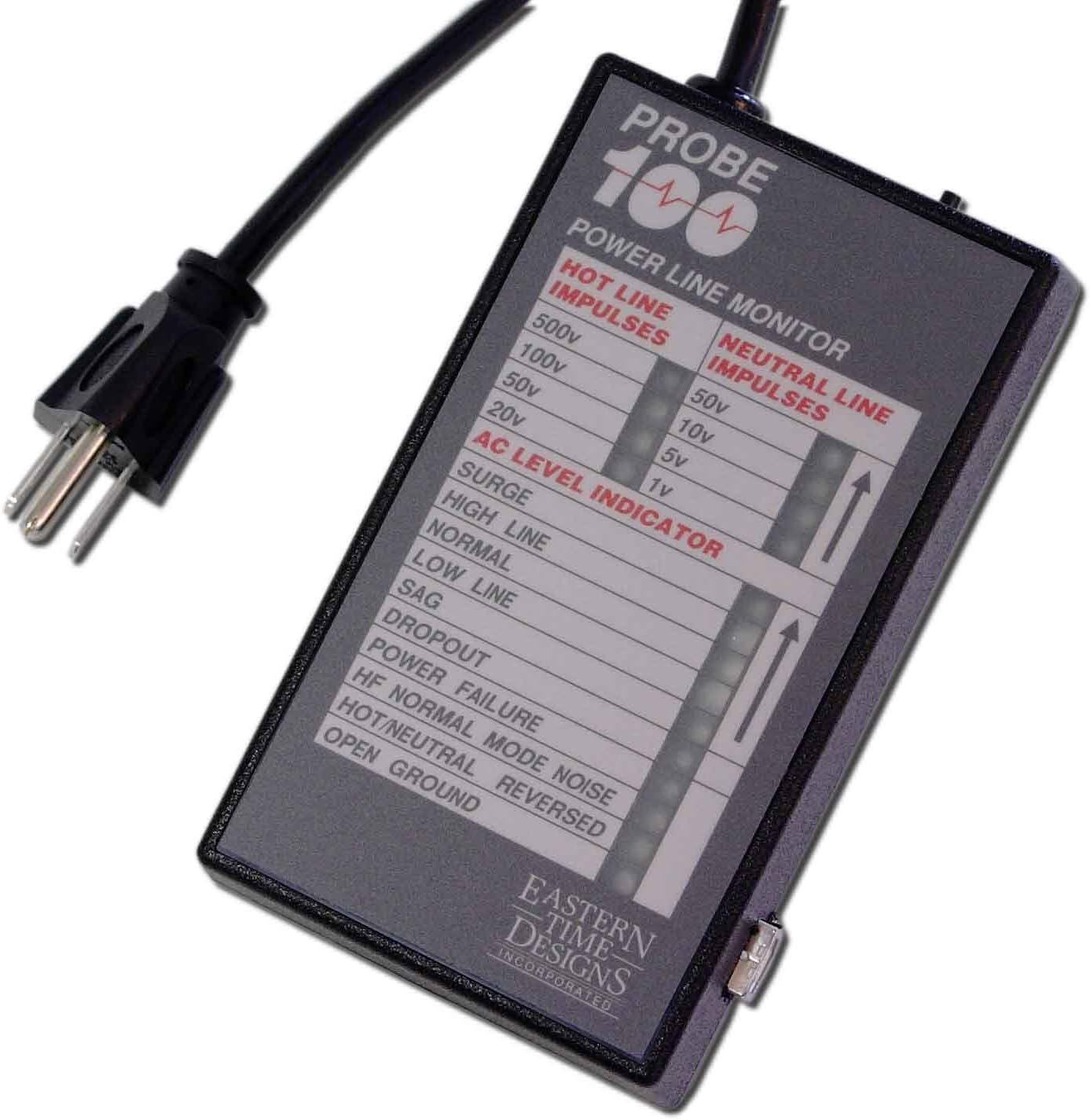
The Probe 100+ USB Power Line Monitor by Powertronics is an essential tool for professionals seeking to detect and analyze power disturbances efficiently. With its advanced features, including high-frequency noise detection and comprehensive monitoring capabilities, this device ensures you stay ahead of potential power issues. The included Probe Communications Software allows for easy recording and analysis of AC line disturbances, all while being backed by a 2-year warranty. Compact and modern, it's designed for indoor use and connects seamlessly to your PC via USB.
| ASIN | B00AYRLH24 |
| Amperage Capacity | 1 Amps |
| Batteries Included? | No |
| Batteries Required? | No |
| Best Sellers Rank | #476,297 in Industrial & Scientific ( See Top 100 in Industrial & Scientific ) #183 in Industrial Power Meters |
| Brand | Powertronics |
| Color | Black |
| Customer Reviews | 3.4 3.4 out of 5 stars (50) |
| Date First Available | January 5, 2013 |
| Global Trade Identification Number | 00610074682486 |
| Included Components | Power Monitor, Power Cord, Software, USB Connection Cable |
| Is Discontinued By Manufacturer | No |
| Item Package Quantity | 1 |
| Item Weight | 1.04 pounds |
| Item dimensions L x W x H | 5.75 x 3.25 x 1.5 inches |
| Item model number | Probe 100+ |
| Manufacturer | Powertronics |
| Measurement Accuracy | +/-1% |
| Part Number | CECOMINOD065066 |
| Power Source | Ac |
| Product Dimensions | 5.75 x 3.25 x 1.5 inches |
| Shape | Rectangle |
| Specification Met | certified frustration-free |
| Style | Modern |
| UPC | 610074682486 |
| Upper Temperature Rating | 160 Degrees Fahrenheit |
| Usage | Indoor use only |
| Voltage | 120 Volts |
| Warranty Description | 2 year warranty against manufacturers defects |
| Wattage | 12 |
K**H
Finally got software to run under Windows 10 after Windows Update disabled it
I really liked the features of this smartbox, and was determined to make it work on my Windows 10 laptop, even though the logging software provided is more than 10 years old now (2014 date). The box's technology is pretty mature and stable, from what I can tell, and it does exactly what I need, which is to record data on a single phase power line and monitor for various power fault conditions; it just suffers from having been neglected by the parent company Powertronics in terms of software upgrades (a product frozen in time). Someone could write a new GUI back-end for this in Linux and give it some more life, since the box just sends the computer a series of text strings that you can watch on a terminal emulator. The user manual and instructions for installation are straighforward, and the user manual covers the basics of what the box is looking for and what it records. The basic software for Windows that it comes with is more than adequate for most testing, I think. If you can get it to work, that is. I installed the software for logging on my Windows 10 laptop, but had to first manually run the VisualBasicPowerPackSetup package they provided to install the prerequisite VB packages it needs, and it worked for a while. But after a Windows update, it would no longer run. In addition, I could not run the Setup command to reinstall it; it would simply quit, and I was only able to determine that it had run with errors by looking at the Event Log under Applications. It does not meet the certification requirements imposed by Micro$oft with it's newer versions of Windows, so it is just allowed to run and die. I was able to get around this by uninstalling the application from Programs and Features, then running the Setup.exe file, have it error out, then type in the application search box "Run Programs Made for Previous Versions" and select the Program Compatibility Troubleshooter, find Setup.exe in the list of applications, and allow it to change the mode of execution to "Windows 8-compatible". Running it again reinstalled the software and created the Desktop icon "ProbePlus Data Logging", but clicking the icon would not run the application. I looked at the properties of the icon saw that it was pointed to some kind of Application Reference file, but it was not starting the application. I created a new Desktop shortcut icon by navigating to where the application had actually been installed under C:\Users\<username>\App Data\Local Apps\2.0\OAHP86AP.76L\" followed by a series of nested subdirectories with gobbledy-gook names, to finally land on "Probe Plus Data Logging.exe"; the desktop shortcut points to that executable. After changing the location of the shortcut, the program ran OK. I did run the Program Compatibility Troubleshooter again and chose the Probe Plus Data Logging app from the list and let it change the compatability mode to Windows 8, just for good measure, but it actually ran before I did that. The data log files are saved in the user's Documents folder under a subfolder called \Powertronics; the files are date stamped, and there are two types, .dlg and .drp. It appears there is a new pair of files created for each day, containing that 24 hour period's data. I was able to open the files and look at the contents using Notepad. The .dlg files appear to be raw voltage data in CSV format, with the two first fields a time stamp of hour and minute, followed by 60 voltage readings, probably one per second. The .drp files contain the same text that is displayed in the logging program on the screen, with each event timestamped with date, time, event type, and description. I could not find any reference to this in the user manual, nor does there appear to be a way to bring this data up later in the software logging program, but it is pretty easy to read the data in Notepad (or any text editor) or import raw voltage data into a spreadsheet. Anyway, I hope this helps the next guy who is fighting with making this old software run on a newer laptop. The box itself is pretty solid.
R**B
Works... but could gain from improvements
The Powertronics probe 100+ does exactly what is states: it monitors the AC voltage and reports on disturbances. I had no issues installing the datalogging application on a Windows 10 computer. Disturbances are by day, so you need to select the day you wish to examine. Some feedback: 1. Probe Plus datalog file display is not sorted by date. My dates seem to have a random order. 2. The manual could be clearer. On initial startup you need to hold down the reset button until all lights are flashing. 3. It would be nice to have an auto start on logging once the usb cable is plugged in. 4. would be nice if the unit had a battery backup, so power outages could be monitored. With a power loss, the unit stops functioning and logging stops. Logging does not restart once power comes back up. 5. The supplies USB cable is too short.
W**H
Really Bad
This is a bad product. I found myself going around and around with my electrical utility concerning power quality issues. I wanted hard proof of these issues. Competing power line monitors/analyzers all cost far more than the Powertronics Probe 100, and just weren't in the budget. I hoped this product would work well enough to give me that proof. I'll start with the included software. This isn't software that was developed. This is software that escaped. It's built using the .NET Framework 4 and so should have worked well on an old laptop I use for all my datalogging capable testers and multimeters. The installer couldn't bring itself to properly install the .NET Framework 4, even though it is supported on Windows XP. No problem. I can install that myself. Fortunately, the installer was smart enough to continue once I'd satisifed that requirement externally. Unfortunately, it did not actually install the software. It created some kind of a bizarre desktop shortcut and left the software on the USB flash drive. That worked until I removed the flash drive and stored it safely away. I finally copied the program to the computer myself and then it worked properly. Something about the data logging proved unreliable after a few days of capture. The software just stopped collecting data silently and it's not clear whether it or the underlying hardware failed. As you'll read in a moment, it could well have been either. The software did not alert me to any issues. As best I remember, I had to restart both the software and the Probe 100 to get things going again. The Powertronics hardware isn't a whole lot better than the bundled software. Curiously, for a device intended to monitor and report on power problems (lack of a working ground connection being one of those for which it has a warning light), you're cautioned not to connect it to an ungrounded circuit. If the Probe 100 loses power for any reason, it doesn't start up in a sane state. You have to perform a manual reset to properly initialize this unit. That seems like an unreasonably poor design choice for a device that could alert you to a power failure having taken place. Just out of pure curiosity, I connected the Probe 100 to an ungrounded outlet that hadn't yet been rewired. Several completely irrelevant fault indicators illuminated (low line voltage, sag, dropout, and perhaps most strangely as such was not the case, hot/neutral reversed) and yet the open ground light remained off. Please see the photos attached to this review, which demonstrate several other testers both new and old, inexpensive and higher priced, all successfully indicating the actual fault. After about two weeks of trying to log data with the Probe 100 and its included software, I gave up. I never got the information I wanted from it. I cut my losses and returned it.
E**S
stunninglly bad software
The device seems to work correctly. Setup needs to painstakingly follow instructions in the readme file. The instructions for usage are incredibly incomplete. Any idea of how to access the data is quesswork and I have not guessed correctly. Powertronics support did not respond to my query. Also, if power goes out the data logger program stops rather than counting how long the outage lasts. It is not clear there is a better product at a reasonbable price for home use, but keep searching
Trustpilot
2 weeks ago
1 month ago