

Nintendo Pro Controller Black - Nintendo Wii U
Product ID: 4143014
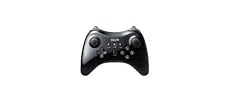
🎮Ergonomic dual analog sticks & button layout
📶Wireless connectivity for seamless gameplay
🔋80-hour rechargeable battery life
Desertcart purchases this item on your behalf and handles shipping, customs, and support to Uruguay.
🎮 Level up your playtime with the ultimate pro controller experience!
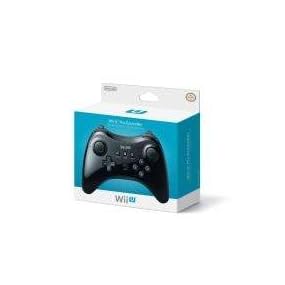
The Nintendo Pro Controller for Wii U offers a premium gaming experience with its ergonomic design, dual analog sticks, and a rechargeable battery that lasts up to 80 hours. Compatible with many Wii U games and downloadable titles, this wireless controller is built for comfort and precision, making it an essential accessory for serious gamers seeking extended play sessions and seamless control.
| ASIN | B00MUY0OFU |
| Additional Features | Touchpad, Wireless |
| Best Sellers Rank | #9,830 in Video Games ( See Top 100 in Video Games ) #21 in Wii U Gamepads & Standard Controllers |
| Brand Name | Nintendo |
| Button Quantity | 16 |
| Color | black |
| Compatible Devices | Nintendo Switch |
| Controller Type | Joystick |
| Customer Reviews | 4.3 4.3 out of 5 stars (2,921) |
| Hardware Platform | nintendo_wii_u |
| Item Dimensions | 3.19 x 6.38 x 6.69 inches |
| Item Weight | 0.7 Pounds |
| Manufacturer | Nintendo of America |
| Package Quantity | 1 |
| UPC | 041114167289 100130575352 045496891022 071021144844 045496891626 172302827361 052615622450 088021329201 132017774633 163120655786 637010542536 021113174099 065555567637 |
C**R
Nintendo really did a great job with this controller
This controller won't work with every game on the system, but there are definitely games that enable it where the gamepad features aren't essential and this controller works really well, e.g. Mario Kart, Virtual Console games (it works with Earthbound, that's the only one I've tried so far), Bayonetta. Nintendo really did a great job with this controller, I just wish the Wii U system behaved a little differently when using them as a primary controller. There are some quirks with the menu where I've connected my pro controller but the hand for it is grayed out and won't let me start any software with the controller. I'd love to hear in the comments if anyone knows why this happens. Pros: - Incredible battery life and a rechargeable battery. I'm not a power-user but I'll use my controller a few times a week for Mario Kart and some platformers. I haven't charged this controller in 3-4 months now and it's just now getting back to low battery. - Very comfortable. I personally like the position of the joysticks with them both being up top. This is my favorite controller for MK8 Cons: - any time you hit a button, it starts searching to connect, so if you toss this controller in a bag where one of the buttons could get mashed, it will just keep searching for a connection. It would be nice if there was some kind of hard off switch on the back for moving these around. - The Wii U is a little weird when using the pro controller as a main controller. I'm sure there's a reason it happens differently sometimes, and I'm not aware of that reason yet, but sometimes when I try to navigate the Wii U menu using the pro controller it shows up as a grayed out player 2 hand and won't let me start any software with it. You can't navigate Netflix with it as of when this review was written, and the pro controller stays on in most games where you are using this as a primary controller (Donkey Kong Tropical Freeze is an exception to this, where they turn off the gamepad screen). Observations - These aren't necessarily things I consider pros/cons but I've heard other people have a strong opinion on them - The shoulder buttons are not pressure sensitive (nor are the gamaepad's), so fine controls on things like the throttle in a racing game will be absent on the controller. I'm personally not a fan of the PS3's pressure sensitive L2/R2, and prefer a rage wheel setup for racing games. - There are a lot of reports for fakes on these controllers, so be wary of unbelievable deals, shy away from third party sellers on this one, and know what to look for to identify real controllers.
J**A
An essential for sure.
So first off, to all the people giving this controller bad scores because it didn't work with your game; learn to read the back of your game case and stop being an idiot. Of course it won't work with Nintendoland or New Super Mario Bros U. This control was BUILT for games that don't focus on motion control or the unique features of the gamepad. It's supposedly meant for the hardcore, but anyone can use it (so long that you are playing a game that either requires or uses this controller). That being said, this is a fantastic controller, and an essential purchase for sure if you plan to buy third party games or shooters. For the longest time, the Xbox 360 controller has been my favorite controller, but I never liked the joystick configuration. I always liked the classic controller configuration, but the classic controller itself was uncomfortable to hold. This bad boy puts the two controllers into one and creates what I think is the most comfortable and natural controller yet. It's sleek, smooth, light, and fits in your hands perfectly. It doesn't feel cheap, and it responds perfectly. I've used it to play NFS Most Wanted U and Assassin's Creed III and it works perfectly. I also love that if someone is using the TV, I can use the gamepad screen as a TV AND use the pro controller to play the game. It's just brilliant. A lot of people complain that the triggers are digital, but I honestly haven't seen it as an issue. In NFS Most Wanted U, a racing game that would normally be best suited with analog triggers, I had no problems driving around and racing with others. The digital triggers worked perfectly. The rest of the buttons work perfectly too. The cherry on top of this item is the battery life. 80 hours from a single charge. That is awesome, and that fact alone should make you buy this controller now. Simply put, if you consider yourself a "hardcore" gamer, or like traditional controllers, the pro controller is a must buy, absolutely. Especially on Amazon, because it's much cheaper here than in stores. Hope this review helps, let me know if any of you guys have questions!
R**S
Comfortable, well-made controller with (so far) good battery life
I bought one of these controllers for use with Sonic & All-Stars Racing Transformed so that two people could play with similar control schemes (not having to combine a nunchuck with Wiimote). I checked ahead of time to make sure it was compatible (it was), and didn't really expect it to be compatible with other games. You can play Sonic with just the Pro Controller (no GamePad). As you can imagine, as a whole it feels smaller than a GamePad (it has no giant screen in the middle!) and is comfortable to use. The triggers (both sets) are slightly smaller than the GamePad trigger buttons, but it's not a problem for gameplay. Just something I noticed. It feels very "tight", compact, and streamlined (much better than other console controller, especially those giant original Xbox controllers). I have fairly average-sized hands, so your results may vary. So far, it appears to have better battery life than the GamePad, which is nice (one to two hours of straight playing didn't phase it). I haven't pushed it to see just how long it lasts, so I can't comment on whether it makes the Nintendo-estimated 80 hour mark on a charge Note the controller has a USB port and comes with a fairly short USB charging cable. The port is NOT compatible with the GamePad charger, and the cable that comes with the Pro Controller plugs into regular USB on the other end...not a wall socket. That means to charge it out of the box, it can only be plugged into a device that supplies power through USB, like the Wii U itself. If you plug it into the Wii U, in order to charge the Wii U must be on. I haven't looked into any other options for charging, or tested playing it while plugged into Wii U USB (I wouldn't advise it because in my opinion the USB cable is way too short for getting proper distance from even a moderately-sized TV). Overall, a good buy, although a bit pricey. If you are looking at one, make sure it is compatible with the games you want to use it for, and don't assume a game will support it. I like it enough that I may get another eventually to reduce dependency upon the GamePad (and its battery limitations) in games that don't depend heavily on it (like Sonic).
J**N
Almost Perfect
Ive used many gaming controllers both aftermarket and originals. The Wii U Pro controller is very nice. Appearance: 5/5 The Black finish is glossy and actually doesn't leave as many finger prints as you'd think. Comfort: 5/5 It fits nicely in my hands, I do have smaller hands but even someone with large hands will find this controller comfortable. Response: 3.5/5 I had no problem pairing the controller up to the wii u. The response time is just as good as the gamepad. However I have been using this for about a week and the minus button feels mushy compared to the plus. And everytime I press up on the D Pad it gets stuck a little then makes a cracking noise, with enough pressure it'll move up. After you do this the first time it goes away, but if I stop playing and come back to play later it'll do it again. Not too happy with that. If this goes away after a month of use I'll change my rating to a 5. (I've had dualshock 3 controllers brand new that had the same powdery chalky feel to the Dpad, and after a few weeks of intense gaming it goes away.) Features: 4/5 It has all the buttons the gamepad has except the TV button. It'd be really nice if it had an IR blaster to change only TV volume. Also would be nice to see the controller include a headphone port like the gamepad and ps4 controller. Overall, it's a great controller, and a must buy if you game on the Wii U, I use it always for Super Smash Bros, Mario Kart and Zelda Windwaker. I hope future games take advantage of this style controller because I find using the gamepad for casual activities, such as Video streaming and Internet browsing.
L**D
Great Controller!
This controller is amazing! I use it for gaming with my laptop. I came from using an Xbox 360 controller, so it takes a little bit to get adjusted to using this one, but I adjusted in less than a week. It feels natural in your hand, The d-pad is very nice compared to the 360's one. Buttons are very responsive, and the vibration is nice as well. The battery life is awesome, and what's great is that this uses a usb cable to charge it! So if you're coming from the 360 controller like me, you'll be happy you don't have to waste money on batteries. I've only had to charge this thing twice since I've had it, and once was when I first got it to make sure it was fully charged, so not counting that one, I've only charged it just once! Overall, I would definitely recommend this controller. The only complaint I have is that the deadzone of the analog sticks are weird. If you cut a pie straight down, and straight across, that's how the deadzones are. It's like 4 separate quadrants, so if you were playing an rpg, you couldn't move the character exactly north, south, east, or west. It may seem like it while you're moving the analog, but once you move the analog to north, it switches quadrants from the upper left, to the upper right, and it might just keep switching between them depending on where you have the analog positioned. But honestly, you won't really notice it. Unless you're playing like a detective game and it requires you to move the analog stick to an exact spot to search something, and the item is where the deadzone is, you won't be able to interact with the item. But if you don't plan on playing those types of games, then this is great!
Z**E
These are counterfeit products
EDIT: It appears that some people are receiving fake products and others are getting the real deal. Despite what the product page says, my controllers were not shipped from and sold by Amazon, which is where the issue lies. Not everyone's seller is the same and mine just happened to be of the shady type. I recommend buying hardware such as this from a local store. Before reading any further, please Google 'fake wii u pro controllers' and visit the first link, which will direct you to the nintendolife forum. I ordered two of these controllers and at first glance, they appeared to be genuine Nintendo hardware. The controllers I received both had faulty left thumb sticks, rendering them unusable. This left me feeling quite disappointed in Nintendo. I've never, in all of my 15+ gaming years, ever had a problem with a piece of Nintendo hardware until now... or so I thought. After doing some research, I've discovered that these are NOT real Wii U Pro Controllers made by Nintendo. The thread on the nintendolife forum will prove this to you. A few of the distinguishing features of these fakes are: A silver colored screw, retaining the battery cover (the authentic one is black) A black colored charging cable (the real one is grey and has Nintendo's logo on it) A discolored box (mine came dull in color) Faulty buttons or thumb sticks (mine thumb sticks came broken) Please, for the sake of all potential buyers, help me get the word out that these are NOT the Nintendo-made products they masquerade as.
G**.
One of the greatest controllers of all time
If you have a Wii U console, you NEED to get a Wii U Pro controller. Trust me, it's one of the greatest and most comfortable controllers I've ever laid my hands on. The symmetrical control sticks placed higher up on the controller are a unique design for Nintendo, and if you're coming from another console (especially an XBOX one), they might take some getting used to. But if you give the sticks a chance, you'll find they are comfortably placed and make perfect sense. When grabbing the controller, your thumbs instinctively go to the sticks and ZL and ZR triggers, which is just what you need for games like the Call of Duty titles and Sonic & All-Stars Racing Transformed. Other games, such as Tekken Tag Tournament 2 Wii U Edition, don't use the back triggers or control sticks. Shift your hands down a bit, and it also feels comfortable with your thumbs over the buttons and your pointing fingers on the L and R triggers. All the buttons, sticks, and triggers feel incredibly nice, and the shape of the controller is more likened to the comfort of XBOX controllers. Perhaps the most astounding feature of this controller, though, is its unheard of 80 HOURS of battery life. Weeks or months could go by before you have to charge this thing! And when you do, it comes with a long USB cord that you just plug into the front of the system to charge it right up. If you really like using your TV to play your Wii U, then trust me, BUY THIS CONTROLLER. And when you do, your gamepad will start gathering dust pretty quickly.
P**S
Best Controller Ever
This is the most comfortable controller I've ever held. It may take a while to get used to coming from any previous controller, but once you do you'll realize that no other controller has ever come close to the comfort and control this thing has. It has insane battery life and fair comptability for WiiU games so far. But it can also be used on the computer (look up WiinUPro), where it can be used as a standard gamepad or a substitute for a 360 controller. I use it for this purpose primarily and I can say that it works relatively flawlessly (set-up is a hassle, but once you're good, you're good). If you have a WiiU and want a comfortable to play your games (Super Mario, next-gen Brawl, Wonderful 101, etc) pick this up and if you're willing to work for it it can be the best PC gamepad you've ever owned ~
E**A
Seguro
Llego a tiempo, llego en excelentes condiciones, operando perfecto.
R**N
Faultless
Official controllers are definitely best. I’ve bought just about every brand of third party controller and none of them even come close to the quality of the pro controller.
A**I
حلو
شغال تمام التمام أخذته وقت ماكان عليه تخفيض كويس
N**S
goede originele controller
knoppen niet uitgesleten. wel wat krassen maar was dan ook tweedehands dus normaal. spijtig dat de batterij niet zo goed meer was. Deze heb ik moeten vervangen. Goede verkoper zou er zeker terug kopen
A**O
Bello e con buoni materiali
Ottimo pad, ergonomico e costruito con ottimi materiali, finora nessun drifting. Belli anche i colori, insomma da avere se non amate i Joycon.
Trustpilot
1 month ago
2 weeks ago