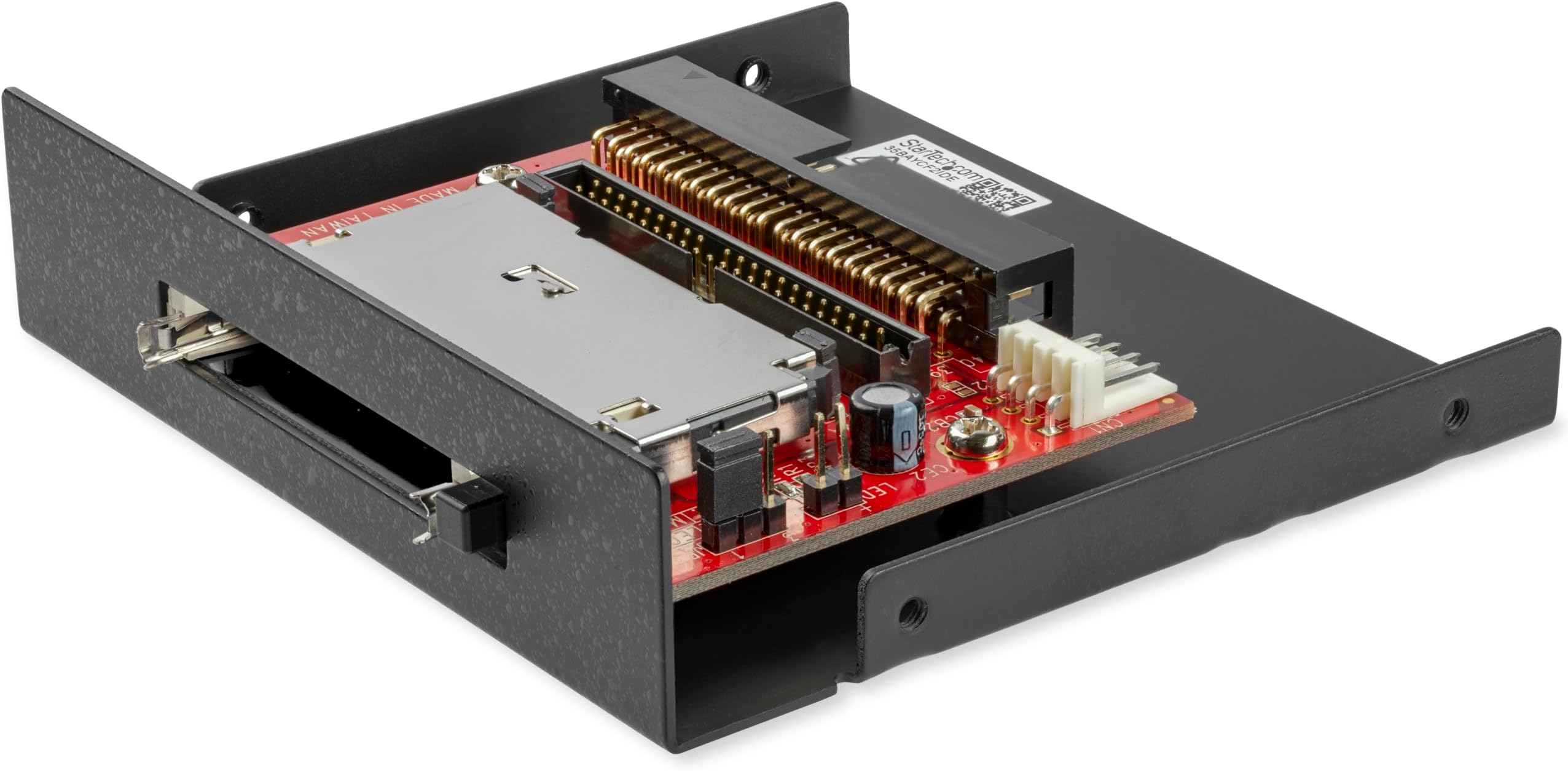
💾 Upgrade your legacy rig with lightning-fast CF access!
The StarTech.com 3.5in Drive Bay IDE to Single CF SSD Adapter transforms CompactFlash cards into IDE hard drives, enabling seamless integration with older desktops. Supporting both 40 and 44-pin IDE slots, it installs easily into any standard 3.5-inch bay without drivers. With a data transfer rate of 1044 Mbps and a robust build backed by a 2-year warranty, this adapter is the perfect solution for professionals looking to modernize legacy systems with reliable, high-speed flash storage.


| ASIN | B000T9QQP0 |
| Additional Features | Not_Performance_Used |
| Best Sellers Rank | #195 in Computer Memory Card Readers |
| Brand | StarTech.com |
| Built-In Media | 1 Compact Flash to IDE Adapter, 1 3.5” Enclosure, 1 Full Profile Expansion Slot Bracket, 1 SP4 to LP4 Molex Power Cable, 1 Instruction Manual |
| Color | Black |
| Compatible Devices | Personal Computer |
| Customer Reviews | 4.4 out of 5 stars 1,308 Reviews |
| Data Transfer Rate | 1044 Megabits Per Second |
| EU Spare Part Availability Duration | 2 Years |
| Global Trade Identification Number | 00065030824194 |
| Hardware Interface | EIDE, IDE |
| Item Dimensions L x W x H | 3.8"L x 1.54"W x 1"H |
| Item Weight | 0.13 Kilograms |
| Manufacturer | StarTech.com |
| Media Type | CompactFlash |
| Operating System | Any |
| Product Dimensions | 3.8"L x 1.54"W x 1"H |
| Special Feature | Not_Performance_Used |
| UPC | 102645810614 782386260994 128096879246 163120258062 012305039203 617018104943 523161048327 245521461927 069060235791 778889461297 065030824194 071030507623 151902987750 854586955496 666669823345 088021282698 012300172318 132017728742 100000013090 803982750921 898029707884 001910715077 919954847565 |
| Unit Count | 1.0 Count |
| Warranty Description | 2 Years |
K**T
Perfect Front-Bay Card Reader for Older Systems
I purchased this StarTech 3.5-inch front bay memory card reader to install in an older desktop system, and it worked exactly as expected. Installation was straightforward. It fit cleanly into the front bay, mounted securely with the included screws, and connected easily to the internal USB header. The instructions were clear, and everything lined up properly with no modifications needed. Once installed, the reader was immediately recognized and works reliably with the cards I use most. The front panel looks clean and professional once installed, and having easy access to multiple card formats on the front of the case is very convenient. Build quality feels solid, and the included cable and hardware are good quality. This is a well-designed internal card reader that does exactly what it’s built for. Overall, a smooth install, good fit and finish, and dependable performance. If you’re adding card reader functionality to a desktop with an open 3.5-inch bay, this is a great option.
T**N
Nice and functional
At long last I have a card reader the same color as my case. More to the point, I have one that supports modern SD cards instead of the antiques too small to be worthwhile. Installation was straightforward and completed in 20 minutes or so. The only thing I regret is that I didn't get the USB 3.0 version. A day after ordering it, I discovered that I had an extra USB 3.0 header hiding under my graphics card.
G**U
This reader is a must for creators!
First and foremost, you can't go wrong with StarTech's products. They do amazing work and produce quality peripherals. I use SD cards all the time for photography and need a dedicated port on my PC for them. In the process of building a new PC, I realize no new (good) cases really come with an SD slot and if they do they are sketchy at best, so I needed something like this to add to a case that had expansion bays. With a 5.25" adapter from the same company, I was able to get this installed and working easily. The black color is great as it matches most modern cases. Since StarTech is based in North America, the experience of actually using this device is well thought out for a western mindset. The text labels makes sense, the design is intuitive, and—again—the quality is impeccable. Love that this supports the new UHS pins for next-gen SD cards on the left slot. I don't have any or devices that support them, but I bet I will someday and be happy not to have to get a different reader/adapter or settle for slower transfers. Because of the UHS SD slot, this technically has 2 full-size SD card slots which is super nice for transferring data between them or just pulling files from both simultaneously. The Micro SD slot is wonderful too (no adapters needed) and I appreciate the support for legacy CF and MS cards (though... TBH, I don't plan on ever using them). I really didn't need an additional USB port on the front, but I can see it being handy for many users. Lots of cheap imported media card readers seem like they use old technology and the fact that this is only one of a handful to use full USB 3 for all slots is kinda mind boggling. So many readers have a USB 3 header cable for the USB ports, but then utilize only USB 2 for the card reader part causing bottlenecks in transfer speed. Not to mention some of those other card readers cost basically just as much as this one! If you need a memory card reader, don't bother with the cheap crap out there unless you know you don't need the quality or speed. This one will provide top-notch transfer rates, great compatibility, and solid construction that I trust will last for years to come.
T**O
Great for a floppy drive bay
Good points: Comes assembled with 3.5" drive bay enclosure (mounts where your floppy drive would). Also has expansion slot bracket, so you can alternatively mount this at the back of a PC (where your PCI cards mount). Includes power connector adapter (converts IDE CDROM/Hard Drive power connector to the smaller floppy power connector which is required for power). Has Master/Slave jumper so you can set the CF card as required. Has 40 & 44 pin IDE connectors. Has DMA jumper to enable/disable DMA. Bad points: Doesn't have LED, but has 2-pin LED connector so you can connect your PC case's HD LED wires so you can see drive activity. As mentioned in another review the Ejection tab feels flimsy. I don't use the tab to eject the card - I pull it out by hand instead. In comparison to other CF>IDE adapters that I've used, this one doesn't have CF card voltage setting jumpers, although for most people this would not be required (CF card operates at 5V). Summary: It works for me. Remember that you can't use any CF>IDE adapter to hot-swap CF cards while in operation, data corruption or damage may result. Also if you're using a CF to replace a hard drive you want to avoid excessive writes to the CF card to extend the lifetime of the CF card (i.e. you don't want to put a swap file on a CF card!).
B**Y
Fast and reliable
Fast transfer speed. Works well. I bought this to replace a flash drive type SD card adapter that was malfunctioning and corrupting my data. I'm really surprised how much faster this reader transfers data.
A**S
Works perfectly!
Easy to install - I also bought the adapter - and it works perfectly!
A**G
StarTech model 35FCREADBU3, the USB 3.0 version
This review is for the StarTech model 35FCREADBU3, the USB 3.0 version, not the 2.0 version. I have an older PC, an i7 2600k Sandy Bridge system, on an ASUS P8P67LE MB with no onboard USB 3.0 header. That mother board comes with PCI Express 2.0. I run an Oculus Rift so had installed a 5 port Inateck USB 3.0 card, the KT5001 ($29, w/ a 20 pin USB 3.0 header), because of the sparse number of 3.0 USB ports available on my box. I chose that Inateck card knowing I wanted to add a card reader and bring at least one USB 3.0 to the front of my PC. The StarTech model 35FCREADBU3, 3.5” wide, reader is simply plug and play behind my Inatech PCIe card. I only use microSDs for active file storage on my laptop, so this review won’t cover the other card types the unit handles. In the past, it was usually faster for me to use a USB 3.0 flash drive for transfers instead of a microSD to USB adapter. First the unit’s hardware. I gave it 3 stars while the value and ease of install got 5. The microSD slot resisted the first time I put the card into the slot but with a little patience, I was able to ease the card into the slot without damaging either the card or the slot. After a few inserts, it’s much easier to slide a card into the slot. The USB 3.0 port was much more of a problem. The port has grounding springs on each side and the left one was stiff and pushed right up against the male plug inside the port. Until I forced it back a bit, plugging in a flash drive was problematic. I’m happy to say that both the USB and microSD slots work fine now. I plugged a 3.0 flash drive into the port and transferred random files and folders from the drive to a folder on my desktop. Windows 10 reports random reads as high as 121 MB/s to a low around 35 MB/s. I’d guess the average transfer rate from the flash drive at 90 MB/s for real world reads. Write speed to the microSDXC I U3 was a steady 50 MB/s +/- 2, on sequential transfer of a 0.25 GB (262,146 KB) bitmap to the card. Read speeds, transferring to the PC’s SSD, for the same file was too fast to determine. Clearly, I’m impressed enough to recommend the StarTech (3.0) unit for older PCs and the Inateck card if you don’t have a 3.0 header on your mother board. Btw, this ASUS mother board comes with PCI Express 2.0 so any later version should also work. I’ve ordered the TOOLFREE MRA916 5.25 inch to 3.5 inch Drive Bay Mounting Bracket Black Aluminum, at ~$12.
C**K
Very nice, worth the extra cost over the cheapo ones
I had a cheapo 3.5" bay card reader before, and it started causing tons of USB errors and slowing my computer down. I don't like using an external reader if I can avoid it, so I got this one as a replacement. It just works, it produces no errors, doesn't occasionally reset my USB bus, and the card orientation actually makes sense. It is "only" USB 2.0 but SD cards aren't really all that fast, so it's fine, and it doesn't use up one of those rare USB 3.0 headers. Generally everything Startech branded is good quality, but comes at a premium.
Trustpilot
2 weeks ago
1 week ago