๐ธ Print Smart, Live Boldly!
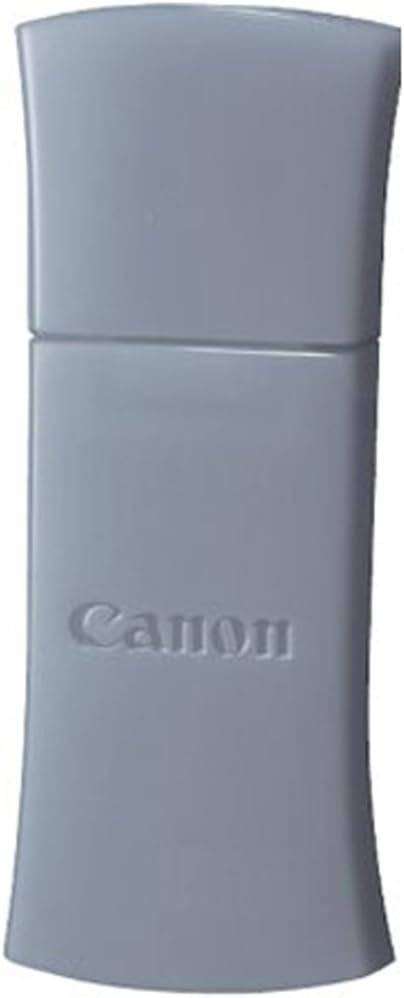
The Canon BU-30 Bluetooth Adapter enables wireless printing for a variety of PIXMA printers and Powershot cameras, offering a hassle-free, plug-and-play experience. Manufactured in Japan, this compact adapter ensures high-quality performance and broad compatibility, making it an essential accessory for tech-savvy professionals.
| ASIN | B00164822W |
| Best Sellers Rank | #4,730 in Camera Power Adapters |
| Brand | Canon |
| Built-In Media | VOIP Telephone Adapters |
| Color | Grey |
| Compatible Devices | Desktop |
| Compatible Operating System Family | Windows |
| Customer Reviews | 4.0 out of 5 stars 348 Reviews |
| Data Link Protocol | Bluetooth |
| Global Trade Identification Number | 00013803090697 |
| Hardware Interface | Bluetooth |
| Item Weight | 0.05 Pounds |
| Manufacturer | Canon Cameras US |
| Mfr Part Number | 2553B002 |
| Minimum Required Operating System Version | Mac OS 10.12 Sierra, Windows 10 |
| Model Number | 2553B002 |
| UPC | 013803090697 |
F**E
Awesome little device!
The reviews were mixed on what printers it was compatable with and it was noted on almost all the reviews that there was no documentation on how to install/use the device, so I was hesitant to order it, but I really needed the bluetooth connectivity so I took a chance and ordered it. I figured if it didn't work I could always return it. It arrived in 1 day and I was so excited. It is true, there are no directions, but you don't need them. I have two Canon printers that were on the compatability list for this adapter. I have a Canon Pixma MX-850 and a Canon Pixma IP100 for travel. I am running Windows 7 on my computer and I literally just plugged the adapter into the usb slot of the printers and Windows connected to them within 30 seconds and they were ready to use. I didn't have to do anything. All I did was rename the new printer connections with a (Bluetooth) notation on the name so I would know which printer connection to use when printing. It was a piece of cake and the adapter works great with both printers. It is fast and easy and tiny for packing. Awesome device!!! I have absolutely no complaints for this device.
H**A
Works great with Canon MX882 printer
I inserted this into the front USB port on my Cannon PIXMA MX882 printer that I had earlier purchased Via Amazon. I had set the printer up with a USB cable initially, and when sure everything was working I removed the USB connection and set the printer to my home wireless network where I used it for a few days flawlessly. Finally no printer cables to mess with! I decided to try Bluetooth because I have other BlueTooth devices, and purchased this 'Canon BU-30 Bluetooth Adapter and it worked flawleslly first time. The only thing I did was to shut off wireless and remove the Ethernet cable from my laptop to be sure it was only connecting by Bluetooth. AS I said, it worked first time, with a glowing flashing light on the Bluetooth device. From within the 'printer' you can set some BlueTooth settings but it wasn't necessary. I think I may even shut off wi-fi on the printer and use Bluetooth exclusively. Yes this BU-30 adapter works great with the Canon PIXMA MX882 printer.
B**E
Canon Bluetooth BU-30 Adaptor for Canon Pixma ip100 (portable)
I bought the Canon Bluetooth BU-30 Adaptor from Amazon, so I could print wirelessly using my small portable printer (Pixma ip100 which as an aside, is a fantastic printer in my view - expensive but faultless and good quality in a smallish, lightish package AND relatively frugal on inks, especially when buying non-OEM inks from Amazon). When the BU-30 Adaptor arrived in the official Canon box I breathed a sigh of relief (given the current unprecedented circulation of fakes of everything worthwhile electronically) but then was disappointed to notice that no instructions of any kind were included. Oh well, must be an easy install I thought - DUH! NOT! I downloaded (twice to be sure) the latest printer driver from Canon for my printer and for my Mac's OSX 10.6.8 and ran through all the obvious bluetooth and printer set up commands and functions I could find and even though my computer bluetooth was able to find and apparently pair with the adaptor, when push came to shove, i.e. actually printing something, it would not work and kept offering the advice that the Printer was offline and/or disconnected. After at least 5-6 hours of unsuccessful full-time effort trying everything I could think of to get my printer to print wirelessly using the BU-30 Adaptor with my "bluetooth-ready" MacBook Pro, I reluctantly called Canon's technical service thinking that they would either have me in limbo forever (i.e. on hold in various computer driven phone loops) or want to charge me for advice/support or something else I wouldn't like. But no, I was wrong and experienced that rarest of items these days - great, fast, responsive and very successful telephone Technical Service. Really I did - thank you Jennifer! Here's what I learned and I have just repeated the process (before writing this review/comment) to make sure that the process works faultlessly and it does: When first pairing with the adaptor plugged into the USB port on the right side of the printer, have the printer really close to the bluetooth enabled computer until it prints successfully one time - after that you can move the computer many feet away (up to 10 at least in my case) and it still prints fine. Also if you have had problems with pairing already, do first delete all earlier attempts and lists in the printers available box and start again with the computer right next to the printer. AND for the finale - le piece de resistance - I was told how to install the bluetooth adaptor 'permanently' inside the printer - it is easy and so worthwhile as I now how a wireless printer with no plug-in item sticking out, waiting to be broken or removed/stolen or lost - way cool - here's what to do. Unplug the power cord from the back left side of the printer and use a gentle prying action (with small blunt knife/screwdriver or whatever) to carefully lever off the entire shiny, black, plastic-insert, left-side of the printer (you will see the small indent for this purpose on the back edge of the black plastic side right next to where the power connector plugs in). With the black plastic removed you will notice the perfect shaped indentated space in the upper right corner of the internal case and if you look at it from the right edge you will see there is a femail USB port which you can slide/push your BU-30 adaptor onto (it is a little bit tricky - make sure the Canon logo on the adaptor is facing out) but you can push it on there like any good tight usb fitting. Then gently clip the entire black plastic side back on the printer - eh VOILA! - you have internalized wireless printing capability for your Pixma ip100! Way to go - good job Canon!
M**D
works well...
I had used the Canon Pixma iP100 with USB cable to my MacBook Pro and had no problems, but the cable was a hassle. The bluetooth adapter goes into a USB port of the printer on the side where the power cable goes. I used a flathead screwdriver to lift the black plastic and slide it out to get access to the USB port. I've read to download the latest drivers/software from the Canon website, so I did. I paired up the computer bluetooth to the printer bluetooth. I was having problems connecting but figured out next that I had to re-add the printer in the printer/scanner preference panel even though the printer was already listed (it's listed as USB cable connection). The newly listed printer was listed as bluetooth connection. Once all that was done, the set up worked perfectly!
A**R
Waste of time and $50 - major Canon fail.
First I bought the Canon Selphy CP-800 printer so my wife could print 4 x 6's from her MacBook. Failure #1. Contrary to any other printer I've ever tried, this printer cannot connect to my wireless print server (an Apple Time Machine) via its USB port. So, no wireless printing, and I called Canon to ask for a solution. No problem, says Canon, buy our BU-30 Bluetooth Adapter for another $50 and you'll be all set. Failure #2. Any of my 3 Mac laptops can easily connect to the BT adapter quickly. But, it's not a print server in any sense of the word. It's just to push a file to the printer, so one can't print directly, either from iPhoto or Canon's own Selphy Printer software, because the printer isn't really hooked up to the computer. This means you need to make a note of the file name and its folder, and search for it by that name (not by sight) and use your Bluetooth software utility to push the file to the printer. Try that with a few thousand files, or even just a few dozen, to search through. Failure #3. There's a limit to the file size you can transfer using the BU-30, and it's apparently a ridiculously tiny size. My wife's Canon P&S cam generates JPG files usually between 3 and 4 MB, hardly very large by current standards. After a 2+ minute attempt to transfer the file, the transfer ultimately fails, with the printer giving a message of "file too large". Another call to Canon, and I'm told the BU-30 is really just made for file transfer from camera phones, so just for laughs I tried a picture from my iPhone 4, still too large. What a joke. Failure #4 for Canon's poor customer service and description of this product.
B**L
Canon rip off
Why can't a regular bluetooth adapter work. This item isn't in stock at local stores. Why not I have no idea. After you get this item for mobile phone connect you will find limited abilities from printer. I use printer in truck and park in a Wifi area to use out and about.
W**L
5 stars for computers, but!!!!
This device works great with a computer, but I wish I could connect to my ipad. If it wasn't for that I would give it 10 stars. Also I see people rating because of lack of instructions, which is fine, however befor I purchased the product I researched it, look at reviews, found a site or review that gave really reliable instructions.(I can't remimber if I foundasite or reada customer review that linked to a site). But I printed it out and had it waiting for when I did receive the BU30. It took hardly no time to connect my wife and my computers. We have the ip100 and it is a great printer. Do your research first you'll find it easier especially with electronic when you do receive items that you purchased. Highly recommend the BU30 adapter for use with any computer.
K**H
Try BTooth on inside of printer = Then It Worked
Using the Canon BU-30 w/ Macbook Pro 13": READ ON - This May Help You To Diagnose I already purchased the factory BTooth adapter, so I did not end up using the one mentioned here that is for sale. This review may help you whether you use the factory OR the aftermarket unit that you are looking at. I kept trying different things, updated the driver and re-pairing the computer with printer (with the BU-30 plugged into the OUTSIDE of the right side of the Canon IP100 Printer) Nothing worked. I FINALLY looked up the manuel that was in my computer from loading the CD that came with it and it mentioned that loading the BU-30 on the inside of the unit was the better option = THE PRINTER WORKED FIRST TIME OUT AFTER INSTALLING ON INSIDE OF PRINTER!! HERE'S HOW (I'm using the IP100 Printer "Pixma") / This may work for similarly for other canon units with the BTooth option) 1. Turn off printer 2. Unplug unit ( this is a must as you will need to take off the black panel on the power cord side "left side" of the unit) 3. There is a small indentation on the back edge of the black side panel 4. Insert a butter knife or flat head screw driver and gently pry outward or toward yourself (it should easily pop off) 5. On the front edge at the top of this inside area you will see a slot with an arrow and a line (you may need a flashlight to see it) You insert the BTooth adapter into the slot and push until you hear it click in and can see the full arrow and the line that runs vertically in front of the arrows tip. This means it is fully inserted. (make sure that the BTooth adapter is in right side up / it will only go in one way, just like a regular USB connection) 6. Do not put black cover on just yet. Plug in power cord and turn unit on. Now try printing a page with very little text on it as a test run. It will take about 1 - 1.5 minutes before it prints (unit has to warm the ink and such. Note* I installed the latest driver at "canon.com" - support - printers / drivers and selected the correct one based on my computers info regarding what operating system I'm currently using. So I updated my printer drive first. I may have not needed to as I should have tried using the internal port on the printer first and seeing if it worked. But in the end, it did work after all as I first did a driver update, then installed on inside of printer. Hope this helps.
L**S
Works Brilliantly
Plugged it into the USB port on our canon iP100, loaded the driver and it works flawlessly. We would recommend this very highly. It totally eliminates the cord from the printer to the computer or to a router
J**L
bluetooth adapter for canon ip100
Does the job but rather expensive for a bluetooth expension that should already be part of the printer today. Selling and shiping uneventful.
G**T
Good
I work from my company truck and have printer in back seat so I don't need cords to run printer
S**S
Five Stars
THANKS!
O**S
So far it doesn't work!
We've tried everything we can think of and so far we can't make this work! We've gone on-line to forums and followed other peoples' suggestions (it is a very common problem!) and still nothing. I guess we'll have to break down and take it to a computer geek to see if it can even be done. So ... it is not the 'plug and go' thing you think it might be!
Trustpilot
2 months ago
2 weeks ago