![USB to HDMI Adapter, USB 3.0/2.0 to HDMI Cable Multi-Display Video Converter- PC Laptop Windows 7 8 10,Desktop, Laptop, PC, Monitor, Projector, HDTV.[Not Support Chromebook]](https://m.media-amazon.com/images/I/51wOyhY6pRL._AC_SL3840_.jpg)

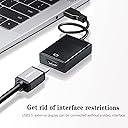
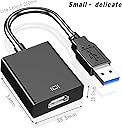


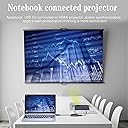
USB to HDMI Adapter, USB 3.0/2.0 to HDMI Cable Multi-Display Video Converter- PC Laptop Windows 7 8 10,Desktop, Laptop, PC, Monitor, Projector, HDTV.[Not Support Chromebook]
Product ID: 439970281
Product Description FAQ 1. If found it can't convert picture well, please check if you plug the adapter on a USB3.0 port or not? And check the HDMI extend cable version you using, the HDMI version at least be V1.3 or higher, or it can't support high resolution data transmission. 2. If your computer have USB 2.0 port only, DON'T BUY this adapter. It also supports USB2.0 port, but for USB2.0 port the max resolution only 800 * 600. 3.This USB 3.0 to HDMI adapter is not compatible with MAC, VISTA, LINUX 4.Please turn off your computer's anti-virus software and firewall before installing the driver software. 5.This converter is not a bidirectional adapter. It only converts USB to HDMI. HDMI can not be converted to USB. Note: If you receiving device cannot support 1920-1080, the output resolution depends on the highest resolution supported by the receiving device. Review: Seems to be pretty effective. - I found that it works with Windows 10 on an ancient laptop so it now drives two HDMI monitors. It took me a few minutes to understand that there are drivers built into the device and then a reastart is required. I'm not sure where the drivers are now should I need to reinstall but maybe that happens on connection to a machine which has not had this connected as yet. I'm using a USB 2 socket so I'm guessing that the results are good enough for what I require they are not optimal. I had considered putting LINUX on this machine but this not supported. Key thing is works as advertised. Read the advertiement description carefully for what is and what is not supported. Review: Stopped working - Worked fine for a few weeks. Now nothing. Waste of money.


| ASIN | B09XK495GT |
| Best Sellers Rank | 114,745 in Computers & Accessories ( See Top 100 in Computers & Accessories ) 414 in DVI to HDMI Adapters |
| Brand | Rtmeyoo |
| Brand Name | Rtmeyoo |
| Colour | Chrome |
| Compatible Devices | Laptop, Desktop, Monitor, Projector, HDTV |
| Compatible devices | Laptop, Desktop, Monitor, Projector, HDTV |
| Connector Type | HDMI, usb |
| Connector type | HDMI , usb |
| Current Rating | 1 Amps |
| Customer Reviews | 3.7 out of 5 stars 60 Reviews |
| Finish type | Chrome |
| Item Weight | 0.06 Kilograms |
| Manufacturer | Rtmeyoo |
| Manufacturer Part Number | 1-1 usb to hdmi female adapter |
| Model Number | 8d6a6574-ed07-443c-8534-35fd0c9cdc1e |
| Number of Ports | 2 |
| Package Quantity | 1 |
| Power Plug Type | No Plug |
| Product Finish Type | Chrome |
| Specific Uses For Product | Laptop, Monitor, Projector, TV |
| Specific uses for product | Laptop, Monitor, Projector, TV |
| Unit Count | 1.0 count |
| Warranty Type | Limited |
J**E
Seems to be pretty effective.
I found that it works with Windows 10 on an ancient laptop so it now drives two HDMI monitors. It took me a few minutes to understand that there are drivers built into the device and then a reastart is required. I'm not sure where the drivers are now should I need to reinstall but maybe that happens on connection to a machine which has not had this connected as yet. I'm using a USB 2 socket so I'm guessing that the results are good enough for what I require they are not optimal. I had considered putting LINUX on this machine but this not supported. Key thing is works as advertised. Read the advertiement description carefully for what is and what is not supported.
K**E
Stopped working
Worked fine for a few weeks. Now nothing. Waste of money.
S**N
trusted driver install?
it works, but you have to install the driver that comes with it. not ideal as its not “validated” by microsoft. it might be innocent enough but not ideal from a security perspective. i took the chance and installed it, probably shouldn’t to be honest. running a full anti virus scan might help. it recommends that you should turn off you firewall / anti virus whilst using it. This is a bit suspicious, you should Never do this. it could mean just during install though (badly translated). there’s no obvious reason I can think of why you would need to do this, but definitely don't turn off your firewall or anti virus whatever you do.
M**N
Handy USB 3 to HDMI adapter
Plugs into a USB 3.0 (or USB 2.0 port) on a computer and provides an (extra) HDMI port. The maximum resolution provided through USB 3.0 is 1920 x 1080 at 60 Hz and through USB 2.0 is 800 x 600 at 60HZ, so it is worth using USB 3.0 if at all possible. The driver for the adapter is actually on the adapter itself which appears in File Explorer as a CD-ROM drive. After installing the driver and a reboot you should have another HDMI output. The extra display appeared just as a regular one and there is no noticeable difference between monitors. The adapter seems well made with good connectors. Handy adapter for when you have a spare USB 3.0 port and not enough HDMI ports.
S**O
Plug and play on Win10
Cool little tool that allow me to extend to another display. Already occupying the only HDMI port on the laptop, this is handy to get one extra HDMI port. I am still stuck with USB 3.0 but it does the job. Straight P&P out of the box on Win10. Price wise, closer to £10 would be more competitive.
L**E
Not compatible for me, description was unclear
Upon thorough review of the description after getting the product I realised it wouldn’t work for me. One of those products with misleading titles that sound like they’ll do the job. Needed to be able to use a second external monitor with my laptop but this would only work if you want to use 1 external monitor.
A**S
Does not work properly
Keeps disconnecting
L**N
This product does not work.
Connected the device up and it doesn't work.
M**O
pessimo prodotto - non funziona
mai funzionato
Trustpilot
2 months ago
1 month ago