We remain fully operational. Our teams are working around the clock to ensure your deliveries continue safely.

DOWNLOAD THE APP


Copyright © 2025 Desertcart Holdings Limited
DOWNLOAD THE APP
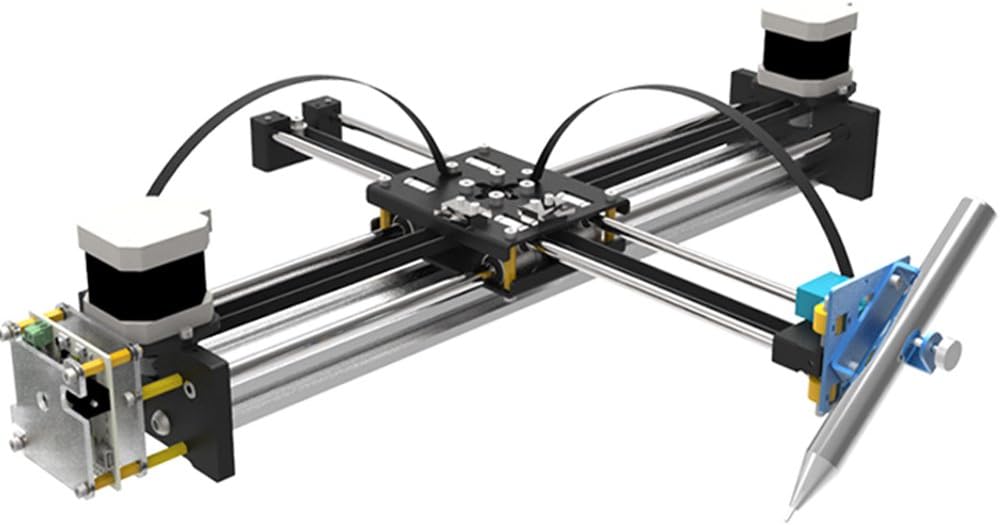

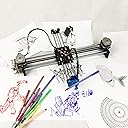

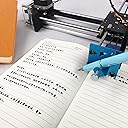
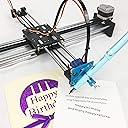

🎯 Draw Your Future: Precision Robotics Meets Artistic Freedom
The Geek-Lab Assembled XY Plotter is a high-precision drawing robot featuring a CoreXY/Hbot dual-structure for smooth, accurate pen movement up to 0.2mm resolution. It supports multi-color layered painting on A4-sized surfaces and comes fully assembled for immediate use. Open-source and compatible with Windows and macOS via Inkscape software, it empowers makers and professionals to create intricate digital artworks, posters, and handwritten notes with quiet, reliable performance.
| ASIN | B06ZXRV6GQ |
| Additional Features | Educational Engagement, Multi-Color Drawing, Human Writing Imitation, Open Source Design |
| Age Range Description | Kid |
| Are Batteries Required | No |
| Brand Name | GoooGi |
| Color | Diy Xy Plotter |
| Customer Package Type | Standard Packaging |
| Customer Reviews | 3.8 3.8 out of 5 stars (67) |
| Edition | Standard Edition |
| Is Assembly Required | Yes |
| Is Autographed | No |
| Item Weight | 0.01 Ounces |
| Manufacturer | GoooGi |
| Manufacturer Part Number | XY10001 |
| Manufacturer Warranty Description | Please download the software via the below link. User Manual:https://drive.google.com/file/d/1j43T7i2MWwOMuA1oTuPPg2DTnZepQF5n/view?usp=sharing Windows: https://drive.google.com/file/d/1pvCsa1VEaIgVRUhrRjPZrzxhZioSHmRU/view?usp=sharing Mac OS: https://drive.google.com/file/d/1mCXbySyd6Sr396WK0mri3D_TIZOKKMnh/view?usp=sharing How to Make Signatures: https://drive.google.com/file/d/1bsvQcboKTieF0tQl… |
| Material Type | Plastic |
| Model Name | 10001 |
| Model Number | 10001 |
| Number of Pieces | 1 |
| Occasion | Imaginative play |
| Outer Material | Plastic |
| Play Activity Location | Tabletop |
| Recommended Uses For Product | Creative projects, DIY enthusiasts |
| Style | Modern |
| Theme | Robot |
| Toy Figure Type | Play Figure |
| UPC | 799355796187 |
D**G
Watching it Work is Almost Magical and Support and Help Installing the Plotter Exceptional
As with everyone else's review, Rene was immediately available (realize there is a time difference since he is in, I believe, Asia) to help me install the necessary software. Between Team VIewer and e-mail Rene got my plotter up and running and every question I had was answered the same day. I have psoriatic arthritis and the carpal bones in my wrist have been eaten away. That makes writing difficult for me. I just finished addressing and writing the inside of my Holiday cards as I watched the pen on the plotter do all the work for me. It is as if I had a disembodied genie working for me. There is a learning curve, however, and I would like to point out a few of the things I have learned so far. 1. You need to install the latest version of Inkscape for this plotter to work. Rene did this for me remotely. 2. If you are using this for writing or engraving, you need to use single stroke fonts so you do not get the empty outline of the letters (unless that is what you want, of course). 3. Rene directed me to FontCreator to make these fonts, but I am still trying to figure this out. However, when I contacted Rene I immediately was sent two single stroke fonts. 4. I discovered that in Inkscape version 0.92.3, which is a free program that Rene installed for me, there is a dropdown under Extensions where if you click on Render and then on that menu of Hershey Fonts, you will find many single stroke fonts of all kinds that you can use. 5. On the Hershey Font menu, you can only type in a line at a time and then in Inkscape you can resize all the lines, justify them, and distribute them evenly. It just requires exploring all the powerful things that Inkscape has built into it. 6. Once you have your text on your page as you like, then you can use another dropdown under Extensions that Rene installed at the same time. This one is iDraw which sends the information to the plotter. Then watch the magic begin as the plotter writes what you had on your screen. I cannot praise Rene enough for his expertise and patience with me. Now I am eager to explore other things that plotter can do such as illustrations and perhaps importing phrases from other programs. You can purchase single stroke fonts on the Internet but with so many in the Hershy Font already in Inkscape, I do not know if it is worth it. Of course, if one had a single stroke font, one could use that with the text tool to write longer strings of text or even an entire page. I will have to explore this further and learn how to use FontCreator to try to achieve my goal. I am also looking at a program called Calligraphr where it says I can write letters in boxes and then scan them for free to create my own font in my own handwriting. I just hope they are single stroke fonts. All-in-all, I am delighted with this plotter and the support is beyond anything I could have expected. Thank you Rene.
T**S
how to operate it !
i received my box but without any instruction book or CD inside it 💔 the good thing was the machine is already assembled .
T**G
Missing part
Look like it a used part and it missing some items to assemble.
M**Z
Awesome product, awesome quality
Bought one of these. I am an engineer, so I work on hardware all the time and am familiar with reading doc and getting things to work. This thing works awesomely. It does exactly what it says it will, and it does it better than anything on the market that can be purchased. The only thing I wish it would do that it doesn't currently is to parse gcode or sliced drawings from cura or other 3d printing slicers. It would also be cool if it worked with pronterface or other tools. I will likely convert this to using arduino CNC with corexy support to draw optical illusions and graphical representations of popular movie hero and villain helmets and other cool things like that and hang them everywhere or give away for Christmas presents. Thanks so much for an awesome product! Your company has earned my respect and future business!
I**H
It works, it's faily accurate, but worried about long term software life
Good device, works as advertised, very simple to use and setup, unless you want to use Inkscape 1.0, which you will find is near impossible. Please update the idraw.py extension so we can use all the new cool stuff in Inkscape 1.0 .
P**R
Broken download link and corrupted software archive
Received my plotter yesterday. Construction is excellent and includes a few pieces of hardware (cover, pen holder) to install, plus tools for the job. Only took a few minutes to finish. But I have spent several hours trying to install Inkscape and the needed extension to support this plotter, with no luck. The link in the Amazon page doesn't work for me on a couple of browsers, so I emailed Rene. She responded immediately with a PDF of the user guide and another link for the manual and the software pack. The file at this link is corrupted and cannot be used by Windows or by 7zip. I have installed Inkscape 0.92.0, but without the plotter extension, I cannot talk to the plotter. I have emailed Rene again, hoping for some help getting this plotter running. It's a really nice looking machine and I'm sure it works well, as others have said, but so far it's been a very frustrating experience. I'll update this in a few days... (The following appeared as a separate comment; I've added it here to make it easier to find the follow-up.) Follow-up from yesterday's review... I have the plotter working with Inkscape 0.91. I have to use Extensions/iDraw to reach the iDraw control panel, then use the Plot tab to plot the selected image. Not as clean as I would like; other plotters using this same board let you use File/Print and treat the plotter as a system printer, but this works. I'm leaving my review at 3 stars. Others might set it lower, but I do like the quality of the product and Rene worked very hard on my behalf. Still, the software experience was horrible; the company needs to do a better job on this. Pros: Superb customer support; Rene and I traded several emails and she was patient and helpful throughout. Excellent construction; I'm impressed with the mechanics and the electronics of this device, and expect it to last a long time. Cons: Terrible software distribution and integration. The links in the Amazon web page didn't work for me. Links provided by Rene to Google Drive either didn't work at all or contained corrupted or incomplete software packages. She finally emailed me a set of Inkscape extensions for iDraw, which worked as above. I had to download a suitable USB driver from the Eggbot website just to get my PC to see the plotter COM port.
Trustpilot
4 days ago
2 weeks ago