🚀 Elevate your note game—smart, sustainable, and effortlessly organized!
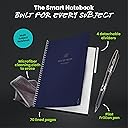
The Rocketbook Multi-Subject Reusable Smart Notebook features 70 erasable lined pages and 4 adjustable dividers to organize up to 5 subjects. Its smart scan technology digitizes handwritten notes via the Rocketbook app, enabling searchable and easily accessible files. Sized at 8.5x11 inches with a premium writing experience, it’s designed for professionals and students seeking sustainable, efficient note-taking.


| ASIN | B09ZXQBNF3 |
| Best Sellers Rank | #16,102 in Office Products ( See Top 100 in Office Products ) #106 in Subject Notebooks |
| Binding | Spiral-bound |
| Brand | Rocketbook |
| Brand Name | Rocketbook |
| Color | Dark Blue |
| Cover Material | Paper |
| Customer Reviews | 4.5 out of 5 stars 2,452 Reviews |
| Item Dimensions L x W | 11"L x 8.5"W |
| Manufacturer | Rocketbook |
| Number of Items | 1 |
| Number of Sections | 4 |
| Pages | 70 Pages |
| Paper Size | 8.5 x 11 inches |
| Ruling Type | Squared |
| Sheet Size | 8.5 x 11 inches |
| Special Features | Adjustable Dividers |
| Style | Notebook |
| Theme | Book |
| UPC | 810056882112 |
| Unit Count | 1.0 Count |
W**W
Amazing!
I have always loved Rocketbook notebooks since they first came out with the Wave in 2015. I lost the Wave I had back then and kind of forgot about them until just recently and wow! Their options are amazing! The app has come a long way since the last time I downloaded it. PROS: - Truly reusable with very helpful subject dividers (that you can move and place wherever you need them!) - Works with all of the Frixion pens, markers, and highlighters I've bought - Pen that it comes with actually works, unlike some other notebooks I've bought that come with a pen that are bone dry by the time they get to me - The app allows you to choose folders to upload your scans into on various online cloud sites like Google Drive, OneDrive, and Dropbox, but it also can go to sites like Evernote, Slack, and an email of your choosing - So far, the OCR feature in the app has been relatively accurate with some exceptions, which is fine. Even Adobe struggles sometimes. I also have oddly spelled names in the story ideas I've written in mine and a lot of very unused words (like ballagarraidh, which is technically Scottish Gaelic) - The app has tutorials built in so you actually know how to use all the features and it has an obvious spot in case you forget how to do something - The ink only takes about 10-15 seconds for it to dry, which is pretty sweet CONS: - I don't recommend using the Frixion highlighters on it. I used it and it smudged the word I was highlighting pretty badly. I rewrote the word to see if that would help, but it just created a pool of ink that didn't dry even though a decent amount of time had passed. - There will come a point that you will not have a clean paper no matter how hard you try to get it all out. It's sucky. I'm hoping this is just a problem with the microfiber cloth needing to be washed so we'll see if that's the case. - You have to buy your own spray bottle. - The microfiber cloth is kinda too big to me. When I try to get a nice, smooth wipe to not get other parts of what I've written on the page, the cloth will just wrinkle on itself and start removing ink in spots that I don't want it to. It is NOT as easy and smooth to wipe all the ink off like they show in the video. Overall, I just love this notebook and am excited to finally have a notebook I can use for classes that doesn't end up filled and unusable and taking up space on my desk shelf like normal notebooks. I definitely recommend getting the pen packs from Frixion, especially the colored ones since it's not a good idea to use the highlighters to emphasize things.
L**Y
PERFECT for college students!
This was my first experience with a rocketbook & all I can say is - you need one. the pages are smooth, sturdy, & it's endlessly reusable which means you'll never run out of notebook space again! on top of that, the multi-subject comes with 4 sturdy dividers & 8 tags which are very nice quality, i was impressed It also comes with a pen & a large towel (the towel I used in the video is from my cloud cards) & is well packaged. The app is also relatively simple to use & if you do encounter any questions/issues, Rocketbook has a lot of informative information on their website that you can refer to! I REALLY like the app feature because I enjoy studying in bed & this way I don't have to have a pile of papers strewn about, bound to get crumpled, torn, or lost, AND your significant other can sleep soundly while you study away in the dark (: I included a screenshot of one of my pages I scanned in the app. overall 11/10 ⭐️ from me I would highly highly recommend a rocketbook to any & every one. **just make sure you're using friXion brand pens/markers/highlighters**
W**T
Really nice system for me, but some flaws
My biggest problem after two full semesters of use is that the spiral binding has started to break pieces off, which is fairly annoying to deal with. I'm hoping I can get the company support to send me a new spiral or something, since the rest of the book is holding up. Cleaning the pages takes a bit of time, but scanning with the app is a breeze, and I love being able to carry one notebook with me for all my classes, and to write clearly/easily with erasable pen instead of pencil or permanent pen. I do still wonder if I would have been better served by an electronic notepad or tablet of some kind, but this is a better value and more durable than those, and having physical pages is really nice in its own way. To be fair, I only bought it because it was on treasure truck for $26, but in hindsight, as long as I can get the breaking spiral problem resolved, I'd be satisfied with the purchase at a higher price. With them on sale again, I may buy 1-2 more for added convenience.
S**L
Great product, it DOES include a pen a towel
The Rocketbook works great! I own the Core, Fusion Plus, Mini, and Multi-Subject. It works exactly as advertised. When scanning with the app, image quality is as good as your camera will allow. OCR text recognition is as expected... it really relies on handwriting quality and consistent lines (I tend to reduce pen pressure at the end of each letter, so most OCR software struggles with my writing). The dividers in the multi-subject notebook work in the other letter sized notebooks. While the dividers can be removed and replaced many times, I think the tabs that go in the coils could eventually break. The ink erases easily with a dampened towel (use the included towel to protect the page surface). Note: don't press too hard when erasing, otherwise you can end up removing the surface coating. Don't press too hard when writing either. If you experience "ghosting" (happens if you leave dark ink on the page for an extended time), a hot, wet towel can remove it. Keep in mind also, the ink is heat sensitive. If you leave the notebook in your car during a hot summer, the ink might disappear. (If this happens, you might be able to recover it by placing it in your freezer). Every notebook comes with a towel and pen. The envelope has a big compartment that holds the notebook and towel. Then a smaller, sealed separately, compartment holds the pen. Any review stating there wasn't a pen likely didn't notice the separate compartment. Note about Frixion writing utensils: the pens work well. I haven't been impressed with the markers.
R**T
I LOVE Rocketbooks
Okay, this review is kind of biased. I already have 3 other kinds of Rocketbooks. They are perfect for people who like to write but feel guilty about their love of ink and paper. Being able to wipe the page clean with nothing more than water on a soft cloth (which comes with it) and use the page again is fantastic! Even better is the ability to use the app to send your page to whichever location you designate and have the app transcribe your writing (as long as it's legible). One of the tabs was slightly bent when it arrived, but that's probably because of the U.S. mail system. Once I get the tab label on no one will notice. I definitely recommend the multi-subject Rocketbook for anyone in school whether it's a middle-schooler, high-schooler, or college student; of course business people with lots of meetings to take notes in will probably appreciate it as well. I love that I get to decide how many pages between each tab. So, I can have a couple of really small sections and a couple of really large sections or I can have an equal number of pages. Because it has 4 tabs, it could be a 5 subject notebook. Also, I am sure there will be plenty of times when I put a note or photo on top of the page, if it fits within the border, and use the app to save it so I know exactly where to find it later.
J**B
More issues than my other Rocketbooks.
I will start by saying I LOVE Rocketbooks and I use them literally every day of my life, and have for years. I use them at work daily for note-taking which has saved the earth who knows HOW much paper waste. I journal in them nearly-daily. It's nice to have my entries tucked away digitally. I make grocery lists on them and then wipe them away afterward. And since I'm a writer, I use them to plot story lines, write down character traits, etc. and then can keep those files forever, organized digitally, rather than needing space to store the notebooks filled with random info. Another bonus of them is of course that the ink is erasable... and I love that there's so many cool Frixion pens available for it AND that they are refillable. For newbies, I'll say that new Frixion pens average about $2/pen, and I try to snag refills when they're about $1 apiece) and that they do not hold a LOT of ink but you get over that quickly, just keep refills or extra pens on hand. Continuing on... I have two of the dot-grid letter-sized Core, two of the dot-grid executive-sized Core, and this one I am currently reviewing. This one is my least favorite of them all for multiple reasons. 1. This one isn't traditionally-lined; the lines are lines of dots. Originally I was thrilled about this. However, I had to switch this to my work notebook. This is because I never scan my work notes; when the projects are done I have no reason to keep the notes, so I just wipe them away. I used to use this as my journal, but could no longer do that. There is something about the lines of dots that makes it difficult for the app to pick up my dotted i's and j's, or periods, when scanning. So my entire scan would have no periods or dotted i's. I'd have to find the color of pen I used and make each dot and period very large in order to scan it. Very inconvenient. I'd have loved to use this as my journal due to the quantity of pages rather than a work notebook where I don't need a ton of pages. But I just can't spend 2-3 minutes a page darkening periods and dots before scanning. 2. The tabs on my plastic dividers got really curled. I don't know why this happened as I can't think of a time where they were super hot or cold, or where the notebook got bent in my backpack (it's usually sandwiched between my work laptop and a library book at any given time.) I have tried setting heavy objects on the tabs for hours to flatten them, to no avail. The whole notebook itself also has a curve to it. This has not happened to any of my other Rocketbooks. 3. There aren't enough dividers right out of the package. Maybe an average person only needs four dividers, but I often have more than five projects going on at work and it's inconvenient not to have a section for each one. I thought I saw on the app where you could purchase more, but I haven't seen that option on Amazon anytime I checked. 4. Randomly, for some reason, some of the pages just do not take the ink very well anymore. (This has been an issue in my newest letter-sized Core, too. The top side of its pages are this way while the bottom side of the pages are perfect.) I kept thinking it was a pen issue, but then I'd use the pen on another sheet and it was totally fine. I'd re-wipe the pages again even though they were clean, and the pens still wouldn't work well on some. I will say, this was not an issue when this Rocketbook was new; it happened over time. I've owned this one for about 17 months. (On my other one mentioned right above, this was an issue from the get-go on the one side of the pages.) So overall I loved this notebook at first, but due to the scanning issues with periods and dots not showing, curly dividers and a curled notebook, and random pages not taking ink well... I kind of don't recommend this one. I'm getting concerned about the quality of their products, too, since my newest Core doesn't take ink well on the top sides of each page (that one was purchased seven months ago and the pages were that way right out of the package.) I certainly do not expect these to hold up forever, especially as heavily as I use them. But I'm not seeing them hold up like my early notebooks lately. I still do recommend them if you are a heavy paper user and want to change that. Just know about these possible issues.
A**R
Multi-subject has the best paper of the RB products
I have several different Rocketbook notebooks from the Core (both executive and letter sizes), Mini, Academic Planner, Fusion, and now the Multi-Subject. The Multi-Subject notebook has a newer paper design and has a much better feel and pen-glide. This is a huge improvement, and reason alone to purchase a new Rocketbook. Having more pages has also been beneficial as I can take minutes from a couple weeks worth of meetings and project notes, and be able to just flip around for the most recent notes before wiping them clean. I'm not always at my computer to view my scanned notes, so having my recent notes still in the book helps when I need to look up a previous conversation in a meeting. It is a pricey investment, especially if you already have a slew of other RB notebooks and the endless supply of pens and refills needed, but the improved paper in the Multi-Subject is worth another purchase. I recommend to wait for it to come on sale if you don't need it right away. And bonus that page dividers come with the notebook, so you don't need to make another purchase for that additional cost. Time will tell if the cover holds up or starts to curl, which is a common issue with RB notebooks. A hard cover would sure be nice as I'm not always writing on a desk.
J**E
Improved page material but easier to smudge
The first Rockebook product I've used is the Flip, and I like the idea but the page material was very plasticky, smooth, and did not seem to allow the included Frixion pen to leave ink very well. I wondered if that was just the included pen's fault, and I prefer clickers to caps, so I got some navy Frixion clicker pens to try. I think the navy ink color on the Flip page is better, but still not great. I read reviews of this multi-subject notebook saying the pages were improved, so I picked one up in Used Good As New condition to try. The multi-subject page texture is definitely different, and I like the texture and ink surface better, but I did notice they also allow the ink to smudge much longer than the Flip pages did. In attached photos I've written on both page types with the same pens to show the difference in ink quality and smudging. In one photo, the top is the multi-subject notebook page where the ink is darker/thicker, but I noted the 2nd line "Rocketbook" word looks a bit smudged. Bottom of that photo is the Flip page where the same pens' writing looks thinner/weaker in both cases, but no smudging appears. The next photo I took was writing a word on the page, waiting a few seconds and then wiping my finger across the word to see how easily/how much it smudged. Both smudge easily for a few seconds, but after 20s the Flip page barely smudges, while the m-s notebook page still smudges to be unreadable. I had to wait 30s for the m-s notebook page to mostly-survive a smudge try. This means the idea of finishing notes on a page, then immediately flipping the page over is very likely to leave smudges on the back of the facing page (where the ink touches). If you're writing on a narrow student desk, try leaving the first page hanging to dry off the edge of the desk while writing on the next page. If writing on a wider desk, try not folding the first page under the notebook while it has time to dry now face down, and don't write on the back side of that page immediately. Ultimately, I hope Rocketbook considers releasing notebooks of recycled material, but non-plastic, non-reusable pages that would capture ink from any pen much like "traditional" notebook pages do. Re-usable is better for the planet, but the real value-proposition (to me) of a Rocketbook is its digital integration with various cloud platforms and making taken notes electronically searchable, sharable, and editable. If its pages are subject to easy smudging to the point it could ruin notes and usefulness, recycled-paper notebooks seem like a fair compromise.
C**D
Top Buch, schlechte App (Android)
Das physische Buch ist super. Die Haptik, das Schreibgefühl und die Haltbarkeit sind top, auch das Abwischen klappt bestens, und auch nach diversem Reorganisieren der Trenner ist noch alles bestens. Leider kann die App nicht so überzeugen. Auf den ersten Blick ist die Idee zwar super, Ablagewege zu haben, die per Kreuz im Buch einfach gewählt werden können, und insgesamt sehr schmale Funktionalität in der App zu haben. Im Detail klappt das aber eher schlecht. Grund hierfür ist der Fotografierprozess in der App. Das automatische Fotografieren, ohne dass man selbst den Auslöser drückt, ist leider in der Praxis eher nervig als hilfreich, und macht meist nicht genau das Bild, wenn man die Kamera optimal hält. Das führt dazu, dass man im Endeffekt meist pro Seite 2-3 Bilder schießt und dann wieder aussortieren muss. Ein zweites Manko der Bilder - zumindest unter Android - ist, dass sie im Vergleich zu Fotos über die reguläre Foto-App relativ unscharf und verwaschen sind. Ich dachte zuerst, es läge an der etwas speziellen Kameraintegration meines damaligen Handys, aber mittlerweile habe ich ein neues, sehr verbreitetes Modell (Samsung Galaxy S24), das exakt das gleiche Problem hat. Beim Kontakt mit dem Support kamen dazu leider nur die Standard-Antworten, die bereits in der Onlinehilfe beschrieben sind und nicht halfen - auf weitere Nachfragen dann nichts mehr.
I**O
Kann nix, was mein Handy nicht auch könnte
Keiner mit Smartphone braucht das. Seite schreiben, abfotografieren und speichern kann mittlerweile jedes Handy. Warum ich da eine Lösung aus Plastik brauche erschließt sich mir nicht. Wäre das wenigstens kompatibel mit den Standard-Cloudlösungen von Apple, Microsoft, Samsung, Google, aber ist es nicht, daher meiner Meinung nach völlig nutzlos.
D**S
Brilliant
Brilliant invention so much easier and less waste instead of having numerous note book laying around just use one and save it all on your device and access it anywhere. GAME CHANGER
A**R
Amazing
This is by far my favorite of all my rocketbooks - and I have several... I write a lot of confidential notes as part of my work. The rocketbooks allow me to take notes and save them without having notebooks filled with private info lying around. The app and the notebook itself are super easy to use. They are evironmentally friendly and super durable. I love the addition of the title and date bar at the top of each page. I also love the extra pages and the movable dividers. Brilliant.Now I just need them to make the multi-subject in the executive size.
S**H
Love the multi-subject rocketbook- matte lined pages!
I've had a few rocketbooks for years (they have lasted me years and still going) and this is by favourite one! It has the most pages out of any other rocketbook which I love because I always found myself wanting more pages with the other rocketbooks. I love that's its all lined, and comes with dividers that you can place anywhere you want in the notebook- even comes with little labels for your dividers. It came with the pen and cloth sealed in the rocketbook package. Although with all my rocketbooks I prefer writing with a thinner 0.5 pen (as it dries quicker so less accidental smudges). A huge improvement in this multi-subject notebook is that the pages feel even more like paper, as they are matte compared to the other rocketbooks which is perfect for writing. If you have never tried rocketbook it feels abit like writing on gloss paper. So these matte pages are perfect! Very happy with my purchase, and the teal colour with bronze is a beautiful notebook combo! 😊
Trustpilot
1 week ago
4 days ago