Buy anything from 5,000+ international stores. One checkout price. No surprise fees. Join 2M+ shoppers on Desertcart.
Desertcart purchases this item on your behalf and handles shipping, customs, and support to Uruguay.
🚀 Elevate your home network to pro-grade speed and control with AS6702T — your personal datacenter unleashed!
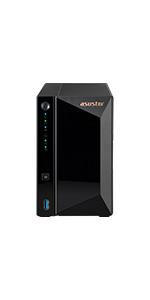
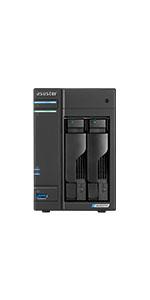
The Asustor AS6702T is a 2-bay NAS featuring a quad-core Intel Celeron N5105 CPU with 31% improved performance, 4GB DDR4 RAM (expandable to 16GB), and four M.2 NVMe SSD slots for ultra-fast storage. Dual 2.5 GbE ports enable up to 5 Gbps network speeds via Link Aggregation. Designed for professionals and tech-savvy users, it supports VPN, Docker, VirtualBox, and custom scripting on a Linux-based ADM OS, delivering a versatile, high-performance, and secure personal data center solution.


| ASIN | B09VXCSLR4 |
| Aspect Ratio | 16:9 |
| Best Sellers Rank | #43 in Network Attached Storage (NAS) Devices |
| Brand | Asustor |
| Built-In Media | 2.5 Gigabit Ethernet ports, 4GB DDR4 RAM |
| CPU Model | Celeron |
| CPU Model Number | 5105 |
| CPU Speed | 2.0 |
| Cache Memory Installed Size | 4 |
| Cache Size | 4 |
| Color | Lockerstor Gen2 |
| Compatible Devices | Keyboard, Monitor, Mouse, Smartphone, TVs, printers |
| Connectivity Technology | Ethernet, LAN, USB |
| Cooling Method | Air |
| Customer Reviews | 4.2 out of 5 stars 148 Reviews |
| Display Resolution Maximum | 3840x2160 |
| Display Type | LED |
| EU Spare Part Availability Duration | 3 Years |
| Global Trade Identification Number | 04710474831425 |
| Graphics Card Description | Integrated |
| Graphics Card Interface | Integrated |
| Graphics Description | Integrated |
| Hard Disk Description | SSD |
| Hardware Interface | Ethernet |
| Human-Interface Input | Buttons |
| Item Dimensions | 90.55 x 42.52 x 64.37 inches |
| Item Weight | 2.4 Kilograms |
| Language | French |
| Manufacturer | Asustor |
| Memory Clock Speed | 2933 MHz |
| Memory Speed | 2133 MHz |
| Memory Storage Capacity | 4 GB |
| Model Name | AS6702T |
| Model Number | AS6702T |
| Native Resolution | 3840 x 2160 |
| Number of Component Outputs | 1 |
| Operating System | Windows 10 Home |
| Personal Computer Design Type | Computer Tower |
| Power Plug Type | No Plug |
| Processor Brand | Intel |
| Processor Count | 4 |
| Processor Series | Celeron |
| Processor Socket | LGA 1151 |
| Processor Speed | 2.0 |
| RAM Memory Installed | 4 GB |
| RAM Memory Technology | DDR4 |
| RAM Type | DDR4 SDRAM |
| Ram Memory Maximum Size | 4 GB |
| Resolution | 3840 x 2160 |
| Screen Size | 6.4 Inches |
| Specific Uses For Product | Video Editing |
| Style Name | Lockerstor Gen2 |
| Video Output Interface | HDMI |
| Video Processor | Intel |
| Warranty Description | Manufacturer Guarantee: 3 Year |
| Wireless Compability | 802.11ac |
| Wireless Network Technology | Wi-Fi |
| Wireless Technology | Wi-Fi |
J**I
Perhaps the most feature rich NAS available for home or small business use
I have been a long time user of a competitors product. I needed to add another NAS to my home/small business office network. I do a lot of photo editing and some video editing and need to back up my work to a very reliable NAS. After careful research I concluded that the ASUSTOR Lockerstor 2 Gen2 AS6702T (2-bay unit) was the best NAS to meet my needs. The unit received high reviews from third parties and it lived up to the hype. PROS- Fast file transfers (much faster than my older NAS) Dual multi-gig LAN ports (but of not value to me since my LAN supports 1000mbs only) Four slots for M.2 NVMe SSDs (for storage or caching but not both) Expandable Large catalog of apps both from the manufacturer and third parties CONS- Expensive Expanding RAM to 16GB requires disassembling the unit (although the manufacturer has a step-by-step video to guide you through the process, and I did upgrade to 16GB and found the video helpful) Setup was easy (except for the memory upgrade installation which took about an hour). I installed 2 10TB HDDs and was up and running in less than 15 minutes. File transfers from my desktop were speedy. Besides my desktop I use an apple laptop as well as a windows laptop on my LAN and they have no problems accessing and using the NAS. I strongly recommend using a UPS with this unit. I would not recommend enabling remote access to the ASUSTOR from the internet unless you are very well versed in the security issues involved, especially using VPNs. I have been using the unit for over a week and so far I am very pleased with its performance. Recommended.
S**C
Asustor AS6702T – My Personal Datacenter in a Box
I've been using the second-generation Asustor AS6702T for about a month, and it’s exceeded my expectations in every way. It’s become the backbone of my home infrastructure, handling multiple roles with ease: • Primary NAS: Hosts 3.5 TB of shared storage via SMB and NFS. • Media Server: Runs Jellyfin for streaming audio, video, and photos. • Web Server: Serves personal websites reliably. • Centralized Logging: Collects logs from my Wi-Fi routers and Linux machines. • Backup System: Automatically backs up data to an attached 4 TB external drive. And that’s just scratching the surface. The AS6702T supports VPN, Docker, VirtualBox VMs, and custom scripting in Python or Shell. It also runs PHP and Perl, though I haven’t explored those deeply. Upgrade Tips Out of the box, the 4 GB of RAM is a bit limiting. I upgraded to 8 GB (the max supported), which required partial disassembly—but it’s far easier than building a PC. I also added 2×512 GB SSDs for caching, which noticeably improved access speeds. Why I Chose AS6702T Over Other NAS Units • Solid build quality • Robust Linux-based ADM 5 OS, accessible via web portal or SSH • Expandable with 4 M.2 slots • Dual 2.5 GbE ports for fast networking • No forced cloud integration—your data stays yours • Two USB 3.0 ports with one-touch copy for easy backups Compared to my older WD MyCloud, this feels like a personal datacenter. File transfers hit 280 MB/s, which is blazing fast for a home setup. Final Thoughts If you’re considering this NAS, I highly recommend investing in the RAM and SSD upgrades. It takes a bit of effort, but the performance gains are absolutely worth it. Also, install a robust HDD—go for something like the WD Red series or Seagate IronWolf. These drives are built for 24/7 operation. IronWolf pairs especially well with this NAS thanks to a dedicated app for monitoring drive health and performance.
G**.
Nice 2 bay NAS with 4 NVME slots!!!!!!!!
OK so I been looking to upgrade my nas units. Was looking another Qnap or Synology. So, I opted for this one. 2 drive slots and 4 NVME. So got it set up and I will say I am happy with this NAS. It boots in 10-15 seconds and is a lot faster with the 16Gb upgrade, I also used 2 500Gb 2.5 SSD drives and 4 2Tb NVME's. My Qnap with the Atom processor was just outdated and slow. This is a big upgrade for my home use. Now, I was reading some the negative reviews adn I will tell you they just didn't know much about accessing the NAS for the first time to set it up to upgrading the rem. For example, on person gave it a 1 star just because he couldn't access the Nas via the IP, well if he had research it, he would have seen he needed to put the port at the end of the IP address. Another complained that to upgrade both memory modules one of the memory slots was in back of the mainboard and had to tear apart the entire unit. Well, it isn't entirely true. Remove the top cover 3 screws, the back cover 7 screws, NVME 2 Screws, SSD board 1 screw, and main board 4 screws. Does it sound like a lot? Yes, but it's so easy a caveman can do it. So, a lot of reviews are from people who don't know how to do these things, get mad and give it a bad review. So read the reviews!!!!!!!
A**D
Good NAS features, Ram upgrade is terrible
To be fair, it's a decent NAS but if you're thinking of maximizing RAM, forget it. ASUS made it extremely difficult to install secondary RAM chip. Yes, one slot is easily accessible just be removing the outer shell but the other one? Oh my god, you literally have to dismantle the entire NAS to be able reach the other memory slot. Why couldn't ASUS install the ram there and leave the user accessible one empty? They chose to do the complete opposite! Thus two star rating. I do like the using HDD and SSD together. As I said, if you're OK with using single ram slot, this is fine. The NVME holder pin is SO WEAK, fragile. Seriously Asus?
P**R
AWESOME NAS
I have a Synology NAS also, but wanted to add one to do additional custom backups on. The Synology was a nightmare to install and maintain, really a nightmare. This one was up and running 15 minutes after I put the ram and hard drives in it. Did my first backup of my entire system within 30 minutes of installing. These units are really nice, their software is so easy to use; or you can use a third party software if you have a favorite.
L**N
Asustor Lockerstor 2 Gen2 AS6702T is perfect for Emby server
I have 2- 8TB 7200rpm HGST in RAID 1 running, I upgraded the RAM to 16GB, I added 2- 1TB Silicon Power M.2 NVMe drives for read/write cache. This thing runs fantastic. Fast, responsive, no buffering, smooth as silk. I submitted the HGST drives and the Silicon Power M.2 NVMe's to Asustor's compatible list because They didn't have them on there. Edit 9-1-19-2024: I did the 12 months to pay this out, so now it's paid for this month. I have had zero problems with it, I did go back to Plex because Emby wasn't what I wanted . I recently recommended this one, the AS6702T and they bought it, I did tell them to upgrade the RAM first thing to 16GB. This was an excellent investment. It sips power, doesn't burn up electricity. 1 year later and I'm still a happy buyer.
D**N
It's just what I needed to replace the file storage of my older Windows Server.
First off, I've supported computer systems professionally for 47 years. I first managed & supported the mainframe and IBM network of our local Fortune 500 public utility for 20 years. For the last 27 years I built and operated my local IT support company for organizations in our local region. When I sold my company at the end of my career, I used my old Windows server at home and it was now time to mothball it. I'm very pleased with this "replacement" and it does what I need to keep my files safe and secure for our home network. It easy to setup (but I'd done a lot of that in the past) and its performance is better than my old Windows Server. It is much cheaper (and easier to setup) than a replacement Windows server would have been. It provides faster file service than my old system (but like that old system, I know how slow us old things become . . .). My only gripe is the lack of documentation when I need to go "deep" for troubleshooting. It's been difficult navigating the system at times (but it is tough on us old dogs to learn new tricks!). An example was that I have external USB backup drives that I use to backup my data and take it off site (I know . . . I just don't trust the "cloud" and its extra expense with my data). I want to be able to swap out my backup drives (I think I have 5 or so) in rotation and be able for the backup software and "external drive connections" to just see the "External Drive" as the place to put files, no matter which of my 5 drives (by their "internal name) I have attached. I also wanted to see if I could use a USB hub to leave my 2 different USB 3.0 cable types (USB micro-B & USB 3.0 B connectors) connected to the device. Nothing in the documentation (that I could track down) about that. By experimentation, it seems to be that a powered USB hub can be used on the rear USB port, but not on the front drive. That'd be handy to know. There were a several other things that I struggled with to find. I recommend this device once it is setup (I've only had it fully operational for a couple of weeks now). There are still a few things I'd like to find out and get ironed out, but it is doing what I need it to do. Connects well with my Windows desktop and is similar enough in Active Directory Security to be familiar too me. (I still haven't figured out how to mimic the "Creator/Owner" property/group that Windows has for files as you create them.
M**N
Perfect replacement for my failed ASUS AS5002T NAS
I chose the ASUS AS6702T as a replacement for my failed ASUS AS5002T (seven years old). To my extreme pleasure, once I moved the old SSDs (maintaining the drive sled order) and powered on the unit, the new unit behaved exactly like the old one including the server identity! All of my files and settings were retained. The new unit got a new IP Address from my router, so I had to login to the MFP and edit the address book settings to use the new IP Address and, after testing, proved that both the SMB file share and FTP file share were populated from a scan. Concerned about the remaining lifespan of the SSDs (seven years old too), I bought and installed two 1 TB NVMe SSD sticks (Samsung 970 EVO Plus). I could find no way to migrate the volume from the old drives to the new ones and I tried every suggestion in the online tutorials plus some of my own. I submitted a query to ASUSTOR Tech Support and received a response the same day. After creating a new volume with the two new NVME drives and backing up the volume and exporting the settings, I powered off the unit, removed the drive sleds with the old SSDs, and then powered the unit back on. This forced a fresh system initialization process which, when finished, permitted me to import the system settings I has previously exported and copy the files from the export media. This was about a 90% recovery. I had to manually recreate the SMB file share, reconfigure the FTP service, and point the service to the correct folder. I had to alter the LED brightness to restore minimal visibility. I had to disable the power savings settings so that the NAS didn't go to sleep when not being accessed. Restoration complete! The network access speed increased to nearly equal that of a drive direct-attached to my PC!
A**Z
Increiblemente Versatil y Poderoso
Si lo quieres para servidor de Plex o servidor Multimedia la repuesta es que si, domina completamente como servidor de Plex. La razón para comprar este modelo en específico contra marcas como WD o Synology es que Asus normalmente pone MUCHO software preinstalado o para bajar gratis y no es excepción. En la appstore vienen todo tipo de utilidades para gestión multimedia, de redes, para cámaras de seguridad y para bajar y compartir archivos. Es el único de su rango de precio que trae doble puerto de red (y son 2.5Gb), entonces puedes hacer cosas como usar un puerto para bajar y otro para subir o usar ambos a la vez como si fuera un solo puerto 5Gb. Es increíblemente fácil crear volúmenes y crear RAIDs con pocos clics y viene todo muy bien explicado. Y por último, todo se puede manejar desde el celular bastante fácil. El NAS incluye una app para administrar descargas, en el cual hasta bajar y administrar torrents.
D**O
Fa quello che promette
Unica nota il software non è il top ma fa quello che deve fare. Molto silenzioso.
K**X
Nas au top
Excellent nas au niveau hardware et os. Ajouter une barrette de 8gb de ram pour être tranquille. L'os est facile en prendre en main et asustor fait des progrès constant. J'ai lu certains critiquer l'absence de doc. Taper asustor collège et vous aurez un didacticiel sur presque tout pour votre nas. Avez vous une doc avec votre smartphone !? Cela reste un serveur et pour les débutants il y a une phase d'apprentissage et du temps . Les débits de transfert sont très bon pour ma part. J'ai installé en volume 1 2 nvme en raid 1 et ça dépote. Et gros avantage : Docker ! (virtual box nginx jellyfin waultwarden nextcloud...) Je ne peux que conseiller ce nas. Prenez la version 4 bais si vous souhaitez de la disponibilité en rappelant qu'un nas n'est pas un backup à lui tout seul. Le système de myarchive est très bien pensé.
ら**ん
最大メモリーの増設はかなり大変
メモリーは16GBまで増設可能で8GBx2枚で購入時に入っているメモリースロット1側の4GBのメモリーの交換にはケースを分解してマザーボードを取り出して差し替えないといけないので、かなり大変です。 メモリースロット2は外側ケースを外すだけで挿せます。
G**R
Good fast NAS, worth the money, but very poor access to replace the first RAM piece.
It was a good upgrade for old QNAP TS220. NAS is quick, interface easy to use, easily added anothr 8GB memory stick, but access to the first 4GB stick is really bad, didn't even try to replace it. Product worth the money.
Trustpilot
2 months ago
2 weeks ago